


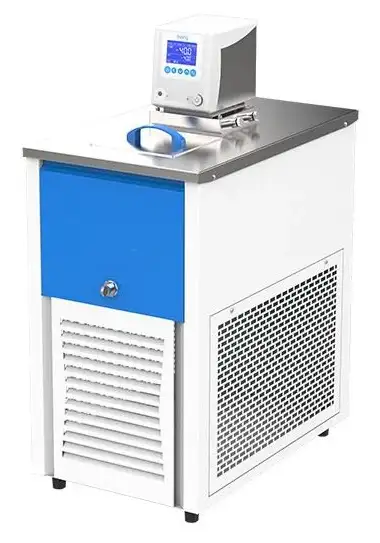
Low Temperature Circulator BGI2L2 (BCLT-2602)
Circulating Bath- Sea, Air, Door to Door Shipping
- 1 Year Warranty
- US & European Standards

Specifications
| Model | BGI2L2 |
| Temperature range | -20 - 100°C |
| Precision | ±0.2 |
| Liquid tank opening/depth (mm) | 150x160/150 |
| Chamber volume | 4.5L |
| Power requirements | AC220V 50HZ |
| Pump (flux) | 8L/min |
| Power consumption | 2300W |
Description
Provided for precise and constant temperature and auxiliary heating in colleges, industrial and mining enterprises and scientific research departments.Features
Microprocessor temperature controller with LCD screen ensures precise and reliable control, easy to operate.No angle in bath chamber, easy to clean.
Programming setting function with 7 periods and 9 steps for each period, which means there are 63 programmable steps in total.
R134a refrigerant.
With interface to external water bath.
Easy to set adjustable timer. (1 minute to 5,999 minutes)
Maintenance-free operation with easy to clean surface.
Both heater and bath chamber are made of corrosion-resistant stainless steel.
Drain valve makes emptying of bath water fast and easy for cleaning and moving.
Safety:
Audible and visible alarm for temperature and water level.
Heater alarm, sensor alarm, upper and lower temperature alarm.
Preset On/Off function.
Built-in power interruption protection function, automatic run after power interruption.
Temperature deviation alarm.
Over current protection alarm.
Option:
Available RS-485 or USB ports for data collection.
Operating Manual
Download1. Safety warning
2. Product introduction
3. Operation of the product
3.1 Preparation before operation
3.2 Power on
3.3 Description of Program Operating:
4. Maintenance of the product and precautions
5. Appendix
5.1 Main technical specifications
5.2 Pump flow adjust
5.3 Function parameters table
5.4 Trouble-shooting
5.5.Electrical Wiring Diagram
1. Safety warning
Danger! The improper use of this unit may cause property damage and/or personnel injury.
This product must be reliably grounded and away from electromagnetic interference sources (The Zero line or the Neutral line should not be as the grounded line).
Please ensure the voltage and frequency of the power supply are compatible with the power requirements before use.
This unit must use the included electrical cord with a dedicated electrical circuit with a confirmed electrical ground connection.
The power switch must be in the "OFF" position when power is connected or disconnected from unit
Do not arbitrarily lengthen or shorten the power supply connection wire.
Unauthorized repair is not allowed and such authorized repair should be carried out by the special personage.
! Warning ( it may cause property damage or personal injury)
Make sure to read and understand thoroughly the Product's Operating Instructions before the operation may be carried out.
To take out the power plug, make sure not to pull directly the power cable.
The power cord must be removed from receptacle when any of the following occur:
When replacing the fuse.
When the product is waiting for overhaul due to faults.
When the product goes out of service for a long time.
When the product is being moved.
! Caution (it may influence the lifetime cause the abnormal operation of the product)
The product should be located on the solid and hard surface to keep it in a horizontal mode.
Keep certain space around the product.
The product must be used in the specified conditions. (The detail refer to chapter 3, item 1.1~1.4).
The product must be used in the correct setting mode. (The details see chapter 3)
2. Product introduction
Outside Drawing
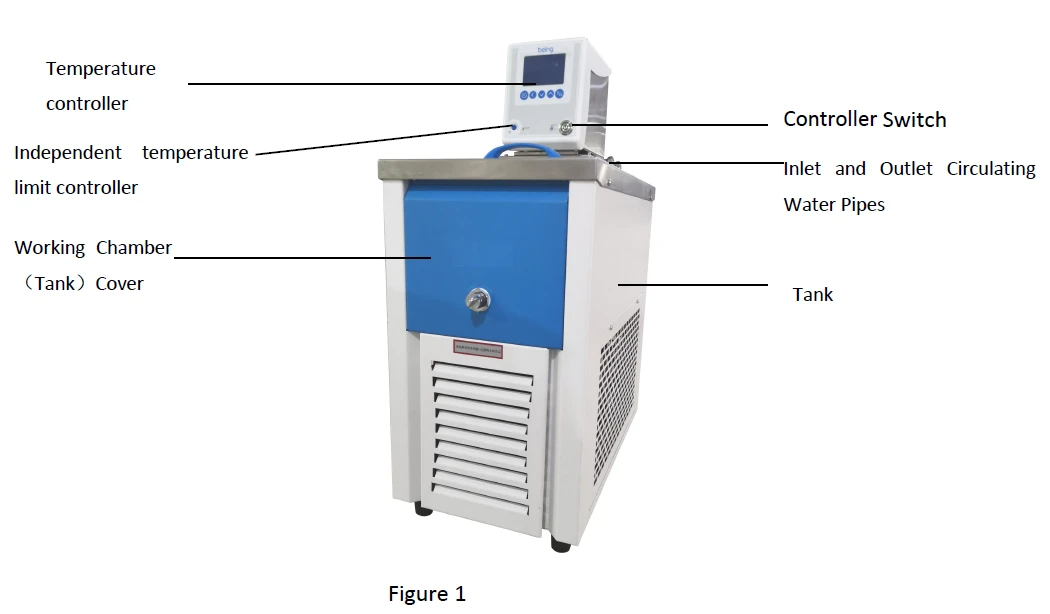
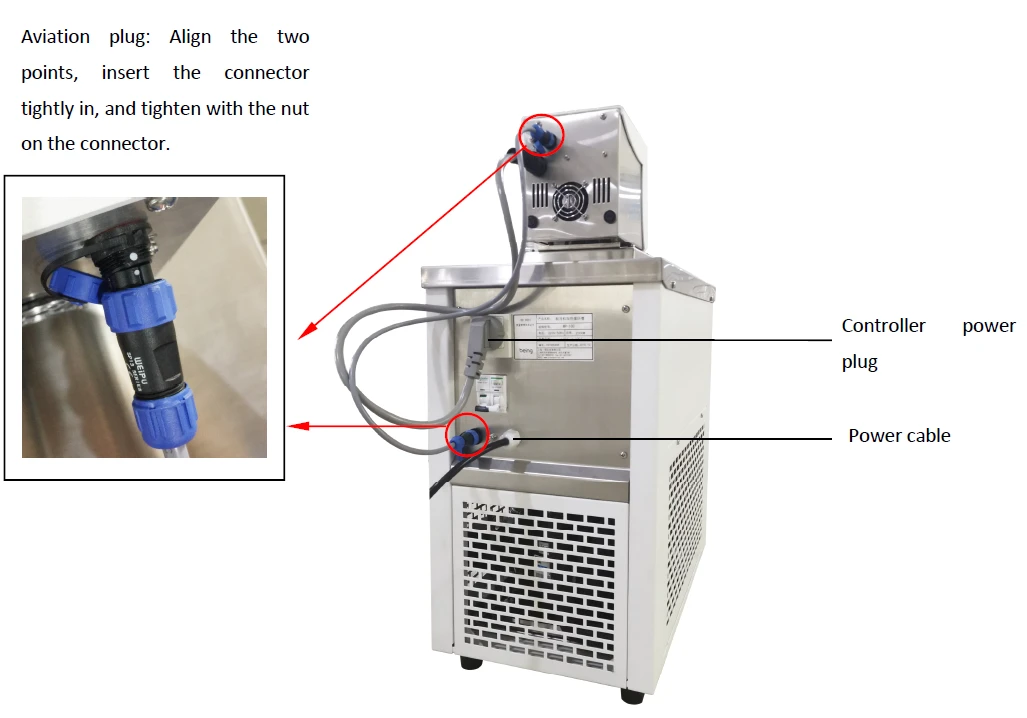
Summary of structure and function
Low Temperature Circulator consists of three parts, circulation controller, tank and cooling system. The circulation controller consists of thermostat, temperature sensor, heating pipe, water level controller and circulating pump. The tank is made of high quality sheet panel and its surface is plastic molded. it has stainless inner layer. The refrigerating system is consists of compressor, condenser, evaporator and other components.
The equipment relies on the balance of cold and hot power to achieve control the temperature precisely, the circulation pump make it has higher temperature uniform in the bath. The circulation pump in addition to meet their own temperature control needs, but also use for delivery the constant temperature bath liquid outside.
In the bottom of the right side of the cycle controller is equipped with circulating bath liquid of the inlet and outlet connections, in order to equip with external bath for connection use. Temperature controller is a double four-digit display continuous PID digital controller, consists of a CPU processor and the external circuit, it used Pt100 platinum resistance as a temperature sensing element, with high control accuracy, good stability, meanwhile it has timing, over-temperature alarm and lack of liquid level protection and other alarm functions.
3. Operation of the product
3.1 Preparation before operation
The products should be used work normally under these following conditions:
- Ambient temperature: 5°C~35°C; Relative humidity:≤85%.
- Atmospheric pressure:(86~106)KPa.
- Elevation not higher than 2000m.
- Power supply:(220±22)V (50±1)Hz.
- Keep away from heating sources, no intense shock source and strong electromagnetic field around.
The base of the equipment should be placed flat, and made of non-combustible material.
A space of not less than 300cm should be left around the product (front, behind, ventilated grid), and well ventilated.
The unit is equipped with a compressor. Do not operate the unit immediately after transport, it should be placed in the correct position wait for (1 ~ 2) days then start to work.
When filling the bath, please be careful not to pour the liquid inside the indicator, it is recommended that the maximum injection level below the edge of the bath 30mm or above the 2/3 total height, to rise the float to the highest position.
According the different temperature range, to fill the tank with different liquid medium. (Do not use over-temperature)
When the operating temperature between 5°C to 80°C, the liquid medium should be purified water.
When the operating temperature is above 80 °C, the liquid medium should be mineral oil (Please note that the ignition of the oil to avoid a fire!)
When the operating temperature is below 5°C, please note the risk of ice! To recommend the liquid medium should be the ethanol or ethylene glycol.
If need an external bath, it should removed the rubber tube that connect the inlet and outlet, use the spare parts (or provide by yourself) rubber hose to connect the external bath of the inlet and outlet directly.
Note: when equipped the external circulation, it should ensure the inlet and outlet of the external bath and the inlet and outlet of the unit are in a horizontal plane.
After long time operation in low temperature, the ice will be formed on evaporator and pipelines. If the temperature is not accuracy, please after turn off the compressor, heating defrost, And due to the melting of the ice the box will have water seepage phenomenon.
Note: During the use of the device, the power supply of the nose and the aviation plug must be connected to the machine, otherwise it cannot be used normally.
3.2 Power on
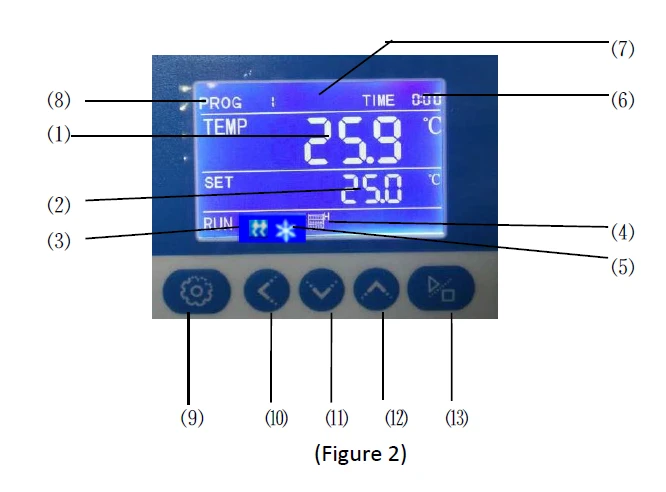
Layout of Operating Panel and Temperature Controller Panel. (See the following figure)
1.1 Description of Indicator Lamps.
1) TEMP area (PV): display measured temperature.
2) SET area (SV): display set temperature.
3) HEAT lamp: lit with heating output.
4) Water level indication: Indicating high, low water level.
5) Refrigeration lights: Bright when there is a cooling output.
6) TIME: time display window; display running time or parameter value.
7) STEP area: display working time or parameter.
8) PROG area: display program working set or setting set.
1.2 Description of Keys
9) SET key: used to revise the set value or enter the setting of internal parameters, which can be, in the mode
of parameter setting, pressed hold for more than 3sec to exit.
10) SHFT key: used to shift set value and internal parameter and view the ambient temperature.
11) - key: used to revise the set value and parameters and auto-set RUN/STOP.
12) + key: used to revise the set value and parameters, or view the remaining period.
13) RUN/STOP: pressed hold for 3sec for RUN or STOP of the controller.
2. Description of Program with Examples
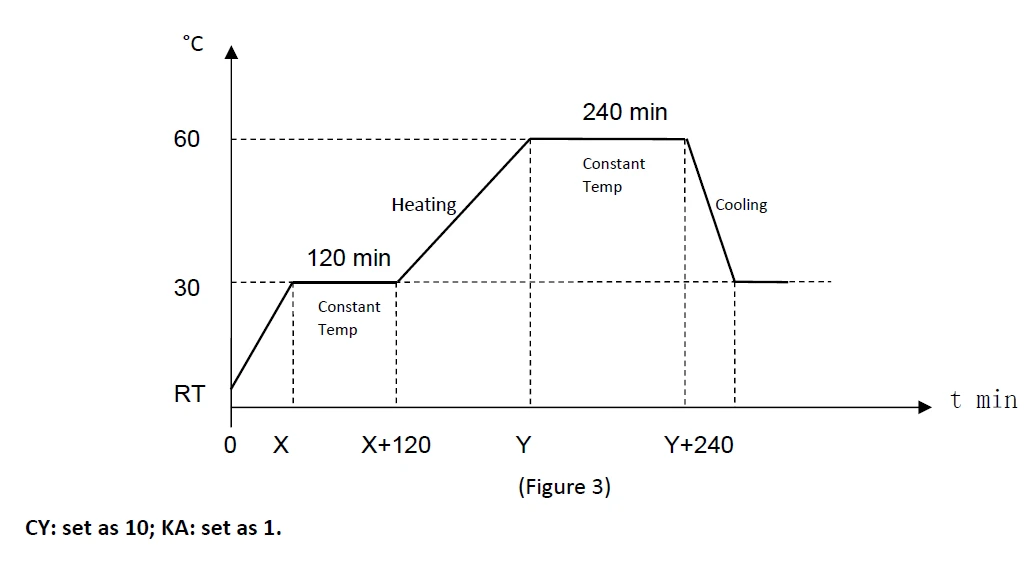
For instance, it is required to run for 120min at the constant temperature of 30°C and then for 240min at the constant temperature of 60°C; this program will run, from start to end, repeatedly for 10 times, and is set to start running automatically with power on for the controller.
(Figure 3)
CY: set as 10; KA: set as 1.
2.1 Editing
2.1 Editing of Program
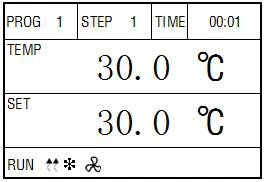
(Figure 4)
2.1.1 In the standard mode, click SET key so that the figure in PROG area flickers, press +/- key to select the setting set for revision, press again SET key so that PROG flickers, STEP displays "1", for setting the parameter of the first section of the set, and TIME area flickers, press +/-, SHIFT keys to set the first section time of the set as 1; click again SET key so that SV area flickers, press +/-, SHIFT keys to set the first section temperature of the set as 30°C.
Then, press SET key so that the second figure of STEP area is 2, prompting to enter the
program setting for the second section of the set.
(See Figure 5)
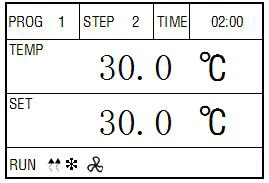
(Figure 5)
2.1.2 When TIME area flickers, set time as 120min; click again SET key, when SV area flickers, set temperature as 30°C. Then press SET key so that the second number of STEP area is 3, prompting to enter the third-section program setting of the set.
(See Figure 6)
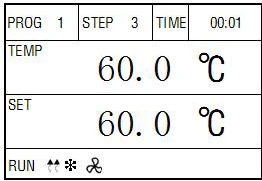
(Figure 6)
2.1.3 When TIME area flickers, set the time as 1min; then click SET key, and when SV area flickers, set the temperature as 60°C. Then press SET key so that the second figure in STEP area is 4, prompting to enter the fourth-section program setting of the set.
(See Figure 7)
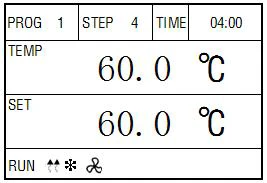
(Figure 7)
2.1.4 When TIME area flickers, set the time as 120min, then click SET key, and when SV area flickers, set the temperature as 60°C. Then press SET key so that the second figure in STEP area is 3, prompting to enter thefifth-section program setting of the set.
(See Figure 8).
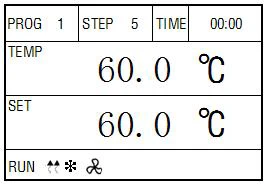
(Figure 8)
2.1.5 When TIME area flickers, set the time as 0, indicating the end of the program when running to this section.
STEP is set as 30°C and TIME as 1min, indicating to heat up from RT to 30°C at the maximum speed and within the minimum time. (Heating speed is required, but heating up should be in a minimum time).
Upon Running for 1min, the program will remain in the section because of the waiting temperature: when the controller is in the section of gradient heating, the section is time up. When the set value of temperature is > the measured value of temperature + waiting temperature, the controller will be automatically suspended till the set value of temperature is < (measured value of temperature + waiting temperature) before entering the next curve.
When the controller is in the section of gradient cooling, the section is time up. If the set
value of temperature is < (measured value of temperature - waiting temperature), the controller will be automatically suspended till the set value of temperature is > (measured value of temperature - waiting temperature) to enter the next curve.
3.3 Description of Program Operating:
3.1 To revise each parameter, it is required to press "SET" key for confirmation before such revision may be valid.
3.2 With all the parameters set, press "RUN/STOP" key, and wait for about 3sec before running starts.
3.3 In a standard mode, click "SET" key so that the first figure of PROG area flickers, press + key or - key to select the required set number. According to the need, the customer may set properly the set number of PROG the required temperature and time so that the set may called for running next time.
Setting of upper deviation alarm
Good setting of upper deviation can protect the system from out-of-tolerance temperature control or lose control and must be put into use when the instrument works.
Example: If AL=3.0 when the product leaves the factory, this means the alarm temperature is(set temperature value +AL)°C.
Calibration of temperature control accuracy
5.1 The 0.1°C-graduation mercury thermometer(or digital thermometer with a resolution of 0.1°C) is placed in the working chamber of the product. The mercury temperature-sensing head of the thermometer should be in the geometrical center of active space in the working
chamber.
5.2 Any point within the scope of temperature control of the product is chosen when the measured temperature value is equal to the set value, keep it thermostatic for another hour and make sure the difference between the measured value from the mercury thermometer and that
shown in the temperature controller should be ≤±0.5°C.
Method of improving temperature control accuracy
6.1 After the product is used for some time, temperature control accuracy should be calibrated as described in 5.2. If the error is in excess of ±0.5°C, correction should be made by the following method:
6.2 Go in for parameter setting and look for character of " ".

After calculation by the following formula, revision is made on the basis of PK value set in the factory(Note:If one revision is inaccurate, it should be repeated till requirement is met).
Use of "independent temperature limit controller".
The independent temperature limit controller is an independent protection system. When the temperature controller malfunctions and causes the temperature to run out, when the temperature in the working room reaches the temperature limit set value of the independent temperature limit controller, the independent temperature limit controller will automatically cut off the heating and issue an alarm sound.
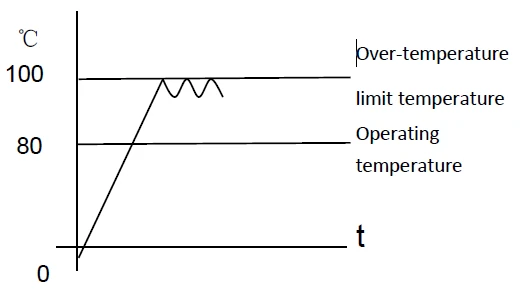
(As shown on the right) When the temperature in the working room is lower than the limit temperature After the set value, the protection system is eliminated and the meter resumes work.
Repeat this cycle until troubleshooting.
7.1 The temperature limit set value should be greater than or equal to
(SV + AL) + (10 ~ 15) °C
7.2 See Figure 4. Turn the blue (with arrow) knob to the required temperature limit.
Example: SV = 80 °C, AL = 10
Should be set to 100 °C.
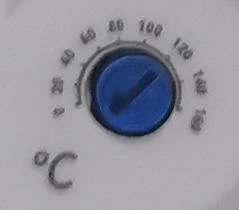
Figure 4
4. Maintenance of the product and precautions
1. The equipment must be connected to a well-grounded electrical outlet! To ensure personal safety.
2. Using high temperature above 80 °C, observe the distance between the liquid level and bath along the mouth carefully, to prevent the thermal expansion of the bath oil during heating, to avoid overflow of the bath.
3. When the bath medium is water, please note that the use of temperature, to prevent freezing or boiling, causing temperature control are not accuracy.
4. When filling the bath medium, the type of bath medium that fill in the bath must the same (Note the liquid medium in working chamber, it must be based on different operating temperature, filling different bath medium.
5. Do not use flammable liquids! The damage of improper use of bath medium caused by their own responsibility!
6. Connect the rubber tube, the connection should be clamped with clamp to prevent fall off.
7. Under continuous operation, the area of the bath cover and the connection of the circulation pump will become very hot or cold, so be careful when touch these places to prevent burns or frostbite.
8. Please be careful when draining the hot baths medium! Check the bath medium temperature before draining (eg, you can open the device up-cover and cooled it for a period of time).
9. If the equipment work in low temperature for long time, evaporators and pipes will have the
phenomenon of icing, causing bath temperature control are not accuracy, at this time please turn off the compressor for heating defrosting the ice, and because of melting ice bath body will have water seepage.
10. After using, turn off the power switch of the cooling and the cycle controller, unplug the power cable plug, and unscrew the drain port then drainage and dry the cabinet (please pay attention to the bath medium temperature, be careful not to burn or frostbite).
Turn off the cooling power switch first, then turn off the power of cycle controller.
11. Before moving the equipment, do not forget to empty the bath medium,, the equipment shall not be oblique (not more than 30 °) or placement it inverted.
5. Appendix
5.1 Main technical specifications
Model Item | BCLT-2601 | BCLT-2602 | BCLT-2603 | BCLT-2604 | BCLT-2605 | BCLT-2606 |
Input power (W) | 2300 | 2300 | 3150 | 2300 | 2300 | 3100 |
Temperature range | -10°C100°C | -20°C~ ~ 100°C | -40°C~ 100°C | -10°C~ 100°C | -20°C~ 100°C | -40°C~ 100°C |
Resolution | ±0.2 | |||||
Pump flux (L/min) | 8 | |||||
Throw of pump (cm) | 50 | |||||
Power | AC220V 50HZ | |||||
Interior dimension/d epth(mm) | 150x160/150 | 240x170/200 | ||||
Exterior dimension(mm3) | 380x640x860 | |||||
Note: Test Conditions for performance parameter: at 20 ° C ambient temperature, relative humidity≤85%,
liquid medium temperature 37°C, with purified water as liquid medium.
5.2 Pump flow adjust
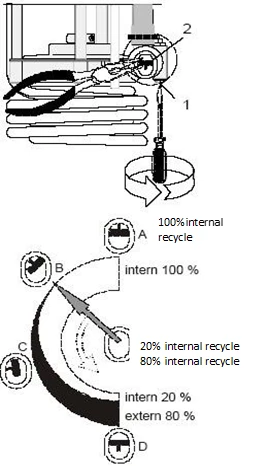
The pump flow has been set up before leave factory, but it could be adjusted according to requestment.
·Use a screwdriver to hold the screw (1) Counterclockwise Rotation 360 °C.
·Use a flat plier to turn the valve in the diagram to the desired position.·Tighten the screws
Eg:
The internal circulation applications of bath
A 100% Bath internal circulation.(used for bigger baths)
B used for the smaller baths internal circulation.(It used for smooth surface, bigger fluidity liquid)
Outer / inner circulation applications
C 40 % Outside circulation flow, 60 % Internal circulation.(used for bigger baths)
D 80 % Outside circulation flow, 20 % Internal circulation. (used for the smaller baths internal
5.3 Function parameters table
Under normal conditions, if you press SET key and shift key for over 3 seconds simultaneously, LK code will be displayed on the liquid crystal screen and setup of a password will allow entry into the parameter setting hierarchy interface.
( 1 ) When the output area on LCD screen displays LK, make LK=0003. You can enter into setting of manufacturer's parameter hierarchy only by pressing SET key.
The menu of manufacturer's parameter hierarchy is as follows:
tM | Setup of maxi temperature permissibl by the instrument | To be set up within the measurement scope | Stop heating beyond maxi temperature and give alarm. | |
PO | Boot mode | 0~2 | ①when PO =0, after open the power, the controller in a stopped state, by long press star/stop key is up and running. ②when PO =1, after open the power, the controller will be running. ③when PO =2, running from last power began to run. | |
AL | Setup of alarm | 0~full range | When temperature surpasses SP+AL value, alarm lamp will light up with alarm output.(with function of HOLD) | |
Pb | Zero adjustment (intercept) | -100.0~100.0 | When the zero error of the instrument is greater and the full scale error is smaller, the value should be adjusted. As a rule with Pt100 the value is seldom adjusted. | |
PK | Adjustment of full scale (slope) | -1000~1000 S | When the zero error of the instrument is smaller and the full scale error is greater, the value should be adjusted. PK=4000x(specified value - actual display value)/actual display value and as a rule with Pt100 the value is adjusted first. |
( 2 ) When the output area on LCD screen displays LK, make LK=0088. You can enter into setting of manufacturer's parameter hierarchy only by pressing SET key.
The menu of manufacturer's parameter hierarchy is as follows:
Prompting character | Name | Setup scope | Description | Initial value |
CL | Setting of cooling control | -5.0~ 60.0 | When temperature that set exceeds CL, the compressor is not open; otherwise open the compressor. | |
CP | Refrigeration protection | -80.0-32 0.0 | When the measured temperature is greater than CP, no cooling is forced. | |
Ct | Delay in cooling control | 0 ~ 300 (s) | Delay time required for start of the compressor for the two consecutive times Ct=0 function of the compressor is canceled. | |
Lt | Setup of lower limit of temperature | -80.0-30 0.0 | Setup of lower limit of measured temp. | |
Ht | Setup of high limit of temperature | -80.0-30 0.0 | Setup of high limit of measured temp. | |
UA | Water level input selection | 0-2 | 0: No water level 1: Closed water shortage 2: Opened water shortage | |
CF | Celsius and Fahrenheit | 0-1 | 0: Celsius 1: Fahrenheit | |
T | Heating cycle | 1~ 100s | Relay output ≮20s, SSR and thyristor switch≮3s. | |
P | Proportion belt | 2.0-300. 0 | Regulation of the proportion action. The bigger P, the weaker the action will be and the lower the system gain will become. | |
I | Integral time (readjustment time) | 2~ 3600s | The integral action time constant. The greater I, the weaker the integral action will become. |
d | Rate time (pre-adjustment time) | 0~ 3600s | The differential action time constant. The bigger d, the stronger the differential action will become and overshoot can be removed. I=0, d=0 for time proportion control. | |
Hp | Overshoot inhibition (resetting of ratio ) | 0~ 100% | The smaller d, The stronger the ability of the controller to suppress the temperature overshoot |
5.4 Trouble-shooting
Table IV
Symptom | Possible Causes | Remedies | ||||||||
1.No power supply after starting (the indicator is not ON) | No voltage on the power supply socket or bad contact of plug or socket | Plug again or repair | ||||||||
Incoming damaged feeder broken or power switch | Replacement or repair | |||||||||
Fuse blows up | If the fuse blows up again after being replaced, it is necessary to check the instrument, pump, heater, refrigerating unit and lamps. Only after repair, then you can start the equipment | |||||||||
2. The indicator no display | Power supply transformer of temperature controller damaged or wiring terminal loosen | Replace temperature controller or re-connect the incoming feeder again | ||||||||
3. Indicator PV screen displays---- | Sensor Pt100 is damaged or something wrong with indicator input | Replace Pt100 or temperature controller | ||||||||
Wrong setting of indicator full measuring range, the measured value out of range | Set again | |||||||||
4 .Temperature lose control | Temperature controller or controlled silicon is damaged, temperature is out of control | Replace temperature controller or BTA16 controlled silicon | ||||||||
5.No heating | heater is damaged | Replace | ||||||||
HEAT lamp on thermostat not ON with failure | Replace the indicator | |||||||||
HEAT lamp is ON, flip-flop or controlled silicon is damaged | Check optical-coupler 3041 or BTA16 | |||||||||
T1 (timing) ≠ 0, the setting is not after timing, heating is stopped | ResetT1=T heating +T constant temperature or make T1=0 | |||||||||
6.Cooling is not working | Not open the cooling switch | Open | ||||||||
Compressor, protector is damaged and it cannot be started when the equipment starts | Replace compressor | |||||||||
Overheating causes the compressor is started protector of | Stop the equipment for several hours and it will recover automatically | |||||||||
Leakage of refrigerant; insufficient refrigerating capacity; block of pipelines | Eliminate block or fill refrigerant | |||||||||
Evaporator frost serious | Heating and melting | |||||||||
7. Water level alarm light up | Liquid medium in chamber is not enough | Fill liquid medium | ||||||||
indicator is damaged | Replace indicator | |||||||||
Float leaking | Replace | |||||||||
8. Error of control temperature is too big | Pt100 is not connected correctly and the error is too big | Replace Pt100 |
Correct parameters SL and HL (too big error) | Refer to this manual | |
Adjust parameters such as PID (steady-state error) | Refer to this manual | |
Cold, thermal power imbalance | Adjust AL | |
9. Low temperature out of control or big error | The heating or cooling system does not operate | Replace the controller or repair refrigeration |
10.Uniformity is poor in working chamber | Circulating pump flow is not enough or bad, liquid medium does not cycle | Adjust or replace |
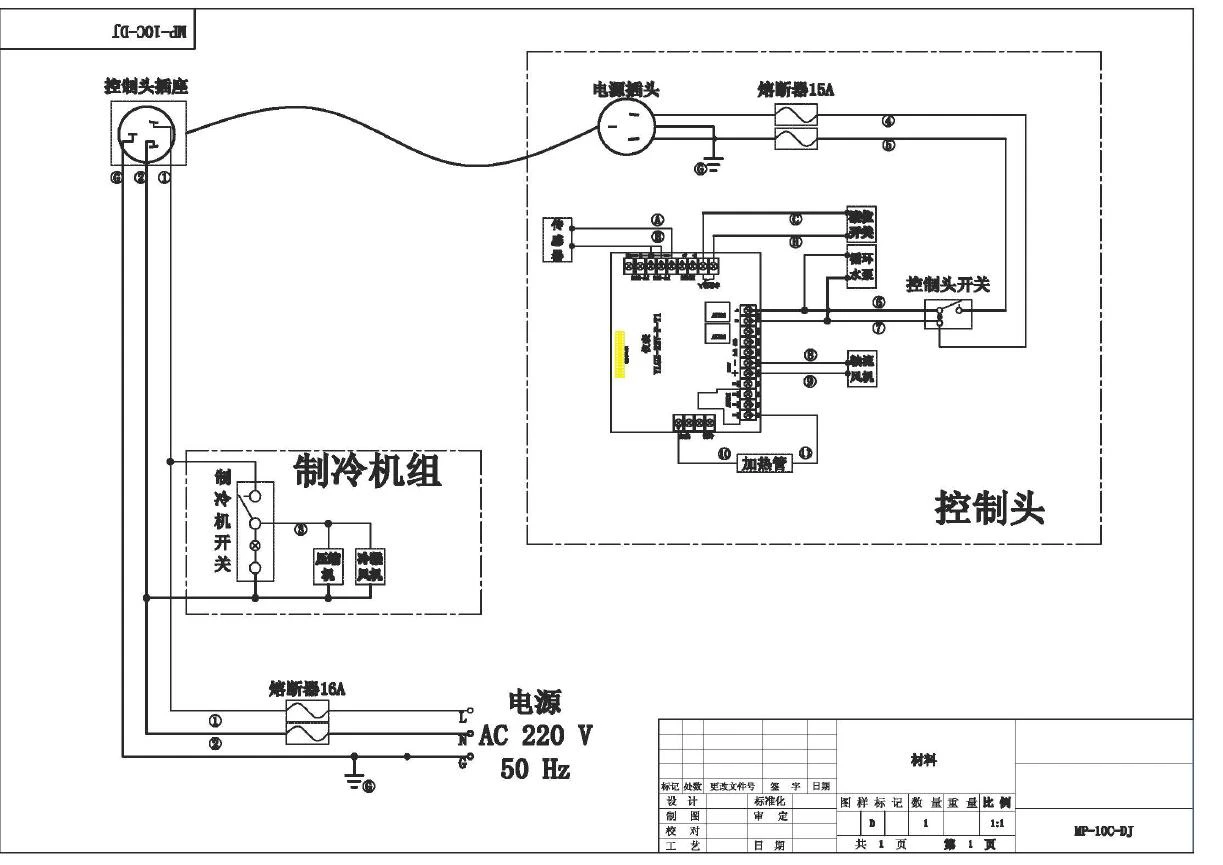
5.5.Electrical Wiring Diagram
Packing List
Product name: Low Temperature Circulator
No. | Type | Name | Unit | Quantity | Remark |
1 | Document | Operation Manual | set | 1 | |
2 | Document | Packing list | set | 1 | |
3 | Spare part | Linking tubes for external bath | pcs | 2 |
Items listed in this table are in accordance with the actual packing
Packing inspector:
Inspector: