


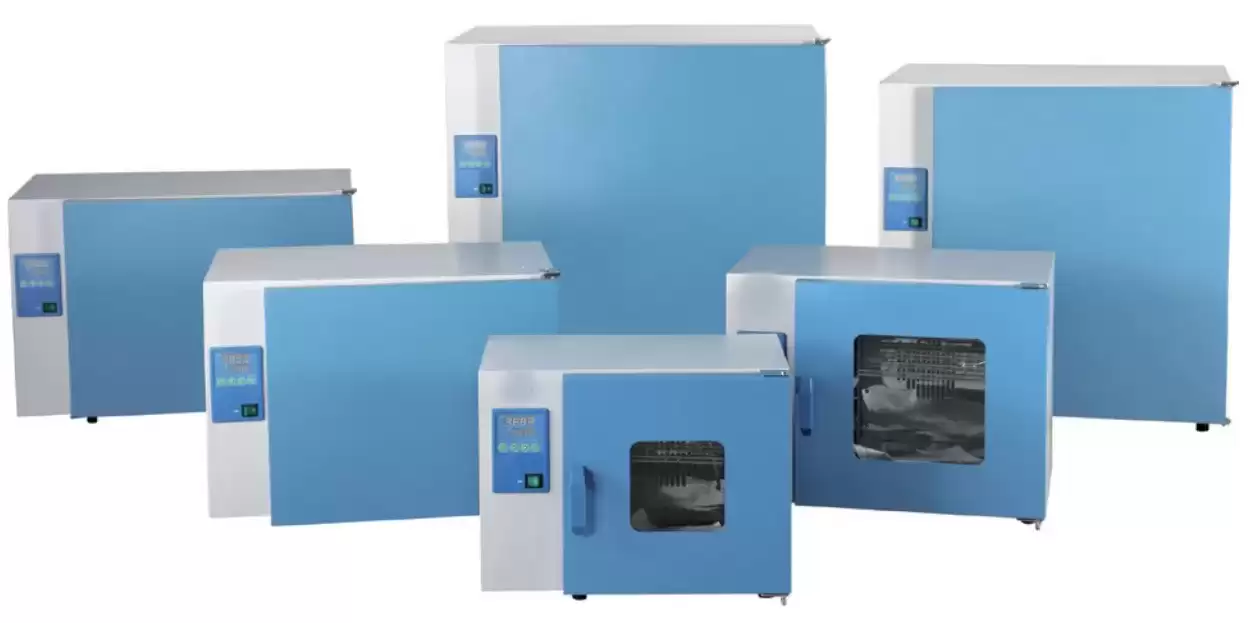
General Purpose Incubator BGI1O15 (BIGP-503)
Heating Incubator- Sea, Air, Door to Door Shipping
- 1 Year Warranty
- US & European Standards

Specifications
| Model | BGI1O15 |
| Electrical Requirement | 220V 50Hz |
| Temperature Range | RT+5~65°C |
| Display Resolution | 0.1°C / ±0.5°C |
| Ambient Temperature | +5~35°C |
| Temperature Uniformity | ±2.0 (at 37°C) |
| Power Consumption | 2200W |
| Chamber Volume | 1000L |
| Interior Dimension (WxDxH) mm | 890x740x1590 |
| Exterior Dimension (WxDxH) mm | 1050x880x2060 |
| Shelves (pcs) | 4 |
| Timing Range | 0-5999min |
| Packing Dimension | 127*95*228 |
| CBM | 2.75 |
| Net Weight | 270.00 |
| Gross weight | 377 |
Description
Microprocessor Controller (with timing function)Provided as a necessary equipment for scientific research to colleges as well as biological, agricultural and scientific research departments for storage of mould and biology cultivation.
Features
• With inner glass door for easy observation.• Polished stainless-steel chamber.
• Independent temperature-limiting alarm system ensures experiments run safely.(Option)
• Printer connector and RS485 connector are options which can connect printer and computer to record the parameters and the variations of temperature.(Option)
Options:
• Printer
• Independent temperature-limiting Alarm system
• RS485 connector
• UV Sterilizer
Operating Manual
Download1. Safety warning
2. Product introduction
2.1 Outline drawing (This drawing is for reference only, subject to the actual object!)
2.2 Overview of structure and function
3. Operation of the product
3.1 Preparation before operation
3.2 Power on.
3.3 Temperature setting
3.4 Timing setting
3.5 Check temperature control accuracy
3.6 High/low speed settings
3.7 Methods for improving the accuracy of temperature control.
3.8 Our suggestion
3.9 Call out sequence of each function
3.10 Use of optional accessories "independent temperature limit controller"
4. Appendix
 Tips for ensuring safety
The matters contained here are extremely important and must be strictly observed.
1. Safety warning
Danger! The improper use of this unit may cause property damage and/or personnel injury.
1. This product must be reliably grounded and away from electromagnetic interference sources (The Zero line or the Neutral line should not be as the grounded line).
2. Please ensure the voltage and frequency of the power supply are compatible with the power requirements before use.
3. This unit must use the included electrical cord with a dedicated electrical circuit with a confirmed electrical ground connection.
4. The power switch must be in the "OFF" position when power is connected or disconnected from unit
5. Do not arbitrarily lengthen or shorten the power supply connection wire.
6. Unauthorized repair is not allowed and such authorized repair should be carried out by the special personage.
! Warning ( it may cause property damage or personal injury)
1. Make sure to read and understand thoroughly the Product's Operating Instructions before the operation may be carried out.
2. To take out the power plug, make sure not to pull directly the power cable.
3. 304 stainless steel liner is not acid resistant, please pay attention to anti-corrosion measures. Do not use acidic media inside the box!
4. The power cord must be removed from receptacle when any of the following occur:
4.1 When replacing the fuse;
4.2 When the product is waiting for overhaul due to faults;
4.3 When the product goes out of service for a long time;
4.4 When the product is being moved;
! Caution (it may influence the lifetime cause the abnormal operation of the product)
1. The product should be located on the solid and hard surface to keep it in a horizontal mode.
2. Keep certain space around the product
3. The product must be used in the specified conditions. (The detail refer to chapter 3, item 1.1~1.4).
4. The product must be used in the correct setting mode. (The details see chapter 3)
5. Do not open/close the product box door by gravity, otherwise it may easily cause the box door to fall off, damage the product, and cause injury accidents.
2. Product introduction
2.1 Outline drawing (This drawing is for reference only, subject to the actual object!)
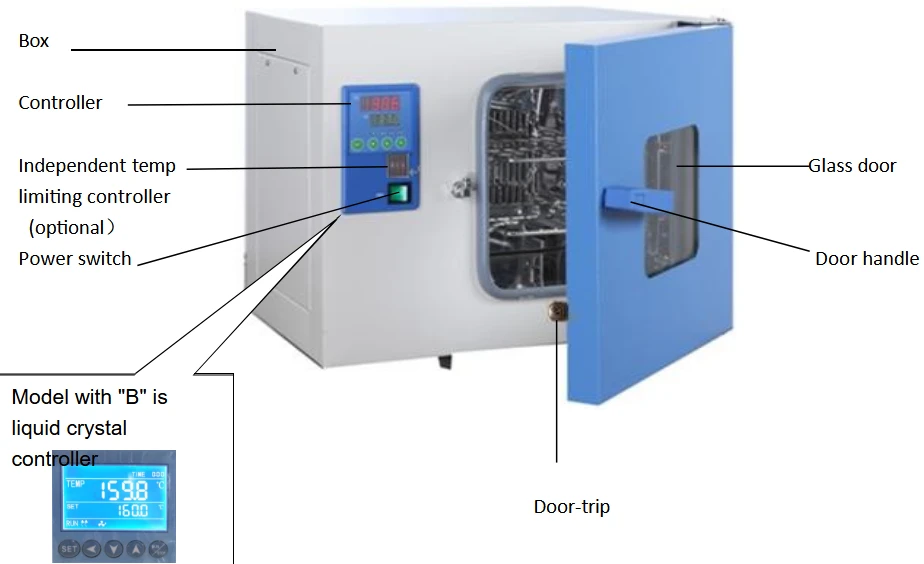
Figure 1
Desktop computer (applicable to BIGP-201 & BIGP-202 models)
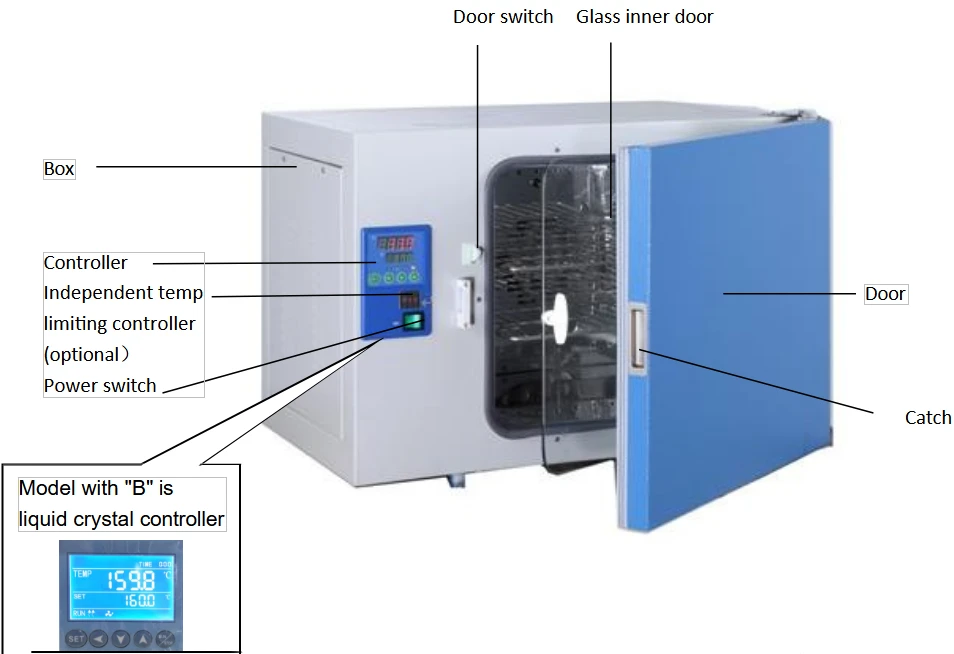
Figure 2
Desktop computer (applicable to BIGP-203-206 models)
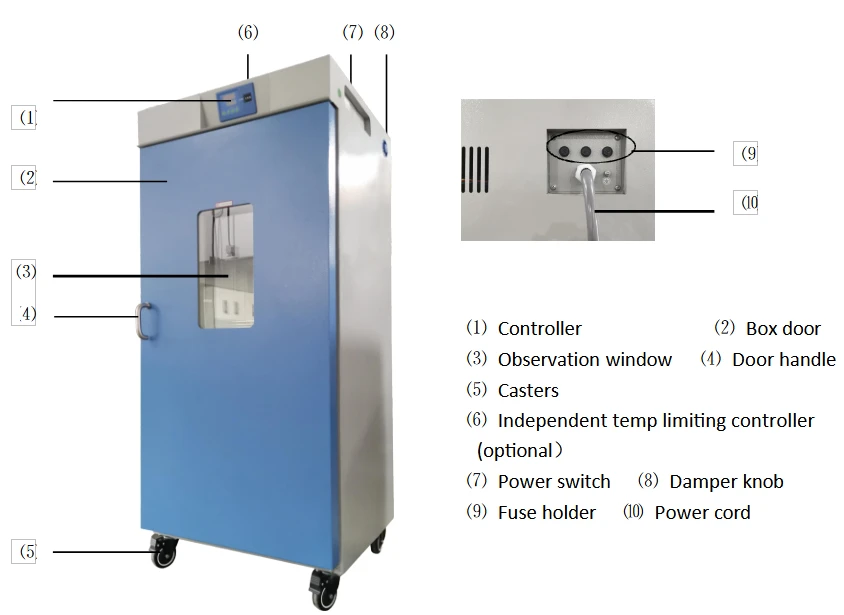
Figure 3
Vertical machine (applicable to BIGP-501- BIGP-503 models)
2.2 Overview of structure and function
BIGP 200 series series electric thermostatic incubator consists of:
Box - The outer shell is made of steel plate, and the surface is sprayed with plastic; The inner liner is made of mirror surface rusty steel, and the four corners of the semicircular arc are easy to clean. The shelf spacing inside the box is adjustable.
Heating - Electric heating.
Circulation - The box is equipped with a motor, which operates through a fan to force the smooth circulation of gas in the working chamber to improve temperature uniformity. At the same time, it has the function of fast and slow speed change.
Control - Microcomputer type electronic controller, sensor using Pt100 platinum resistance temperature control accurate, stable and reliable.
Protection - With multi-level independent overtemperature protection and alarm system:
【One level overtemperature protection 】: The controller is equipped with an upper deviation alarm function, which allows users to adjust the deviation AL1 parameter as needed and set it by themselves.
【Second level overtemperature protection】: When the actual temperature of the equipment exceeds the set protection value for the high temperature limit, the power supply to the heating section is automatically cut off, and an audible and visual alarm is issued.". Due to the fact that the circulating fan still
operates normally during an alarm, the alarm will automatically be cleared when the temperature is lower than the set value. (User option)
Convenience - (BIGP-201-BIGP-202) Direct observation through the inspection window of the box door, convenient and clear. While (BIGP-203~BIGP-206) have dual interior and exterior box doors, which can be opened for observation through a glass interior door. When the doors of the desktop (BIGP-201-BIGP-202 )box and the glass doors of the (BIGP-203~BIGP-206) box are opened, the breeze circulation automatically stops, reducing the temperature "overshoot" caused by opening/closing the box door. The vertical BIGP-501~BIGP-503 doorless switch does not have this function.
(BIGP-201-BIGP-206) models can be optionally equipped with a liquid crystal display controller or a multi stage programmable liquid crystal temperature controller. (BIGP-201-BIGP-206) Type B is a liquid crystal display controller (see VI, Instructions for the Use of Liquid Crystal Display Controllers), optionally equipped with a multi stage programmable liquid crystal temperature controller.
Option Name | Introduction to optional features | Picture |
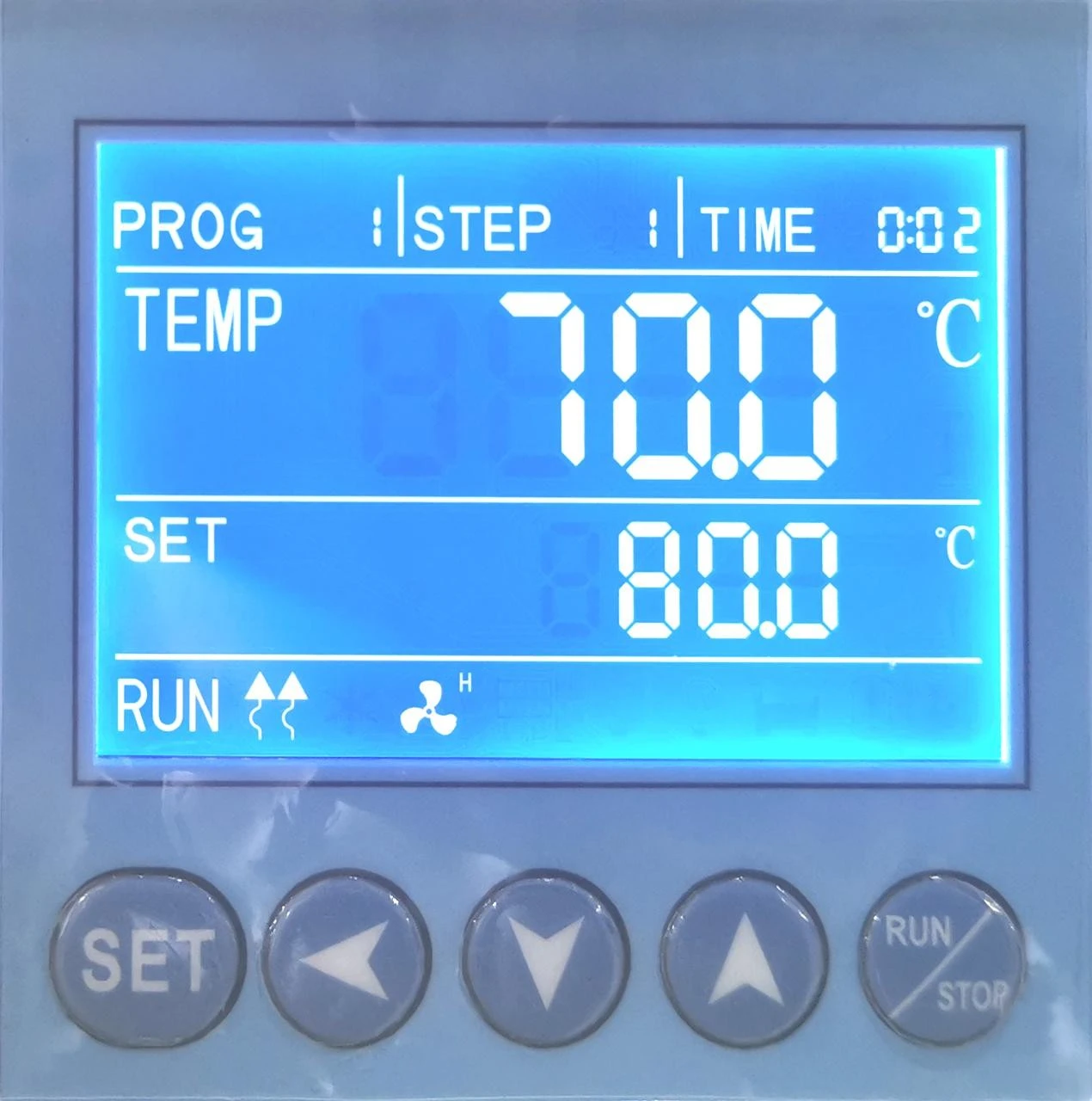
Intelligent programmable liquid crystal temperature controller | Microcomputer program controller, time and heating rate. Can preset 7 groups of 9 steps programmable, with a set time of 1 to 99 hours and 59 minutes per segment. Multi stage programmable control can simplify complex test processes and truly achieve automatic control and operation. | |
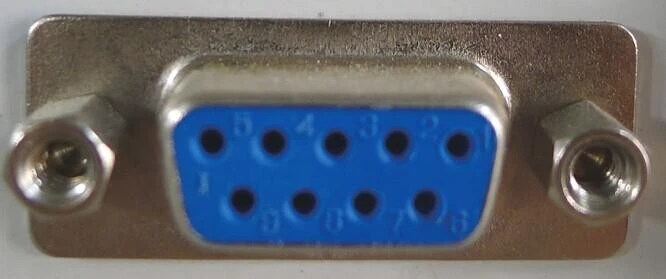
RS485/232 Communication interface and software CD | Display and monitor various experimental data by connecting a computer. |
|
Embedded printer | Print the data required for the experiment. | |
USB flash disk storage data | USB data transfer interface, which can be used for data transfer. | |
Add BOD socket | Special socket for BOD instrument | |
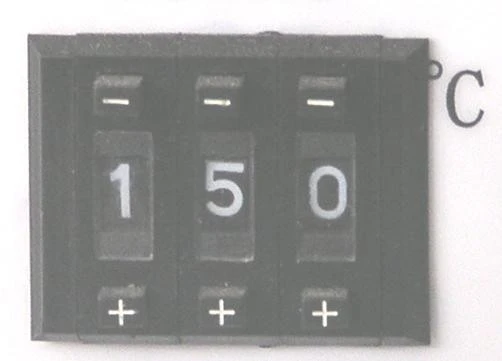
Independent temperature limiting controller | Automatically interrupt when the temperature exceeds the limit, ensuring safe operation of the experiment without accidents |
|
Ultraviolet sterilization system | ||
Wireless alarm system | Wireless alarm system (SMS alarm system) | |
Test hole | 25mm/50mm/100mm Test hole It can be installed on the side of the box and can be wired according to the needs of the placement site. |

 or
or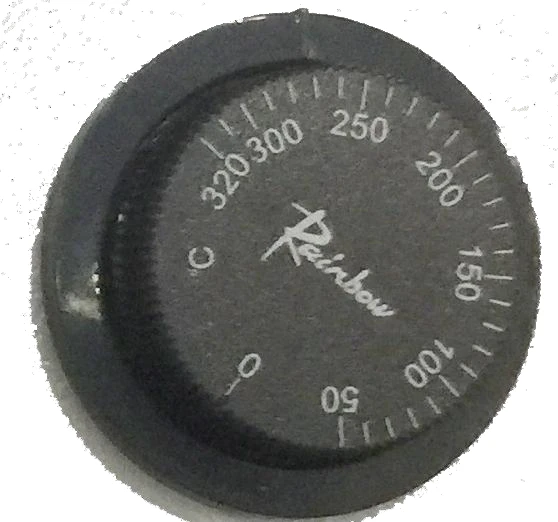
Table 1
3. Operation of the product
3.1 Preparation before operation
1. The products should be used work normally under these following conditions:
a. Ambient temperature: 5°C~35°C; Relative humidity:≤85%
b. Atmospheric pressure:(86~106)KPa
c. Elevation not higher than 2000m ≥30cm
d. Power supply:(220±22)V (50±1)Hz
e. Keep away from heating sources, no intense shock source and strong electromagnetic field around.
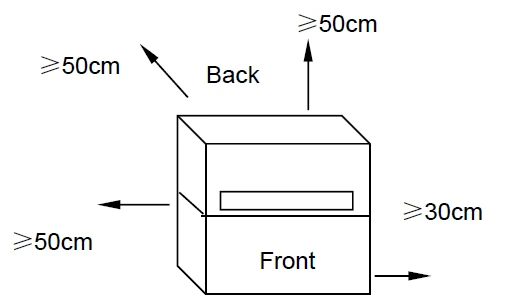
Figure 4
3.2 Power on.
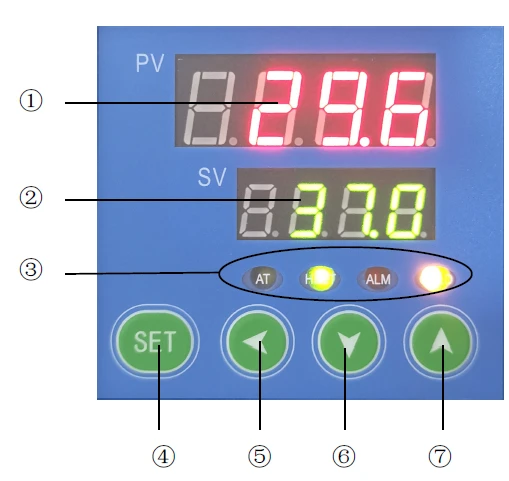
Figure 5
1 PV display unit (Red)
• Display measured value.
• Dispalys the various characters depending the statue of the instrument.
2 (SV) display unit (Green)
• Displays the set value
• Dispalys the various parameter values depending the statue of the instrument.
3 Indicators
• COLD(AL2)Output light (yellow), lit when motor is operating at high speed.
• ALl Deviation alarm output light (red), lit during operation.
• AT The lamp (yellow) is shared with the TIME lamp, when lamp flashes, the meter runs at a fixed time; The table performs self tuning when it is normally on.
• HEAT heating output lamp (green) It shines when working for output.
4 SET Function key
• Setting value modification
• Call out of parameter symbols and confirmation of parameter modification.
5 Shift key
6,7 Number plus and minus keys
*"↑"Used to adjust parameter values or observe timing remaining time/timing recovery.
*"↓"Used to adjust parameter values or enable/disable self setting status/current real-time power, i.e. SV displays "o 100".
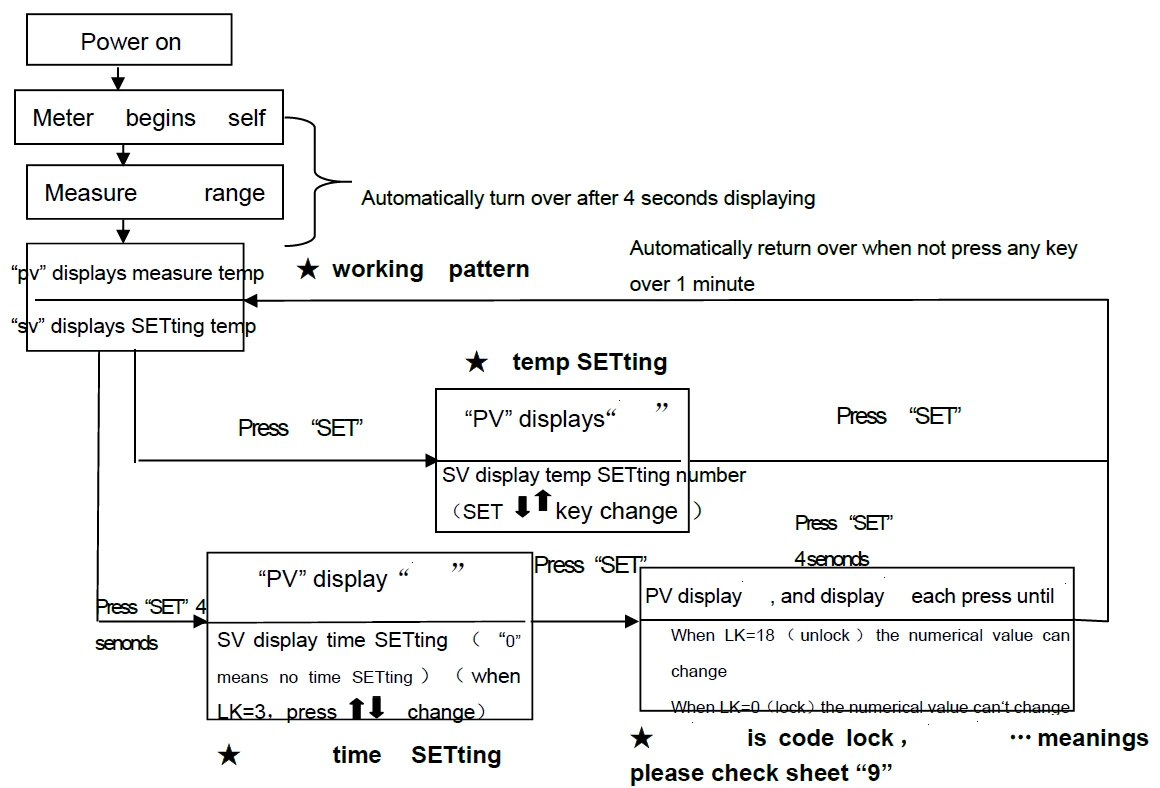
3.2.1 Turn on the power switch. At this time, the power indicator light is on, the controller PV screen displays the measured temperature, and the SV screen displays the set temperature.
3.2.2 Close the glass door and the box door, and the motor runs. At this time, the incubator enters the working state.
3.3 Temperature setting
3.1 (See Figure 6)Click"SET"key, The PV screen displays "  ", SV screen displays the set temperature value.
3.2 Use "←" to cycle through the flashing bits displayed on the SV screen.
3.3 Use "↓" or "↑" to change the value of the flashing bit on the SV screen until the desired temperature value is reached.
3.4 Click again "SET" key, Return to operating mode (PV screen display measure the temperature, SV displays the set temperature, and enter the working state.
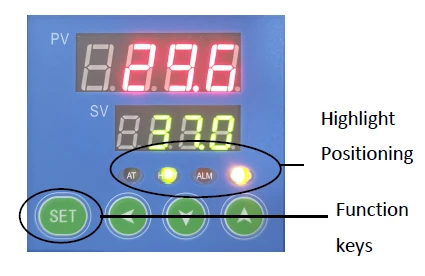
Figure 6
3.4 Timing setting
1. See figure 7, After pressing the SET key for 4 seconds, the PV
screen displays"  ", if SV screen display "0", it indicates that timing function not set (factory status).
2. Press the SET key several times, until PV screen display"LK ", trough  key make the SV screen display 3 (timed unlock), press again SET key, PV screen return" "trough key, set the required value for timing (timing range: 1 to 9999 minutes), press the SET key again for 4 seconds, and the controller returns to the working mode. The timing starts to run. At this time, the AT light flashes, entering the calculation time. When the timing ends, PV and SV windows are displayed "End", the AT light goes out and the buzzer beeps 4 times to indicate a reminder.
3. Timing recovery: Press and hold the key until the instrument enters the working mode, and still operate at the original set timing time.
4. Self setting is not allowed after a timed start. To observe the running time, press the key once, and the SV screen displays the remaining time value. (Note: The determination of the total timing time should consider the combined calculation of temperature rise and constant temperature in two stages).
5. During timed operation of the product, it is allowed to modify the timing time "ST". The previous accumulated running time is "memorized" and runs to the new timing time. The product stops heating, and the buzzer beeps. (When the new timing time is less than the previous cumulative operating time, the heating output is immediately turned off and the buzzer sounds.)
6. When the power is cut off during operation or the power is turned off and then restarted, the timing needs to be reset.
3.5 Check temperature control accuracy
1. Select a digital thermometer with a resolution of 0.1°C that has passed the verification and is within the verification period as a standard and put it into the product work room, and ensure that the sensor temperature sensor is in the geometric center of the work room.
2. Choose a point within the temperature control range of the product and set the SV temperature control value. When the PV measurement value is equal to the set value, keep it at a constant temperature (1~2) hours or so (depending on the product specifications, the constant temperature time may vary) , Observe that the difference between the actual measured temperature value of the standard thermometer and the measured value displayed by the controller PV should be ≤±0.5°C.
3.6 High/low speed settings
1. Yellow lamp(COLD/AL2)light, high speed operation of fan.
2.(See figure 8)When the temperature reaches: PV = SV +Fn, That is, from high speed to low speed operation, and the yellow light goes out at this time.
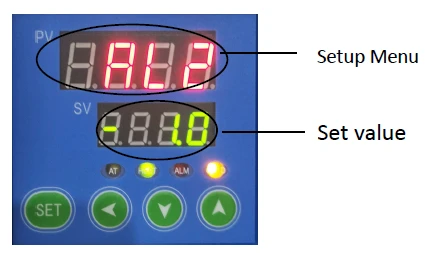
Figure 8
3.7 Methods for improving the accuracy of temperature control.
1. Error correction between measured temperature and actual temperature in the working room.
1.1 Press "SET" key more than 4 seconds (enter menu B), when PV screen display " " just release, press SET key Several times, find the "LCK" prompt.
1.2 Press " "key, make the SV screen display 18 (unlock).
1.3 Press again "SET" key Several times, find the "Pb" prompt for the control parameter that needs to be adjusted, and press the function key to display the control parameter as the desired value. Pb = Original Pb value +(Actual temperature - PV display value)
1.4 Calculate the "Pb" value according to the above formula, and input it. (If the adjustment is not correct at one time, it can be repeated multiple times until it meets the standard.).
1.5 If Pb has been adjusted to the maximum (out of range) and cannot be adjusted again, set "Pb" to 0 and return to the working state.
1.6 Press the "SET" key, and "PK" will appear on the PV screen. Modify the "PK" to 1.000, and then return to the working state.
1.7 Select 1 test point within the temperature range, such as:
PK=4000*(Standard values of the recorder - displayed temperature measurements)/Displayed temperature measurement (be sure to retain three decimal places)
1.8 Set a new "PK" parameter value, and if it is no longer accurate, adjust the "Pb" according to the steps in 1.3 of this chapter (repeatedly until it meets the standard).
2. Suppression of temperature instability (causing up and down fluctuations or excessive overshoot).
2.1 Refer to 1.1 of this chapter to enter the B menu.
2.2 Increase the parameter "P" (proportional band) by about 0.5 each time.
2.3 Simultaneously change the parameter "I" for about 100 seconds each time, and simultaneously change the parameter "D", D=I/4, and observe the temperature again until the temperature overshoot meets the requirements.
2.4 If it still cannot be eliminated, refer to Section 7.1.6 of this chapter to enter the B menu.
2.5 Find "HP" (output power) and reduce it by about 10% each time.
2.6 Self setting startup/shutdown: Hold the key for a long time, the AT light will be on for a long time during self setting, and the SV window will alternately display the SV value and the words "- AT -"; At the end of self setting, the AT light goes out.
2.7 When the required temperature is low, a secondary setting method can be used to reduce temperature overshoot.
(For example, when the required temperature is 40 °C, set 38 °C first, and then set 40 °C after the temperature is basically stable, which can reduce or even eliminate temperature overshoot.)
3.8 Our suggestion
1 When the set temperature "SV" is close to RT (ambient temperature)+5 °C, use the secondary setting method (see Chapter 3, Article 7.2.7)
2 If the humidity in the box is found to be too low during work, a water pan can be placed inside the box. Through natural evaporation, the relative humidity can generally reach about 90% (the water pan only provides a humidity environment and cannot control humidity).
3.9 Call out sequence of each function
3.10 Use of optional accessories "independent temperature limit controller"
The over-temperature protector is an independent protection system. When the temperature controller fails and the temperature is out of control, when the temperature in the working room reaches the temperature limit setting value of the over-temperature dial, the over-temperature protector will automatically cut off the heating and sound an alarm.
(As shown in the right picture) When the temperature
in the working room is lower than the temperature limit. After the set value, the protection system is eliminated and the instrument resumes work.
Repeat this way until the fault is eliminated.
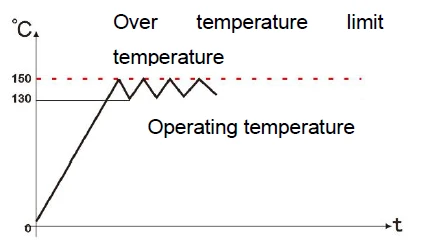
Figure 9
The specific operations are as follows:
1. The temperature limit setting value should be greater than or equal to • (SV+AL) + (10~15)°C
2. See Figure 2, use the + and-buttons on the over-temperature setting dial on the panel to set the required temperature limit.
Example: SV=130°C, AL=10 Then 150°C should be set up.
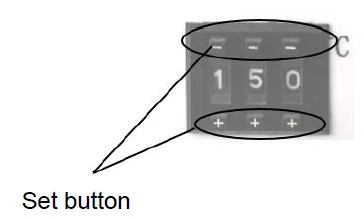
Figure 10
4. Appendix
1. Technical indicators
Model | BIGP-201 BIGP-7601 | BIGP-202 BIGP-7602 | BIGP-203 BIGP-7603 | BIGP-204 BIGP-7604 | BIGP-205 BIGP-7605 | BIGP-206 BIGP-7606 | BIGP-501 | BIGP-502 | BIGP-503 | |
Power Voltage | AC 220-240 V 50-60HZ | |||||||||
Range of Controlling Temperature | RT (room temperature) +5°C -- 65°C | |||||||||
Precision of Controlling Temperature | ±0.5°C | |||||||||
Output Power | 200W | 200W | 300W | 400W | 600W | 750W | 1100 | 1400 | 2200 | |
Volume | 16L | 35L | 50 L | 80L | 160L | 270L | 420L | 620L | 1000 | |
Working Size(mm) | 250x260 x250 | 340x320 x326 | 415x360 x355 | 500x400x 400 | 500x500x 650 | 600x600x 750 | 640x585 x1355 | 840x60 0x1355 | 1000x6 00x160 0 | |
Appearance Size(mm) | 530x480 x420 | 620x490 x490 | 690x500 x500 | 760x580x 420 | 630x770x 770 | 890x730x 960 | 780x750 x1880 | 980x80 0x1880 | 1140x 800x2 150 | |
Table 2
Note: "B" refers to the liquid crystal display controller.
2. Table of Functional Parameters
2.1 B Menu
LCK=3 | ||
Parameter name | Function | Setting range |
ST | Timing | 0~9999 |
The timing start method is optional. Timing is a countdown operation mode. Press the △ key to observe the current remaining time. Note: The timing value meter does not remember, and this setting is valid. When the timer expires, the buzzer beeps continuously by pressing a short beep for four times. (The beep stops after three minutes.) The PV display window and the SV display window both display End. You can press and hold the plus key to reset the timer (with two beeps). After resetting, you need to reset the timer value. After a timed start, the TI timing light flashes. | ||
LCK=18 | ||
AL | Upper and lower limit deviation alarm | 0~100.0 |
PV>SV+AL cuts off the output and beeps an alarm, and the SV window displays E002. PV<SV-AL beep alarm, SV window displays E006, and the output is not cut off. (First power-on exemption for lower limit deviation alarm) The beep alarm can be muted by pressing any key. | ||
Fn | High and low speed conversion value of fan | 0~300.0 |
The PV is at a low speed within the range of SV ± Fn, and at a high speed outside the range. (with a return difference of ± 0.2 degrees). | ||
Pb | Display value translation correction | -100.0~100.0 |
PV=PV+Pb | ||
ATU | Self tuning | 0 / 1 |
Note: The status of AL1 and AL2 will not change during self tuning. It is recommended to turn on self-tuning when PV<<SV. After opening the self-tuning, the SV window displays - AT -. | ||
P | Proportional band | 0~100.0% |
Proportional action adjustment: the larger the P, the larger the proportional action range, and the lower the system gain. P=0 is a bit control. | ||
I | Integral Time | 1~4320 second |
Integrated time constant. I larger, then the integrated action is smaller. | ||
d | Derivative Time | 1~4320 second |
Derivative time constant. D larger, then the derivative action is also larger. | ||
t | Heating period | 1~60 second |
The heating cycle is generally 2-3 seconds for the thyristor and 20-40 seconds for the relay output. | ||
PK | Slope correction | -1000~1000 |
PK=4000*(Standard value of recorder - displayed temperature measurement value)/displayed temperature measurement value | ||
HP | Output power suppression | 0~100% |
* Note that if the HP value is too small, the temperature will not reach the set value | ||
LK | Key lock | 0~255 |
Table 3
2.2 B*Menu.
LCK=28 | ||
Parameter name | Function | Setting range |
Ad | postal address | 0~128 0:broadcast |
bA | Baud rate | 0:1200 1:2400 2:4800 3:9600 4:19200 |
Fo | Communication format | 3:8,N,2; 4:8,E,1 5: 8,O,1; |
Pt | Print Interval | 0-9999 |
yr | Year | 21-50 |
MH | Month | 1-12 |
dA | Day | 1-31 |
Hr | Hour | 0-23 |
Mi | Minute | 0-59 |
on | Date modification confirmation | 0-1 To modify the date and time of printing or USB flash disk storage, after modifying the above time, change this parameter to 1. |
Table 4
※Products are strictly tested before leaving the factory. When the technical indicators meet the
requirements and work normally, no correction is generally required.
2.3 Trouble removal
S.N. | Failure | Reason for presuming | The handing ways for failure |
1 | No power when starting | The power outlet has no current or badly connecting | Checking and repairing |
Coming line interrupting of power. | Changing it | ||
Switch of the power doesn't open or run | Open (closing) the switch, changing it | ||
Not installing the cartridge fuse or burn out | Installing the right cartridge fuse, and checking the reason, then starting after repairing | ||
2 | PV screen displaying…. | The instrument or the sensor PST00 does not work | Changing it, PST00=0°C ,it is 100 Ω |
3 | The temperature not rising or after at some degree, not ring, but dropping | The setting temperature is lower the RT (surrounding temperature) | Resetting SV≥RT+5 °C |
The timing of the instrument booting T≠0 | Setting ST=0 | ||
The inner glass window is closed, but not closing the switch of the door | Adjusting the inner door's locking | ||
The "heating light" temperature controller is on | The controlled silicon or the integrated piece does not work, changing it | ||
There is voltage between two sides of the heating tube | The connector of the heating tube is hurt or dropped. | ||
When over 60 °C, temperature suddenly not rising | The heat protection of the temperature relay, after nature cooling, it could restore. | ||
4 | Big difference of the displaying and actual temperature | Refer to the specification, and repair it. | |
5 | Producing the static difference | Displaying temperature > setting temperature | Reducing the RT temperature, and modifying the "OUT-", |
Displaying temperature < setting temperature | Increasing the "OUT-" | ||
Blower fun does not run | Repairing it | ||
The sensor (PST00) connects not well | Connecting it once more. | ||
7 | The noise of the motor is big | The vane of blower fan touching the wind way board | Placing the gasket to increasing the height. |
The motor is blocked or no grease | Change it | ||
6 | Temperature could not be controlled | The heating light of temperature controller is on and not off | Changing the temperature controller |
When heating light of temperature controller if off, but the temperature is still rising | Changing the dual controlled silicon BTA16 |
Table 5
Packing list
S.N. | Class | Name | Unit | Amount | Remark |
1 | File | Operating specification | Set | 1 | |
2 | File | Packing list | Set | 1 | |
3 | Spare parts | Shelf | Piece | 2 | |
4 | Spare parts | Core for the fusible cutout | piece | 2 |
The things listed in this list are consistent with practicality. Packing operator: 2