


Conductivity Meter BJG1T1 (BMET-301)
Benchtop Conductivity Meter- Sea, Air, Door to Door Shipping
- 1 Year Warranty
- US & European Standards


Specifications
| Model | BJG1T1 |
| Conductivity | |
| - Range | 0.00 μS/cm to 100 mS/cm |
| - Resolution | 0.01 μS/cm minimum; changed with range |
| - Accuracy | ± 1.5 % FS |
| - Reference Temperature | 25 °C |
| Measurement | |
| - Reading Mode | Continuous |
| - Reading Prompts | Reading, Stable |
| - Temp. Compensation | MTC |
| Inputs | |
| - pH Electrode | BNC(Q9) |
| - Conductivity Probe | 5-pin aviation connector |
| Display Options | |
| - Backlight | Yes |
| - Auto Shutdown | 300, 600, 1200, 1800, 3600 sec., off |
| - IP Rating | IP54 |
| General | |
| - Power | AC Adapter, 100-240 V AC input, DC9 V output |
| - Dimensions | 200x160x63 mm |
| - Weight | 600 g (1.32 lb) |
Description
A Conductivity meter is an instrument that measures the amount of electric conductivity or current in a solution. The conductance can be measured by applying an alternating electrical current to the two electrodes present in the solution, after which the cations move to the negative electrode and the anions move to the positive electrode. This movement ultimately leads the solution to be conductive.Operating Manual
Download1 Introduction
1.1 Introduction
1.2 Technical Specification
1.3 Function Introduction
2 Safety Notices
3 Terms Explanation
4 Overview and Installation
4.1 Overview
4.2 Instrument Installation
5 Instrument Operation
5.1 Screen Icons
5.2 Key Function
5.3 Instrument Settings
5.4 Calibration
5.5 Measurement
6 Maintenance/Troubleshooting
6.1 Maintenance
6.2 Electrodes Maintenance
1 Introduction
1.1 Introduction
BMET-301 Conductivity Meter can measure conductivity in water solution, and can be widely used in universities, environmental protection, medicine, food, sanitation, geological prospecting, metallurgy, ocean exploration.
1) General Features
- LCD display screen, 6.0 inches.
- Cell constant is settable.
- Manual temperature compensation ensures accurate results.
- IP54 protection.
1.2 Technical Specification
Table 1-1 Instrument Specifications
Model | BMET-301 | |
Conductivity | Range | 0.00μS/cm~100.0 mS/cm |
Resolution | 0.01 μS/cm, automatic switching according to the range | |
Accuracy | ± 1.5%(FS) | |
Repeatability | 0.5%(FS) | |
Measurement Accuracy | ±2.0%(FS) | |
Measurement Repeatability | 1.0%(FS) | |
Temperature | Range | Manual (0.0~60.0)°C |
Work environment | Ambient temperature: (0~40)°C Relative humidity: not more than 85% | |
Dimensions (LxBxH), weight (kg). | 200mmx160mmx63mm, 0.6kg | |
Power supply | AC Adapter, 100-240V AC input, DC 9V output | |
1.3 Function Introduction
Table 1-2 Function Introduction
Function | Explanation | |
Basic Function | Backlight adjustment | • |
Reset settings | • | |
Power failure protection | • | |
Automatic shutdown | • | |
Protection | IP54 | |
Reading Function | Reading Mode | continuous-read |
Measurement | Conductivity | • |
Cell constant set | • | |
Manual temperature compensation | (0.0°C~60.0°C) | |
Temperature Function | Temperature Unit | °C |
2 Safety Notices
Please read the entire contents of this manual carefully before use, and please keep this manual properly. The user MUST use the instrument following this manual to avoid damage to the user and equipment.
Before using the meter, READ the following notes:
- DO NOT disassemble the device for inspection or repair.
- To prevent electric shock or damage to the device, do not place cables and connectors in any liquid, wet or corrosive environment.
- Please use the defaulted power adapter, Do not use it if the power cord is damaged (the wire is exposed or broken).
- Do not use in flammable and explosive environments.
- Do not use if the user finds any abnormalities such as damage or deformation of the device.
The following identifier will be used in this manual.
3 Terms Explanation
- Cell Constant: Also known as the conductivity cell constant. The ratio of the distance to the area of the electrode sheet, expressed in cm-1. Usually, there are conductance electrodes with several cell constants such as 0.01, 0.1, 1.0, 10, etc. The conductance electrode with a cell constant of 1.0 is the most used one and has a wide measurement range.
- Temperature Coefficient: The change in conductivity caused by a 1°C change in temperature is usually expressed in %/°C, and the default is 0.02, which is 2.00%/°C.
4 Overview and Installation
4.1 Overview
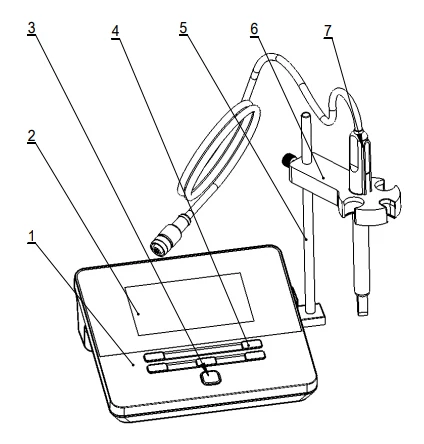
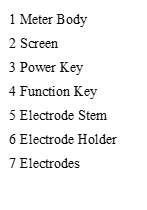
Fig. 4-1 Overview-Front View
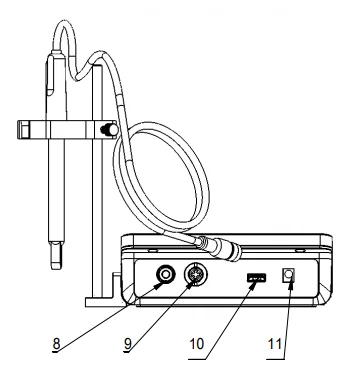
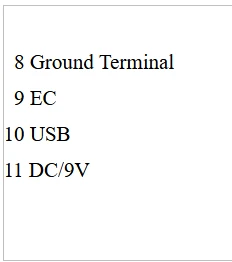
Fig.4-2 Overview- Back View
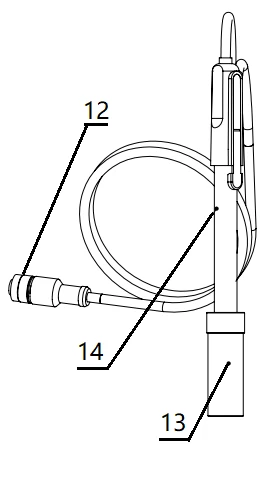
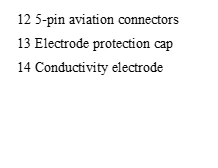
Fig. 4-3 Electrodes and connectors
Table 4-1 Connector Specifications
Electrode type | Connector specifications |
Conductivity electrode | 5-pin aviation |
4.2 Instrument Installation
4.2.1 Electrode Stand Installation
1) Screw the electrode stem into the screw hole of the insert plate.
2) Insert the round hole at the back of the electrode fixing clip into the electrode stem, adjust the height, and tighten the fixing screw.
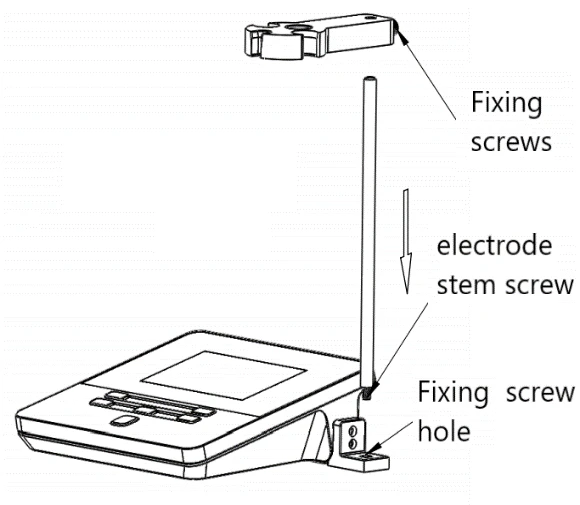
Fig. 4-4 Electrode Stand Installation
4.2.2 Electrodes Connection
Push the conductivity electrode into the electrode holder. Remove the protector cap of the conductivity electrode. Connect the conductivity electrode into the right socket.
5 Instrument Operation
5.1 Screen Icons
The meter has 6.0 inches high resolution LCD display screen. The User interface has the menu, status, result. The menu has measurement and setting. The status shows the reading mode, reading prompts and auto shutdown etc. The result shows the conductivity, unit, temperature, cell constant type etc.
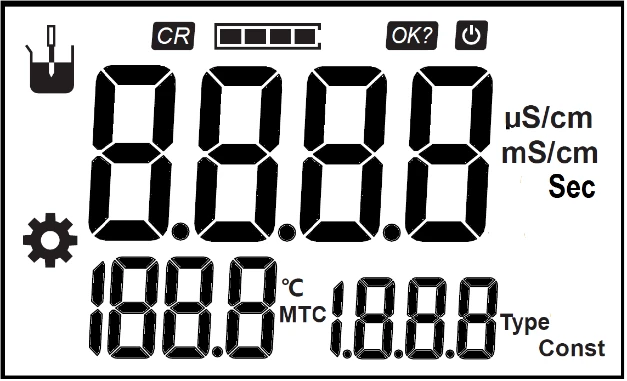
Fig. 5-1 Screen icons explanation
Table 5-1 Symbol Explanation
No. | Symbol | Explanation | Note | |
1 |
| continuous-read | Continuous Reading | |
2 |
| Reading state | When all four sections are lit up, it shows a stable status | |
3 |
| Automatic shutdown | Automatic shutdown has been set | |
4 |
| Confirm the option | Flashing Display when Need to Confirm | |
5 | μS/cm | Conductivity Unit | Unit: μS/cm | |
6 | mS/cm | Conductivity Unit | Unit: mS/cm | |
7 | Sec | Time Unit | Unit: Sec | |
No. | Symbol | Explanation | Note | |
8 | °C | Temperature Unit | Unit: °C | |
9 | MTC | Manual temperature compensation | ||
10 | Const | Cell Constant | ||
11 | Type | Electrode Type | ||
12 |
| Measurement | ||
13 |
| Setup | ||


5.2 Key Function
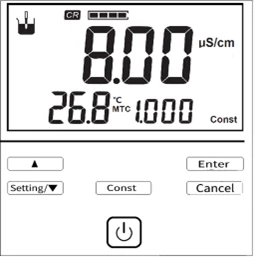
Fig. 5-2 The Screen and the Key
Table 5-2 Key Function Explanation
No. | Key | Explanation | Note |
1 |
| Power Key | Switch on the meter by press and release the key. Switch off the meter by press and hold the key for more than 3 seconds and release. Backlight adjustment key when Switch on the meter. |
2 |
| Up | Increase the number in setting. |
3 |
| Setting/Down | View the setting. Decrease the number in setting. |
4 |
| Constant | Cell constant settings. |
5 |
| Enter | Confirm. |
6 |
| Cancel | Give up. |





5.3 Instrument Settings
5.3.1 Switch On/Off
Connect the power adapter, and press and release to switch on the meter. The startup screen shows software version and other related information. After the self-test program, the screen turns to the homepage and the meter are ready to measure. Press and hold the key for more than 3 seconds and release to shut down.
Table 5-3 Switch On/Off Interface Explanation
No. | Display | Explanation |
1 | U11 | Switch On, Software Version |
2 | OFF | Switch Off |
5.3.2 Instrument Settings
The meter has the parameter setting, such as Temperature Settings, Automatic shutdown settings, Reset settings. Press the "Setting/▼", the meter shows the setting symbol, SEL and No. Press the up and down to adjust the parameter and select the Enter to select.
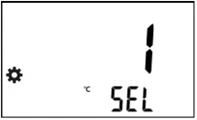
Fig. 5-3 Instrument Settings
Table 5-4 Instrument Settings
No. | Explanation | Note |
1 | Temperature Settings | Flashing display °C |
2 | Automatic shutdown settings | Flashing display "APD"(Auto Power Down) |
3 | Reset settings | Flashing display "rSt" (Reset)and "dFt" (Default) |
5.3.2.1 Temperature Settings
The meter supports manual temperature compensation. Measure the test solution temperature with the temperature meter. Press the "Settings/▼" to select the "Temperature Settings", adjust the temperature as the real temperature.
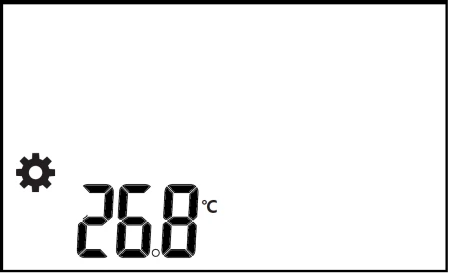
Fig. 5-4 Temperature Settings
5.3.2.2 Automatic shutdown settings
The meter provides auto shutdown function. When the meter is not using and set the auto shutdown, the meter switches off automatically.There are six options: off, 300Sec, 600Sec, 1200Sec, 1800Sec, and 3600Sec.
5.3.2.3 Reset settings
When the meter is not working. Users can reset the meter from the default's backup. The default setting includes constant type as 1.0, Cell constant as 1.000, refer temperature as 25.0°C, automatic shutdown as close etc.
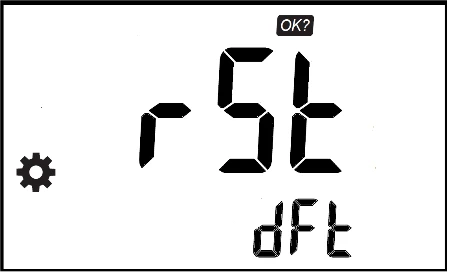
Fig. 5-5 Reset settings
Table 5-5 Reset settings Explanation
No. | Symbol | Note |
1 | rSt | Reset |
2 | dFt | Default |
3 |
| Flashing display |

5.4 Calibration
5.4.1 Calibration Preparation
In common, there are two type calibrations. one is entering the cell constant value directly; the other is calibrating the conductance electrode with standard conductivity standard solution.
There are many conductance electrodes in order to suit for different measurement range. According to the material, conductive electrode is divided into platinum black electrode and bright electrode. Usually, there are conductance electrodes with several cell constants such as 0.01, 0.1, 1.0, 10, etc. The conductance electrode with a cell constant of 1.0 is the most used one and has a wide measurement range.
It is needed to choose the suitable conductance electrode according to the sample properties, such as the conductivity range as recommend table.
Table 5-6 Conductivity Range and Cell Constant recommend
Cell constant cm-1 | Conductivity range μS/cm |
0.01 | 0~2.000 μS/cm |
0.1 | 0.2~20.00 μS/cm |
1 | 2 μS/cm~100.0 mS/cm |
5.4.2 Cell Constant Settings
Users need to enter the cell constant value on the label of conductance electrode for accurate measurement. The defaulted conductivity cell constant is 1.
Cell constant settings process is as follows:
- In the measurement status, press "Const", it shows the cell constant and constant type.
- Adjust the constant type by press the "Setting/▼".
- Adjust the cell constant by press the "▲" and "Setting/▼".
- Press "Enter" to save the constant.
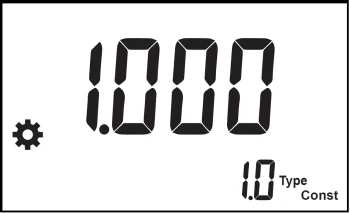
Fig. 5-6 Constant Type is 1.0, Cell constant is 1.000
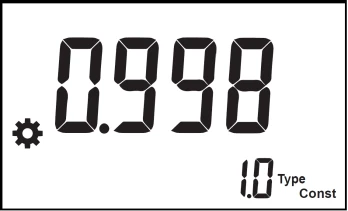
Fig. 5-7 Constant Type is 1.0, Cell constant is 0.998
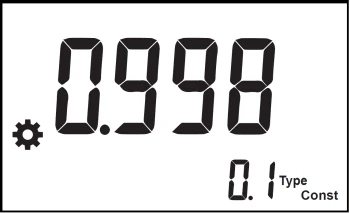
Fig. 5-8 Constant Type is 0.1, Cell constant is 0.0998
5.4.3 Calibration with standard
In general, conductivity electrodes need few calibrations. When the user gets an unexpected result, an electrode calibration is considerable.
Usually, single standard solution is required for calibration. The standard solution needs close to the sample. After calibration, user could calculate the cell constant and set the cell constant.
For conductivity electrodes with different cell constants, it is recommended to use the following conductivity standard solutions for calibration.
Table 5-7 KCl standards to electrode cell constants
Cell constant (cm-1). | 0.1 | 1 | 10 |
KCl solution Concentration (mol/L). | 0.001 | 0.01 or 0.1 | 0.1 or 1 |
Table 5-8 Approximate concentrations of KCl solutions and their conductivity values relationship.
T(°C) | 84μS/cm | 1413μS/cm | 12.88mS/cm |
5 | 53.02 | 896 | 8.22 |
10 | 60.34 | 1020 | 9.33 |
15 | 67.61 | 1147 | 10.48 |
20 | 75.80 | 1278 | 11.67 |
25 | 84.00 | 1413 | 12.88 |
30 | 92,19 | 1552 | 14.12 |
35 | 100.92 | 1696 | 15.39 |
The manual calibration process is as follows:
- Place a standard conductivity (e.g., 1413μS/cm conductivity solution) solution in a thermostatic bath, and set the temperature to (25.0±0.1) °C.
- Rinse the conductance electrode with DI water, dry out and place it into a standard solution.
- When the conductivity and temperature reading are stable, record the conductivity value Ct ((eg.1420μS/cm, 25.0°C).
- Get the standard conductivity value Cs (e.g.,1413μS/cm, 25.0°C) according to the table.
- Calculate the cell constant, k=Cs/Ct.
- In the measurement status, press "Const", it shows the cell constant and constant type.
- Adjust the constant type by press the "Setting/▼".
- Adjust the cell constant by press the "▲" and "Setting/▼".
- Press "Enter" to save the constant.
5.5 Measurement
5.5.1 Measurement Preparation
Before measurement, the user should understand the properties and attributes of the substance (sample) to be measured, the method of routine testing, the basic operation and application of the instrument, and the use and maintenance of conventional electrodes.
The user needs to prepare the sample, the standard solution that needs to re-calibrate the electrode, etc.
5.5.2 Measurement
The measurement process is as follows:
- Rinse the electrode with DI water. Put the measurement end of the electrode into the sample solution.
- Measure the test solution temperature with the temperature meter. Press the "Settings/▼" to select the "Temperature setting", adjust the temperature as the real temperature.
- When the reading is stable, end the measurement and save the results.
- After measurement, switch off the meter, and store the probe referring to the electrode instruction manual.
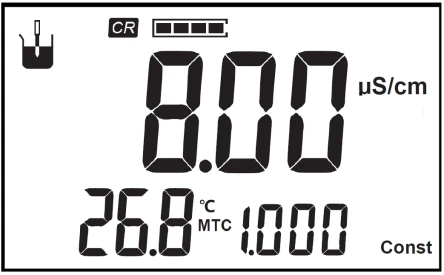
Fig. 5-9 Measurement Results
6 Maintenance/Troubleshooting
6.1 Maintenance
The correct use and maintenance of the instrument can ensure the accurate and reliable performance of the instrument. Additionally, exposure to chemicals or harsh use environments can affect performance.
- If the meter is not used for a long time, please disconnect the power supply.
- The electrode socket of the instrument must be kept clean and dry, and should not be in contact with acid, alkali, and salt solutions.
- Keep the meter and accessories clean and away from acids, alkalis, and any corrosive solutions/gases.
- Users can clean the meter surface with clean waters and detergent.
- When the meter is transported, please follow the instructions:
- please remove all connected cables.
- Please use original packaging in the long distance transport to avoid damage.
6.2 Electrodes Maintenance
Before using the electrode, you should read the electrode manual carefully to know the type, structure and application scope of the electrode.
For more detailed information, please refer to the electrode instruction manual.