


Class II Biosafety Cabinet BER1BM3
Class Ii A2 Biosafety Cabinet- Sea, Air, Door to Door Shipping
- 1 Year Warranty
- US & European Standards

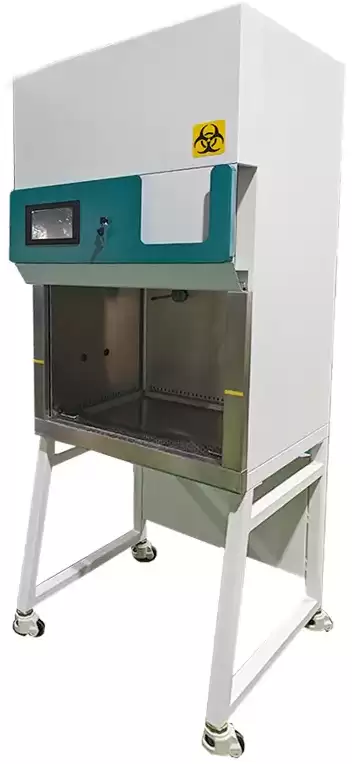
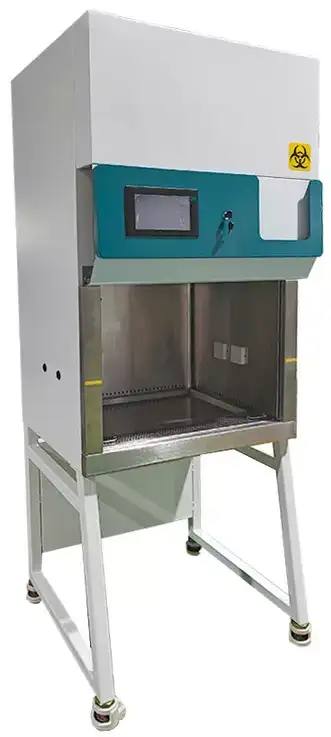
Specifications
| Model | BER1BM3 |
| Classification | A2: 30% efflux, 70% internal circulation |
| Function | |
| Cleanliness | Class 100 |
| Collection Efficiency | 0.3um particle ≥99.995% |
| Colony count | ≤0.5/vessel (petri dish is Φ90mm) |
| Noise Level | ≤67db |
| Vibration Semi-peak Value | ≤5um |
| Downflow Velocity | 0.33 ± 0.025m/s |
| Inflow Velocity | 0.53 ± 0.025m/s |
| Lumination | Average luminance ≥650lx, the measured value of each illuminance ≥430lx |
| Total air exhaust of system | 500m³/h |
| Composition | |
| Work surface | SUS304 Stainless steel plate |
| Outer Shell | Cold rolling steel electrostatic spraying exterior |
| Operation Door | Tempered Glass |
| HEPA filter (mm) | 920*420*69 / 1380*470*69 |
| Fluorescent Lamp Power | 16W*2 (LED) |
| UV Light Power | 40W*1 |
| Fan | 734W one piece |
| Rated Power | 1800W |
| Working height of front window | 200mm |
| Maximum height of front window | 440mm |
| Controller | |
| Display | Full color 7.0-inch touch screen |
| Additional Function | Reservation timing sterilization function, three-level authority management function, high efficiency filter, sterilization lamp service life display, built-in socket controller to control switch function, front window status display function, three position interlock function, cumulative work timing function |
| Specification | |
| Operating Area Size (W*L*Hmm) | 1350*652*600 |
| Exterior Size (W*L*Hmm) | 1500*772*2253 |
| Packing Size (W*L*Hmm) | 1630*902*1680 |
| Max Power of Universal Socket | Single socket: 800W |
| NW/GW kg | 320/400 |
Features
1. Color 7.0 inch touch screen controller2. Standard with high precision thermal wind sensor
3. With reservation timing sterilization function, three-level authority management function, high efficiency filter, sterilization lamp service life display, built-in socket instrument controllable switch function, front window status display function, can set three position interlock function, cumulative work timing function.
4. Optional: ULPA Filter
Applications
Table type clean equipment.Operating Manual
Download1. Safety Warning Before Operate
2. Product Main Features
3. Technical Parameters
4. Interface and Operation
4.1 Monitor interface
5. Wiring Diagram
6. General fault and troubleshooting
1. Safety Warning Before Operate
 Must prohibit items
The following items could cause serious injury or death:
1. Read the product instruction manual before using this product.
2. Do not put volatile, flammable and explosive stuff in the machine, otherwise could cause explosion or fire.
3. Do not place the device in a place exposed to rain, moisture, or splashing, as this may result in electrical leakage, short circuit, or electric shock.
4. Non-professional technicians must not disassemble, repair or modify the equipment, otherwise it may cause fire or electric shock to personnel due to improper operation.
5. Do not damage the power plug or the power cord. If it is damaged, the power cord must be replaced. Otherwise, it may cause fire or electric shock.
 Must conform items
The following items may cause personal injury, equipment damage and related property damage.
1. This equipment should install on the firm ground, otherwise could cause staff injury
2. because of drop down of the equipment.
3. Please use the special power supply that indicated one the nameplate. This equipment must install on the ground, otherwise could cause electric shock and fire because of electric leakage.
4. Do not touch the power plug with wet hands, otherwise there is a risk of electric shock
5. Before any repair or maintenance is carried out, the power must be disconnected to prevent electric shock or injury.
6. Please wear gloves when repair and maintain the equipment in case of injury.
7. Do not to damage the power cord or use the non - specified power cord, do not connect the power cord in the middle section and use long soft wire, otherwise it may lead to electric shock or fire.
8. Do not remove the power plug during the operation, do not pull the power cord by pulling the power cord.
9. If you find that the equipment is running abnormally, unplug the power plug immediately and stop the equipment.
2. Product Main Features
Color 7.0 inch touch screen controller
Standard with high precision thermal wind sensor
With reservation timing sterilization function, three-level authority management function,high efficiency filter,sterilization lamp service life display, built-in socket instrument controllable switch function, front window status display function, can set three position interlock function, cumulative work timing function.
3. Technical Parameters
Model | BER1BM3 |
A2:30% efflux, 70% internal circulation | |
Cleanliness | Class 100 |
Collection Efficiency | 0.3um partical ≥99.995% |
Colony count | ≤0.5/vessel(petri dish is φ 90mm) |
Noise Level | ≤67db |
Vibration Semi-peak Value | ≤5um |
Downflow Velocity | 0.33±0.025m/s |
Inflow Velocity | 0.53±0.025m/s |
Illumination | Average Illuminance≥650 lx, the measured value of each illuminance≥ 430 lx。 |
Total air exhaust of system | 500m3/h |
Work surface | SUS304 Stainless steel plate |
Outer Shell | Cold rolling steel electrostatic spraying exterior |
Operation Door | Tempered Glass |
HEPA filter(mm) | 920*420*69/ 1380*470*69 one of each |
Fluorescent Lamp Power | 16W*2(LED) |
UV Light Power | 40W*1 |
Fan | 734W one piece |
Rated Power | 1800W |
Working height of front window | 200mm |
Maximum height of front window | 440mm |
Display | Full color 7.0-inch touch screen |
Additional Function | Reservation timing sterilization function, three-level authority management function, high efficiency filter, sterilization lamp service life display, built-in socket controller to control switch function, front window status display function, three position interlock function, cumulative work timing function |
Operating Area Size(W*L*H) | 1350x600x600mm |
Exterior Size(W*L*H) | 1500*750*2250mm |
Packing Size(W*L*H)mm | 1630x880x2380 |
Max Power of Universal Socket | Single socket: 800W |
NW/GW kg | 320/400 |
Table 1
4. Interface and Operation
4.1 Monitor interface
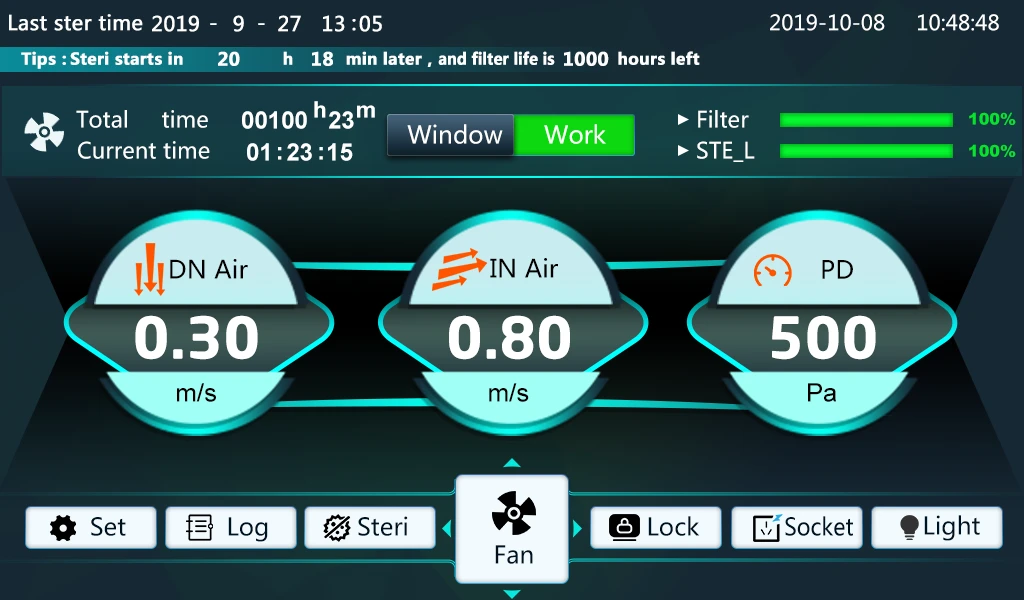
Figure 1
At the [monitor] users can view the data to be controlled, the time progress of the fan operation, the status of the front window, the percentage of life of the filter, sterilizing lamp, control the output and closing operation of the socket, lighting, sterilization and fan, and view the operation log.
4.1.1 Key Description
icon | Name | Description |
| [Set] | Click to enter the password interface; |
| [Log] | Click to enter the operation log interface, you can view the nearest 7000 operation records; |
| [Lock] | Click to enter the lock screen interface; |
| [Sterilization] | Click to enter the sterilization setup interface; |
| [Socket] | Click to open or close the socket, after opening the button display bright; |
| [Light] | Click to turn on or off the light and the button turns on (note: only when the sterilizing lamp is closed can the lighting be turned on) |
| [Fan] | Click to open or close the fan, after opening the button to display bright (note: the front window state is working area to open the fan) |
| [Real time] | Click to enter the real-time modification interface; |





Table 2
4.1.2 Sterilization interface
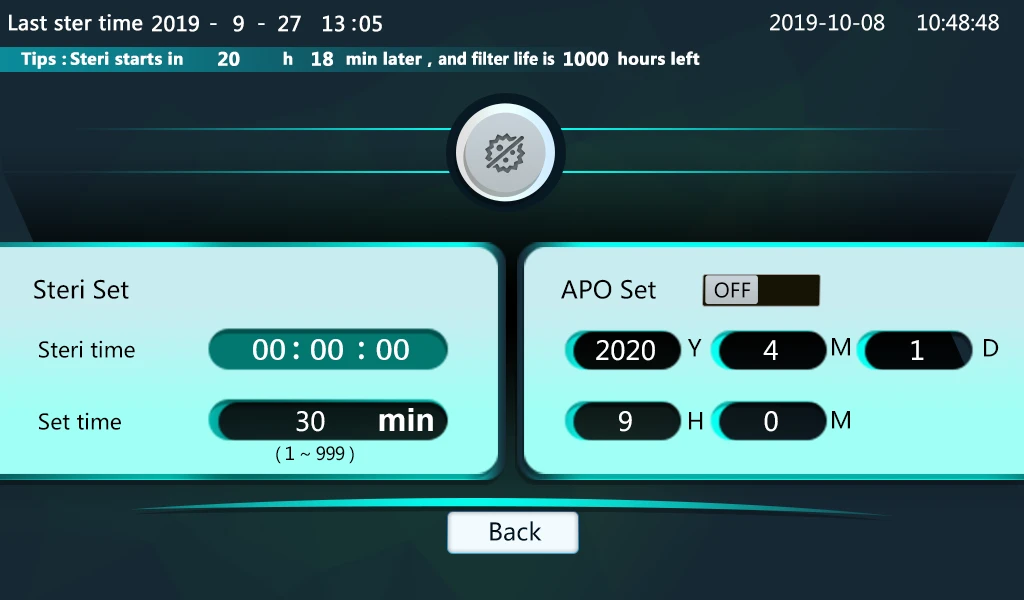
Figure 2
In the [sterilization] interface, users can view sterilization timing time, set sterilization setting time and reservation function;
1. Appointment for sterilization
Users can open a key to make an appointment for sterilization, set the sterilization reservation time, click on the sterilization reservation switch, will pop up into the sterilization reservation status prompt box, click on the system will enter the sterilization reservation state;
2. Opening of sterilization
Users can directly open sterilization, click on the sterilization switch, will pop up into the sterilization state prompt box, click on the system will enter the sterilization state; note: in the front window is closed and lighting and fan closed state can open sterilization;
3. Operational log
Users can view 7000 operating records of recent operations and manually delete all records;
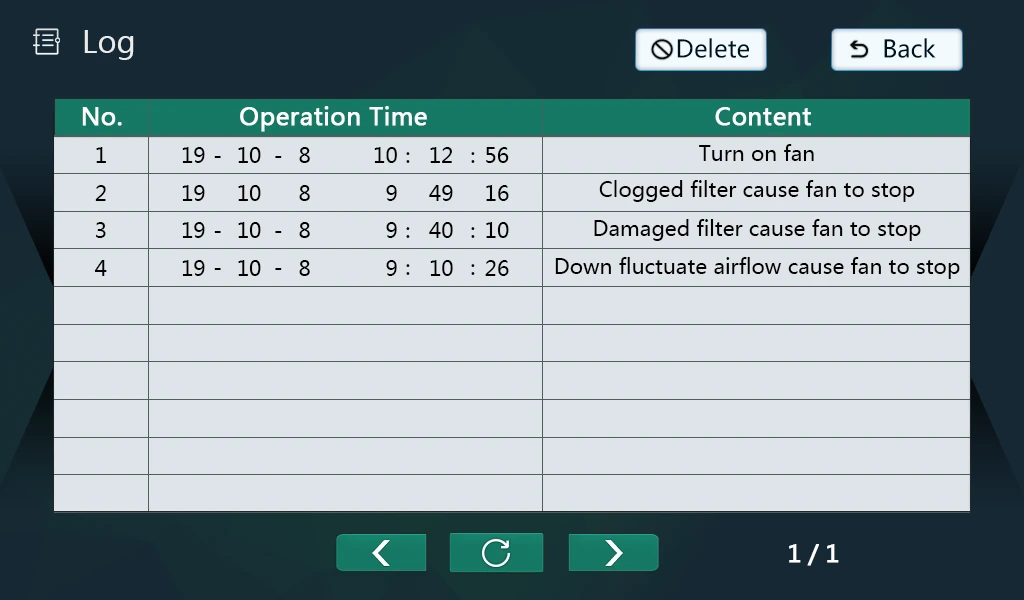
Figure 3
4. Prompt box
When the system enters the abnormal state from the normal state or when sterilization is completed, there will be corresponding prompt information, and the user will be prompted in the form of a pop-up frame in the monitoring interface;
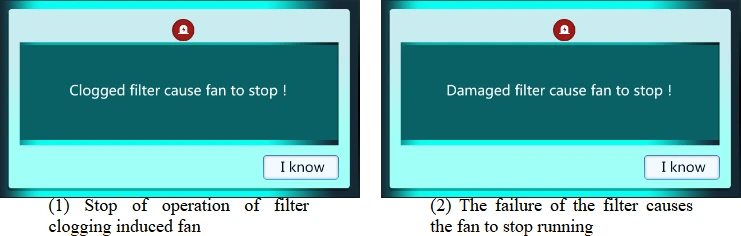
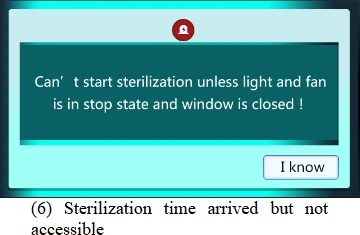
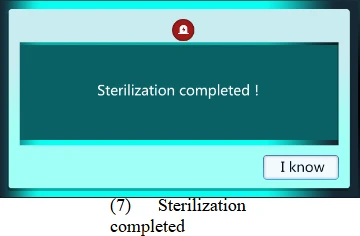
(1) Stop the operation of the filter clogging induced fan: when the fan is in operation, if the current pressure difference measurement value is greater than the "pressure upper limit value" for 10 seconds, the fan operation stops, the buzzer calls, and the corresponding prompt box pops up when entering the monitoring interface;
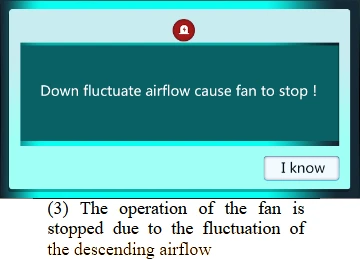
(2) When the fan is in operation, if the current pressure difference measurement value is less than the "pressure limit value" for 10 seconds, the fan operation stops, the buzzer calls, and the corresponding prompt box pops up when entering the monitoring interface;
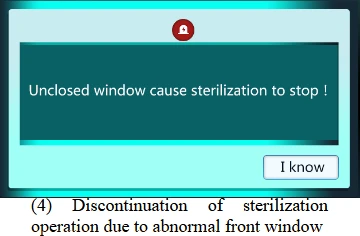
(3) Stop the operation of the fan caused by the fluctuation of the descending airflow: when the falling fan is in operation, if the current falling wind speed measurement value continuously "alarm delay" time exceeds the ±20% of the "set falling wind speed ", the fan stops running and the buzzer calls. When entering the monitoring interface, the corresponding prompt box will pop up;
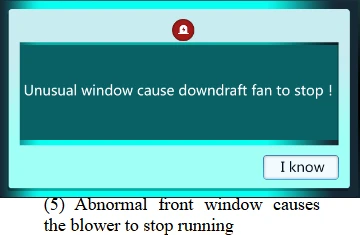
(4) The abnormal sterilization operation of the front window stops: when the sterilization is in the open state, the front window is in the non-closed area, the sterilization operation stops, the buzzer calls, and the corresponding prompt box pops up when entering the monitoring interface;
(5) When the fan is in the running state, the front window is in the non-working area, the falling fan stops running, the buzzer calls, and the corresponding prompt box pops up when entering the monitoring interface;
(6) The sterilization time arrives but can not enter the sterilization: the user has opened the reservation sterilization, and the current time has reached the sterilization reservation time, but the system can not enter the sterilization state because the front window is not closed or the lighting, the fan is open, the buzzer calls and the corresponding prompt box pops up when entering the monitoring interface;
(7) Sterilization completion: when sterilization is completed, the buzzer calls 6 times, and the corresponding prompt box pops up when entering the monitoring interface;
Note :1~5 buzzer continuous call 60 seconds after closing ;6,7 buzzer intermittent call 6 after closing; users can also click on the confirmation key to close buzzer call;
5. User set
Enter [user settings], you need to enter password 3 to enter, otherwise pop up error prompt dialog box;
5.1 Wind speed control
![5. User set, Enter [user settings], you need to enter password 3 to enter, otherwise pop up error prompt dialog box;, 5.1](https://biolabscientific.com/content/manual/20260120001/5.-User-set-i21-Biolab.webp "5. User set")
Figure 4
5.1.1 Wind speed control parameters
Name | Function | Initial value (set range) |
Set down wind speed | Set value of falling air speed | 0.31m/s (0.00~1.00) |
Flow velocity deviation | When the calculation mode of the inflow fan in [system set] chooses the descending wind speed, the measured value of the inflow wind speed = sets the descending wind speed + the deviation of the inflow wind speed (the measured value of the descending wind speed-set the descending wind speed)* the inflow wind speed coefficient | 0.24m/s (-1.00~1.00) |
Flow wind speed factor | 0.01(0.01~1.99) | |
P wind | Adjustment of Time Proportion | 7(1~100) |
I wind | Regulation of Integration | 5(1~2000) |
T wind | Calculation period of wind speed control | 50m/s (5~6000) |
Table 3
5.1.2 Fall Wind Error Correction
In order to facilitate the user to correct the sensor, the system adopts the function of three-point correction, that is, the user can correct the deviation at any three measuring points, and the system automatically corrects the other measuring points linearly.
Such as: speed at 0.10 m/s,0.31m/s,1.00m/s three measuring points to correct, when the instrument measured speed value of 0.10 m/s,0.31m/s,1.00m/s three points, using anemometer to measure the speed of 0.00 m/s,0.15m/s,0.87m/s, the correction mode is as follows:
Name | Function | Initial value (set range) |
Correction point 1 | You should enter 0.10 m/s, or 0.10 m/s as the first correction point in this example | 0.10 m/s (0.00~ correction point 2) |
Correction point 2 | Type 0.31 m/s, or 0.31 m/s as the second correction point in this example | 0.31 m/s (correction point 1~ correction point 3) |
Correction point 3 | You should enter 1.00 m/s, or 1.00 m/s as the third correction point in this example | 1.00 m/s (correction point 2~1.00) |
Calibration deviation 1 | For this example, enter m/s ,-0.10, the value of the anemometer at the first corrected velocity point - the system measurements | -0.10 m/s (-0.50~0.50) |
Calibration deviation 2 | For this example, enter -0.16 m/s, the value of the anemometer at the second corrected velocity point - the system measurements | -0.16 m/s (-0.50~0.50) |
Calibration deviation 3 | For this example, enter -0.13 m/s, the value of the anemometer at the third corrected velocity point - system measurements | -0.13 m/s (-0.50~0.50) |
Table 4
5.1.3 inflow wind error correction
When the calculation mode of inflow wind speed is chosen as inflow wind speed sensor in system setting, the user corrects the error of inflow wind speed by correcting the descending wind speed.
5.2 Other parameters
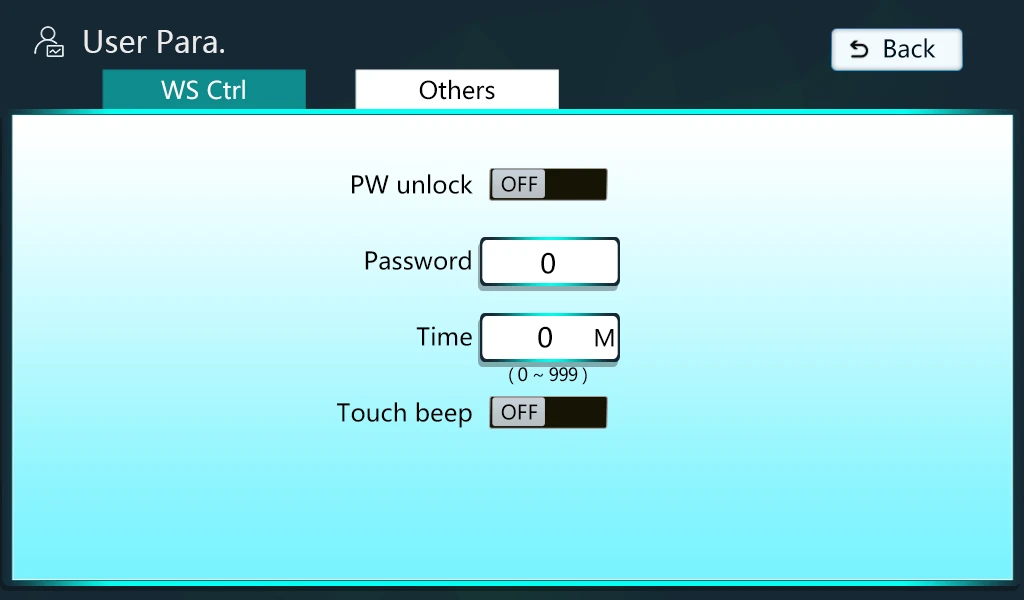
Figure 5
Name | Function | Initial value (set range) |
Password unlock | When this function is turned off, the lock screen interface click unlock key to enter the monitoring interface directly; when this function is turned on, click unlock key to enter the password to enter the monitoring interface | Customs |
Unlock Password | Password to enter the monitoring interface from the lock screen interface | 0 |
Lock time | Automatic lock time, no automatic lock screen at 0 | 0 minutes (0~999 minutes) |
Touch beep | Does the touch screen beep | Customs |
Table 5
6. System set
Enter [system set], you need to enter password 9 to enter, otherwise pop up error prompt dialog box;
6.1 Wind speed & sterilization
![6. System set, Enter [system set], you need to enter password 9 to enter, otherwise pop up error prompt dialog box;, 6.1](https://biolabscientific.com/content/manual/20260120001/6.-System-set-i23-Biolab.webp "6. System set")
Figure 6
Name | Function | Initial value (set range) |
Password unlock | When this function is turned off, the lock screen interface click unlock key to enter the monitoring interface directly; when this function is turned on, click unlock key to enter the password to enter the monitoring interface | Customs |
Unlock Password | Password to enter the monitoring interface from the lock screen interface | 0 |
Lock time | Automatic lock time, no automatic lock screen at 0 | 0 minutes (0~999 minutes) |
Touch beep | Does the touch screen beep | Customs |
Table 6
Name | Function | Initial value (set range) |
Wind speed alarm delay | If the falling wind speed exceeds 20% of the set wind speed for X second in a row, the air flow fluctuation alarm is generated, the fan operation stops and the buzzer calls; when it is 0, there is no wind speed fluctuation alarm; | 60 seconds (0~600) |
First-order inertial filtering | Speed filter coefficient | 100(1~200) |
Calculation of inflow wind speed | Falling wind speed: the measured value of inflow wind speed is calculated by the measured value of falling wind speed according to the relevant proportion; Inflow wind speed sensor: the measured value of inflow wind speed is obtained by inflow wind speed sensor; | Decreasing wind |
Filter life mode | Percentage of filter life calculated based on life time or pressure change | Life time |
Filter life time | Total filter life time set | 100 hours (1~300) |
Fan start-up value | According to different fan settings, the greater the value, the higher the fan start-up voltage; | 5000(1000~9000) |
Life time of sterilizing lamp | Total sterilization lamp life time set | 100 hours (1~300) |
Filter Time Zero | Time to clear filters | |
Sterilization time cleared | Time to clear the sterilization lamp |
Table 7
6.2 Pressure & other
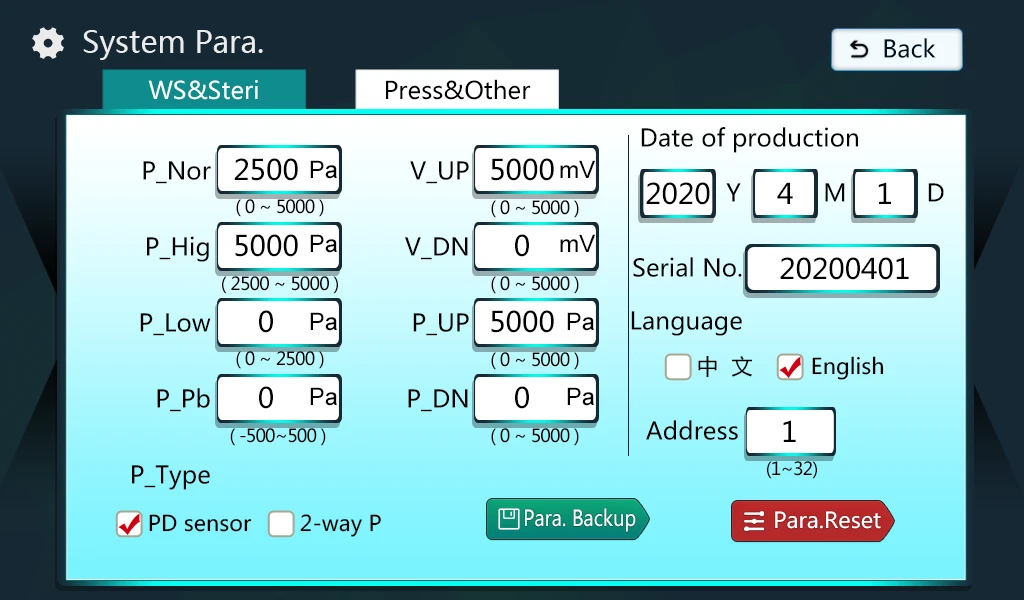
Figure 7
Name | Function | Initial value (set range) |
Normal pressure | The percentage of fan life is calculated by comparing the pressure measured value with these three values. During the operation of the fan, if the pressure difference is continuously lower than the pressure limit for 10 seconds, there is a filter breakage alarm and the fan stops; if the pressure difference is higher than the pressure limit for 10 seconds, there is a filter clogging alarm and the fan stops; | 2500Pa( pressure limit ~ pressure limit) |
Pressure upper limit | Normal 5000Pa( pressure ~ upper limit) | |
Pressure lower limit | 0Pa( shows lower limit ~ normal pressure) | |
Pressure deviation correction | Pressure deviation correction | 0Pa(-500~5 0Pa(-500~0Pa(-500~) |
Voltage upper limit | Maximum output voltage signal of pressure sensor | 5000 mV(0~5000) |
Voltage limit | Minimum output voltage signal of pressure sensor | 0 mV(0~5000) |
Display upper limit | Maximum displayed by pressure sensor | 5000Pa(0~5000) |
Display lower limit | Minimum value of pressure sensor display | 0Pa(0~5 0Pa(0~0Pa(0~0Pa(0~) |
Date of departure | Setting the date of departure | |
Factory Number | Factory Number | |
Display language | Choose Chinese or English | Chinese |
Address | Address of 485 Communications | 1(1~32) |
Save factory parameters | Save the currently set parameters for "Restore Factory Parameters" recovery | |
Recovery of factory parameters | Can be restored to "save factory parameters" when the save parameters; |
Table 8
5. Wiring Diagram
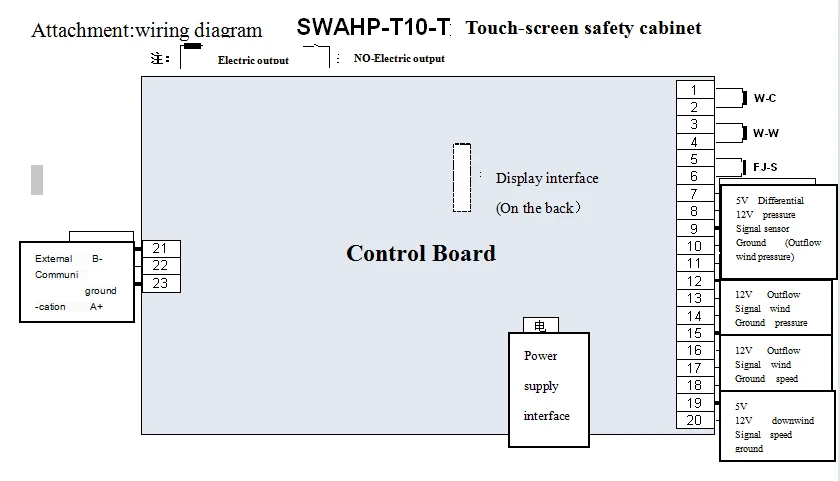
Figure 8
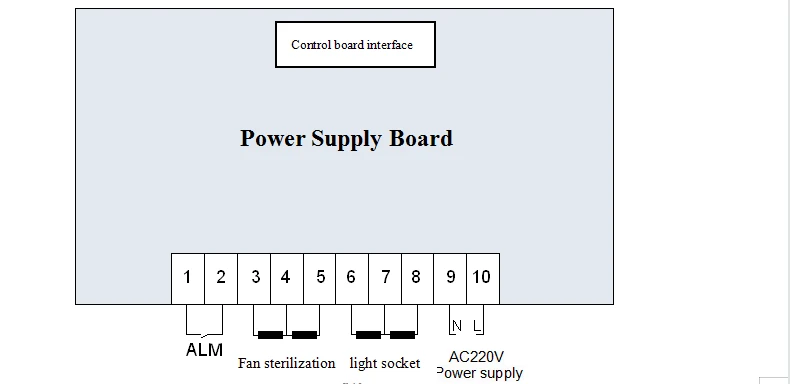
Figure 9
6. General fault and troubleshooting
Failure phenomenon | Fault analysis | Troubleshooting |
No display when turned on | Power failure | Check the power outlet for voltage |
The power plug is not properly plugged in | Check the reliable contact between the power plug and the socket | |
The power switch is not on | Turn on the power switch on the right side of the instrument | |
The fuse of the cabinet is damaged | Replace the power fuse of the same specifications | |
The measured temperature is higher than the set temperature or the instrument enters the high temperature alarm state | The door of the cabinet was not closed tightly | Close the door |
The instrument has not yet entered the constant temperature state | Wait a while and observe again | |
The temperature is not displayed after startup, and the temperature is not heated | The power cord is not plugged in | Plug in the power cord |
Sensor fault | Notify the factory to repair | |
Heater fault | Notify the factory to repair |
Table 9