


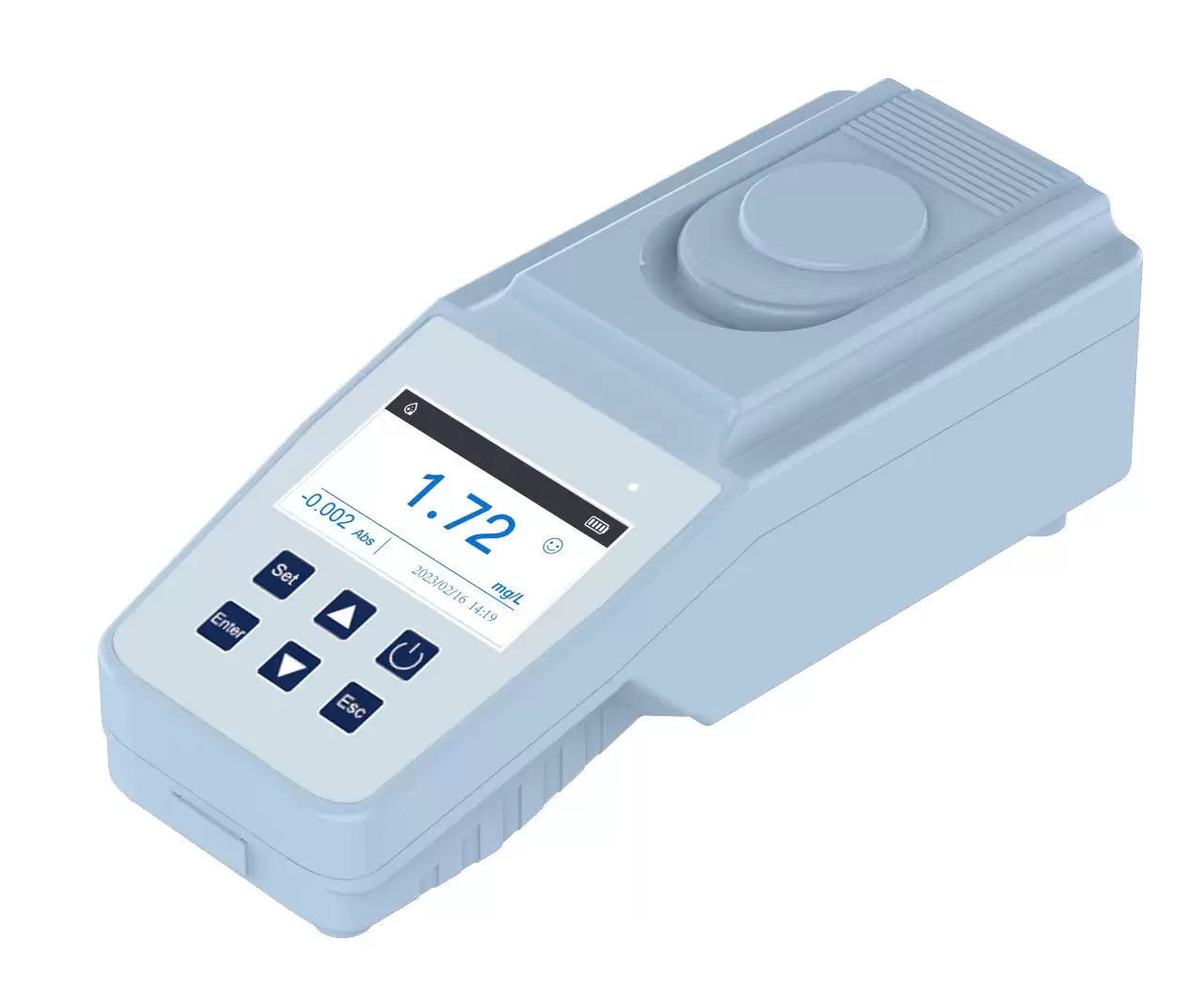
Turbidity Meter BFU1CB1
Portable Turbidity Meter- Sea, Air, Door to Door Shipping
- 1 Year Warranty
- US & European Standards

Specifications
| Model | BFU1CB1 |
| Measurement Method | 90° scattering method |
| Applications | Drinking water, surface water, sewage |
| Measuring Range | 0-200 NTU |
| Colorimetric Method | Tube Colorimetric |
| Accuracy | ≤5% |
| Resolution | 0.01 NTU |
| Light Source | Imported Silicon Photodiode |
| Stray Light | < 0.02 NTU |
| Display | 3-inch color screen |
| Output | Micro USB |
| Power | Power adapter/Rechargeable lithium battery |
| Waterproof Level | IP54 |
| Ambient Temperature | (5-40) °C |
| Ambient Humidity | Relative humidity ≤ 85% (No condensation) |
| Dimensions/N.W. | 100x210x70 mm/1kg |
| Shipping size/G.W. | 355x265x150mm/2kg |
| Standard Accessaries | Sample bottle x 2 pcs, Power adapter(Charger), Manual |
Features
1. 3 inch color screen with friendly GUI.2. The unique high-precision filter system makes the instrument more stable and accurate.
3. No blank calibration, automatic measurement, direct reading of concentration.
4. With built-in standard curves. Users can set up curves according to different measurement requirements.
5. Support zero point and up to 9-point calibration. Support calibration restoring function to restore factory
calibration data.
6. With a large-capacity storage function, can store 5000 sets of test data.
7. A rechargeable battery can last for 10 hours. Auto power-off time can be set.
Operating Manual
Download1. Features
2. Specifications
3. Operation Keys
4. Measurement interface
5. Menu
5.1 Linear Calibration
5.2. Standard Sample
5.3 Data Query
5.4 Time Setting
5.5. Restore Factory
5.6 General
Please read and adhere to all recommendations in this manual to ensure the best experience and to maintain your Meter in good working order. The manual is for portable turbidity meter BFU1CB1.
1. Features
• 3 inch color screen with friendly GUI.
• The unique high-precision filter system makes the instrument more stable and accurate.
• No blank calibration, automatic measurement, direct reading of concentration.
• With built-in standard curve. Users can setup curves according to different measurement requirements.
• Support zero point and up to 9-point calibration. Support calibration restoring function to restore factory calibration data.
• With large-capacity storage function, can store 5000 sets of test data.
• Rechargeable battery can last for 10 hours. Auto power-off time can be set.
2. Specifications
Measurement Method | 90° scattering method |
Applications | Drinking water, surface water, sewage |
Measuring Range | 0-200 NTU |
Colorimetric Method | Tube Colorimetric |
Accuracy | ≤5% |
Resolution | 0.01 |
Light Source | Imported Silicon Photodiode |
Stray Light | < 0.02 NTU |
Display | 3-inch color screen |
Output | Micro USB |
Power | Power adapter/Rechargeable lithium battery |
Waterproof Level | IP54 |
Ambient Temperature | (5-40) °C |
Ambient Humidity | Relative humidity ≤ 85% (No condensation) |
Dimensions/N.W. | 100x210x70 mm/1kg |
Shipping size/G.W. | 355x265x150mm/2kg |
Standard Accessaries | Sample bottle x 2 pcs, Power adapter(Charger), Manual |
Table 1
3. Operation Keys
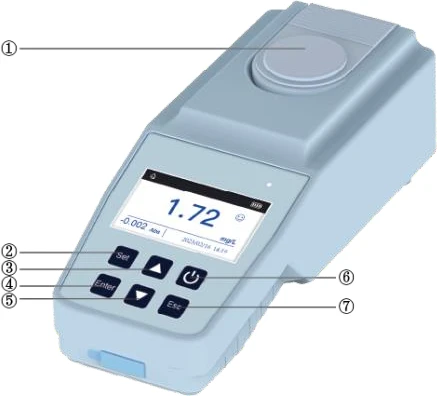
Figure 1
1---Sample Chamber
2---Switch key: Long press to switch on and off
3---Up key: Scrolls the menu. Increase the number of standard samples.
4---SET key: Scroll menu. Modify step value
5---Esc key: Exit the current menu
6---Start/Enter key: Test/OK
7---Down key: Scrolls the menu. Reduce the number of standards.
4. Measurement interface
Pour pure water into the colorimetric bottle, put it into the sample chamber, press UP key to perform zero calibration. After the zero calibration, shake the water sample evenly and pour it directly into 2/3 of the colorimetric bottle. Then align the mark on the bottle cap with the mark on the Meter, put the colorimetric bottle into the sample chamber, and press Enter key to get the concentration value of the sample. If the concentration of the water sample exceeds 1000NTU, dilute the water sample within 1000NTU before measurement.
Note: Factory has already made a curve. The Meter can be used directly after zero calibration.
5. Menu
5.1 Linear Calibration
If you want to perform linear calibration, set the number and concentration to be calibrated in Standard Sample. Then long press Enter key to enter Linear Calibration, calibrate the corresponding points. The points calibrated this time will be recorded at the bottom of this interface, and you can view the points you have calibrated and the points to be calibrated at any time. Please do not change the data after entering. If the data is changed, the Meter needs to re-calibrate the curve.
Tips: Once the user performs linear calibration without permission, the calibration data will directly overwrite the calibration data before the instrument leaves the factory.
5.2. Standard Sample
The standard sample management mode is the point where the you want to calibrate the turbidity by yourself. You can select 2~9 corresponding standard samples. When the cursor is on the standard sample, press Up/Down key to select the standard sample. number. Long press Set key to modify the step value. The step value is divided into four step values: 0.01, 0.10, 1.00, and 10.00. These four step values can be increased or decreased according to different needs. Short press Set key to move the cursor, and only when the cursor moves to the corresponding position can the value be changed.
5.3 Data Query
In Data Query, you can view the measured data. Long press Set key to delete the measured data.
5.4 Time Setting
Time setting is to set the year, month, day, hour, minute and second. If you want to set a certain time of the Meter, short press Set key to switch the setting items, move the cursor to the corresponding position, short press Up/Down key to increase or decrease a corresponding value, long press Up/Down key to quickly change the value. Press Enter key to save.
5.5. Restore Factory
Press Enter key on factory reset interface.
5.6 General
Beep: Press Up/Down key to turn on/off the prompt sound.
Brightness: Short press Up/Down key to change the brightness by a value, and long press Up/Down key to quickly change the screen brightness.
Auto Power-off: Short press Up/Down key to increase or decrease the value by one minute, and long press Up/Down key to quickly increase or decrease the shutdown time.