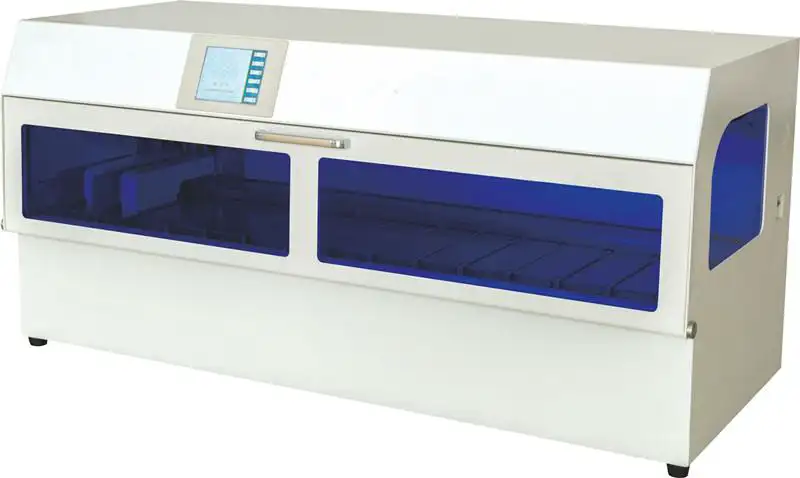
Tissue Processor BHM1E1 (BHTP-306)
Double Basket Tissue Processor- Sea, Air, Door to Door Shipping
- 1 Year Warranty
- US & European Standards

Specifications
| Model | BHM1E1 |
| Volume of individual reagent containers | 2000 ml |
| Number of reagent containers | 14 pcs |
| Hanging basket filtrate time | Time can be adjusted arbitrarily |
| Number of dehydrated tissues | About 200 pcs (100 pcs in a single hanging basket) |
| Processing time in a single container | 0~99 hours adjustable |
| Power supply | AC220V ±10%, 50Hz |
| Power | 500W |
| Net Weight | 116 kg |
| Dimensions | 1300*600*600 mm |
| Package Info | |
| --Packing | Wooden Case |
| --Gross Weight | 173 kg |
| --Package Dimensions | 1380*680*740 mm |
Features
1. This machine can run both single hanging basket and double basket, one dehydrator is equivalent to two hanging baskets;2. Large LCD touch screen, all English menu, simple and clear operation;
3. Adopt intelligent program control technology to protect equipment and specimens ,Intelligent separate protection specimen in case of failure:When the dehydrator fails before the anhydrous alcohol cylinder, the tissue is protected in the fixed cylinder; when the dehydrator fails before the paraffin cylinder and after the anhydrous alcohol cylinder, the tissue is protected in the anhydrous alcohol cylinder; when the hanging basket fails in the paraffin cylinder dehydrator, the tissue is protected in the paraffin cylinder;
4. Adopt new water heating mode, low pressure contactless temperature control technology, more safe.Reagent cylinder can be fully heated to avoid the effect of dehydration due to the difference of temperature in winter and summer.
5. The new generation environmental protection design idea, adopts the dual purification function, and matches with the full seal internal circulation filtration, guarantees the operator not to be harmed by the harmful gas.
6. The "self-checking" item is displayed on the operating screen of the dehydrator, which has the function of preventing the abnormal protection of the card cylinder, and can display the running state and various functions in real time.
7. Power failure protection, in the state of sudden power failure, maintain program memory, and
complete the whole process of dehydration (can maintain more than 16 hours of normal
operation).
8. Can set the hanging basket stay filtrate time and the hanging basket oscillation times of the design of the starting cylinder filtrate, to avoid the former cylinder reagent into the latter cylinder caused by mixing.
9. Reasonable setting of single cylinder cover and elastic sealing technology to avoid reagent
volatilization.
10. Small specimens can be added at any time;Flexible programming, different tissues can start from any solution container to the end of any solution container, to obtain the best dehydration effect of different tissues;
11. Adopt international popular synchronous tooth belt, digital program control positioning, make the operation more accurate.
12. The steel linear guide rail is used to fit the step motor to make the operation more accurate.
13. Hanging basket take-off and landing back using two-column two-dimensional soft transmission mechanism, transmission stability, no noise, no hard wear;
14. Can set up 24 sets of operating procedures, imported core chip, powerful, no external magnetic field interference.
15. Remote alarm system, failure, dehydrator can automatically dial the operator's phone, so that you can know at any time whether the equipment is safe operation;
16. Has the intelligent key function (does not look at the screen also can operate), when the display screen does not display and the touch function damage, the dehydrator main function may operate normally;
Operating Manual
DownloadI. Precautions
II. Performance Characteristics and Parameters
III. Operation and Use
IV. Troubleshooting
V. Maintenance
VI.Annex
I. Precautions
1. If flammable articles are needed in the working state of the instrument, attention shall be paid to safety closely.
2. If the instrument will not be used for a long time, please unplug the power plug.
3. It is strictly prohibited to add reagents under working conditions to prevent organic reagents from dropping into the machine and causing accidents.
Hard objects are strictly prohibited from touching the display screen.
The plastic pipe that receives the water must be lower than the pipe joint to prevent the water from flowing back into the machine when the water is discharged.
The input power shall be well grounded to eliminate inductive current.
II. Performance Characteristics and Parameters
1. The processor is a double-mechanism strip biological tissue processor. The processor consists of Mechanism A, Mechanism B and 14 containers. 1B-9 bath is a liquid bath, and 10-12A is a wax bath
2. Mechanism A shall control 1A, 02, 03, 04, 05, 06, 07, 08, 09, 10, 11, 12A
3. Mechanism B shall control 1B, 02, 03, 04, 05, 06, 07, 08, 09, 10, 11, 12B
02-11 is the common bath; 1A and 12 A are special baths for Mechanism A; 1B, 12B are baths for Mechanism B.
In the machine, the two mechanisms can work at the same time, or Mechanism A or Mechanism B can work alone.
5. This machine has power failure protection and low wax temperature protection function. Before entering the wax bath, if the wax temperature is lower than 58°C or the power failure mechanism, the machine shall back three baths. After the wax temperature is normal, the machine shall be delayed for 60 minutes; after entering the wax bath, if the wax bath temperature is lower than the set temperature of 5°C, the machine shall be delayed for 60 minutes after the wax temperature is normal.
6. The set temperature of the wax temperature is room temperature - 80°C.
III. Operation and Use
I. Manual operation
Turn on the power switch (green light means battery is on, red light means AC power is on); if only the green light on, the battery is switched on, and the red light is not on, the machine will not start working when the AC power is not switched on. When the red light is on and the AC power is switched on, the machine will start to work and charge the battery automatically. In case of AC power failure during the work, the battery can automatically maintain and protect the tissue to work for 8h~18h, but the wax bath cannot be heated and kept warm; depending on the battery consumption, it will take about 10h~48h for the battery to be recharged after the AC power is restored. Please reserve power for areas with frequent power outages
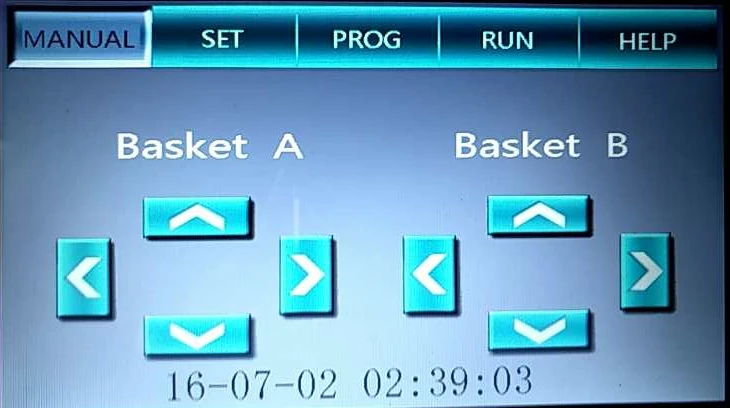
Fig. 1
The equipment is equipped with a 5-inch TFT color touch screen.
After starting up, the system enters the initial self-test stage. When Mechanism B and Mechanism A return to the bottom of Bath 1B and Bath 1A respectively (see Fig. 2), the system will automatically enter the manual interface (see Fig. 1).
Manual operation of Mechanism A and Mechanism B can be carried out on the manual interface;
Notes: 1. When returning bath, except for Bath 1, the lower bath cannot be operated because the bath head is not opened;
2. When Mechanism A and Mechanism B are between 2-11 baths, they need to be separated by one bath, otherwise they cannot be operated;
Press the corresponding function keys in the Manual interface to enter the pressed function interface; such as: Set, Programming, Run and Help
II. Set
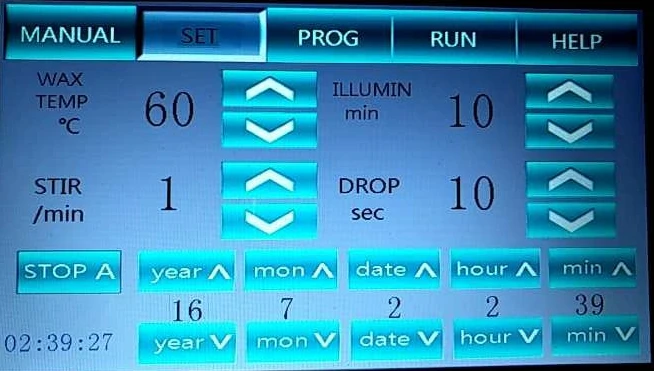
Fig. 2
1.Wax temperature can be regulated from 0 to 80 ° C (degrees);
2.Stirring regulation range is 0~6/min (minutes), 0 means no stirring;
3.Lighting regulation range is 1~10min (minutes);
4.Leachate regulation range is 30 sec (seconds), and the leachate is progressive at 10sec;
5.The system time shall be regulated separately according to the corresponding Year, Month, Day, Hour and Minute; (see Fig. 3)
1.Press A Deactivation, the Mechanism A will go to the Bath 12 A automatically, then the
system will be restarted, and the Mechanism A will be deactivated. After restarting, the manual interface will change (see Fig. 4); the lower left corner of the set interface will also change (Fig. 4). Nothing else will change.
2.To enable the Mechanism A, please press A Enable, the Mechanism A will be able to operate normally; the set interface will return to the state shown in Fig. 1.
III. Programming
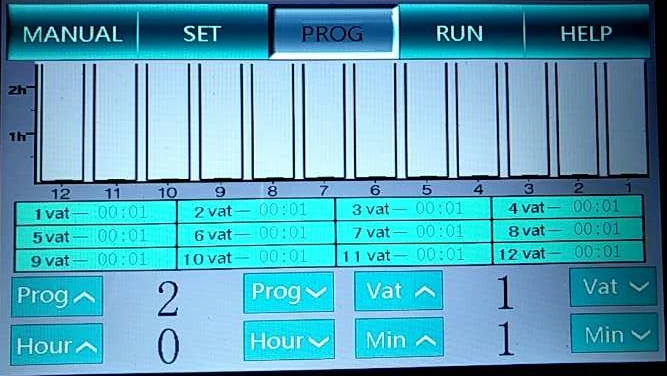
Fig. 3
The table in Fig. 3 shows the bath position and time of the selected program.
The above table is a bar diagram showing the bath position and time of the selected program; the X direction is the displayed bath position, and the Y direction shows the maximum time of 2:30. When the time is greater than 2:30, it shall be displayed with a full red column..
IV. Running preparation
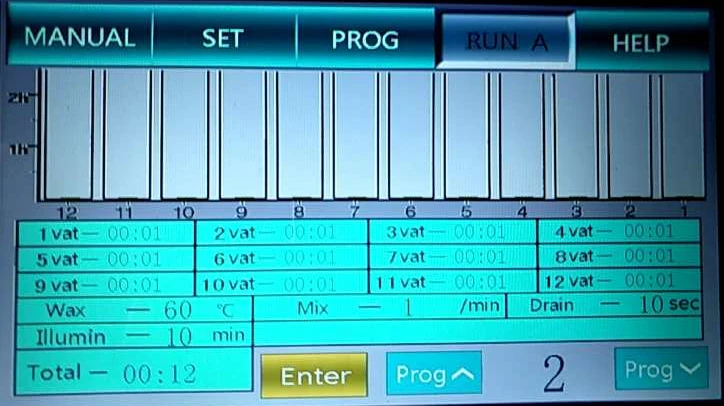
Fig. 4
When entering the running interface, the system will default to Run A, which means the default running of Mechanism A (see Fig. 4). Select the corresponding program in the lower right corner of program selection key. The column table and charts will display the data of each bath relative to the program; the data of Wax Bath Setting, In-bath Stirring, Upper Bath Leachate and Lighting Delay at the bottom of the chart are the data of Wax Temperature, Stirring, leachate and Lighting set in the setting interface. The data of Total is the automatic calculation result of baths 1-12 of the selected program by the system.
After checking that the selected program is correct, click the Ok and the system will enter the working state. The interface will also display the running state.
When the Mechanism A has been deactivated, the system will enter the interface of Run B when entering the running interface
Other displays and settings are the same as those shown in Fig. 1. However, please pay attention to the words at the bottom of chart in Fig. 8 (Mechanism A has been set to stop, please confirm that Mechanism A stops at Bath 12A), and check whether Mechanism A is at Bath 12A.
V. Running
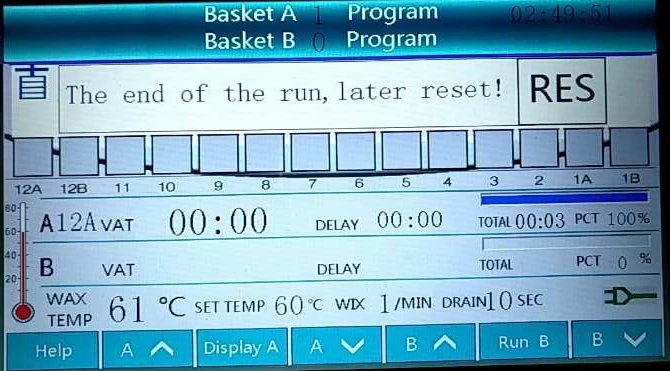
Fig.5
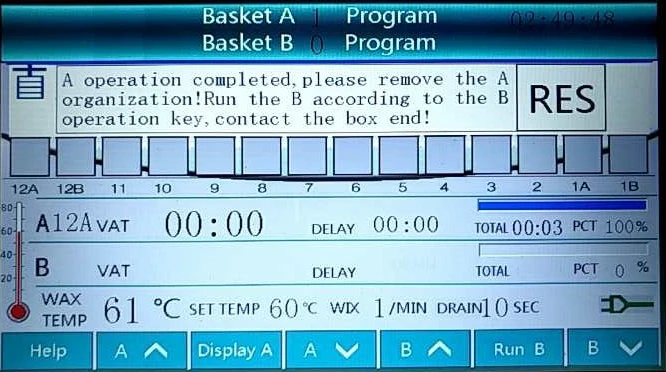
Fig.6
In the running preparation interface, click Confirm to enter the running status (Fig. 5). During running, the system starts to warm the wax bath; the screen graphical interface simulates the bath position status of Mechanism A and Mechanism B; the numerical value displays the wax temperature, current bath number during running, remaining time, total time, running progress, stirring setting, leachate setting, waiting time of baths A and B, and other information.
When pressing Display A in the lower key of Fig. 9, the running schedule of Mechanism A will be displayed
Click Run B interface to enter the manual interface (see Fig. 7). After loading the tissue, press Run to enter the running preparation interface (see Fig. 8). After checking the program is correct, click Confirm to enter the running status. See the yellow words (fig. 1) (which in practice are the same as Run A). Meanwhile, Run B changes to Display B .
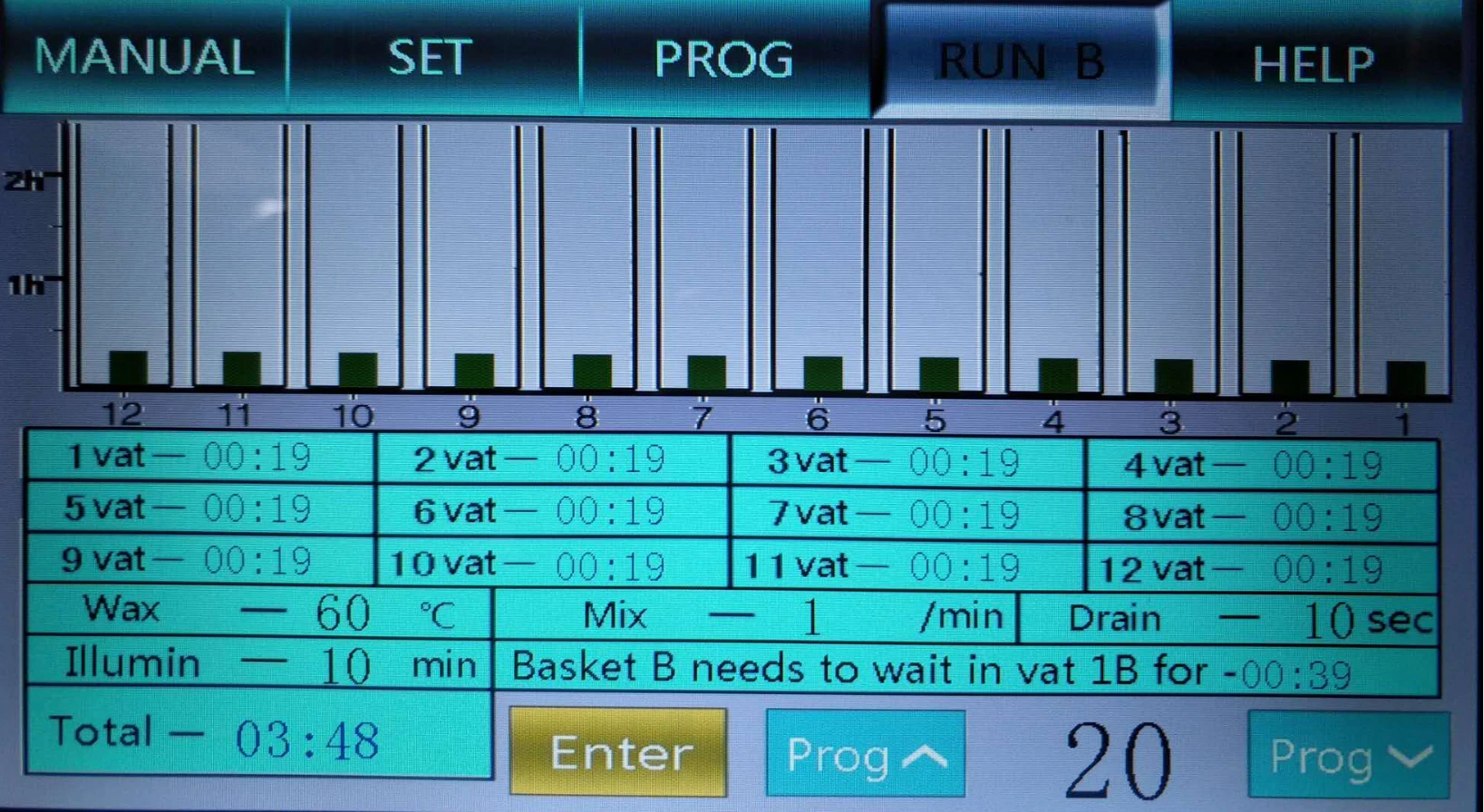
Fig.7
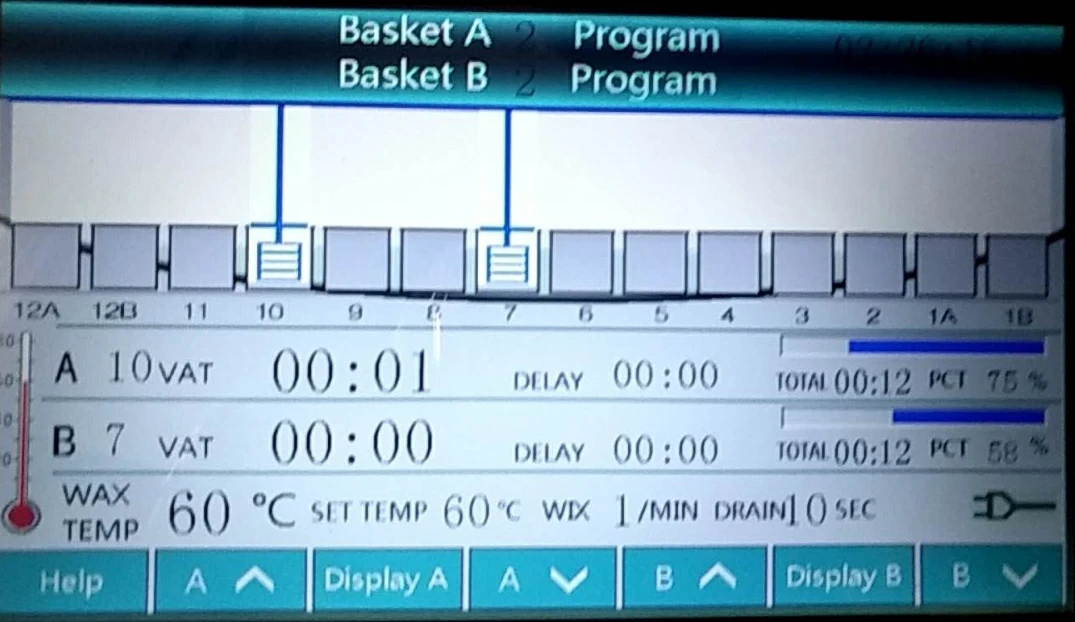
Fig.8
After the tasks are completed by the Mechanism A and Mechanism B, the word of "Complete" will appear where the remaining time is shown. Click A︿ or B︿ to manually load the baths for tissues of A and B. After removing the tissue, the corresponding prompt box will appear on the screen. When tasks are completed by the Mechanism A and Mechanism B, click A︿ or B︿, the A and B will load bath, and the screen will appear corresponding reset box. Please remove the tissue and touch the reset box to reset the machine. Reset can also be achieved by turning off the power for 2 seconds and starting up.
VI. Help
Press the Help of function keys to enter the help interface, see Fig. 9.
Press the box in Fig. 14 to enter the corresponding help interface.
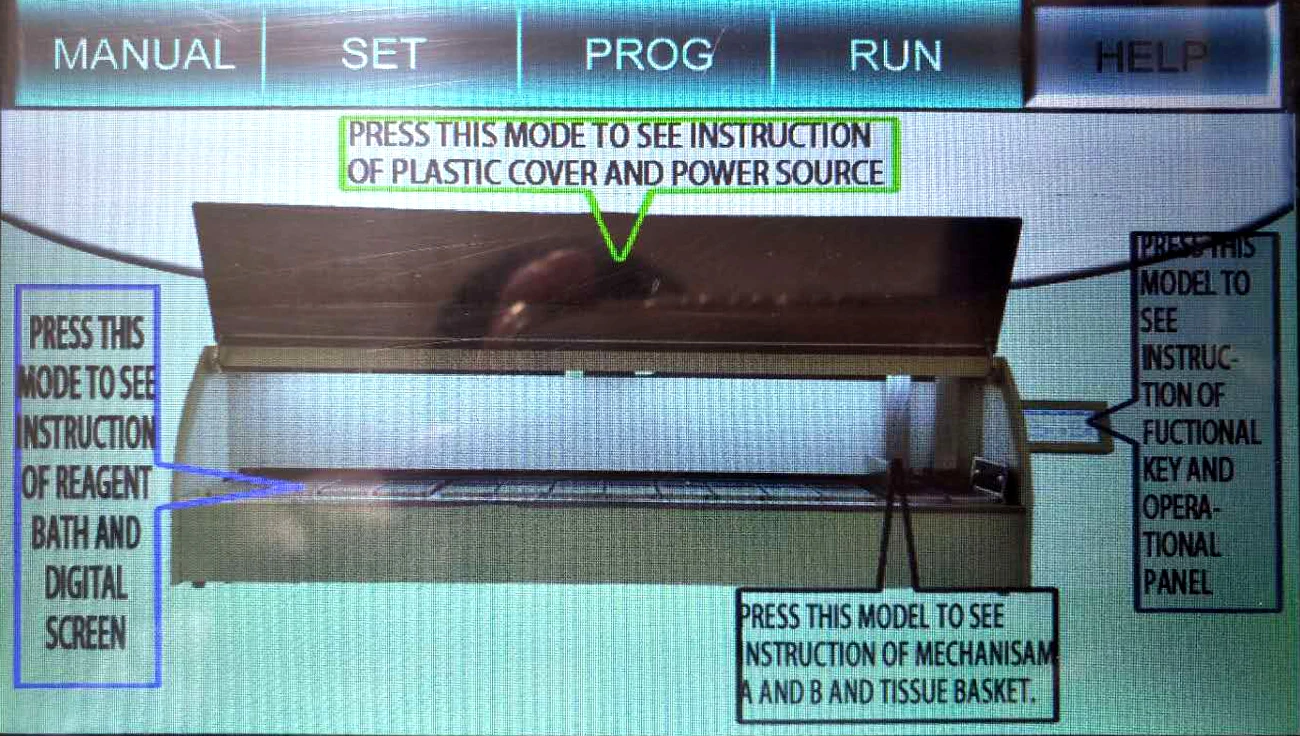
Fig.9
IV. Troubleshooting
No. | Troubles | Reasons | Troubleshooting methods |
1 | No power indication | Blowout or unreliable power connection | Replace the fuse or power line |
2 | Program input failure | Operation key failure | Replace the key switch |
3 | The whole machine does not display | Blown fuse | Replace the fuse |
4 | Insufficient motor power | Motor plug is loose | Reinsert the motor plug |
V. Maintenance
1. The machine shall be placed in a relatively fixed position with good grounding and ventilation measures.
2. The machine should be kept clean during use.
3. Use the right method to hang the basket to avoid bath stuck.
4. The machine has a service life of 6 years under normal use and maintenance.
VI.Annex
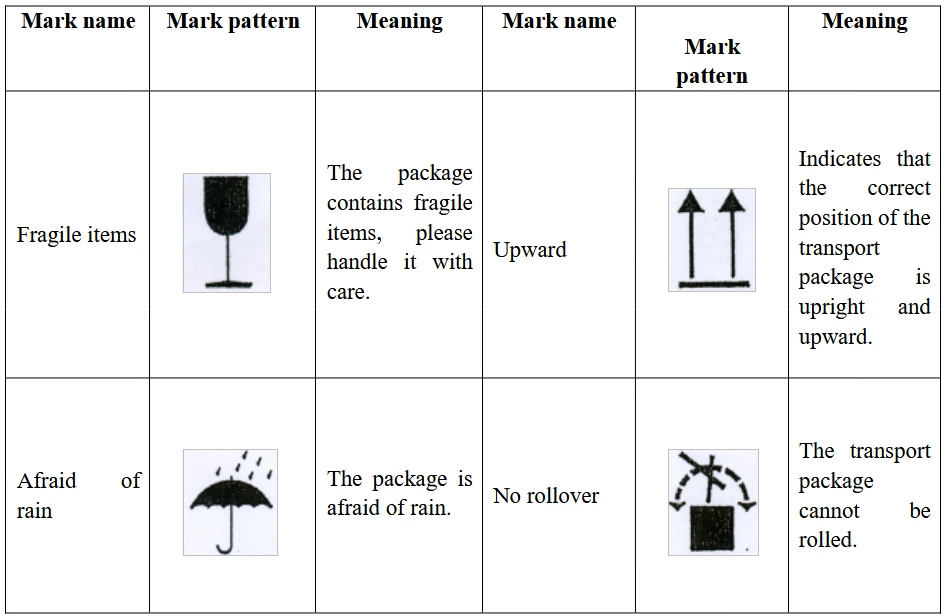
Storage and transportation marks on the outer packing of products:
The product is fragile. The package shall be upward, afraid of rain, and no rollover. The explanation is as follows: