


Multi-parameter Analyzer BJG1BG1 (BMET-608)
Portable Multi-parameter Analyzer- Sea, Air, Door to Door Shipping
- 1 Year Warranty
- US & European Standards


Specifications
| Model | BJG1BG1 |
| pH | |
| - Range | -2.000 to 20.000 pH |
| - Resolution | 0.1, 0.01, 0.001 pH |
| - Accuracy | ± 0.002 pH |
| - Calibration Points | Up to 8 |
| - Standard Customization | Yes |
| - Calibration Reminder | Yes |
| - Standard Recognition | USA, NIST, MERK, JIS, GB and DIN buffers |
| - Slope Limit | Yes |
| mV/ORP | |
| - Range | -2000.00 to 2000.00 mV |
| - Resolution | 0.1, 0.01 mV |
| - Accuracy | ±0.1 mV or ±0.03 % of reading whichever is greater |
| - EH ORP Mode | Yes |
| - ORP Calibration Points | 1 custom point (relative mV) |
| pX | |
| - Range | -2.000 to 20.000 pX |
| - Resolution | 0.1, 0.01, 0.001 pX |
| - Accuracy | ± 0.002 pX |
| - Calibration Points | Up to 6 |
| ISE | |
| - Range | 1E-9 to 9.999E9 |
| - Unit | mol/L, mmol/L, g/L, mg/L, μg/L |
| - Resolution | Up to 4 significant digits |
| - Accuracy | ± 0.3 % |
| - Calibration Points | Up to 8 |
| Conductivity | |
| - Range | 0.000 μS/cm to 3000 mS/cm |
| - Resolution | 1.001 μS/cm minimum; changed with range |
| - Accuracy | ± 0.5 % FS |
| - Reference Temperature | 5, 10, 15, 18, 20, 25 °C |
| - Calibration Points | Up to 5 |
| - Calibration Reminder | Yes |
| - Standard Recognition | 10 μS/cm, 84 μS/cm, 500 μS/cm, 1413 μS/cm; 12.88 mS/cm |
| Resistivity | |
| - Range | 5.00 Ωcm ~ 100.00 MΩcm |
| - Resolution | 0.01 Ωcm minimum |
| - Accuracy | ± 0.5 % FS |
| TDS | |
| - Range | 0.000 mg/L ~ 1000 g/L |
| - Resolution | 0.001 mg/L minimum; changed with range |
| - Accuracy | ± 0.5 % |
| Salinity | |
| - Range | (0.00 ~ 8.00) % |
| - Resolution | 0.01 % |
| - Accuracy | ± 0.1 % |
| Temperature | |
| - Range | -10 to 135 °C, 14 to 275 °F |
| - Unit | °C, °F |
| - Resolution | 0.1 |
| - Relative Accuracy | ± 0.2 |
| Measurement | |
| - Reading Mode | AutoRead (Fast, Medium, Slow), Timed, Continuous |
| - Reading Prompts | Reading, Stable, Locked |
| Data Management | |
| - Data Storage | 1000 Groups |
| - GLP Features | Yes |
| Inputs | |
| - pH Electrode | BNC(Q9) |
| - Temp./DO Probe | 4-pin aviation connector |
| - Temp./EC. Probe | 5-pin aviation connector |
| Outputs | |
| - USB | USB 2.0 flash memory device, PC, scanner |
| - Bluetooth | printer |
| Display Options | |
| - Backlight | Yes |
| - Auto Shut-down | 300, 600, 1200, 1800, 3600 sec, off |
| - IP Rating | IP65 |
| General | |
| - Power | AC Adapter, 100-240 V AC input, DC5V output |
| - Dimensions | 90x255x40 mm |
| - Weight | 500 g (1.1 lb) |
Description
Multi-parameter Analyzer simultaneously measures Ion, Conductivity, Dissolved Oxygen, Temperature that otherwise requires four different meters. With the appropriate probes installed, it can also simultaneously measure several or one parameters.Operating Manual
Download1. Introduction
1.1 Introduction
1.2 Technical Specification
1.3 Function Introduction
2. Safety Notices
3. Terms Explanation
4. Overview and Installation
4.1 Overview
4.2 Instrument Installation
5. Instrument Operation
5.1 Switch On/Off
5.2 Screen Icons
5.3 Methods Management
5.4 Parameter Setting
1. Introduction
1.1 Introduction
The BJG1BG1 portable multi-parameter analyzer is a multifunctional water quality testing device equipped with pH/ISE conductivity, dissolved oxygen, temperature modules. The meter support measurement parameters include pH, mV, ORP, pX, ion concentration, conductivity, resistivity, TDS, salinity, dissolved oxygen concentration, dissolved oxygen saturation, temperature.
Modules and measurement parameters
Module | Parameters | BJG1BG1 |
pH | pH, mV, ORP | • |
ISE | pX, ion concentration | • |
Conductivity | Resistivity, conductivity, TDS, salinity, ash | • |
Dissolved oxygen | Dissolved oxygen current, dissolved oxygen concentration, saturation | |
Temperature measurement | Temperature | • |
Table 1
General Features
• Color High contrast LCD touchscreen, 4.3 inches.
• Intelligent operation system provides features including user management, calibration management, electrode management, method management, data management, Log Management and etc.
• Multi-reading feature allows auto-read, timed-read and continuous-read.
• Automatic/Manual temperature compensation ensures accurate results.
• Auto-hold feature senses and locks the measurement endpoint.
• Data Storage 1000 sets for each parameter (GLP-compliant).
• Data analysis feature helps user review, compare and recalculate results.
• Support for USB communication.
• Auto-power off feature effectively extends the battery service life.
• Reset feature automatically resumes all settings back to factory default options.
• IP65 waterproof. The portable meter is suitable for fields measurements and outdoor measurements.
pH
• 1-8 points calibration with Standard Recognition.
• Selectable pH buffer groups, including DIN, NIST, USA, MERK, JIS and GB.
• Support for pH standard group customization.
• Automatic electrode diagnosis with pH slope and offset display.
Ion
• 1-8 points calibration.
• Selectable measurement unit, including μg/L, mg/L, g/L, mmol/L, pX, ppm and ppb.
• Multi-measurement modes are supported, including Direct Reading mode, Standard Addition mode, Sample Addition mode and GRAN mode.
• Over 10 methods are built-in, including F-, Cl-, Br-, I-, NO3-, BF4-, NH4+, K+, Na+, Ca2+, Cu2+, Pb2+, Ag+ and etc., user-defined method is supported.
Conductivity
• 1-5 points calibration automatically recognizes the standard solutions.
• Settable parameters, including cell constant, reference temperature (5/10/15/18/20/25°C), temperature compensation coefficient and TDS factor.
• Temperature compensation type (none, linear, pure water).
DO
• Support for air-saturated water or zero oxygen calibration.
• Auto barometric pressure compensation.
• Manual Salinity Factor Correction.
• Selectable pressure unit, including kPa, mbar, Torr, Atm.
1.2 Technical Specification
Instrument Specifications
Model | BJG1BG1 | |
pH/pX level | 0.001 pH/pX | |
mV | Range | (-2000.00~ 2000.00) mV |
Resolution | 0.01mV | |
Accuracy | ±0.03% or ±0.1mV | |
Repeatability | 0.1mV | |
Input Current | ≤1x10-12A | |
Input Impedance | ≥3x10¹²Ω | |
pH | Range | (-2.000~ 20.000) pH |
Resolution | 0.001pH | |
Accuracy | ±0.002pH | |
Repeatability | 0.001pH | |
Measurement Accuracy | ±0.01pH | |
Measurement Repeatability | 0.005pH | |
pX | Range | (-2.000~ 20.000) pX |
Resolution | 0.001pX | |
Accuracy | ±0.002pX | |
Repeatability | 0.001pX | |
Measurement Accuracy | ±0.01pX | |
Measurement Repeatability | 0.005pX | |
Ion concentration | Range | (1E-9~9.999E9), mol/L, mmol/L, g/L, mg/L, μg/L, ppm, ppb |
Resolution | 4 significant digits | |
Measurement Accuracy | ±0.3% | |
Conductivity | Range | 0.000 μS/cm~3000mS/cm |
Resolution | 0.001μS/cm, automatic switching according to the range | |
Accuracy | ±0.5% (FS) | |
Repeatability | 0.17%(FS) | |
Measurement Accuracy | ±0.80% (FS) | |
Measurement Repeatability | 0.40% (FS) | |
Resistivity | Range | 5.00Ω.cm~100.0MΩ.cm |
Resolution | 0.01Ω·cm, automatic switching according to the range | |
Accuracy | ±0.5% (FS) | |
TDS | Range | 0.000 mg/L~1000g/L |
Resolution | 0.001mg/L, automatic switching according to the range | |
Accuracy | ±0.5% (FS) | |
Salinity | Range | (0.00~8. 00)% |
Resolution | 0.01% | |
Accuracy | ±0.1% | |
Measurement Accuracy | ±0.2% | |
Temperature | Range | (-10.0~ 135.0) °C/ (14.0~ 275.0) ℉ |
Resolution | 0.1 °C/0.1 ℉ | |
Accuracy | ±0.1 °C | |
Instrument indication error | ±0.3°C (0°C~ 60°C), ±1.0 °C(Else) | |
Work environment | Ambient temperature: (0~ 40) °C Relative humidity: not more than 85% | |
Dimensions (LxBxH), weight (kg) | 90mm x255mmx40mm,0.5kg | |
Power supply | Rechargeable lithium battery, power adapter (Input AC 100~240V;Output DC 5V) | |
Table 2
1.3 Function Introduction
Features | Explanation | |
Basic Function | Languages | English |
Backlight adjustment | • | |
Automatic diagnostics | • | |
Factory reset | • | |
Default parameter | • | |
Prompt Sound | • | |
Time settings | • | |
Power failure protection | • | |
Login password protection | • | |
Firmware upgrade | • | |
Anti-interference automatic recovery | • | |
Automatic shutdown | • | |
Protection | IP65 | |
Reading Function | Reading stability settings | • |
Auto-lock reading | • | |
End point judgment/reading mode | Continuous, Auto, Timed | |
Sample ID | • | |
Alarm | • | |
Data Management | Storage | 1000 sets of measurement parameters each |
View | • | |
Data Management | Delete | • |
Alarm | • | |
GLP | • | |
Communications and external devices | U Disk | • |
Content and format customization | Standard, GLP, Custom format | |
Connect to the PC for data collection | • | |
Connect to a PC for instrument control | • | |
Wireless | Bluetooth | |
pH/mV Measurement | pH electrode status/performance | Slope, Electrode status (Excellent, good, bad) |
Multi-point calibration | 8 points | |
Automatic standard solutions recognition | 6 groups | |
Standards customization | • | |
Standard groups customization | 1 group | |
Temperature compensation | Automatic/Manual | |
pH Electrode Diagnostics | • | |
pH electrode calibration reminder | • | |
pH electrodes mandatory calibration | • | |
pH standard solution verification | • | |
pH Mandatory Verification | • | |
ORP Measurement | • | |
ORP electrode calibration reminder | • | |
ORP electrodes mandatory calibration | • | |
pX/ISE Measurement | Built-in ions methods | 12 kinds |
Ion's customization | • | |
Multi-point calibration | 6 points | |
Optional units | mol/L, mmol/L, g/L, mg/L, μg/L, ppm, ppb | |
Measurement mode | Direct reading method, Standard addition method, Sample addition method, GRAN method | |
Ion electrode calibration reminder | • | |
Ion electrode mandatory calibration | • | |
Conductivity Measurement | Conductivity | • |
Resistivity | • | |
TDS | • | |
Salinity | • | |
Conductivity-ash | • | |
Reference temperature | 6 types, default 25.0°C | |
Multipoint calibration | 5 points | |
Automatic standard solutions recognition | Universal Standard, GB Standard | |
Cell constant set | • | |
Temperature compensation coefficient set | • | |
Salinity compensation coefficient set | • | |
Compensation mode | Non-compensatory, linear, pure water | |
Automatic temperature compensation | • | |
Manual temperature compensation | • | |
Dissolved oxygen Measurement | Measurement principle | Polarographic |
Zero calibration | • | |
Air calibration | • | |
Automatic temperature compensation | (0.0~45.0) °C | |
Automatic atmospheric pressure compensation | (600~1100)mbar | |
Manual atmospheric pressure compensation | (600~1100)mbar | |
Atmospheric pressure units | kPa, mbar, Torr, Atm | |
Manual salinity compensation | (0.0~50.0) g/L | |
Temperature Measurement | Temperature units | °C , ℉ |
Temperature calibration | • | |
System & Running log | • | |
User management | • | |
Sample list | • | |
Table 3
2. Safety Notices
Please read the manual before use. The user MUST use the instrument following this manual to avoid damage to the user and equipment.
Before using the meter, READ the following notes:
• DO NOT disassemble the device for inspection or repair.
• To prevent electric shock or damage to the device, do not place cables and connectors in any liquid, wet or corrosive environment.
• Please use the defaulted power adapter, Do not use it if the power cord is damaged (the wire is exposed or broken).
• Do not use in flammable and explosive environments.
• Do not use if the user finds any abnormalities such as damage or deformation of the device.
The following identifier will be used in this manual.
3. Terms Explanation
pH/pX:
• pH/pX Slope: The amount of potential change generated by each 1 pH/pX change, expressed in mV/pH or by 100% Theoretical Slope (PTS). pX = - log[X], where [X] means molar concentration (mol/L) of X ions.
• E0 of pH: Also known as "zero potential", it usually refers to the potential value at a pH of 7.
• One-point calibration: Calibration with a standard solution.
• Two-point calibration: Calibration with two standard solutions.
• Multi-point calibration: Calibration with more than two standard solutions.
Redox potential (ORP):
• Redox potential: Also known as ORP value, it refers to the potential difference between the potential difference of a measuring battery relative to a standard hydrogen electrode consisting of an indicator electrode, a reference electrode, and a solution under test. The symbol for ORP measurement is "RmV", and the unit is mV.
• One-point calibration: Calibration with an ORP standard solution.
• Offset: = ERmV-E (ERmV potential relative to the hydrogen electrode, E measured potential). At a certain temperature, when the ORP calibration solution is used for calibration, the potential value "RmV" and the potential difference between the measured system.
Electrical conductivity:
• Cell Constant: Also known as the conductivity cell constant. The ratio of the distance to the area of the electrode sheet, expressed in cm-1. Usually, there are conductance electrodes with several cell constants such as 0.01, 0.1, 1.0, 10, etc. The conductance electrode with a cell constant of 1.0 is the most used one and has a wide • measurement range.
• Temperature Coefficient: The change in conductivity caused by a 1°C change in temperature is usually expressed in %/°C, and the default is 0.02, which is 2.00%/°C.
• TDS Conversion Factor: The conversion factor between conductivity and TDS, which defaults to 0.5.
Dissolved oxygen:
• Dissolved oxygen concentration: The content of oxygen dissolved in water. Expressed in milligrams of oxygen per liter of water, usually denoted as DO.
• Dissolved Oxygen Saturation: The ratio of the on-site dissolved oxygen concentration to the saturated dissolved oxygen concentration under the same conditions.
• Salinity: Salt content in water, expressed in g/L. When the salinity increases by 1g/L at 15°C, the saturated dissolved oxygen of water decreases by about 0.0559 mg/L.
• Zero-point calibration: Electrodes are calibrated in "oxygen-free water" (freshly formulated 5% sodium sulfite solution).
• Fullness calibration: The electrodes are calibrated in air or water fully dissolved and saturated with air.
• Atmospheric pressure compensation: The atmospheric pressure affects the measurement of dissolved oxygen concentration and dissolved oxygen saturation, and atmospheric pressure compensation is required. Before calibration, the on-site atmospheric pressure needs to be input, expressed in mbar, and the default is 1013 mbar.
General:
• Calibration reminder (Recommended): "Electrode calibration" prompts on the homepage, user can start measurement without last calibration.
• Calibration reminder (Mandatory): "Electrode calibration" • prompts on the homepage, calibration is required for accurate measurement.
• Upper limit: The upper limit value is monitored for the measured or calibrated data, and the upper limit value must not be lower than the lower limit value.
• Lower limit: Lower limit monitoring of measured or calibrated data.
4. Overview and Installation
4.1 Overview
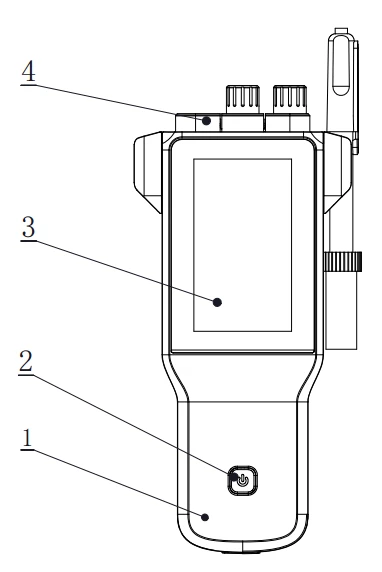
Figure 1 Overview-Front view
1 Meter Body
2 Power Key
3 Display
4 Socket Cap
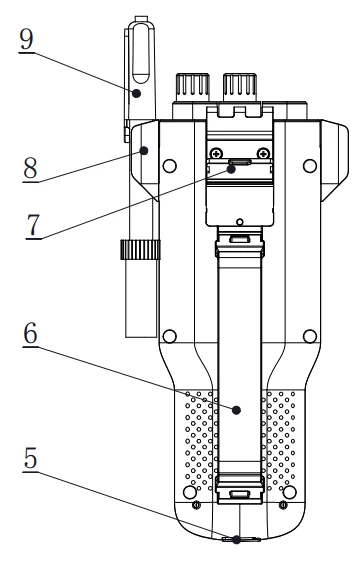
Figure 2 Overview- Back view
5 Power sockets
6 Wristbands
7 Flip Tilting Stand
8 Electrode Holder
9 Electrodes
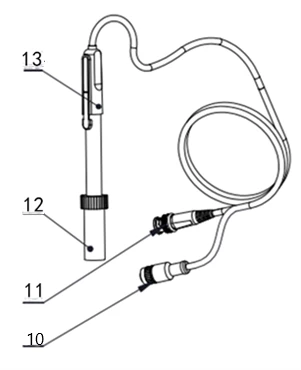
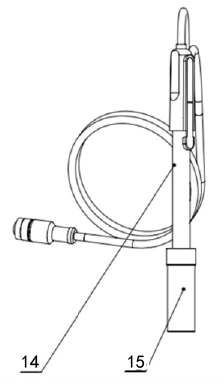
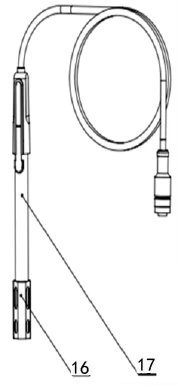
Figure 3 Electrodes and connectors
10 Four-pin aviation connectors
11 pH electrode connectors
12 Electrode protection cap
13 pH electrodes
14 Conductivity electrodes
15 Conductivity electrode protection cap
16 Dissolved Oxygen Electrode protection cap
17 Dissolved oxygen electrodes
Connector Specifications
Electrode type | Connector specifications | Electrodes Connection |
pH electrode | BNC(Q9) | pH electrode, ORP electrode, ISE probe |
DO/T electrode | Four-pin aviation | DO electrode, ATC probe |
Conductivity electrode | Five-pin aviation | Conductivity electrode |
Table 4
4.2 Instrument Installation
4.2.1 Electrodes Stand Installation
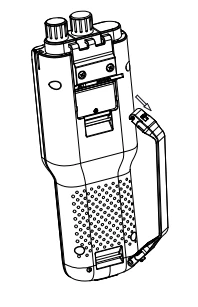
Figure 4 Electrode stand installation
1 Screw
2 Hold part
3 Electrode stand base
4 Fixing holes
Installation:
1) Pull the wristband switch at the head of the wrist so that its closed round hole opens.
2) Snap the opened round hole card slot into the shaft of the corresponding instrument housing and close the round hole.
3) The lower wristband card slot is also operated as above.
4.2.2 Electrodes Connection
4.2.2.1 Connection of pH electrodes
Push the pH Electrode into the electrode holder. Remove the socket protector cap of the pH electrode. Connect the pH electrode into the right socket. If the ATC probe is applied, or ATC has been integrated into the pH probe, please connect the ATC probe onto the DO/T electrode socket.
4.2.2.2 Connection of conductivity electrodes
Push the conductivity electrode into the electrode holder. Remove the protector cap of the conductivity electrode. Connect the conductivity electrode into the right socket. Combination conductivity probes integrated with ATC probe. If the separate ATC probe is applied, please connect the ATC probe onto the DO/T electrode socket. At the measurement, please choose the right input of ATC in the meter when you applied a separated ATC probe.
4.2.2.3 Connection of dissolved oxygen electrodes
Push the dissolved oxygen electrode into the electrode holder. Remove the protector cap of the dissolved oxygen electrode socket. Connect the dissolved oxygen electrode into the right socket. All dissolved oxygen electrodes integrated with ATC probe.
 【TIPS】
• The adopted DO Electrode with a four-pin aviation connector.
• The ATC module of the DO electrode as temperature info input also works for pH measurement. As well the ATC of the connector of pH combination is not available at this period.
5. Instrument Operation
5.1 Switch On/Off
Press and release  to switch on the meter. The startup screen shows software version and other related information. After the self-test program, the screen turns to the homepage and the meter are ready to measure. If the meter does not turn on, charge the meter for 15 minutes. Otherwise, please contact the manufacturer for further assistance.
Also press and hold the key for more than 3 seconds and release to shut down.
5.2 Screen Icons
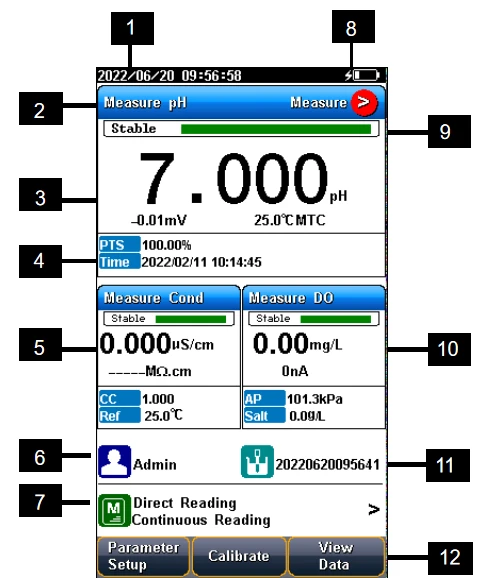
Figure 5 Screen icons explanation
1 System time.
2 Measurement parameters.
3 Main measurement box.
4 Calibration information.
5 Measurement box.
6 User ID.
7 Method management.
8 Power information.
9 Reading states.
10 Measurement box.
11 Sample ID.
12 Function buttons.
The instrument displays symbol identification that has the following functional implications:
Symbol Explanation
No. | Symbol | Explanation |
1 | | Reading status, display the measurement status of reading, stable, locked, each indicates that the processing, stable, and reading completed. |
2 | PTS | The percentage slope of the pH electrode calibration data |
3 | BUFF | The Standard buffer solution for calibration |
4 | Auto Mode | Auto-recognition of Standards |
5 | Manual Mode | Manual - recognition of Standards |
6 | No. | Number |
7 | ATC | Automatic temperature compensation |
8 | MTC | Manual temperature compensation |
9 | E | Measured potential in mV |
10 | RmV | The relative potential value in mV |
11 | Offset | Offset potential, in mV |
12 | Temp | Temperature in °C and F |
13 | Res | Resistivity in Ω ·cm, kΩ ·cm, MΩ ·cm |
14 | Cond | Conductivity in μS/cm, mS/cm |
15 | Zero Point | Dissolved Oxygen Zero calibration |
16 | Full Scale | Dissolved Oxygen Air calibration |
17 |
| Measurement method management, display the current method information |
18 | | Standard solution for pH calibration |
19 | | Standard solution for ion calibration |
20 | | Standard solution for conductivity calibration |
21 |
| User ID |
22 |
| Sample ID |





Table 5
5.3 Methods Management
The meter provides a library of built-in methods. Select the proper method to measure, system loads method's preset information, including the method name, brief overview, creator, creation date, and measurement parameters.
In the method settings, it supports the navigation setting including the method information, parameters, reading mode, pX parameters setting, pH parameters setting, ORP parameters setting, EC parameters setting, DO parameters setting, temperature setting and data management setting. For the first use, please follow the guide to settings the measurement parameters.
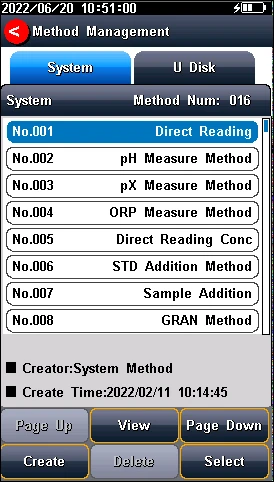
Figure 6 Methods Information
【TIPS】
If a modified built-in method is not saved to library, the "Method management" logo will turn to red. When the user returns to the method management page, the system will prompt.
5.3.1 Update Method
When the method is revised by the setting, there is a red mark in the method management logo to remind user that the current method is different from the method in the library.
When press the method in the method library, there is a system tip to give user a choose to update or create a new method.
5.3.2 Create a new Method
There are three modes to create a new method: create method step by step in the system, save the setting as a new method in the system, and save the method with a new name, description and location. The location can be the system and U disk.
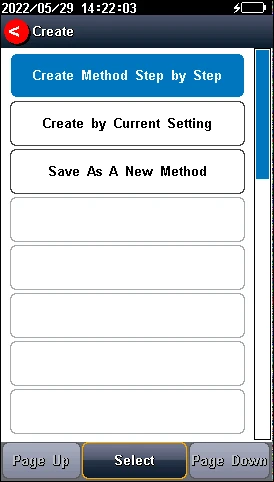
Figure 7 Method setting view
5.3.3 Delete a Method
There are 16 methods saved in the meter as the default setting in the library method. The No.001-No.016 method cannot be deleted, and the others can be deleted.
5.3.4 Save and Load a Method
It is support to store up to 50 methods in the meter, and save and load the methods in the U Disk.
5.4 Parameter Setting
In the measuring, users can set the instrument parameters by pressing "Parameter Setting" to set the measuring parameters including tutorial setting, basic method information, select parameters, endpoint format, pH parameter, pX/ISE parameter, ORP parameter, EC parameters setting, DO parameters setting, temperature parameter, data management, output setting, user management, system setting and GMP mode manage.
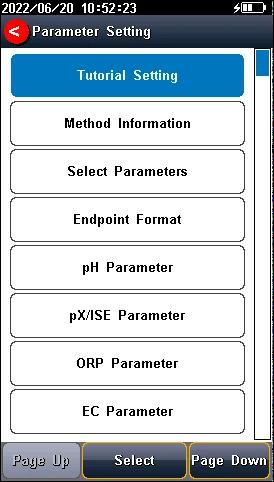
Figure 8 Parameter settings of instrument
5.4.1 Tutorial setting
For the first use, please follow the guide to settings the measurement parameters. After all the settings, press the "  " to return to the previous page.
5.4.2 Method basic information
The meter provides a library of built-in methods. Select the proper method to measure, system loads method's preset information, including the method name, brief overview, creator, creation date, and measurement parameters.
5.4.3 Select parameters
It could select one measurement parameter from pH, pX, Ion Conc and ORP, resistivity, conductivity, TDS, salinity, ash, DO, saturation every test.
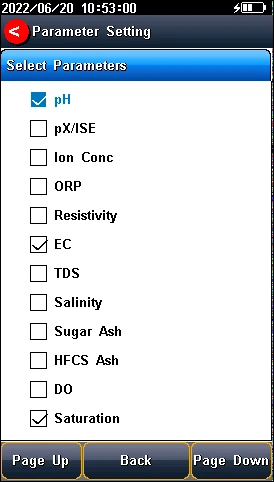
Figure 9 Select parameters
The instrument contains up to 3 measurement modules, and each measurement function can select different measurement parameters (Switch the parameters by clicking on the blank area of measurement box of screen).
Select the proper measurement parameters to perform a measurement. The screen displays the detail of three measurement parameters when three modules are chosen. Two parameters are shown as two modules are chosen. Single parameter is shown by one measurement method is selected.
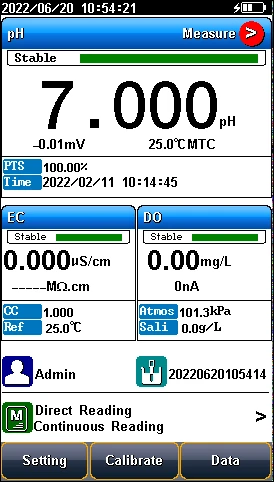
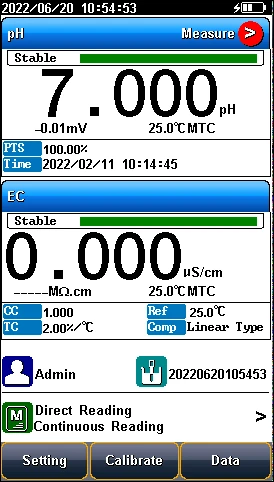
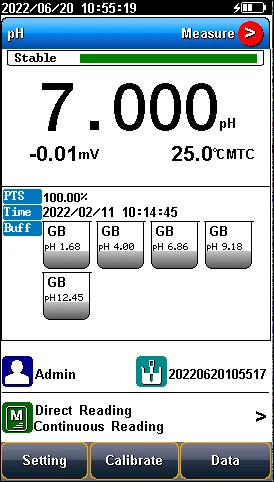
Figure 10 Measurement parameters
5.4.4 Reading Mode Settings
The meter provides three reading modes, including continuous reading, auto reading, and timed reading.
• Continuous reading: The instrument displays real-time measurement results. User can end the measurement at any time and save the last result.
• Auto-reading: The measurement reached the balance, and the meter locked the reading result. The meter offers "Fast", "Medium", "Strict" and "Custom" four options for endpoint detection conditions.
• Timed reading method: Timed Reading contains two kinds of timed reading methods: "Interval Measurement" and "Timed Measurement". "Interval Measurement" provide measurement results at interval time and "Timed Measurement" provide measurement result after a set time.
Reading Parameters Settings
Stability Type | pH | pX/ Ion concentration | Conductivity | DO | |
Fast | Stable time | 4s | 4s | 5s | 5s |
Fluctuation | 0.6mV | 0.3mV | 1.0% | 4nA | |
Medium | Stable time | 6s | 8s | 8s | 8s |
Fluctuation | 0.1mV | 0.08mV | 0.4% | 3nA | |
Strict | Stable time | 8s | 12s | 15s | 15s |
Fluctuation | 0.03mV | 0.03mV | 0.1% | 2nA | |
Custom (Recommended value) | Stable time | 1 to 30s | 1 to 30s | 1 to 30s | 1 to 30s |
Fluctuation | 0.03~1mV | 0.03~1mV | 0.1~2% | 2~5nA | |
Table 6
5.4.5 pH parameter setting
5.4.5.1 pH electrode information
In the meter setting, a set of pH Electrode info is defaulted. At the measurement, the meter loads the defaulted pH electrode's info including serial number, last calibration result, including the number of calibration points, slope value, zero-point potential value and electrode state description, etc., the calibration time and calibrator will also be loaded together.
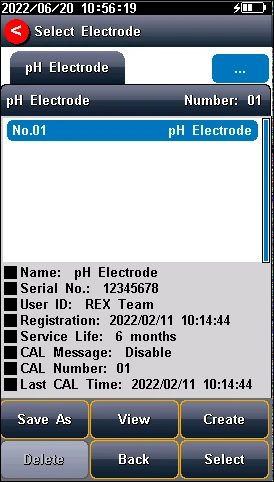
Figure 11 pH electrode information
5.4.5.2 Recognition
Auto Mode and Manual Mode.
In some special cases, it is necessary to use some non-standard pH buffer solutions, or use two very close pH standard buffer solutions for electrode calibration. In this case, the manual standard solution identification function can be used. When set to "Manual Mode", the pH value of the current standard solution can be input during and used for electrode calibration.
5.4.5.3 pH Buffer groups
The meter provides various Standards Group including GB, DIN, NIST, USA, MERK and JIS. And allows the user to prepare the customized Standard groups.
Standard Solution Groups
Groups | Contents |
GB | 1.680pH, 3.559pH, 4.003pH, 6.864pH, 7.409pH, 9.182pH, 12.460pH |
DIN | 1.680pH, 2.000pH, 3.557pH, 3.775pH, 4.008pH, 6.865pH, 7.000pH, 7.416pH, 9.184pH, 10.014pH, 12.454pH |
NIST | 1.677pH, 4.008pH, 6.864pH, 7.000pH, 7.416pH, 10.014pH, 12.469pH |
USA | 1.680pH, 4.010pH, 7.000pH, 10.010pH |
MERK | 2.000pH, 4.000pH, 7.000pH, 9.000pH, 12.000pH |
JIS | 1.680pH, 4.008pH, 6.865pH, 7.413pH, 9.180pH, 10.010pH |
Table 7
Usually, we use the pH value corresponding to 25.0°C to mark the pH standard buffer solution, such as NIST 7.00pH standard solution, which means the standard pH buffer solution 7.00pH, and it is 7.00pH at 25.0°C.
After selecting the standard solution group, we need to select the standard buffer solution used for calibration from the standard solution group. The instrument supports up to 6-point calibration, that is, up to 6 standard solutions can be selected. Since the pH values of multiple standard buffer solutions in the standard solution group may be very close, to ensure that the instrument can correctly identify the standard buffer solution, will limit the selection of standard solutions with neighboring pH values. The check mark indicates the currently used standard solution group and the corresponding standard solution.
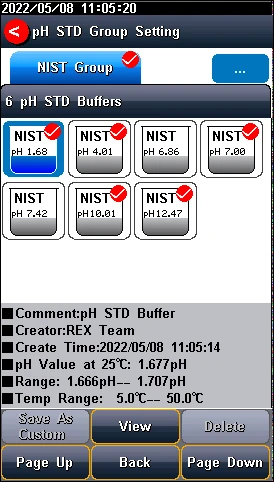
Figure 12 Selection of standard groups and standard solution
 【Tips】
If the selected standard solution group is different from the pH standard buffer solution used, it will lead to wrong calibration results.
5.4.5.4 Resolution settings
The pH measurement resolution of the instrument is adjustable.
pH resolution: 0.001pH, 0.01pH and 0.1pH.
mV resolution: 0.01mV, 0.1 mV and 1 mV.
Set the result resolution through "pH Parameters" - "Resolution".
5.4.5.5 pH Alarm setting
The meter support pH measurement and calibration result monitoring alarm. The setting includes slope limit, potential value limit and monitoring options. When the measurement results out of the selected range, the meter alarms.
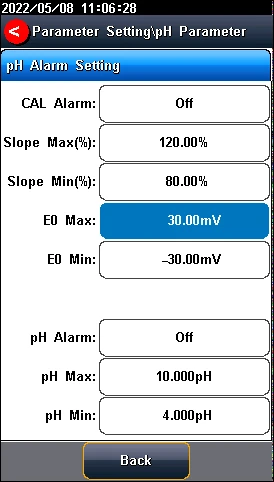
Figure 13 pH Alarm setting information
5.4.5.6 pH Calibrate reminder settings
The meter provides calibration prompts function. From the setting, the user can select calibration reminder (recommended) and calibration reminder (mandatory) for future calibration.
Calibration reminder (recommended): When enable the calibration reminder, the instrument verifies whether the calibration data of pH electrode is within the validity period. If calibration information expires, a striking calibration reminder will appear at "Calibrate" on the main interface, but it will not affect the measurement and data saved.
Calibration reminder (mandatory): When enable the mandatory calibration, the instrument verifies whether the calibration data of pH electrode is within the validity period. If calibration information expires, a striking calibration reminder will appear at "Calibrate" on the main interface, the measurement data cannot be saved and output.
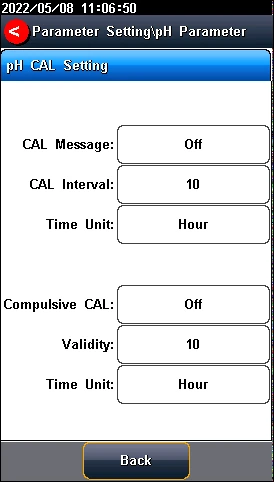
Figure 14 pH calibration reminder setting information
5.4.6 pX/ISE parameter settings
5.4.6.1 pX electrode information
The instrument has one pX electrode created by default, which is convenient for users. When using the built-in default electrode, the instrument automatically loads the electrode serial number and the last calibration result, including calibration points, slope value, zero-point potential value, etc., and the calibration time and calibrator are also loaded.
5.4.6.2 Ion mode
Ion mode corresponds to pX/ISE, ion concentration measurement. The instrument supports conventional ion modes and user-defined ion modes. The instrument provides a variety of commonly used ion modes such as: F-, Cl-, Br-, I-, NO3-, BF4-, NH4+, K+, Na+, Ca2+, Cu2+, Pb2+, Ag+ and etc., which are convenient for use. Users can directly measure the concentration of the corresponding ions as long as they are equipped with the corresponding ion selective electrode.
Custom ion mode: Press the "Custom" key, enter the ion name (maximum 8 characters), then enter the molecular weight (molar mass), and select the ionic valency.
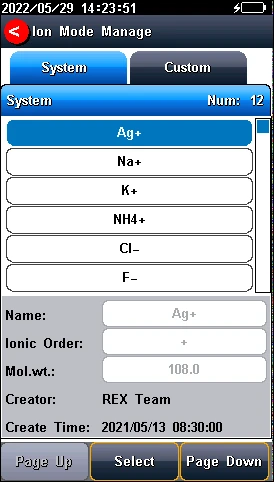
Figure 15 Ion mode management
5.4.6.3 Select measurement mode
The instrument supports 4 ion measurement modes: direct reading concentration method, standard addition method, sample addition method, GRAN Measurement method.
Users can choose the following ion measurement methods according to their requirements. In general, when the ion measurement parameter selects pX or ion concentration measurement, it is recommended to use the direct reading concentration method for measurement, which has a fast measurement speed and is suitable for the measurement of batch samples. STD addition, sample addition and GRAN measurements are only valid when the measurement parameter selects ion concentration.
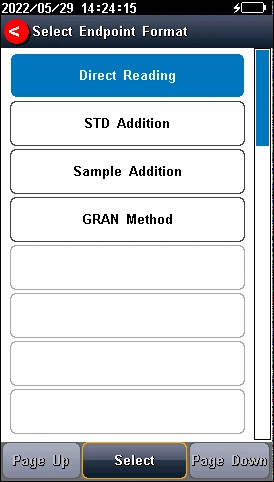
Figure 16 Ion measurement mode selection
Direct reading concentration method: also called standard curve method, is the most commonly used method for measuring ion concentration. According to the Illuminant formula, a linear relationship is established between the ion concentration and the electrode potential, so as to determine the ion concentration of the sample.
STD addition method: Also called the known addition method, it is mainly used to measure samples with low content. The standard solution is added to the sample, and the concentration value of the sample is determined by measuring the potential change before and after the addition.
Sample addition method: Similar to the standard addition method, it is mainly used to measure samples with higher content. The sample to be tested is added to the standard solution, and the concentration value of the sample is determined by measuring the potential change before and after the addition.
GRAN measurement method: similar to the standard addition method, it is mainly used to measure samples with low content, and the concentration value of the sample is measured according to the mathematical principle of the GRAN mode.
Users can choose according to actual requirements.
【TIPS】
• When selecting "pX" measurement parameter, the measurement mode is only valid for the direct reading concentration method.
• Due to the particularity of the standard addition, sample addition and GRAN measurement method, it can only be used in single channel mode.
5.4.6.4 Resolution settings
The pX measurement resolution of the instrument is adjustable.
pX resolution: 0.001pX, 0.01pX and 0.1pX.
mV resolution: 0.01mV, 0.1 mV and 1 mV.
Set the result resolution through "pX/ISE parameter" - "Set Resolution".
5.4.6.5 pX/ISE Alarm setting
The meter support pX/ISE measurement alarm. When the measurement results out of the selected range, the meter alarms.
Enter the ion alarm limit setting through "pX/ISE parameter" - "Alarm setting", and you can set the max and min limit values of ion concentration measurement.
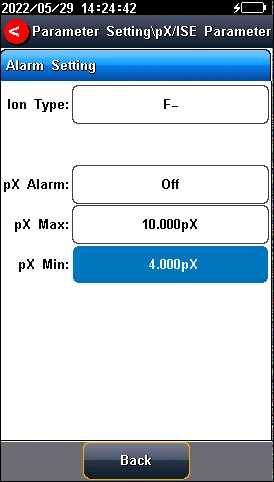
Figure 17 pX/ISE Alarm setting information
5.4.6.6 pX Calibrate reminder settings
The meter provides calibration prompts function. From the setting, the user can select calibration reminder (recommended) and calibration reminder (mandatory) for future calibration.
Calibration reminder (recommended): When enable the calibration reminder, the instrument verifies whether the calibration data of pH electrode is within the validity period. If calibration information expires, a striking calibration reminder will appear at "Calibrate" on the main interface, but it will not affect the measurement and data saved.
Calibration reminder (mandatory): When enable the mandatory calibration, the instrument verifies whether the calibration data of pH electrode is within the validity period. If calibration information expires, a striking calibration reminder will appear at "Calibrate" on the main interface, the measurement data cannot be saved and output.
Under "pX/ISE parameter" - "Calibrate Reminder", set calibration reminder and mandatory calibration. Fulfill the electrode calibration reminder function by setting the calibration period and time, and the electrode calibration function by setting the mandatory calibration validity period and time.
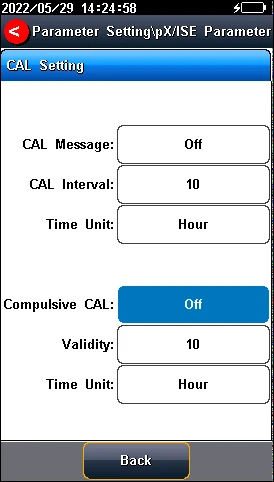
Figure 18 pX calibration reminder setting information
5.4.7 ORP Parameter Settings
5.4.7.1 ORP electrode information
In the meter setting, a set of ORP Electrode info is defaulted. At the measurement, the meter loads the defaulted pH electrode's info including serial number, resolution (mV supports 0.01mV, 0.1 mV and 1mV settings), recognition mode and last calibration result (nominal and offset), the calibration time and calibrator are also loaded.
5.4.7.2 ORP Alarm setting
The meter supports ORP measurement and calibration result monitoring alarm. When the measurement results out of the selected range, the meter alarms.
Enter the ORP alarm limit setting through "ORP parameter" - "Alarm Setting", and you can set the max and min limit values of ORP measurement.
5.4.7.3 ORP calibration reminder setting
ORP electrode calibration reminder: If the ORP electrode is not calibrated after the calibration period, the instrument will display a prominent calibration reminder at the "Calibrate" on the initial interface, but it does not affect the use.
ORP electrode mandatory calibration: After turning on, the instrument verifies whether the ORP electrode calibration data is within the validity period. If the calibration information expires, only the test results can be read before normal calibration, and the data cannot be saved and output.
Under "ORP parameter"-"Calibrate Reminder", set the calibration reminder and mandatory calibration settings. Fulfill the electrode calibration reminder function by setting the calibration period and time, and the electrode calibration function by setting the mandatory calibration validity period and time.
5.4.8 EC Parameter Settings
5.4.8.1 EC Electrode management
The electrode information includes the name, serial No., user ID, registration time, service life, calibration message, calibration number, last calibration time. It allows user to choose one electrode to calibrate and measure samples.
The meter has one created default pH electrode, which is convenient for users. When using the built-in default electrode, the meter automatically loads the electrode serial number and the last calibration result, including calibration points, slope value, zero-point potential value, etc., and the calibration time and calibrator will also be loaded.
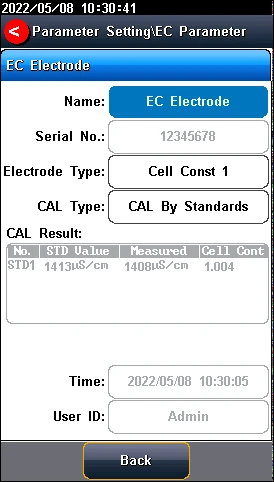
Figure 19 EC electrode information
The meter allows users to create and save electrodes information up to 5. The electrode information contains electrode name, electrode serial number, electrode type, registrant, registration time, shelf life, shelf-life reminder, calibration No., latest calibration time etc.
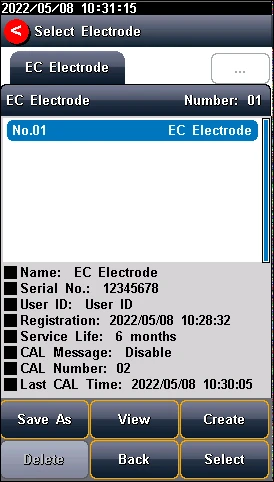
Figure 20 Electrode management
5.4.8.2 Conductivity electrode type
Conductivity electrode: Four conductivity cell constant 0.01, 0.1, 1, 10. The defaulted conductivity cell constant is 1. Users need to enter the cell constant value on the label of conductivity electrode for accurate measurement.
5.4.8.3 EC calibration type
EC calibration type: Cal by Standards and input manually.
Cal By Standards: Cell constant is calibrated with standard conductivity standard solution.
Input manually: It allows user to set the cell constant.
5.4.8.4 Cal Information
The meter provides two EC standards groups including universal group and GB group. And allows the user to prepare the customized standard groups.
For neighboring standards, please choose the customization to perform calibration.
Standard solution groups
Standard group | Standard solution |
Universal Group | 10μS/cm, 84μS/cm, 500μS/cm, 1413μS/cm and12880μS/cm. |
GB group | 146.5μS/cm, 1408μS/cm, 12852μS/cm and 111310μS/cm. |
Table 8
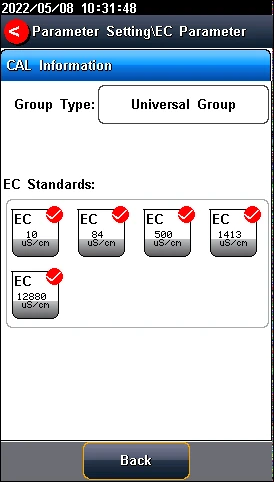
Figure 21 Selection of conductivity standards
5.4.8.5 EC Reference temperature
Conductivity reference temperature: The conductivity of the solution is greatly affected by temperature, to make the conductivity measurement results at different temperatures comparable, the conductivity and temperature values at the time of measurement are usually recorded and converted into the conductivity value at a certain temperature through temperature compensation, which is the reference temperature.
When measurement parameter is conductivity, TDS or resistivity, the meter allows settings of 5.0°C, 10.0°C, 15.0°C, 18.0°C, 20.0°C, 25.0 °C 6 reference temperatures, the default reference temperature is 25 °C.
When measurement parameter is salinity, the default reference temperature is 18 °C and cannot change.
When measurement parameter is Conductivity ash, the default reference temperature is 20 °C and cannot change.
5.4.8.6 Conductivity Compensation
EC Compensation Mode: Three different compensation modes can be used for various applications. The meter supports Linear type, DI water type and non-comp type.
1) Linear type: Linear compensation is usually used for the measurement of medium and high conductivity solutions. With linear compensation, you can set the temperature compensation coefficient, which defaults to 2.00%/°C (approximately the temperature compensation coefficient of a sodium chloride solution at 25°C). It allows user to set the temperature coefficient.
2) DI water type: DI water compensation is usually used for the measurement of pure water and ultrapure hydropower conductivity below 5μS/cm. It allows user to set the temperature coefficient.
3) Non-comp type: Non compensation is usually used to obtain the true conductivity value at the measured temperature.
5.4.8.7 TDS Parameter
The TDSF calibration type can be calibrated by standard solution or setting the TDS Factor. The TDS factor can be adjustable, and the default is 0.500. It allows user to calibrate the TDS Factor.
5.4.8.8 Salinity parameter
The meter supports both default salinity and seawater salinity measurement types.
Sea salinity mode: it indicates the nominal salinity value used to measure seawater salinity correction. The standard seawater salinity concentration adopted here is 3.500%, also written as 35 psu.
Default Salinity Mode: the salinity of common sample, which can be used to approximate the salinity of the measured solution.
5.4.8.9 Conductivity Ash parameter
The meter supports the measurement of conductivity ash generally calculating the ash content using an ash conversion coefficient.
Ash Conversion Factor: Represents the conversion coefficient K of the conductivity of the solution to ash, which has a small value of 10-4.
Blank Conductivity: It allows to input manually or measure in the blank.
5.4.8.10 Alarm setting
The meter support measurement and calibration result monitoring alarm. The parameter includes the conductivity, TDS, salinity, resistivity, sugar ash and HFCS Ash.
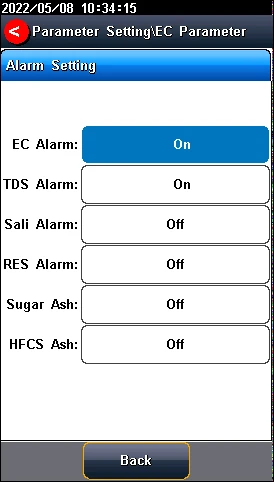
Figure 22 Alarm setting information
5.4.8.11 Calibration reminder settings
The meter provides calibration prompts function. From the setting, the user can select calibration reminder (recommended) and calibration reminder (mandatory) for future calibration.
calibration reminder (recommended): When enable the calibration reminder, the instrument verifies whether the calibration data of conductivity electrode is within the validity period. If calibration information expires, a striking calibration reminder will appear at "Calibrate" on the main interface, but it will not affect the measurement and data saved.
calibration reminder (mandatory): When enable the mandatory calibration, the instrument verifies whether the calibration data of conductivity electrode is within the validity period. If calibration information expires, a striking calibration reminder will appear at "Calibrate" on the main interface, the measurement data cannot be saved and output.
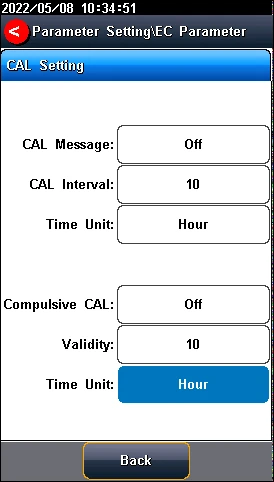
Figure 23 pH calibration reminder setting information
5.4.9 Dissolved Oxygen Parameter Settings
5.4.9.1 DO electrode information
In the meter setting, a set of DO Electrode info is defaulted. At the measurement, the meter loads the defaulted DO electrode's info including serial number, last calibration result.
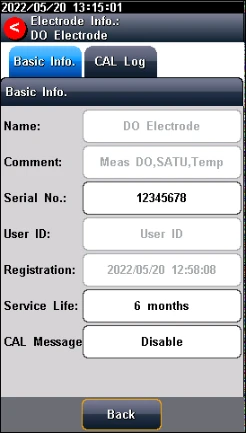
Figure 24 DO electrode information
5.4.9.2 DO salinity compensation settings
Salinity, is the amount of sodium chloride dissolved in 1 L of water, in g/L. The dissolved oxygen concentration of water is highly affected by salinity. Typically, for every 1 g/L increase in salinity, the saturated dissolved oxygen of water decreases by 0.0559 ppm.
Users can set salinity compensation on the setting page. The salinity compensation range of measurement is (0.0~50.0) g/L.
【TIPS】
If the sample has high salinity, salinity compensation is required to obtain accurate results.
5.4.9.3 DO barometric compensation
Atmospheric pressure is an important factor for dissolved oxygen concentration and dissolved oxygen saturation measurement. The meter supports automatic barometric compensation and manual barometric compensation modes in range of (600~1100) mbar. The default atmospheric pressure is 1013mbar in manual compensation mode.
Users can select the necessary compensation mode and pressure unit for measurement in the setting.
【TIPS】