Dry Bath Incubator BFA1BP2 (BDIB-109)
Dry Bath Incubator- Sea, Air, Door to Door Shipping
- 1 Year Warranty
- US & European Standards

Specifications
| Model | BFA1BP2 |
| Temp. Control Range | R.T.+5°C~150°C |
| Temp. Setting Range | 5°C~150°C |
| Time Range | 1min~99h59m (00:00 is continuous) |
| Block Temp. Stability@40~100°C | ±0.5°C |
| Block Temp. Stability@>100°C | ±1°C |
| Block Temp. Uniformity@40°C | ±0.3°C |
| Block Temp. Uniformity@>40°C | ±0.5°C |
| Temp. Display Accuracy | 0.1°C |
| Heating Speed | <15min(20°C~150°C) |
| Sample Capacity | 2 standard blocks |
| Voltage | AC 220V/AC 110V 50Hz/60Hz |
| Power | 400W |
| Fuse | 250V, 3A/6A, Φ5x20 |
| Dimension | W.285xD.225xH.95 |
| Net Weight (kgs) | 2.64kgs |
Description
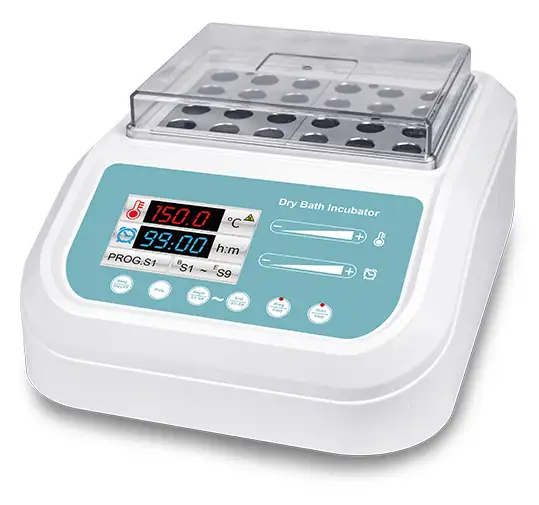
Dry Bath Incubator is a new product controlled by a microcomputer, which can be widely used in sample preservation and reaction, DNA amplification and electrophoresis pre-denaturation, serum coagulation, etc.Features
Fast heating speed, uniform heating, accurate temperature control, high stability, low energy consumption and no noise.Built-in temperature deviation calibration function, automatic fault detection and buzzer alarm function.
Built-in over-temperature protection device, safe and reliable, enhance the service life of the machine.
The product design is compact and the space occupied is small. High-definition color screen display, providing intuitive and clear visual experience
Simple or program temperature control mode is available, making the experiment more convenient
Sliding operation, light touch button, novel and fashionable.
The buzzer tone can be turned off, making the experiment quieter.
The metal block is easy to replace, easy to clean and disinfect. Protect samples from contamination.
Accessories For Purchase
| Images | Spec | Dia. of hole | Name | Block dimension | |
 | 6 mm x 42 | 6.5 mm | Round bottom | 95.5 x 76.5 x 50 mm | |
 | 7 mm x 42 | 7.5 mm | Round bottom | 95.5 x 76.5 x 50 mm | |
 | 10 mm x 20 | 10.5 mm | Round bottom | 95.5 x 76.5 x 50 mm | |
 | 12 mm x 20 | 12.5 mm | Round bottom | 95.5 x 76.5 x 50 mm | |
 | 13 mm x 20 | 13.5 mm | Round bottom | 95.5 x 76.5 x 50 mm | |
 | 15 mm x 12(7ml Centrifuge tube) | 15.5 mm | Round bottom | 95.5 x 76.5 x 50 mm | |
 | 16 mm x 12(10ml/15ml Centrifuge tube) | 16.5 mm | Round bottom | 95.5 x 76.5 x 50 mm | |
 | 19 mm x 12 | 19.5 mm | Round bottom | 95.5 x 76.5 x 50 mm | |
 | 20 mm x 6 | 20.5 mm | Round bottom | 95.5 x 76.5 x 50 mm | |
 | 26 mm x 6 | 26.5 mm | Round bottom | 95.5 x 76.5 x 50 mm | |
 | 28 mm x 4(50ml Centrifuge tube) | 28.5 mm | Flat bottom | 95.5 x 76.5 x 50 mm | |
 | 40 mm x 2 | 40.5 mm | Round bottom | 95.5 x 76.5 x 50 mm | |
 | 0.5 ml x 42 | 8 mm | Cone bottom | 95.5 x 76.5 x 50 mm | |
 | 1.5 ml x 24 | 10.8 mm | Cone bottom | 95.5 x 76.5 x 50 mm | |
 | 2.0 ml x 24 | 10.8 mm | Round bottom | 95.5 x 76.5 x 50 mm | |
 | 0.2 ml x 48 | 6.1 mm | Cone bottom | 95.5 x 76.5 x 50 mm | |
| Customized | Customized | Customized | Customized |
Operating Manual
Download1. Introduction
2. Specifications
2.1 The normal working condition
2.2 Basic parameters and performance
2.3 Optional blocks
3. Basic Operation Instruction
3.1 Construction
3.2 Operation panel
3.3 Display description
3.4 Indicator light description
3.5 Temperature control mode description
4. Operation Guide
4.1 Button Description
4.2 Slide description
4.3 Temperature calibration
4.4 Instrument installation
4.5 Metal block replacement
5. Error Analysis and Trouble Shooting
Annex 1:Wiring Diagram of BDIB-109
1. Introduction
The Dry Bath Incubator is a new product controlled by a microcomputer, which can be widely used in sample preservation and reaction, DNA amplification and electrophoresis pre-denaturation, serum coagulation, etc.
Features
1. Each block has its own temp. and time, which can be individually controlled.
2. A wide temperature control range up to 150°C.
3. The temperature control mode can be simple or program, the experiment is more convenient.
4. It has a compact structure and is convenient to use in narrow space.
5. High-definition color screen display provides an intuitive and clear visual experience.
6. Real-time temperature and constant temperature countdown.
7. Use metal blocks can prevent samples from contamination.
8. The metal block is easy to replace, easy to clean and disinfect.
9. Built-in over-temperature protection device to protect you and the safety of the experiment.
10. Temperature deviation calibration, temperature control is more accurate.
11. Fault code display function, the system comes with fault detection function.
12. The buzzer can be turned off, making the experiment quieter.
13. Sliding operation, light touch button, novel and fashionable.
2. Specifications
2.1 The normal working condition
The room temperature: 5C ~40C
The relative humidity: ≤70%
The using power: 110V / 220V ~50/60Hz
2.2 Basic parameters and performance
Model | BDIB-109 |
Temp.Control Range | R.T.+5°C~150°C |
Temp.Setting Range | 5°C~150°C |
Time Range | 1min~99h59m (00:00 is continuous) |
Block Temp. Stability@40~100°C | ±0.5°C |
Block Temp. Stability@>100°C | ±1°C |
Block Temp. Uniformity@40°C | ±0.3°C |
Block Temp. Uniformity@>40°C | ±0.5°C |
Temp. Display Accuracy | 0.1°C |
Heating Speed | ≤15min(20°C~150°C) |
Sample Capacity | 2 standard block |
Voltage | AC 220V/AC 110V 50Hz/60Hz |
Power | 400W |
Fuse | 250V,3A/6A,Φ5x20 |
Dimension | W.285xD.225xH.95 |
Net Weight(kgs) | 2.64kgs |
Table 1
2.3 Optional blocks
Model | Hole diameter | Number of holes | Block size (mm) |
DT01 | 6mm | 42 | 95.5x76.5x50 |
DT02 | 7mm | 42 | 95.5x76.5x50 |
DT03 | 10mm | 20 | 95.5x76.5x50 |
DT04 | 12mm | 20 | 95.5x76.5x50 |
DT05 | 13mm | 20 | 95.5x76.5x50 |
DT06 | 15mm | 12 | 95.5x76.5x50 |
DT07 | 16mm | 12 | 95.5x76.5x50 |
DT08 | 19mm | 12 | 95.5x76.5x50 |
DT09 | 20mm | 6 | 95.5x76.5x50 |
DT10 | 26mm | 6 | 95.5x76.5x50 |
DT11 | 28mm | 4 | 95.5x76.5x50 |
DT12 | 40mm | 2 | 95.5x76.5x50 |
DT13 | 0.5ml | 42 | 95.5x76.5x50 |
DT14 | 1.5ml | 24 | 95.5x76.5x50 |
DT15 | 2.0ml | 24 | 95.5x76.5x50 |
DT16 | 0.2ml | 48 | 95.5x76.5x50 |
DT19* | Can be customized | Can be customized | Can be customized |
Table 2
3. Basic Operation Instruction
This chapter mainly describes the instrument's mechanical structure, the keyboard and functions of each key, as well as preparations before power on.
3.1 Construction
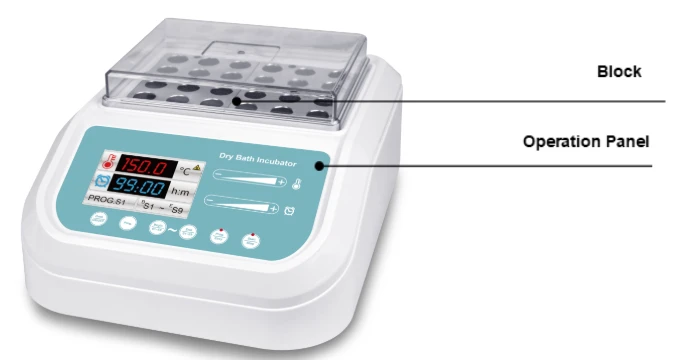
Figure 1
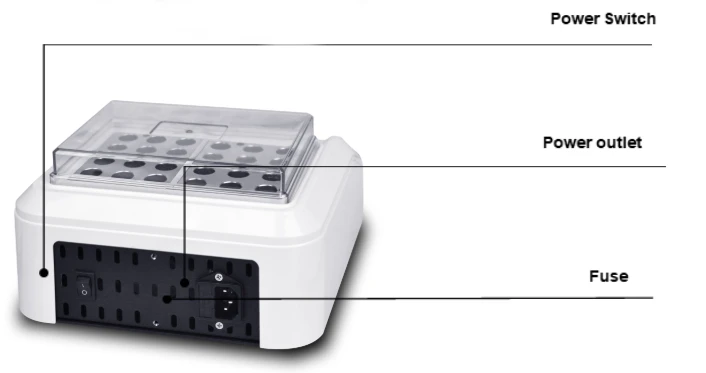
Figure 2
3.2 Operation panel
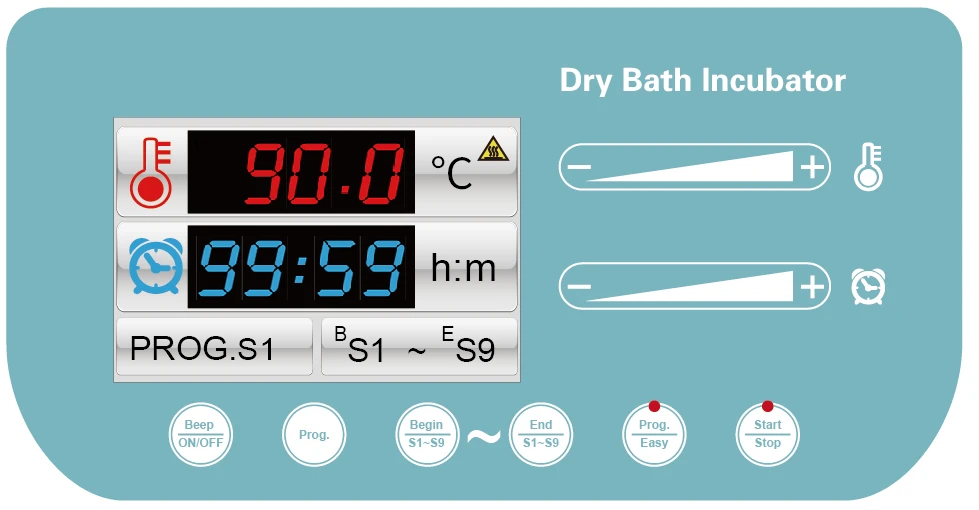
Figure 3
3.3 Display description
3.1 Red font shows the set temp.
3.2 Blue font shows the set time
3.3 Node number (S1)
3.4 High temp. Hazard reminder
3.5 Start node (S1) ~ end node (S9)
3.4 Indicator light description
 When the indicator light is on, the temperature control mode is Prog mode, when it is off, the temperature control mode is Easy mode;
 The indicator light is on when it is running, and it is off when it is stopped;
3.5 Temperature control mode description
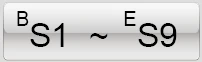 The program mode starts from the start node and ends at the end node.
 In simple mode, only selected nodes will be run.
4. Operation Guide
4.1 Button Description
 Press and hold the buzzer for 3 seconds to beep once, to turn on or off the buzzer sound;
 Touch this key to switch the current step PROG.S1 ~ PROG.S9;
 Touch this key to switch the start step BS1 ~ BS9;
(Note: the start step cannot be higher than the end step)
 Touch this key to switch the end step ES1 ~ ES9;
(Note: the end step must not be smaller than the start step)
 Touch this key to switch between simple or program mode;
 Touch this key to run or end temperature control;
4.2 Slide description
4.2.1 Temperature slider operating instructions 
Slide from left to right to increase the temperature value. You can also touch the "+" key to increase the temperature value; at the same time, the parameter font changes to yellow.
Slide from right to left to decrease the temperature value. You can also touch the "-" key to decrease the temperature value; at the same time, the parameter font changes to yellow.
4.2.2 Time slider operation instructions 
Slide from left to right to increase the time value. You can also touch the "+" key to increase the time value; at the same time, the parameter font changes to yellow.
Slide from right to left to decrease the time value. You can also touch the "-" key to decrease the time value; at the same time, the parameter font changes to yellow.
Reminder! When the time is set to 00:00, it means that the time running value is ∞, and the instrument continues to run.
4.3 Temperature calibration
The temperature of this instrument has been calibrated before leaving the factory. However, due to some reasons, there is a deviation between the actual temperature and the displayed temperature. The temperature error can be corrected according to the following methods.
Notice! In order to ensure the accuracy of the temperature, this instrument adopts a three-point temperature calibration method, namely a synchronous linear calibration method for three-point temperature of 40°C, 100°C and 140°C. After the three-point temperature linear calibration, the system ensures that the temperature accuracy of other temperature points is ≤±0.5°C.
When calibrating the temperature, the ambient temperature and the temperature of the block must be lower than 35°C.
The specific operation method is as follows
4.3.1 After the instrument is turned on, enter the waiting interface. At this time, observe the temperature of the temperature display window and confirm that its temperature value should be less than 35°C. If the temperature is higher than 35°C, wait for the temperature to drop to 35°C, and then operate according to the following methods.
4.3.2 Inject paraffin oil into a tapered hole in the center of the block, and put a thermometer in the tapered hole (the accuracy of the thermometer is required to be 0.1°C, and the thermometer bulb must be completely immersed in the tapered hole), the upper part of the block use insulation materials to isolate from the environment. See figure 4 below
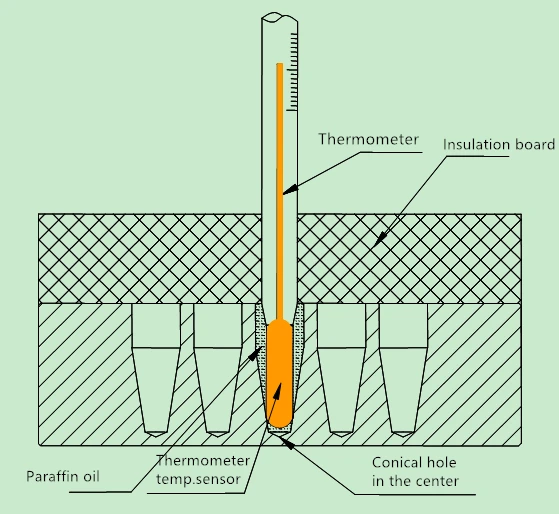
Figure 4
4.3.3 Simultaneously press and hold the "Begin/S1~S9" and "End/S1~S9" keys to enter the temperature calibration interface. The temperature display window displays the instant temperature, the ADJ... icon appears, and the temperature rises to 40.0°C automatically. When the temperature rises to a constant temperature of 40.0°C, the decimal place starts to flash, waiting for the temperature calibration value of 40°C. After 20 minutes of constant temperature, read the actual temperature of the thermometer.
Notice! In order to ensure the accuracy of temperature calibration, it is recommended that users read the measured temperature after 20 minutes of constant temperature!
If the value read by the thermometer is 39.6°C, use the slider to modify the temperature value in the temperature display window to make the temperature value 39.6, and press the "Start/Stop" key to confirm the input value.
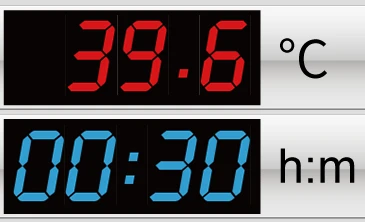
4.3.4 Then the instrument automatically heats up to 100°C and waits for the temperature calibration value to be input after the constant temperature of 100°C. It is also required to read the actual temperature of the thermometer after 20 minutes of constant temperature.
Notice! In order to ensure the accuracy of temperature calibration, it is recommended that users read the measured temperature after 20 minutes of constant temperature!
If the value read by the thermometer is 101.5°C, use the slider to modify the temperature value in the temperature display window, make the temperature value 101.5, press the "Start/Stop" key to confirm the input value.
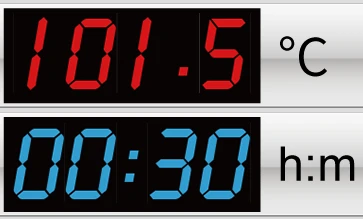
4.3.5 Then the instrument automatically heats up to 140°C and waits for the temperature calibration value to be input after the constant temperature at 140°C. It is also required to read the actual temperature of the thermometer after 20 minutes of constant temperature.
Notice! In order to ensure the accuracy of temperature calibration, it is recommended that users read the measured temperature after 20 minutes of constant temperature!
If the value read by the thermometer is 140.5°C, use the slider to modify the temperature in the temperature display window, make the temperature value 140.5, press the "Start/Stop" key to confirm the input value. In this way, the three-point temperature calibration has been completed, and it will automatically exit the temperature calibration interface and return to the waiting interface.
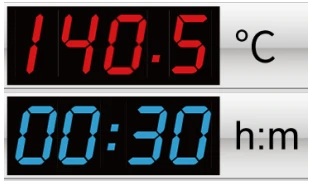
4.3.6 Attention! During the three-point temperature calibration process, press and hold the "Begin/S1~S9" and "End/S1~S9" keys at the same time to exit the temperature calibration program.The temperature value is invalid!
4.4 Instrument installation
4.4.1 Button Description
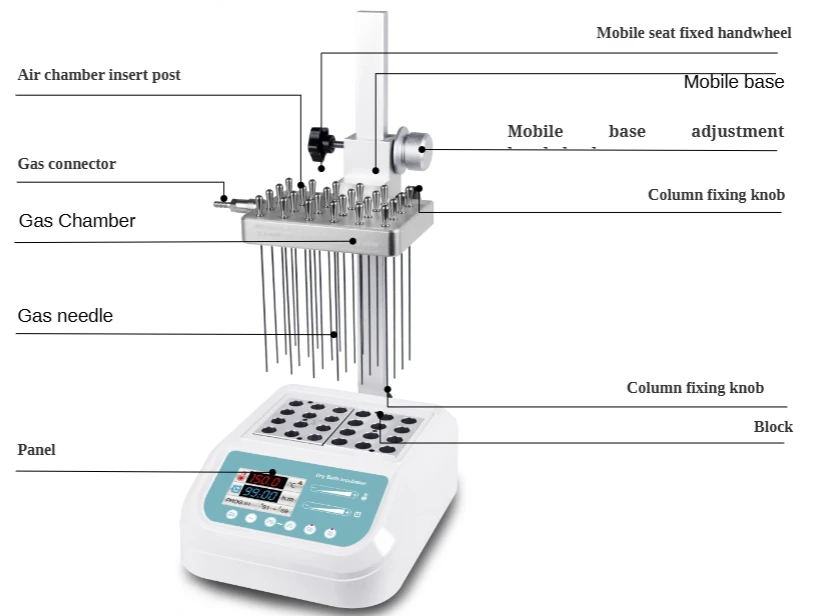
Figure 5
Installation steps:
1. Place the main instrument on the workbench steadily and firmly.
2. Insert the column into the square hole of the column holder at the back of the host, insert the column completely to the end, then screw the knob into the column holder, and tighten the knob to fix the column.
3. Screw the fixed knob of the movable seat into the threaded hole on the left side of the movable seat as shown in the figure, do not tighten it first, then hold the knob of the movable seat with your left hand, turn the adjusting handwheel counterclockwise with your right hand, and the movable seat will rise to Tighten the knob with the left hand at the desired position, then fix the movable seat. Turn the adjusting handwheel clockwise, and the movable seat will descend.
Note: When raising and lowering the mobile base, you must use your left and right hands to operate the fixed knob and adjustment handwheel of the mobile base at the same time.
4. Pre-screw the air chamber fixing knob into the threaded hole on the left side of the movable seat as shown in the figure. Please do not screw it completely, and then align the air chamber insert of the air chamber with the corresponding hole in the front of the movable seat. Pay attention to the air chamber. After the positioning pin is matched with the air chamber, after the air chamber inserting column is fully inserted, tighten the air chamber fixing knob.
4.4.2 Gas needle installation
a)Make the hole at the front side of the air needle completely sealed and fixed in the air chamber plate. If some holes in the module are not used, please turn off the throttle so that the air source will not be wasted.
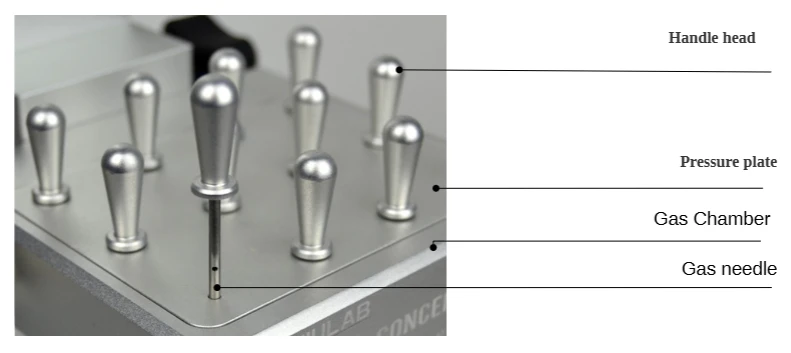
Figure 6
b) After installing the gas needle, turn over the gas chamber, insert the gas chamber into the movable seat, and fix the gas chamber with the gas chamber fixing knob.
c) There is a quick connection function at the gas joint, so that the user can conveniently and quickly switch on and off the gas source. The operation is as follows:
As shown in the figure below, press the part 2 (connector) by hand, and then align the plug with 1 (intake nozzle) to the A direction. The spring part in the connector will automatically clamp 1 (intake nozzle). When you need to get the air pipe out of the gas distribution chamber, just hold down 2 (connector) and push it hard to B, and the spring part in the connector will automatically detach from 1 (intake nozzle).
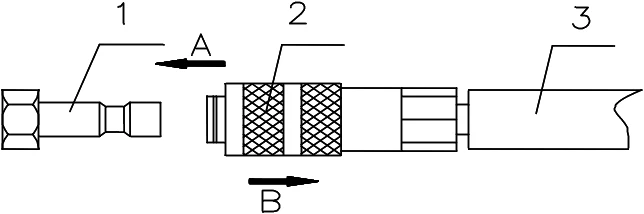
Figure 7
1. Intake nozzle 2 . Connector 3. gas tube
d) Hold the fixed knob of the moving seat with the left hand, loosen the knob, and turn the adjusting handwheel with the right hand to lower the air chamber with the air needle installed, so that the air needle is inserted about 10mm above the liquid in the test tube. Tighten the knob of the movable seat to fix the movable seat.
Reconnect the air source as needed.
Note: The pressure of the input gas should not be greater than 0.08Mpa. Excessive pressure of the gas source will make the gas chamber poorly sealed and leak the gas chamber, thereby wasting the gas source. When the number of gas needles used is less than 16, the gas pressure should not be greater than 0.04Mpa.
4.4.3 Nitrogen flow control valve installation
1) Composition of nitrogen flow regulating valve
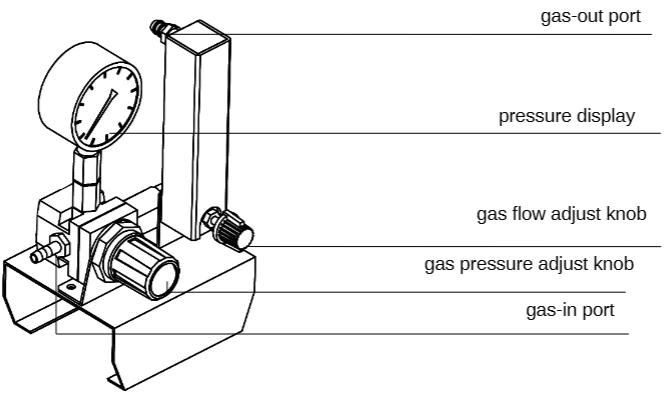
Figure 8
Pull out the pressure adjustment knob, turn the knob clockwise to increase the pressure, otherwise, reduce the pressure to close. Press the knob to lock the knob, and the pressure cannot be adjusted at this time. Turn the flow adjustment knob counterclockwise to increase the flow, otherwise reduce the flow to close.
Note: The nitrogen flow regulating valve and air filter are optional accessories, which are chosen by customers according to their needs.
2) Nitrogen flow control valve installation
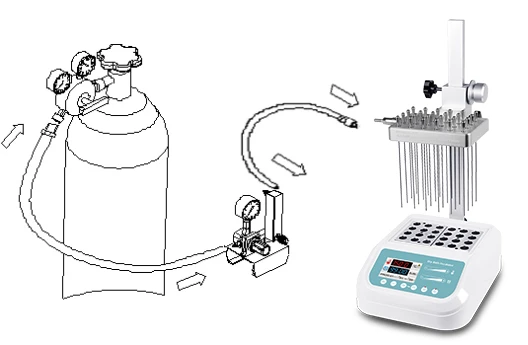
Figure 9
As shown in the figure above, connect the outlet of the nitrogen flow regulating valve with the inlet of the air chamber of the main instrument with a short gas pipe (about 1.5m long), and connect the inlet of the nitrogen flow regulating valve and the outlet of the nitrogen cylinder with a long gas pipe (about 3m).
Note: Slowly open the valve of the nitrogen bottle to control the outlet pressure between
0.1MPa to 0.2MPa, and then open the valve adjusting knob to keep pressure value at 0.02MPa. According to the number of holes, we can adjust the pressure appropriately (usually between 0.02MPa and 0.05MPa optional).
4.5 Metal block replacement
a) Pull out the two screws which fix the block to the heating board with the screwdriver.
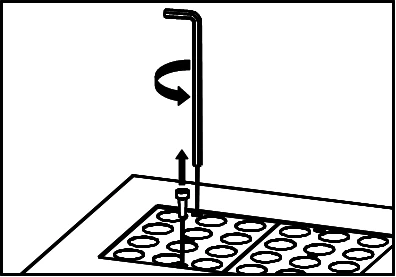
Figure 10
b) Tighten the M4 threaded of the handle clockwise with the M4 threaded hole in the middle of the metal block to be replaced.
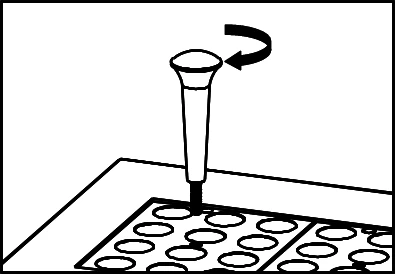
Figure 11
c) Pull the upper part of the handle upward by hand to take out the metal block.
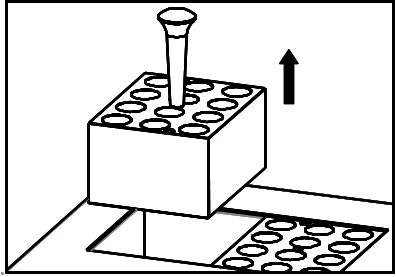
Figure 12
d) Unscrew the handle and fix it on the metal block of another model to be replaced. Then place it on the corresponding position of the instrument, and fix the newly replaced metal block on the instrument in a clockwise direction with an Allen key.
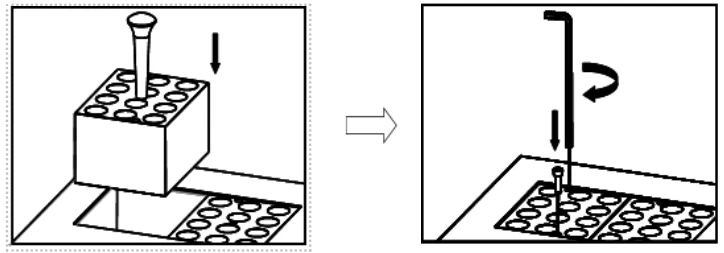
Figure 13
Notice: It is a little complicated to exchange the block, please be a bit patient.
5. Error Analysis and Trouble Shooting
No. | Fault phenomenon | Cause analysis | Recovery processing |
1 | No signal on the display when power on | No power | Check the connection of power |
Broken fuse | Exchange fuse | ||
Broken switch | Exchange the switch | ||
Others | Contact to the seller | ||
2 | The actual and display temperature are quite different | Broken sensor or loose contact of the block | Contact to the seller |
3 | The temperature display window displays "ERR.1"/"ERR.2" | Broken sensor or room temperature below zero. | Contact to the seller |
4 | No heating of the block | Broken sensor. | Contact to the seller |
Thyristor damage | |||
Broken heater | |||
5 | Touch the slider does not work | Poor cable contact | Contact to the seller |
Table 3
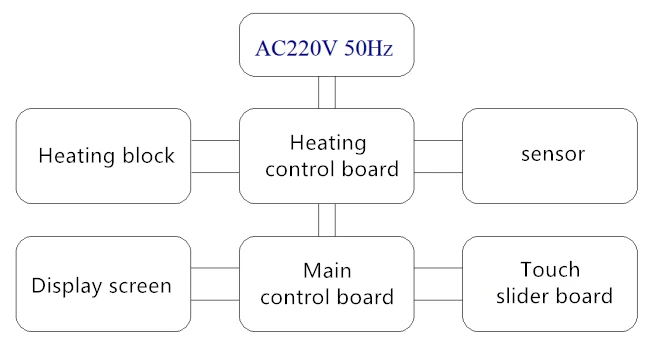
Annex 1:Wiring Diagram of BDIB-109
Below diagram is just for reference. It is subject to change without prior notice.