


Dental Autoclave BFG1B4 (BADT-104)
Autoclave, Table-top Autoclave- Sea, Air, Door to Door Shipping
- 1 Year Warranty
- US & European Standards

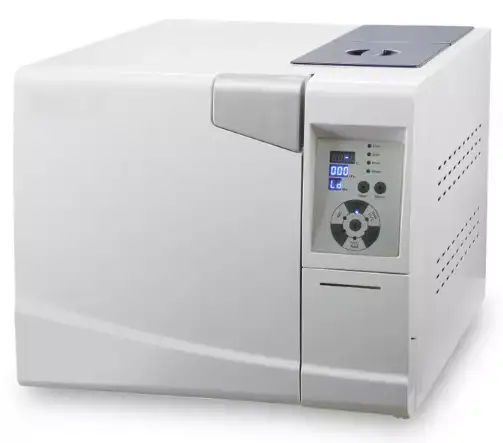

Specifications
| Model | BFG1B4 |
| Voltage | 220V / 50Hz |
| Power | 1750W |
| Capacity | 22L |
| Chamber size | Φ25*45cm |
| Product size | 70*44.5*39cm |
| Installation size | 60cm |
| N.W. | 50kgs |
| Printer | optional |
Features
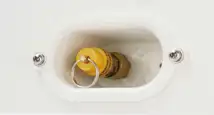

1.Safety Valve
Prevent chamber from over pressure


2.Bacteria Filter
High quality,2μm precision
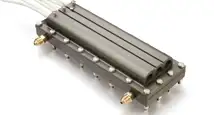

3.Steam Generator
Patented design, high efficiency and reliable
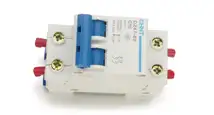

4.Air Switch
Shut down the machine in case of electricity leakage or short circuit
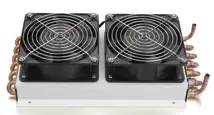

5.Double Fans
Bring faster cooling and more efficiency sterilization
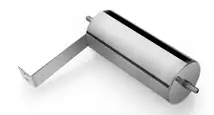

6.Water Steam Separator
Patented design, prevent vacuum pump from oil damaging
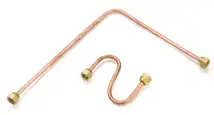

7.Brass Piping
Withstand high temperature and pressure safe and reliable
Operating Manual
Download1. Customer's Record
2. User Guide:
3.Safety Attentions:
4. General Instruction
5. Using Range
6. Parameters and process of the sterilizer
7. Control Panel
8. Installation
9. Operation
10. Abnormal Situations
11. Maintenance
12. Transport and Storage
13. Attention.
14. Accessories
15. Appendix
Appendix 1: Table of Working Status:
Appendix 2: Adjusting time of sterilization
Appendix 3. Structure diagram
Appendix 4: Circuit diagram
Appendix 5: EMC
1. Customer's Record
Item: Pressure Steam Sterilizer
Model:
No.:
Attentions:
Read this instruction carefully before start to use this Pressure Steam Sterilizer.
Follow the instruction seriously when the user uses this Pressure Steam Sterilizer.
Please keep this instruction for reference in future.
Contact the sellers or manufacturer if the Pressure Steam Sterilizer has any problems.
2. User Guide:
Customer will get the instruction after buying the Pressure Steam Sterilizer.
The symbols as below indicate important meanings.
 Warning, Attention and other importance
Warning:Please pay attention on these "Warning", if the user ignores them, may cause
death or serious injury.
Attention:Please pay attention on these "Attention", if the user ignores them, may cause
injury or equipment damages.
Importance:Please pay attention on these "Importance", if the user ignores them, may
cause equipment damages or low quality sterilization.
 Tip and explanation:Tip for user to operator.
3.Safety Attentions:
Please read it carefully.
If the user ignores these "Warning", may cause electronic shock, fire or equipment damage.
1. Please use three holes socket (230±23VAC/10A/50Hz~60Hz), and be sure it is connected to the ground.
2. Please don't use any other voltage powers.
3. Never touch the plug or the socket by wet hands.
4. Don't pull, change, over-bend or twist wire, or don't leave heavy things on wire.
5. Don't put the sterilizer on an unstable shelf or caunter.
6. Don't block the sterilizer's ventilation and radiation.
7. Don't put anything on the sterilizer.
8. If the user smells or hears abnormally during running (it doesn't include the noise of pumps), then cut off the power and contact sellers or manufacturer.
9. Please cut off the power if the user won't use the sterilizer for a long time.
4. General Instruction
The sterilizer is operated by doctors or professionals and is designed especially for clinic, hospital, laboratory etc. The sterilizer uses microprocessor with intelligence control system, and humanistic interface, operate easily, safety and reliable. The parameters and conditions of the sterilizer will be displayed on the digital screen during the processing. For ensuring the reliability of sterilization, the machine will do trouble self-diagnose and self-protect automatically during overheat or overpressure situations.
5. Using Range
The sterilizer is highly penetrability for department of hospital, stomatology, ophthalmology, and biological research institute to sterilize surgical instruments, stomatology instruments and syringes etc.
6. Parameters and process of the sterilizer
6.1 Parameters:
The condition of using the sterilizer:
Temperature of environment: 5°C~40°C;
Relative humidity: ≤80%;
Atmospheric Pressure: >70kPa;
Frequency: 50Hz/60Hz, Voltage: one-phase 230V±23V.
6.2 Process of the sterilizer:
Process | sterilizing time | Sterilizing temperature | Sterilizing pressure | Dry time min |
121°C/solid (121°C/unwrapped) | 20min | 121°C | 110KPa | 4 |
121°C/universal (121°C/wrapped) | 20min | 121°C | 110KPa | 15 |
134°C/solid (134°C/unwrapped) | 4min | 134°C | 210KPa | 4 |
134°C/universal (134°C/wrapped) | 4min | 134°C | 210KPa | 15 |
134°C/cotton | 4min | 134°C | 210KPa | 20 |
B-D TEST | 3.5min | 134°C | 210KPa | 10 |
VACUUM TEST | 15min | |||
The sterilization time can be adjusted!
Importance: B-D Test: Countdown on the display shows 4min,but normally it takes 3.5min
7. Control Panel
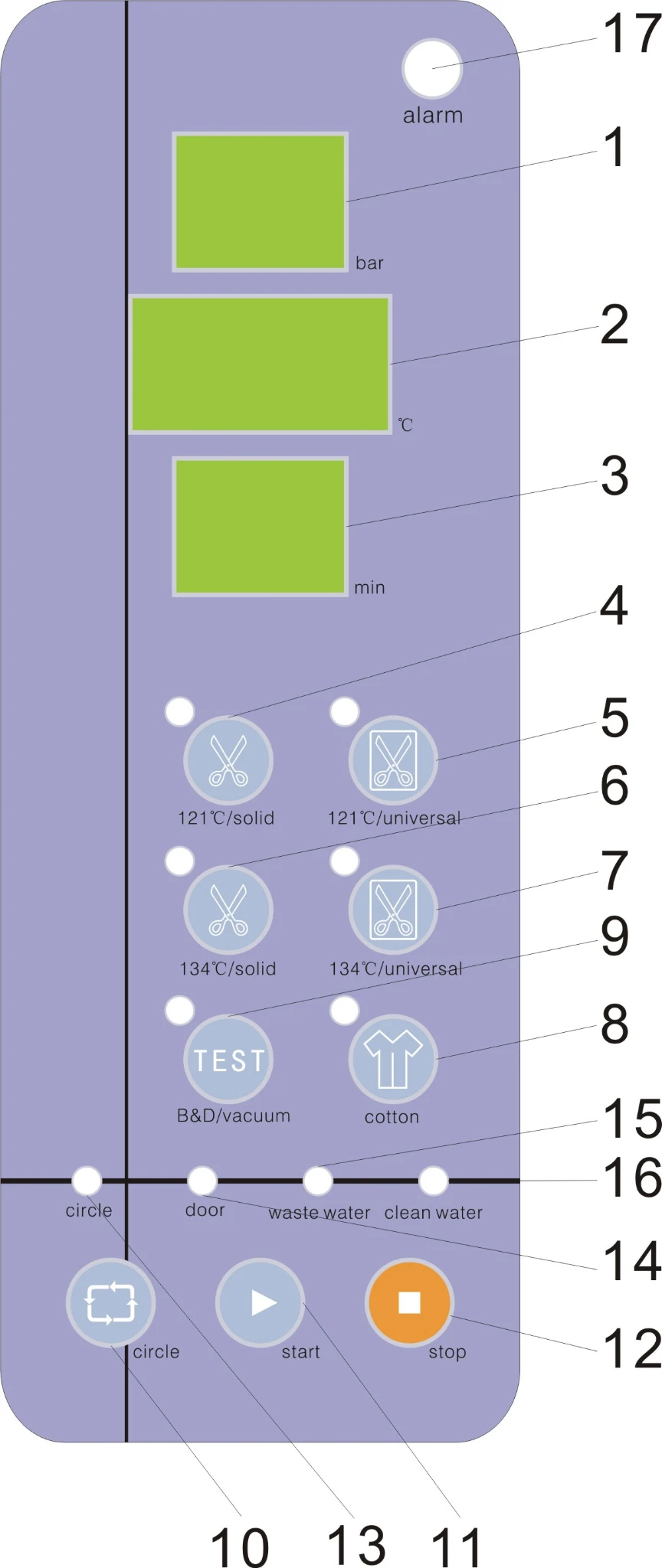
1. Pressure screen
Showing the pressure inside of the chamber
It is a relative pressure. unit:Kpa
Showing -80 means inside pressure -80Kpa
Showing 214 means inside pressure 214Kpa
2. Temperature/Error Code screen
Showing the temperature inside of the chamber. unit:°C
Showing 131.3 means inside temperature is 131.3 °C
It shows the error code No. when error happens. Checking with the "Error Codes and Resolution" table could find a solution to tackle the problems. (see below Page 14 "Error Codes and Resolution")
Warning: Contact the seller or manufacturer for solutions if there is any problem!
3. Status screen
Showing various Status of the process of sterilizer(see below page 19).
4~8. Keys. for pre-setting program
Five keys for pre-setting program: 121°C/solid(121°C/unwrapped),121°C/universal(121°C/wrapped),134°C/solid(134°C/unwrapped),134°C/universal(134°C/wrapped) and cotton,one button-push choice makes the operation convenient and easy.
Caution: Solid/unwrapped program can only sterilize solid instruments without wrapped, such as plier, forfex, forceps etc.
Universal wrapped program can sterilize all instruments, such as handpieces etc ,except liquid,.
Tip :
Since 121°C-program and 134°C-program has no difference in sterilization ,please take 121°C program for the instruments temperature resistance below 134°C.
Caution : Check the instruments maximum temperature resistance and choose a proper temperature. Don't sterilization any instruments temperature resistance below 121°C.
9. "Test" key
This key is for user to run B-D test program or vacuum test program.
1)Press test key once to choose the Vacuum test program. The "test key" indicator lamp will be on and the status screen will show  .Then press the Start key to run vacuum test program;
2)Press test key for 5 seconds long once to choose the B-D test program. The "test key" indicator lamp will be on and the status screen will show .  Then press the Start key to run B-D test program;
Tip:
B-D test and Helix test is the same test program. The only difference is that B-D test uses a B-D test package, while Helix test uses a Helix test device (PCD: process challenge device).
Caution: must do a B-D test program before using the device for sterilization every day.
10. "Circle" key
Using for successive sterilization process.
If not choosing cycle function, the sterilizer will only do one sterilization cycle and then it will cool down automatically.
If choosing cycle function, the sterilizer will do more than one sterilization cycle, after each cycle, the sterilizer will keep warm until the door of sterilizer open, in this way, it can take shorter heating time for the next cycle.
11. "Start" key
To start sterilization process
12. "Stop" key
To stop the sterilization process, press this key for 5s when any abnormal situations of the machine happen.
13."Circle"indicator lamp
The lamp will be on after press "Circle" key.
14."Door"indicator lamp
The door of the sterilizer must been closed tightly before the sterilizer is started, otherwise the "Door" indicator lamp will be on and the sterilizer cannot be started.
15."Waste Water Tank" indicator lamp
When this lamp is flashing, it indicates the level of waste water is too high and has to be drained.
When the waste water tank is full during operation, the lamp will keep flashing. The beeps is on for 10 times and then stops. After the cycle is completed, drain out the water.
16."Water Storage Tank" indicator lamp
When this lamp is flashing indicates the level of water in storage tank is too low, and it may cause the sterilization process failed (E8 or E9), so the tank must be top up.
When the lamp is still on, the tank is full.
17. Error lamp
If any problems happen during the sterilization process, the lamp will be flashing with beeps and stop running automatically, The pressure will also be released automatically.
8. Installation
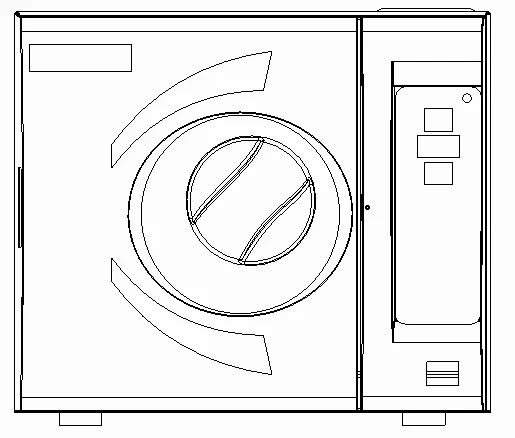
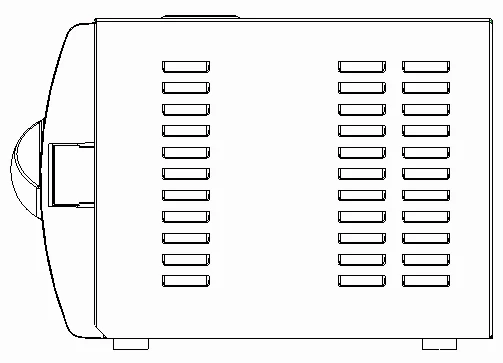
8.1) At least 10 cm space should be left around the sterilizer, and the back space must be at least 20 cm.
Suggest putting sterilizer in well-ventilated location. Don't block the radiator of the sterilizer.
Put the sterilizer on the horizontal shelf or counter.
8.2) Adjust atmospheric pressure before the first time use since atmospheric pressure varies from place to place.
Steps:
1) Cut off the power 2) Open the door 3) Turn on the power, and 20's late, cut off the power, it is done automatically.
If the user don't adjust atmospheric pressure, the sterilizer might not be able to run
8.3)Date & Time adjustment:
1. Press "stop" key for 20's, the pressure screen shows 
2. Then release the key.
3. Press "stop" key for 20's, the pressure screen shows  On the temperature screen, it shows the year, e.g. "11" means year of 2011. Press "start" key for up and "circle" key for down.
4. Press "stop" key once to adjust month. ( the same as above adjusting year). On the pressure screen, it shows:
d1: year d2: month d3: day
d4:hour d5: minute d6: second
5. Cut off the power and it's done.
9. Operation
Prepare before using:
Connect the power line correctly before starting the sterilizer. Press the power switch that is on the right front side, the lamp will be on which indicates the sterilizer has been
connected to the power and it is on the initial condition without heating. The working condition will display as "LD". After press the start key, the sterilizer will go to run.
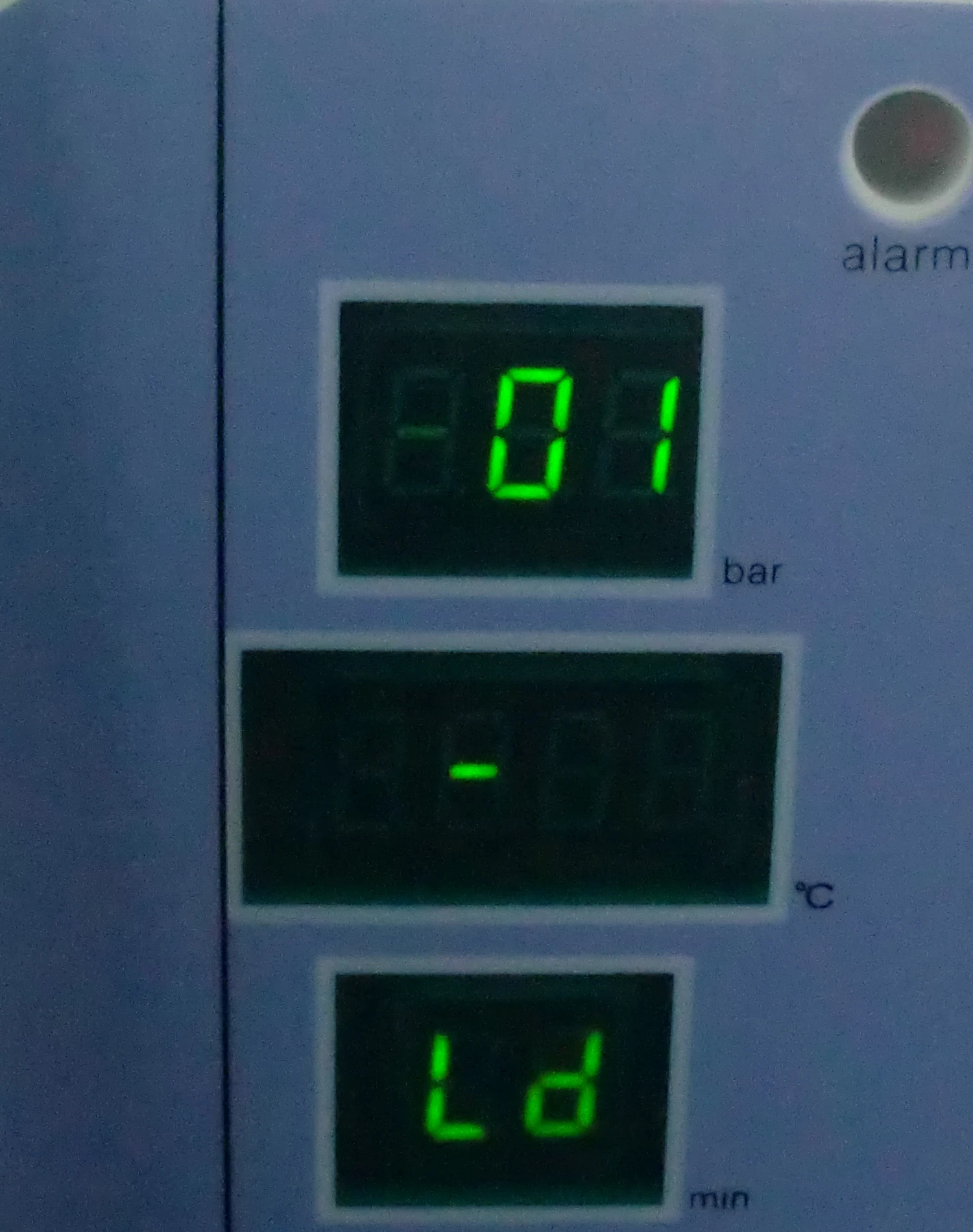
Warning :Please ensure to be well grounded.
9.1 Top up water
If the level of water in the storage tank is too low, the water storage tank indicator lamp will keep flashing with beeps, and the start key will become invalid, user must fill water in. There is a hole on the top of the sterilizer, as the picture shows, when the user top up the water the lamp will be off with beeps, which indicates the tank has enough water to run a cycle, the user can continue filling water until it is full. The storage tank lamp keeps on and beeps 10 times and then stops.
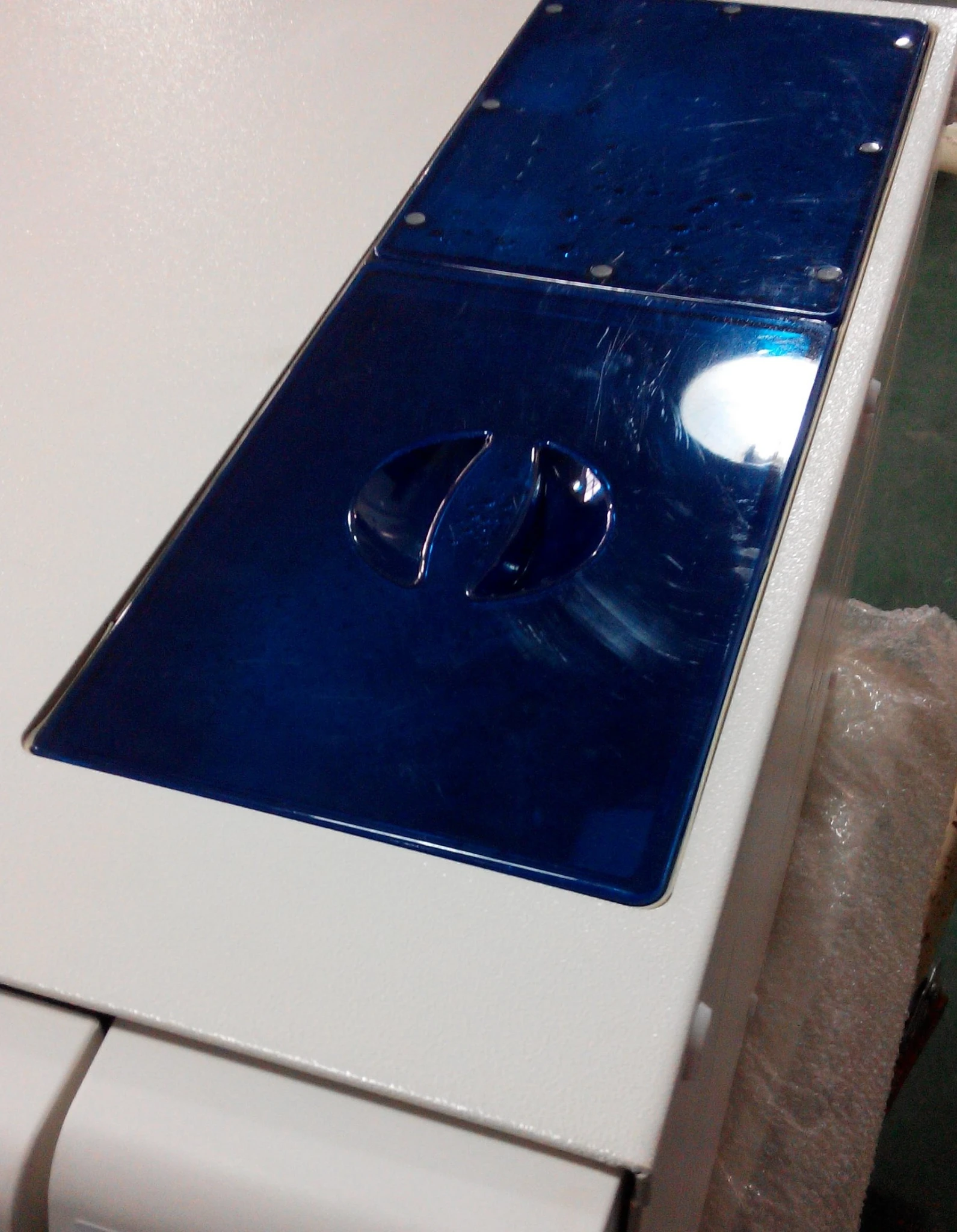
Attention : Please use distilled water to avoid clogging of the steam generator and the valves. Users should be responsible for the consequences it caused.
Tip:
1. Before top up water, the power must be connected.
2. Please do not put the sterilizer upside down when tank is full.
3. Suggest: Drain the waste storage tank also when the water in the storage water tank used out.
4. Pressing the stop key can stop the beeps when the waste water tank is full. The lamp won't
be off until the waste water tank is empty.
9.2 Working
When storage tank indicator lamp and waste water tank indicator lamp don't flash, it is ready for working.
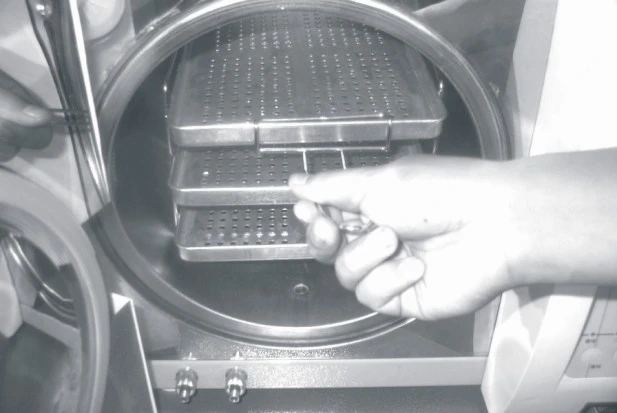
9.2.1 Put the loads into the chamber
Tip:
1. No more than 70% of the volume of the sterilizer or no more than 6kg for once.
2. The instruments should not stick to the inside-wall, especially should not block the outlet of the chamber. It should leave at least 10 mm from the inside-wall.
3. Put the test paper into the center of the sterilization package if the user wants to test and judge the sterilization effect.
4. When putting the loads into the sterilizer, we suggest using the tray-hand-holder to prevent from scalded.
9.2.2. After the user put the loads into the sterilizer and close the door tightly (turn the handle to the maximize position) and the door indicator lamp will be off.
Caution : The user must turn the handle to the maximize position otherwise the sterilization won't start, and even the user presses the start key, the user will get "E6" alarm.
Tip :
If the user feels the door is too hard to close, may be steam still in the sterilizer, we suggest that closeing door quickly or waiting for a few seconds to close door.
9.2.3. Choosing program
After the door is closed, choose the relative sterilization program according to the loads in the chamber. Press the program key, the relative program indicator lamp will be on. It won't be off until the sterilization cycle is finished and another program is chosen.
9.2.4. Choosing cycle
For successive sterilization process, press "circle" key after the program is chosen. Therefore the sterilizer will keep warm after each cycle. It can take shorter preheating time for the next cycle.
Without choosing cycle, it will cool down after a cycle finished.
Tip :
Whenever the door is opened, the function of "cycle" will be stopped.
9.2.5. Having made the choice, the user can press the start key to start the program. The sterilizer will run pre-heating, 3-times vacuum, sterilization and drying automatically. The time of the whole cycle is decided by the initial temperature, the loads and the program.
9.2.6 When the sterilization process finished, "Ed" will be displayed on the panel with three beeps. Then the user can open the door and take the sterilized loads out.
Caution : The user shall fill in water promptly if there is a low-water alert. Otherwise it will show "E08 or E9" error alarm.
9.2.7 When it is not in use, please turn off the power switch (be sure the power lamp is off). If the user won't use the sterilizer for a long time, please disconnect the power.
Warning : 1. We strongly suggest using the tray-hand-holder to take the tray out of the sterilizer for preventing scald.
2. Don't open the door until the pressure within "-05~05".
Tip:
To ensure the effectiveness of sterilization, we suggest putting test paper or pouches with indicators together with the loads into the sterilization chamber every time.
10. Abnormal Situations
The sterilizer will give alarm, release pressure and stop heating automatically if it has any abnormal situations during working. It will absolutely keep the user safe and display the error code ( See the below page 14).
Write down the error code No. and cut off the power, don't open the door and then turn on the power again to wait the pressure turn back to "-0.5~0.5".
Tip :
We suggest running one more time to see if the error happens again.
If the user cannot find the resolution from the table, contact with seller or our service department, telling us the error code No., we will help the user to solve it as soon as possible.
Error Codes and Resolutions.
E1 | "Du"long beep | The temperature sensor has problems. | Check the temperature sensors. |
E2 | "Du"long beep | Over pressure | Do a vacuum test. If the result is fail, checking the vacuum pump . |
E3 | "Du"long beep | Inner temperature or steam generator over heat | Check steam generator ,the temperature sensor of steam generator and heating ring. |
E4 | "Du"long beep | Pre-heating failed. | Check steam generator and heating ring have been heated or not |
E5 | "Du"long beep | The pressure cannot be released. | Check the drain water valve |
E6 | "Du"long beep | The door senor is open | Check the sensor of the door. |
E7 | "Du"long beep | The local air pressure value too low | Turn off the power ,open the door and turn on the power, waiting for 25S. (refer to page 10) |
E8 | "Du"long beep | Rising pressure failed. | Check the water tank Check water pump, steam generator, pips and heating stick. |
E9 | "Du"long beep | Keeping pressure failed | Check if it is out of water in the water tank |
11. Maintenance
11.1 Door Tightness Adjustment
Door Adjustment:
Push down the lever while turning the door to adjust tightness. As show in below picture, anticlockwise turning will tighten the door, i.e, the door will be closer to the chamber. Therefore, it needs more strength to turn the handle. Clockwise turning the door will loosen it.
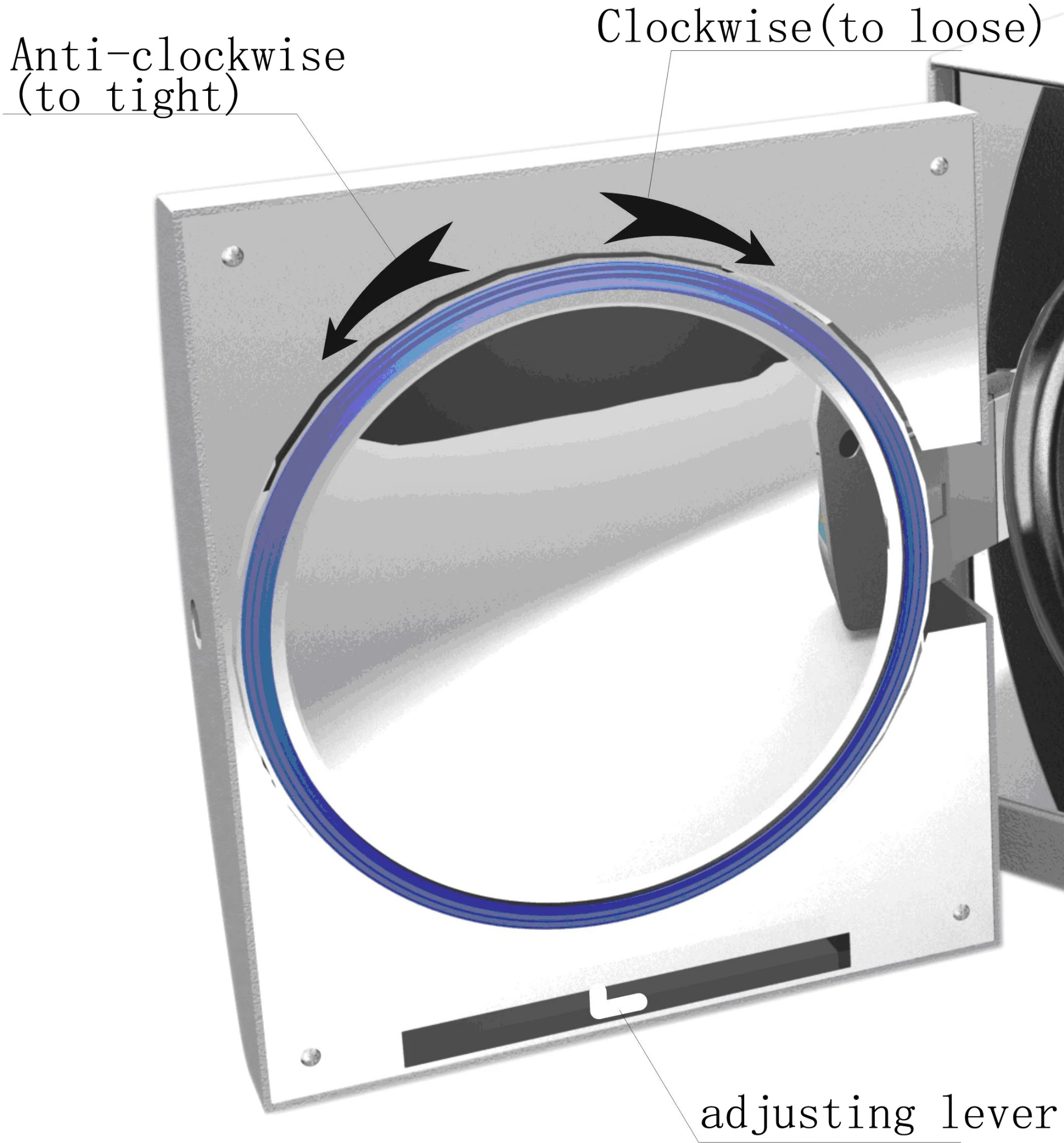
Steps:
1) Push down the lever a little 2)Turning the door to an angle 3) Release the lever
4)Keep turning the door to a place where the door cannot move anymore.
Importance : After the door adjustment, it needs to do a vacuum test. If there is a leakage, the user shall adjust it again.
Caution : If the door is too loose, the sealing ring might be exploded out with a big "bang". So, please be careful to use this function!
11.2 Change printer paper and paper feed .
Change printer paper:
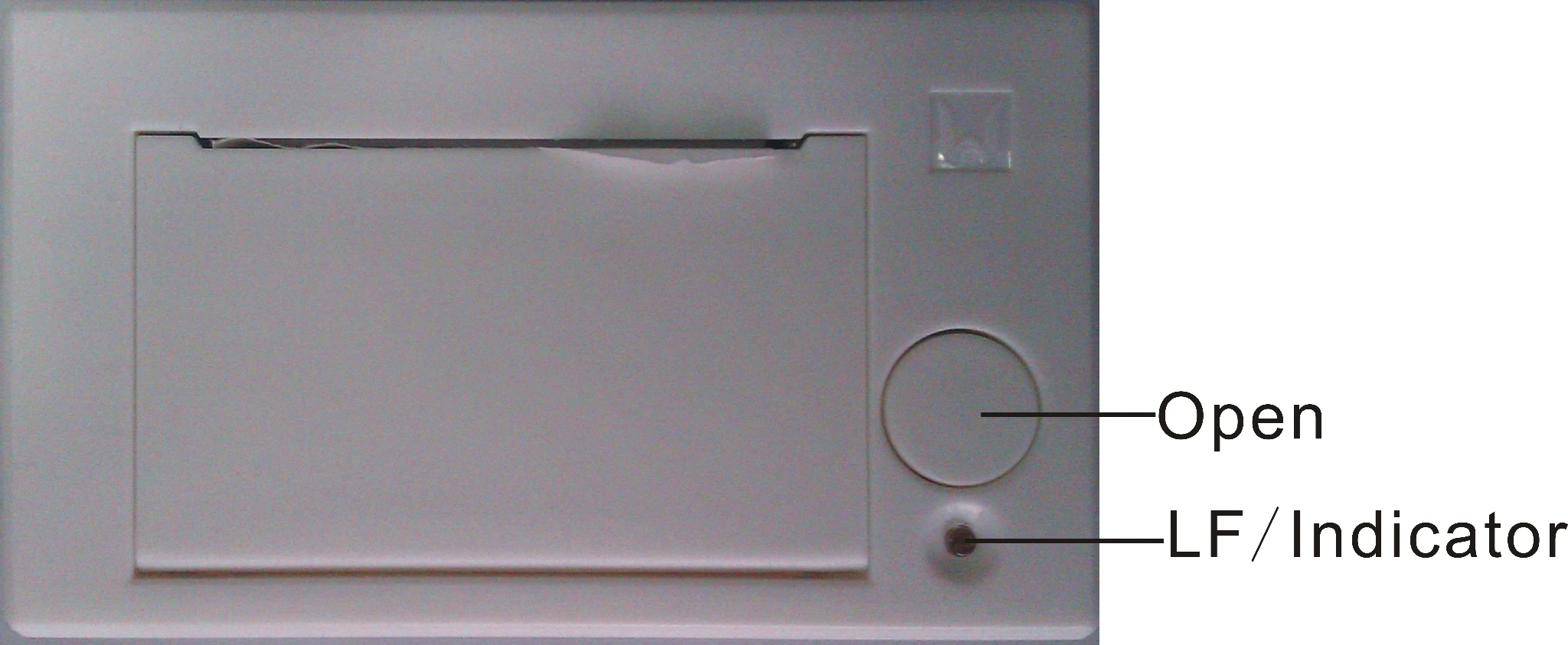
press "open" button of the printer to open the door,
change the paper,cover the door sheet as the figure 2;
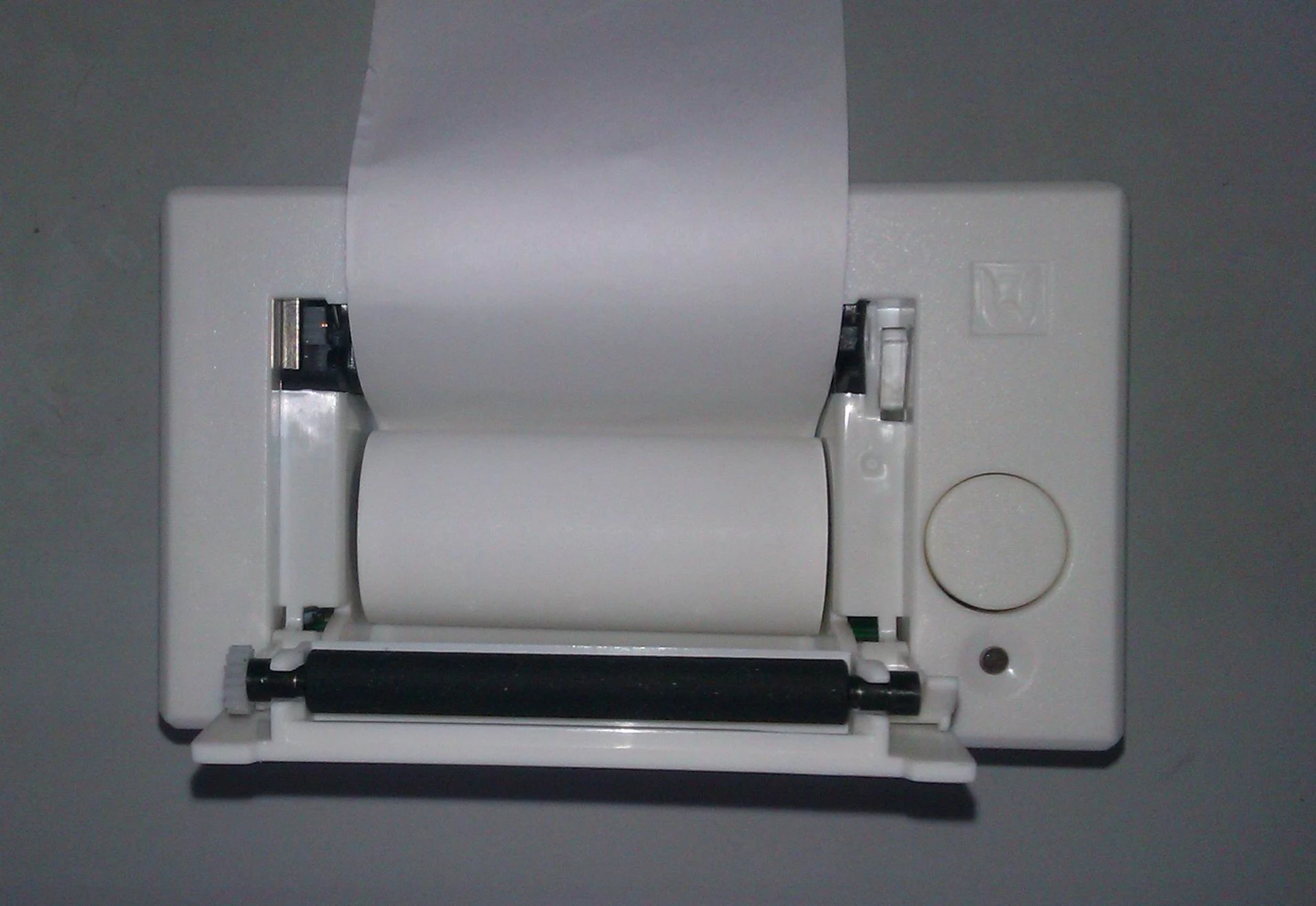
(2)Checking whether the paper change is correct through paper feed.
Printer paper feed check:
when press "LF" button once to see if the paper feed in gear; if the paper feed out of gear, the paper jammed, then change paper and feed again;
If the printer paper feed correct, but where's no data on the paper, please anti to install the pinter paper.
Tip:
The printer paper has direction and only one side can be printed on.
11.3. To use medical alcohol to clean the tank every week.
Caution: Use methyl alcohol and other cleaning agent may cause water tank broken.
11.4 To use ethyl alcohol disinfect and clean the inner surface of the sterilizer every month.
11.5 Every 150 cycles, we recommend to replace the germ-tight filter.
11.7 Clean seal ring regularly
For keeping a good ability of seal, the user should clean the seal ring regularly. Cleaning the seal ring by distilled water. If leaking still happens after clean, the user may have to replace the seal ring.
11.8 Replace the seal ring
Tool:The user needs a screwdriver without sharp.
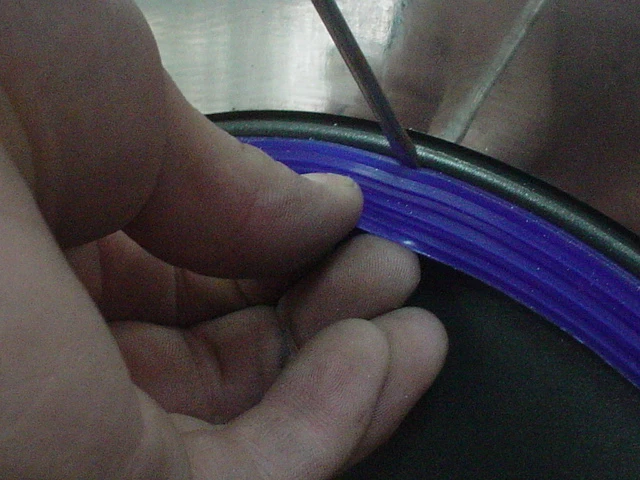
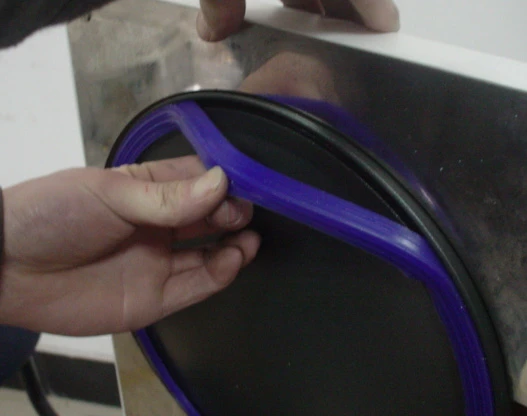
A. Hold the seal ring by a hand and use another one to hold a screwdriver carefully to separate the door and the seal ring. Then take the seal ring out slowly.
B. After the user takes the seal ring out, clean and check it, if it is damaged, the user must replace it.
C. After the seal ring is cleaned, put it back.
D. Attention: if the user finds it hard to put the seal ring back, use screwdriver press it carefully until it is done.
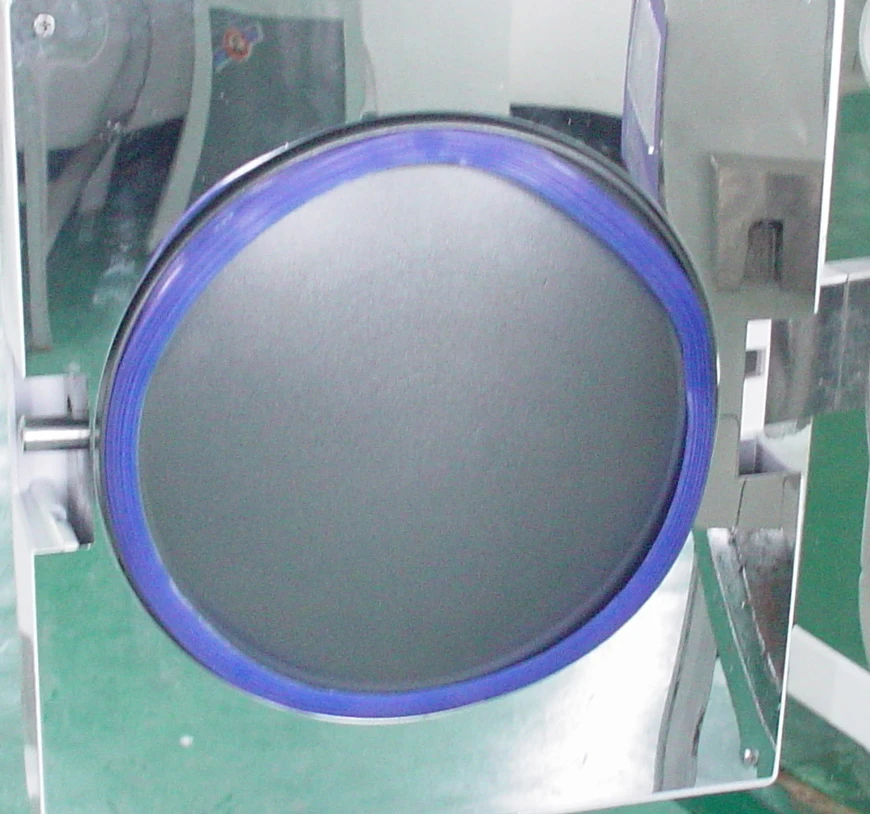
11.9 Never repair the sterilizer until the power is disconnected and it is getting cool down for preventing scald. Repairing the sterilizer must be done by the well trained professionals.
12. Transport and Storage
12.1 Preparation
Cool down the sterilizer and disconnect power.
12.2 Drainage
Empty all tanks:Insert the side of pipe without joint
into bleeder valve,A is waste water tank bleeder valve,
B is water storage tank bleeder valve. Then turn the
drainage switch towards anti-clockwise
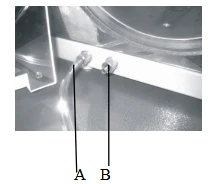 .
.
12.3 Terms of transportation:
Terms of transportation should according to the order contract.
12.4 Terms of store:
After packing, the sterilizer should keep in the clean indoor, which the temperature is 5°C~40°C, the relative humid is no more than 80%,no corroding gases and well-ventilated.
Importance: Don't drag during moving.
13. Attention.
1.Please use three holes socket (230±23VAC/10A/50Hz~60HZ), and be sure it is connected to the ground.
2. Please don't use other voltage power.
3. Don't touch plug or socket by wet hands.
4. Don't pull, change, over bend or twist wire, and don't leave heavy things on wire.
5. Don't put sterilizer on unstable place.
6. Don't block sterilizer's ventilate, radiation.
7. Don't put anything on the sterilizer.
8. If the user smells or hears any abnormal (it doesn't include the noise of pump) then cut off power and contact sellers or manufacturer.
9. Please cut off power if the user won't use the sterilizer for a long time.
10.Contact the seller or manufacturer for solutions if there is any problem.
11. Solid/unwrapped program can only sterilize solid instruments without wrapped, such as plier, forfex, forceps etc;Universal/wrapped program can sterilize all instruments except liquid, such as handpieces etc.
12. Check the instruments maximum temperature resistance and choose a proper temperature. Don't sterilization any instruments temperature resistance below 121°C.
13. The user must do a B-D test program before using the device for sterilization every day.
14. If the user don't adjust atmospheric pressure, the sterilizer might not be able to run。
15. The user must turn the handle to the maximize position otherwise the sterilization won't start, and even the user presses the start key, the user will get "E6" alarm.
16. The user shall fill in water promptly if there is a low-water alert. Otherwise it will show "E08" error alarm.
17. We strongly suggest using the tray-hand-holder to take the tray out of the sterilizer for preventing scald.
18. Don't open the door until the pressure within "-05~05".
19. After the door adjustment, it needs an airproof check. If there is a leakage, the user shall adjust it again.
20. If the door is too loose, the sealing ring might be exploded out with a big "bang". So, please be careful to use this function.
21. Don't drag during moving.
14. Accessories
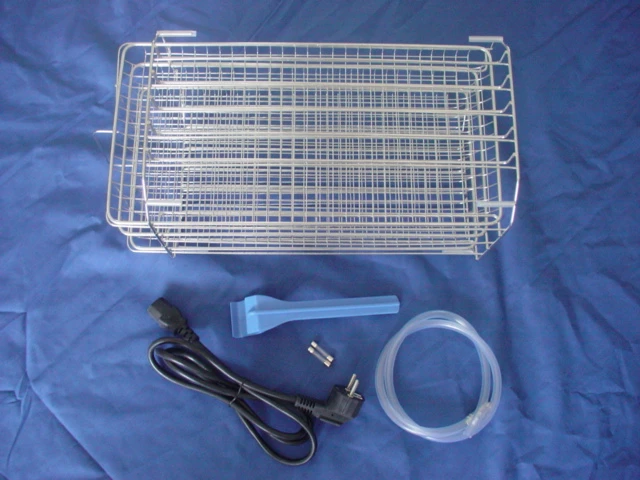
1. Drainage pipe 1
2. Equipment tray 3
3. Wire 1
4. Tray shelf 1
5. Tray-hand-holder 1
15. Appendix
Appendix 1: Table of Working Status:
Item | Code | Status | Status Explanation |
1 |
| Prepare | Loading loads, drain out waste water |
2 |
| Preheating | Heating the ring and steam generstor. |
3 |
| Vacuum | Vacuuming |
4 |
| Raising Temperature | Temperature raising and pressure raising in the chamber |
5 |
| Water drain and steam releasing | Water drain and steam releasing inside of a cycle |
6 | Show working time | Sterilization | Countdown of sterilization |
7 | Show drying time | Drying | Countdown of drying |
8 |
| Pressure balance | Balance of inside pressure and barometric pressure |
9 |
| Ending work | Program finished, and can open the door to get loads out |





Appendix 2: Adjusting time of sterilization
1) Press "circle" key for 5 seconds to enter sterilization time adjustment.
2) Choosing the program which need to be adjusted:
Having be choosed ,the light is on, and show the time of sterilization.
3) Adjusting the time:
Press the "start" key, increase 1 min; press the "stop" key, reduce 1 min, the range is 4~60 min.
4) Quit the process:
Press "circle" key, and save the setting.
5) Return to fault:
Press the "start" key for 5 seconds, when it shows "55", press it again to reset.
Caution : The time of installing processes is recommending time, it has been verified with the method which has prescript in standard ISO 14161:2009.
Once the time is adjusted, it must been verified with the method which has prescript in standard ISO 14161:2009; do not operate sterilizing until it has been verified, or the consequence should take by clients. Verifying can do by the clients who have the corresponding ability or the verifying-companies.
Tip :
The relations between pressure units : 1bar=0.1MPa=1.0x10⁵Pa=1 barometric pressure
Appendix 3. Structure diagram
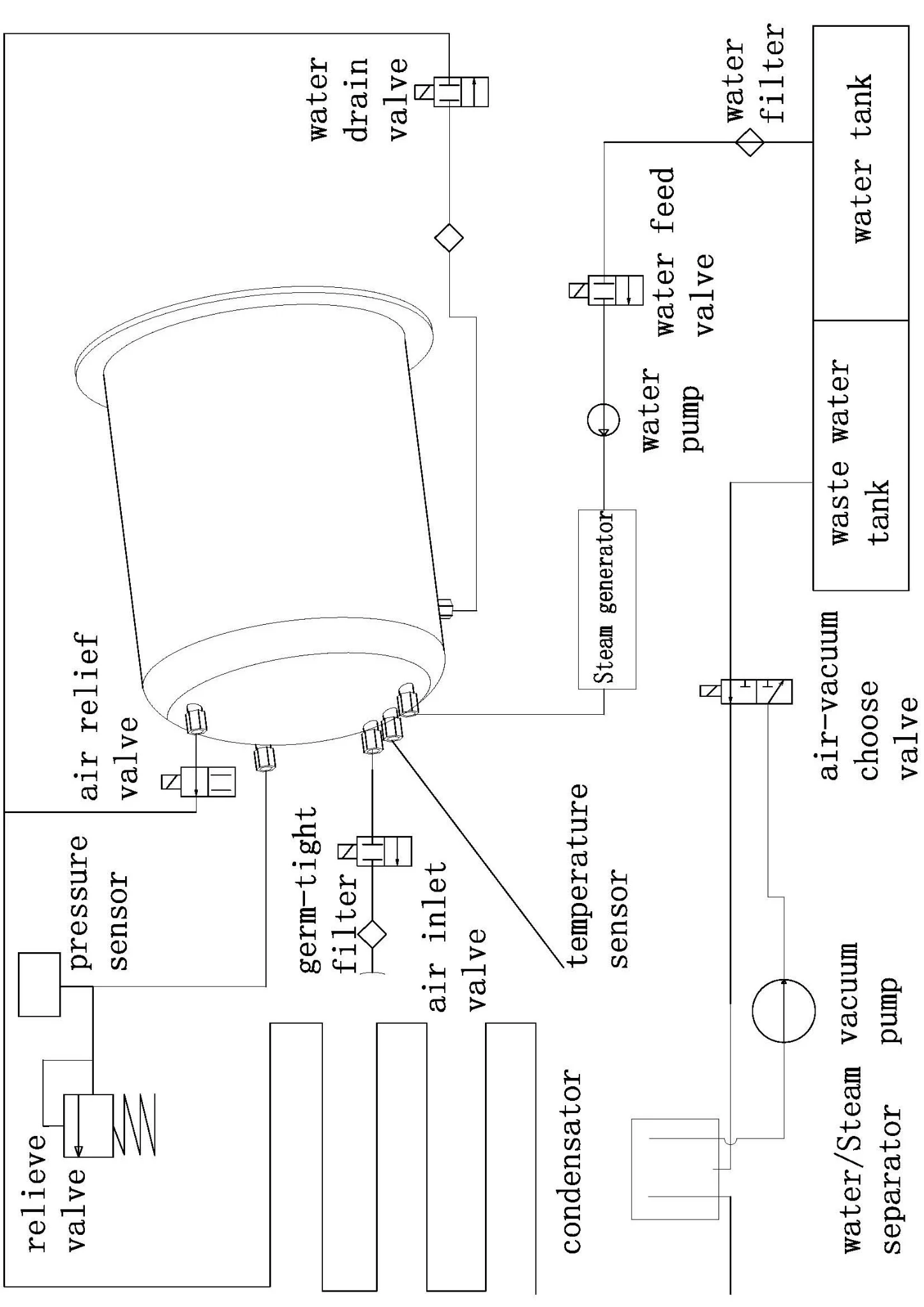
Appendix 4: Circuit diagram
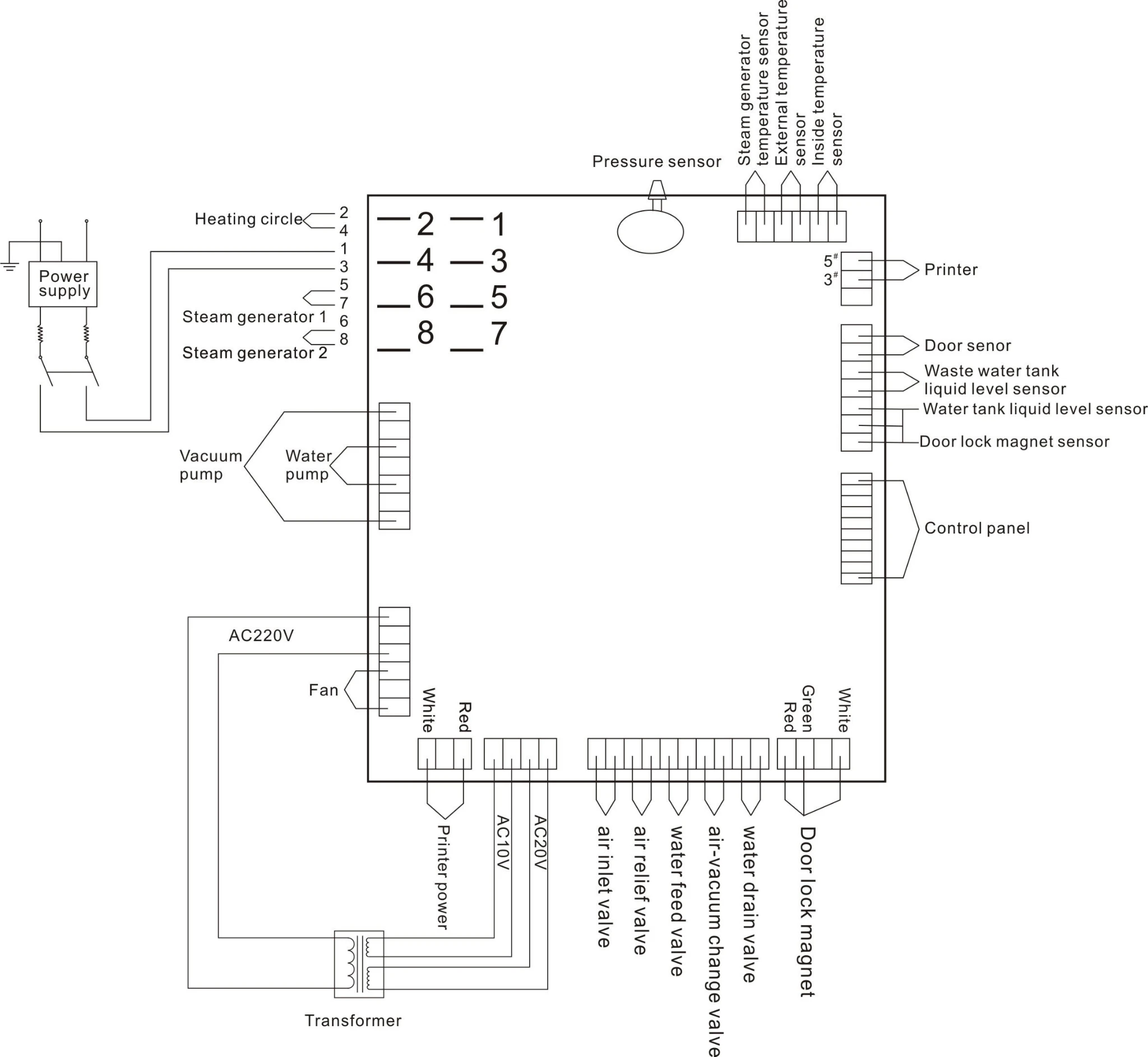
Above Figure : AC220V input interface, 2 is FireWire, 3 is zero-line.
Component parameters
Vacuum pump power: AC: 230V 50Hz 75W
Water pump power: AC: 230V 50Hz 47W
Heating circle: AC: 230V 50Hz 1500W
Heating rod: AC: 230V 50Hz 750W
Electromagnetic valve: DC: 24V 5W
Appendix 5: EMC
Electromagnetic emissions | ||
The Steam sterilizer is intended for use in the electromagnetic environment specified below. The customer or the user of the Steam sterilizer should assure that it is used in such an environment. | ||
Emissions test | Compliance | Electromagnetic environment - guidance |
RF emissions CISPR 11 | The Steam sterilizer uses RF energy only for its internal function. Therefore, its RF emissions are very low and are not likely to cause any interference in nearby electronic equipment. | |
RF emissions CISPR 11 | The Steam sterilizer is suitable for use in all establishments, including domestic establishments and those directly connected to the public low-voltage power supply network that supplies buildings used for domestic purposes. | |
Harmonic emissions IEC 61000-3-2 | ||
Voltage fluctuations/ flicker emissions IEC 61000-3-3 | ||
Electromagnetic immunity | |||
The Steam sterilizer is intended for use in the electromagnetic environment specified below. The customer or the user of the Steam sterilizer should assure that it is used in such an environment. | |||
Immunity test | IEC 60601 test level | Compliance level | Electromagnetic environment - guidance |
Electrostatic discharge (ESD) IEC 61000-4-2 | 6 kV contact 8 kV air | 6 kV contact 8 kV air | Floors should be wood, concrete or ceramic tile. If floors are covered with synthetic material, the relative humidity should be at least 30 %. |
Electrical fast transient/burst IEC 61000-4-4 | 2 kV for power supply lines 1 kV for input/output lines | 2 kV for power supply lines 1 kV for input/output lines | Mains power quality should be that of a typical commercial or hospital environment. |
Surge IEC 61000-4-5 | 1 kV line(s) to line(s) 2 kV line(s) to earth | 1 kV line(s) to line(s) 2 kV line(s) to earth | Mains power quality should be that of a typical commercial or hospital environment. |
interruptions and voltage variations on power supply input lines IEC 61000-4-11 | <5 % UT (>95 % dip in UT) for 0,5 cycle 40 % UT (60 % dip in UT) for 5 cycles 70 % UT (30 % dip in UT) for 25 cycles <5 % UT (>95 % dip in UT) for 5 sec | <5 % UT (>95 % dip in UT) for 0,5 cycle 40 % UT (60 % dip in UT) for 5 cycles 70 % UT (30 % dip in UT) for 25 cycles <5 % UT (>95 % dip in UT) for 5 sec | Mains power quality should be that of a typical commercial or hospital environment. If the user of the Steam sterilizer requires continued operation during power mains interruptions, it is recommended that the Steam sterilizer be powered from an uninterruptible power supply or a battery. |
Power frequency (50/60 Hz) magnetic field IEC 61000-4-8 | 3 A/m | 3 A/m | Power frequency magnetic fields should be at levels characteristic of a typical location in a typical commercial or hospital environment. |
NOTE UT is the a.c. mains voltage prior to application of the test level. | |||
Electromagnetic immunity | |||
The Steam sterilizer is intended for use in the electromagnetic environment specified below. The customer or the user of the Steam sterilizer should assure that it is used in such an environment. | |||
Immunity test | IEC 60601 test level | Compliance level | Electromagnetic environment - guidance |
Conducted RF IEC 61000-4-6 Radiated RF IEC 61000-4-3 | 3 Vrms 150 kHz to 80 MHz 3 V/m 80 MHz to 2,5 GHz | Vrms V/m | Portable and mobile RF communications equipment should be used no closer to any part of the Steam sterilizer including cables, than the recommended separation distance calculated from the equation applicable to the frequency of the transmitter. Recommended separation distance d = 1,2 d = 1,2 80 MHz to 800 MHz d = 2,3 800 MHz to 2,5 GHz where P is the maximum output power rating of the transmitter in watts (W) according to the transmitter manufacturer and d is the recommended separation distance in metres (m). Field strengths from fixed RF transmitters, as determined by an electromagnetic site survey,a should be less than the compliance level in each frequency range.b Interference may occur in the vicinity of equipment marked with the following symbol: |
NOTE 1 At 80 MHz and 800 MHz, the higher frequency range applies. NOTE 2 These guidelines may not apply in all situations. Electromagnetic propagation is affected by absorption and reflection from structures, objects and people. | |||
a Field strengths from fixed transmitters, such as base stations for radio (cellular/cordless) telephones and land mobile radios, amateur radio, AM and FM radio broadcast and TV broadcast cannot be predicted theoretically with accuracy. To assess the electromagnetic environment due to fixed RF transmitters, an electromagnetic site survey should be considered. If the measured field strength in the location in which the Steam sterilizer is used exceeds the applicable RF compliance level above, the Steam sterilizer should be observed to verify normal operation. If abnormal performance is observed, additional measures may be necessary, such as reorienting or relocating the Steam sterilizer. b Over the frequency range 150 kHz to 80 MHz, field strengths should be less than V/m. | |||
Recommended separation distances between portable and mobile RF communications equipment and the Steam sterilizer | |||
The Steam sterilizer is intended for use in an electromagnetic environment in which radiated RF disturbances are controlled. The customer or the user of the Steam sterilizer can help prevent electromagnetic interference by maintaining a minimum distance between portable and mobile RF communications equipment (transmitters) and the Steam sterilizer as recommended below, according to the maximum output power of the communications equipment. | |||
Rated maximum output power of transmitter W | Separation distance according to frequency of transmitter m | ||
150 kHz to 80 MHz d = 1,2 | 80 MHz to 800 MHz d = 1,2 | 800 MHz to 2,5 GHz d = 2,3 | |
0,01 | 0,12 | 0,12 | 0,23 |
0,1 | 0,38 | 0,38 | 0,73 |
1 | 1,2 | 1,2 | 2,3 |
10 | 3,8 | 3,8 | 7,3 |
100 | 12 | 12 | 23 |
For transmitters rated at a maximum output power not listed above, the recommended separation distance d in metres (m) can be estimated using the equation applicable to the frequency of the transmitter, where P is the maximum output power rating of the transmitter in watts (W) according to the transmitter manufacturer. NOTE 1 At 80 MHz and 800 MHz, the separation distance for the higher frequency range applies. NOTE 2 These guidelines may not apply in all situations. Electromagnetic propagation is affected by absorption and reflection from structures, objects and people. | |||