


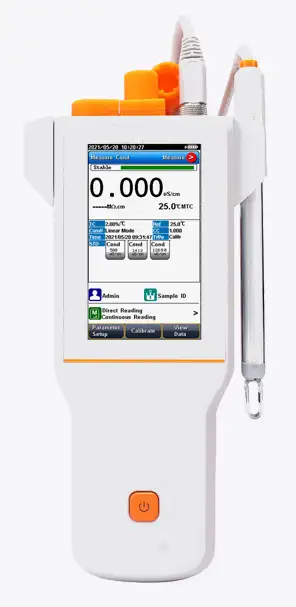
Conductivity Meter BJG1Z1 (BMET-307)
Benchtop Conductivity Meter- Sea, Air, Door to Door Shipping
- 1 Year Warranty
- US & European Standards

Specifications
| Model | BJG1Z1 |
| Conductivity | |
| - Range | 0.000 μS/cm to 3000 mS/cm |
| - Resolution | 1.001 μS/cm minimum; changed with range |
| - Accuracy | ± 0.5 % FS |
| - Reference Temperature | 5, 10, 15, 18, 20, 25 °C |
| - Calibration Points | Up to 5 |
| - Calibration Reminder | Yes |
| - Standard Recognition | 10 μS/cm, 84 μS/cm, 500 μS/cm, 1413 μS/cm; 12.88 mS/cm |
| Resistivity | |
| - Range | 5.00 Ωcm ~ 100.00 MΩcm |
| - Resolution | 0.01 Ωcm minimum |
| - Accuracy | ± 0.5 % FS |
| TDS | |
| - Range | 0.000 mg/L ~1000 g/L |
| - Resolution | 0.001 mg/L minimum; changed with range |
| - Accuracy | ± 0.5 % |
| Salinity | |
| - Range | (0.00 ~8.00) % |
| - Resolution | 0.01 % |
| - Accuracy | ± 0.1 % |
| Temperature | |
| - Range | -10 to 135 °C, 14 to 275 °F |
| - Unit | °C, °F |
| - Resolution | 0.1 |
| - Relative Accuracy | ± 0.2 |
| Measurement | |
| - Reading Mode | AutoRead (Fast, Medium, Slow), Timed, Continuous |
| - Reading Prompts | Reading, Stable, Locked |
| Data Management | |
| - Data Storage | 1000 Groups |
| - GLP Features | Yes |
| Inputs | |
| - Temp./EC Probe | 5-pin aviation connector |
| Outputs | |
| - USB | USB 2.0 flash memory device, PC, scanner |
| - Bluetooth | printer |
| Display Options | |
| - Backlight | Yes |
| - Auto Shut-down | 300, 600, 1200, 1800, 3600 sec, off |
| - IP Rating | IP65 |
| - Date and Time | Yes |
| General | |
| - Power | Rechargeable Lithium batter; AC Adapter, 100-240 V AC input, DC5V output |
| - Dimensions | 90x255x40 mm |
| - Weight | 500 g (1.1 lb) |
Description
A Conductivity meter is an instrument that measures the amount of electric conductivity or current in a solution. The conductance can be measured by applying an alternating electrical current to the two electrodes present in the solution, after which the cations move to the negative electrode and the anions move to the positive electrode. This movement ultimately leads the solution to be conductive.Operating Manual
Download1. Introduction
1.1 Introduction
1.2 Technical Specification
1.3 Function Introduction
2. Safety Notices
3. Terms Explanation
4. Overview and Installation
4.1 Overview
4.2 Instrument Installation
5. Instrument Operation
5.1 Switch On/Off
5.2 Screen Icons
5.3 Methods Management
5.4 Parameter Settings
5.5 Conductivity Measurement
5.6 TDS Measurements
5.7 Salinity Measurement
5.8 Resistivity Measurement
5.9 Ash Measurement
5.10 User ID management
5.11 Data Management
6. Maintenance/Troubleshooting
6.1 Meter Maintenance
6.2 Electrodes Maintenance
6.3 Battery Maintenance
6.4 Troubleshooting
7 Technical Supports
Accessories
8 Appendixes
Appendix 1
1. Introduction
1.1 Introduction
MET31-005A Conductivity Meter can measure conductivity, TDS, resistivity, salinity and ash in water solution, and can be widely used in universities, environmental protection, medicine, food, sanitation, geological prospecting, metallurgy, ocean exploration.
• General Features
- Color High contrast LCD touchscreen, 7.0 inches.
- Intelligent operation system provides features including user management, calibration management, method management, data management and etc.
- Multi-reading feature allows auto-read, timed-read and continuous-read.
- Automatic/Manual temperature compensation ensures accurate results.
- Data storage 1000 sets for each parameter (GLP-compliant).
- Data analysis feature helps user review, compare and recalculate results.
- Support for USB or RS-232 communication.
- Reset feature automatically resumes all settings back to factory default options.
- IP54 waterproof.
- 1-5 points calibration with standard recognition.
- Settable parameters, including cell constant, reference temperature (5/10/15/18/20/ 25°C), temperature compensation coefficient and TDS factor.
- Temperature compensation type (none, linear, pure water).
1.2 Technical Specification
Table 1-1 Instrument Specifications
Model | MET31-005A | |
Conductivity | Range | 0.000 μS/cm~2000mS/cm |
Resolution | 0.001 μS/cm, automatic switching according to the range | |
Accuracy | ±0.5% (FS) | |
Repeatability | 0.17%(FS) | |
Measurement Accuracy | ±0.80% (FS) | |
Measurement Repeatability | 0.40% (FS) | |
Resistivity | Range | 5.00Ω·cm~100.0MΩ·cm |
Resolution | 0.01Ω·cm, automatic switching according to the range | |
Accuracy | ±0.5% (FS) | |
TDS | Range | 0.000 ppm~1000 ppt |
Resolution | 0.001 ppm, automatic switching according to the range | |
Accuracy | ±0.5% (FS) | |
Salinity | Range | (0.00~8.00)% |
Resolution | 0.01% | |
Accuracy | ±0.1% | |
Instrument indication error | ±0.2% | |
Temperature | Range | (-10.0~135.0) °C |
Resolution | 0.1 °C | |
Temperature | Accuracy | ±0.1 °C |
Instrument indication error | ±0.3°C(0.0°C~60.0°C), ±1.0°C(Else) | |
Work environment | Ambient temperature: (0~40) °C Relative humidity: not more than 85% | |
Dimensions (LxBxH), weight (kg). | 220mm x195mmx68mm,about 0.95kg | |
Power supply | AC Adapter,100-240V AC input, DC24V output | |
1.3 Function Introduction
Table 1-2 Functions Specification
Function | Explanation | |
Basic Function | Backlight adjustment | • |
Automatic diagnostics | • | |
Reset settings | • | |
Default parameter | • | |
Prompt Sound | • | |
Time settings | • | |
Firmware upgrade | • | |
Password | • | |
Anti-interference automatic recovery | • | |
Power failure protection | • | |
Automatic shutdown | • | |
Protection | IP54 | |
Reading Function | Reading stability settings | • |
Auto-lock reading | • | |
Reading Mode | Continuous, Auto, Timed | |
Sample ID | • | |
Data Management | Storage | 1000 sets of measurement parameters each. 100 sets of verification parameters each. 100 sets of calibration parameters each. |
Filter | Storage number, time, operator, method name, sample ID and electrode ID. | |
View | Sheet and Graph | |
Delete | • | |
Alarm | • | |
GLP | • | |
Communications and external devices | Connect to Printer | RS232 |
U Disk | • | |
Content and format customization | GLP, Standard, custom | |
PC Output | • | |
Connect to a PC for instrument control | • | |
Scanner | • | |
Auto sampler | • | |
Measurement | Conductivity | • |
Resistivity | • | |
TDS | • | |
Salinity | Default Mode, Seawater Mode | |
Measurement | Conductivity-ash | White Sugar Ash, Fructose Glucose Syrup Ash |
Reference temperature | 5.0°C,10.0°C,15.0°C,18.0°C,20.0°C,25.0 °C | |
Multipoint calibration | 5 points | |
Automatic standard solutions recognition | Universal and GB groups | |
Cell constant set | • | |
Temperature compensation coefficient set | • | |
TDS coefficient set | • | |
Ash coefficient set | • | |
Compensation mode | Non-Compensation, linear, DI water | |
Temperature compensation | Automatic/Manual | |
Calibration reminder | • | |
Compulsive calibration | • | |
Calibration reminder | • | |
Compulsive calibration | • | |
Temperature Function | Temperature Unit | °C , ℉ |
Temperature calibration | • | |
Management | GMP Mode | • |
System & Running log | • | |
User management | • | |
Method management | • | |
Sample list | • | |
2. Safety Notices
Please read the entire contents of this manual carefully before use, and please keep this manual properly. The user MUST use the instrument following this manual to avoid damage to the user and equipment.
Before using the meter, READ the following notes:
- DO NOT disassemble the device for inspection or repair.
- To prevent electric shock or damage to the device, do not place cables and connectors in any liquid, wet or corrosive environment.
- Please use the defaulted power adapter, Do not use it if the power cord is damaged (the wire is exposed or broken).
- Do not use in flammable and explosive environments.
- Do not use if the user finds any abnormalities such as damage or deformation of the device.
The following identifier will be used in this manual.

3. Terms Explanation
• Cell Constant: Also known as the conductivity cell constant. The ratio of the distance to the area ofthe electrode sheet, expressed in cm-1. Usually, there are conductance electrodes with several cell constants such as 0.01, 0.1, 1.0, 10, etc. The conductance electrode with a cell constant of 1.0 is the most used one and has a wide measurement range.
• Temperature Coefficient: The change in conductivity caused by a 1°C change in temperature is usually expressed in %/°C, and the default is 0.02, which is 2.00%/°C.
• TDS Conversion Factor: The conversion factor between conductivity and TDS, which defaults to 0.5.
• Calibration reminder (Recommended): "Electrode calibration" prompts on the homepage, user can start measurement without last calibration.
• Calibration reminder (Mandatory): "Electrode calibration" prompts on the homepage, calibration is required for accurate measurement.
• Upper limit: The upper limit value is monitored for the measured or calibrated data, and the upper limit value must not be lower than the lower limit value.
• Lower limit: Lower limit monitoring of measured or calibrated data.
4. Overview and Installation
4.1 Overview
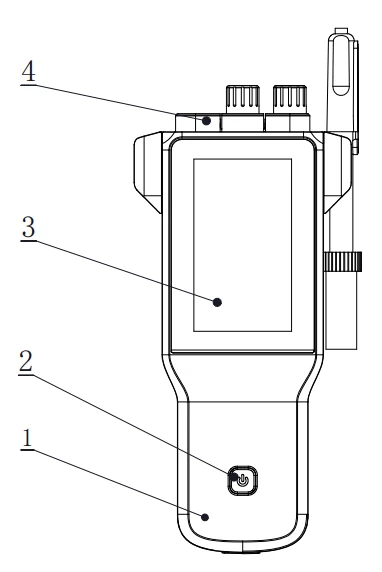
Figure 4-1 Overview-Front View
1 Meter Body
2 Power Key
3 Display
4 Socket Cap
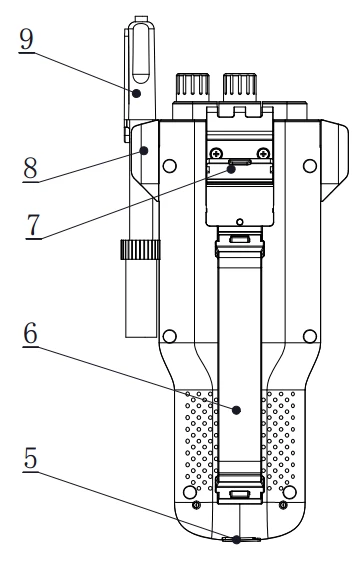
Figure 4-2 Overview- Back View
5 Power sockets
6 Wristbands
7 Flip Tilting Stand
8 Electrode Holder
9 Electrodes
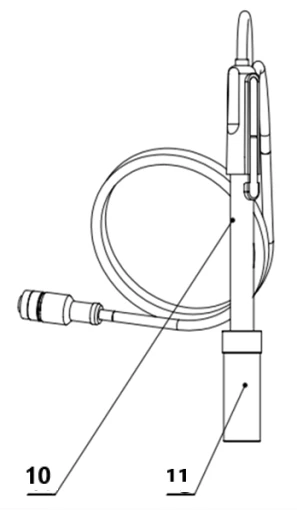
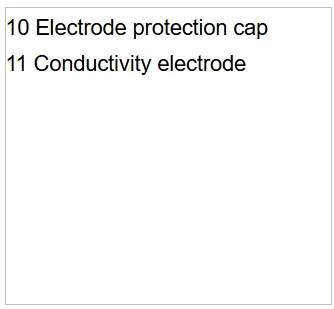
Figure 4-3 Electrodes and connectors
Table 4-1 Connector specifications
Electrode type | Connector specifications | Electrodes Connection |
Conductivity electrode | 5-pin aviation | Conductivity electrode |
4.2 Instrument Installation
4.2.1 Electrodes Stand Installation
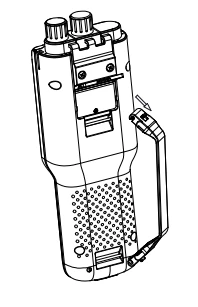
Figure 4-4 Wristband Installation
Installation:
1) Pull the wristband switch at the head of the wrist so that its closed round hole opens.
2) Snap the opened round hole card slot into the shaft of the corresponding instrument housing and close the round hole.
3) The lower wristband card slot is also operated as above.
4.2.2 Electrodes Connection
Push the conductivity electrode into the electrode holder. Remove the protector cap of the conductivity electrode. Connect the conductivity electrode into the right socket.
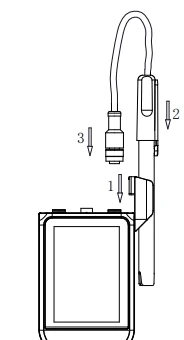
Electrodes Connection
5. Instrument Operation
5.1 Switch On/Off
Press and release  to switch on the meter. The startup screen shows the software version and other related information. After the self-test program, the screen turns to the homepage and the meter is ready to measure. Users press and hold the key for more than 3 seconds and release to shut down.
5.2 Screen Icons
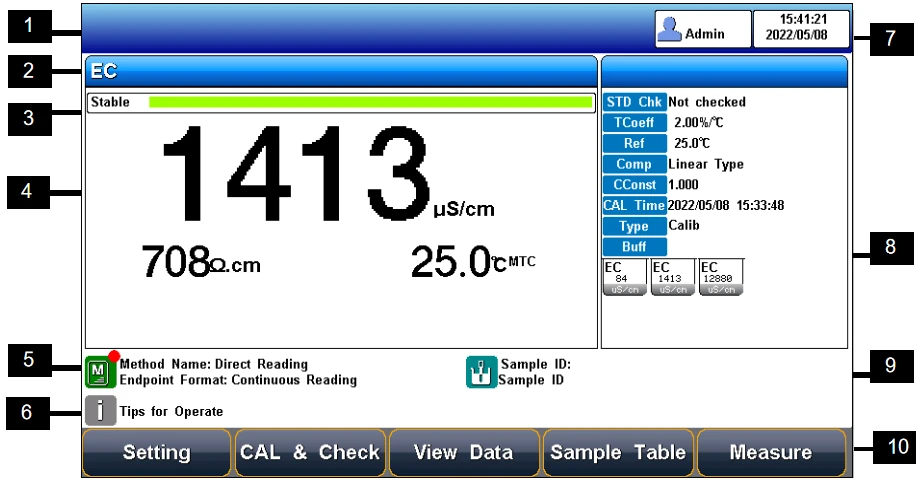
Figure 5-1 Screen icons explanation
1 User ID. 2 Measurement parameters. 3 Reading states. 4 Main measurement box. 5 Method information. 6 Tips information. 7 System time. 8 Calibration information. 9 Sample ID.
10 Function buttons.
The instrument displays symbol identification that has the following functional implications:
Table 5-1 Symbol Explanation
No. | Symbol | Explanation |
1 |
| Reading status, display the measurement status of reading, stable, locked, each indicates that the processing, stable, and reading completed. |
2 | ATC | Automatic temperature compensation |
3 | MTC | Manual temperature compensation |
4 | Temp | Temperature, unit °C and F |
5 | RES | Resistivity, Unit MΩ·cm, kΩ·cm, Ω·cm |
6 | STD | Standard solution |
7 |
| Standard solution for conductivity calibration |
8 | CC | Cell constant |
9 | Ref | Reference temperature |
10 | TC | Temperature coefficient |
11 | Comp | Compensation mode |
12 | Type | Calibration type |
13 | Time | Calibration time |
14 | TDSF | TDS conversion factor |
15 |
| Measurement method management, display the current method information |
16 |
| User ID |
17 |
| Sample ID |
18 | Auto Mode | Auto-recognition of Standards |
19 | Manual Mode | Manual-recognition of Standards |



5.3 Methods Management
The meter provides a library of built-in methods. Select the proper method to measure, system loads method's preset information, including the method name, brief overview, creator, creation date, and measurement parameters.
In the method settings, it supports the navigation setting including the method information, parameters, reading mode, conductivity setting, temperature setting and data management setting. For the first use, please follow the guide to settings the measurement parameters.
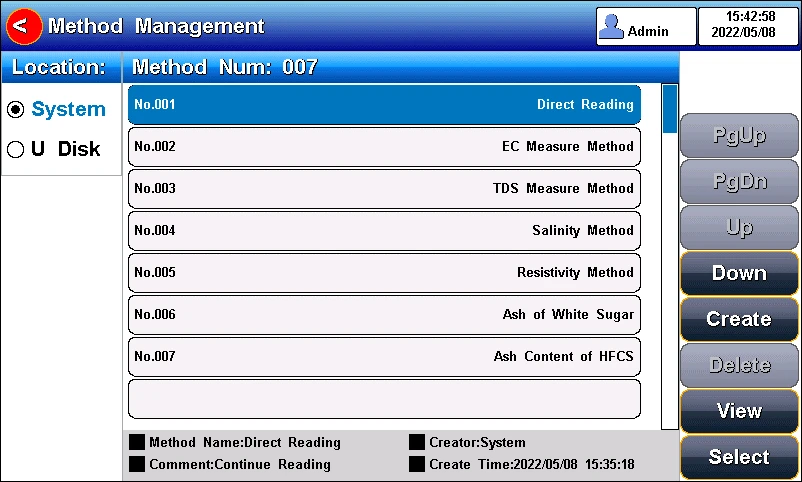
Figure 5-2 Methods Information
5.3.1 Update Method
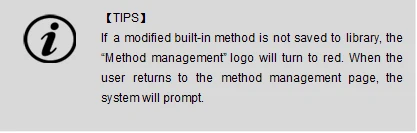
When the method is revised by the setting, there is a red mark in the method management logo to remind user that the current method is different from the method in the library.
When press the method in the method library, there is a system tip to give user a choose to update or create a new method.
5.3.2 Create a new Method
There are three modes to create a new method: create method step by step in the system, save the setting as a new method in the system, and save the method with a new name, description and location. The location can be the system and U disk.
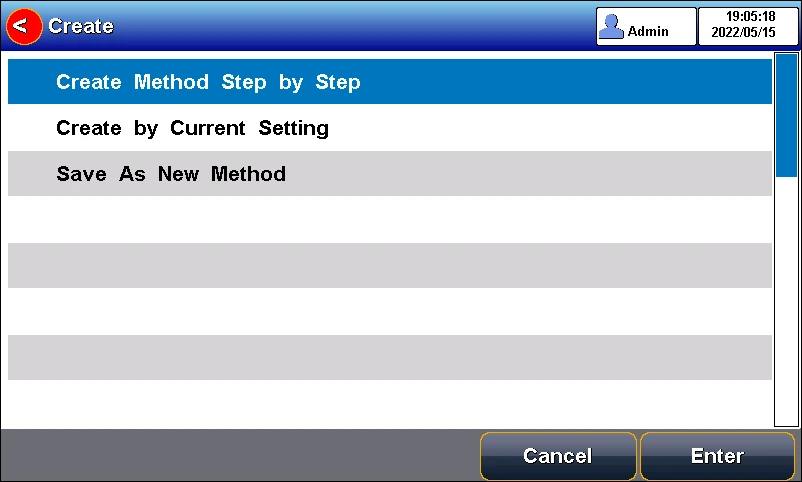
Figure 5-3 Method setting view
5.3.3 Delete Method
There are 7 methods saved in the meter as the default setting in the library method. The No.001-No.007 method cannot be deleted, and the others can be deleted.
5.3.4 Save and Load a Method
It is support to store up to 50 methods in the meter, and save and load the methods in the U Disk.
5.4 Parameter Settings
Press "Setting"- to the setting menu. It includes tutorial setting, method information, select parameters, reading mode, EC parameters, Temperature parameters and data management, output option, User management, system parameters and GMP Mode.
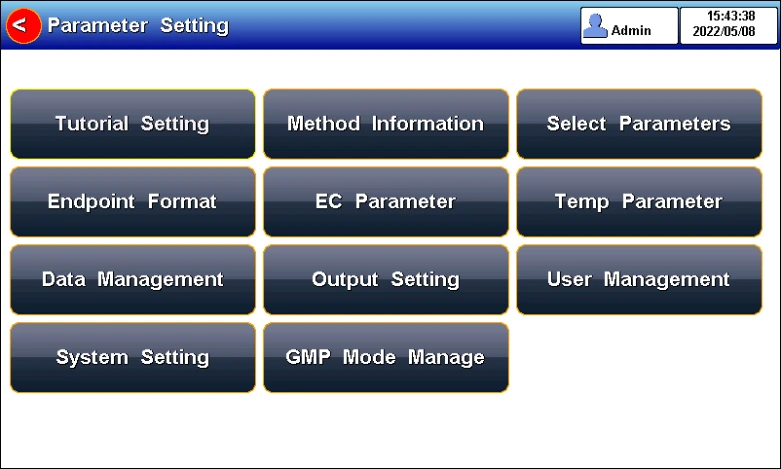
Figure 5-4 Parameters setting view
5.4.1 Tutorial settings
For the first use, please follow the guide to settings the measurement parameters. After all the settings, press the"  " to return to the previous page.
5.4.2 Select parameters
It could select one measurement parameter from conductivity, TDS, salinity and resistivity every test.
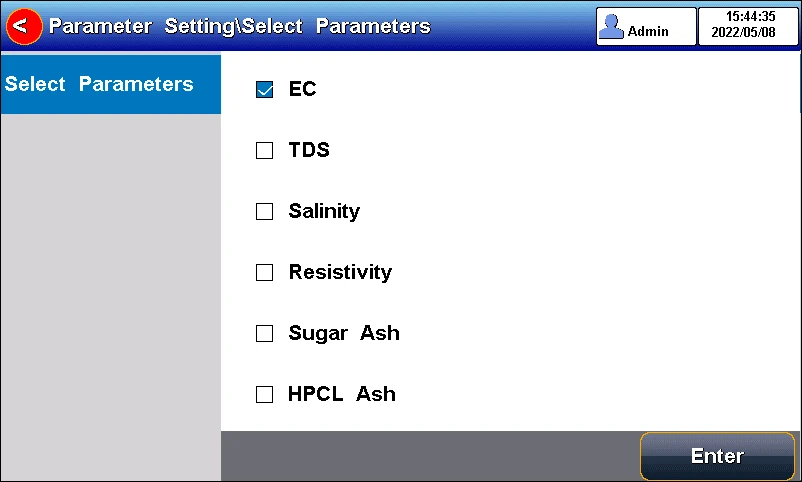
Figure 5-5 Select parameters
5.4.3 Reading Mode Settings
The meter provides three reading modes, including continuous readings, auto readings, and timed readings.
• Continuous reading: The instrument displays real-time measurement results. User can end the measurement at any time and save the last result.
• Auto-reading: The measurement reached the balance, and the meter locked the reading result. The meter offers "Fast", "Medium", "Strict" and "Custom" four options for endpoint detection conditions.
• Time reading method: Timed Reading contains two kinds of timed reading methods: "Interval Measurement" and "Timed Measurement". "Interval Measurement" provide measurement results at interval time and "Timed Measurement" provide measurement result after a set time.
Table 5-2 Reading Parameters Settings
Stability Type | Conductivity | |
Fast | Stable time | 5s |
Fluctuation | 1.0% | |
Medium | Stable time | 8s |
Fluctuation | 0.4% | |
Strict | Stable time | 15s |
Fluctuation | 0.1% | |
Custom (Recommended value) | Stable time | 1 to 30s |
Fluctuation | 0.1~2% | |
5.4.4 Conductivity Parameter Settings
5.4.4.1 EC Electrode management
The electrode information includes the name, serial No., user ID, registration time, service life, calibration message, calibration number, last calibration time. It allows user to choose one electrode to calibrate and measure samples.
The meter has one created default EC electrode, which is convenient for users. When using the built-in default electrode, the meter automatically loads the electrode serial number and the last calibration result, including calibration points, constant cell, etc., and the calibration time and calibrator will also be loaded.
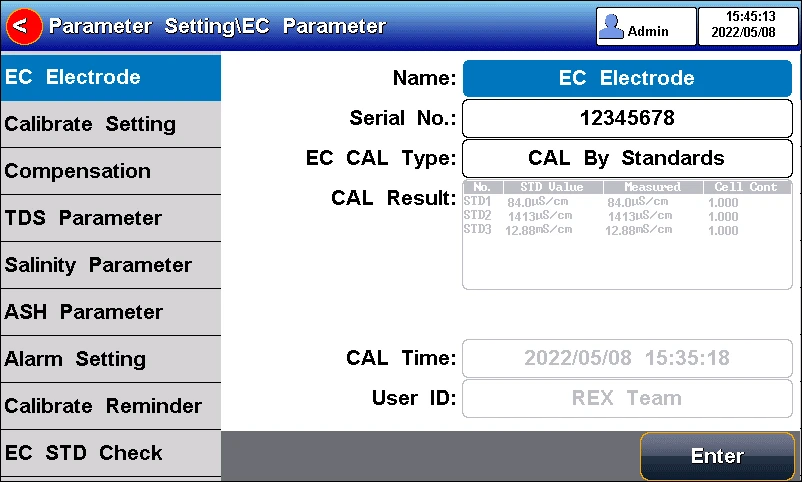
Figure 5-6 EC electrode information
5.4.4.2 EC calibration type
EC calibration type: Cal by Standards and input manually.
Cal By Standards: Cell constant is calibrated with standard conductivity standard solution.
Input manually: It allows user to set the cell constant.
Conductivity electrode: Four conductivity cell constant 0.01, 0.1, 1, 10. The defaulted conductivity cell constant is 1. Users need to enter the cell constant value on the label of conductivity electrode for accurate measurement.
5.4.4.3 Cal Information
The meter provides two EC standards groups including universal group and GB group. And allows the user to prepare the customized standard groups.
For neighboring standards, please choose the customization to perform calibration.
Table 5-3 Standard solution groups
Standard group | Standard solution |
Universal Group | 10μS/cm,84μS/cm,500μS/cm,1413μS/cm and12880μS/cm. |
GB group | 146.5μS/cm,1408μS/cm,12852μS/cm and 111310μS/cm. |
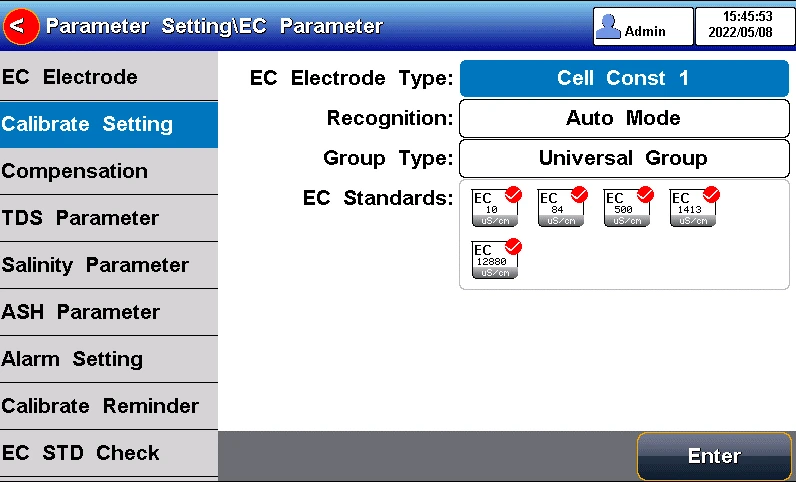
Figure 5-7 Selection of conductivity standards
5.4.4.4 EC Reference temperature
Conductivity reference temperature: The conductivity of the solution is greatly affected by temperature, to make the conductivity measurement results at different temperatures comparable, the conductivity and temperature values at the time of measurement are usually recorded and converted into the conductivity value at a certain temperature through temperature compensation, which is the reference temperature.
When measurement parameter is conductivity, TDS or resistivity, the meter allows settings of 5.0°C,10.0°C,15.0°C,18.0°C,20.0°C,25.0 °C 6 reference temperatures, the default reference temperature is 25 °C.
When measurement parameter is salinity, the default reference temperature is 18 °C and cannot change.
When measurement parameter is Conductivity ash, the default reference temperature is 20 °C and cannot change.
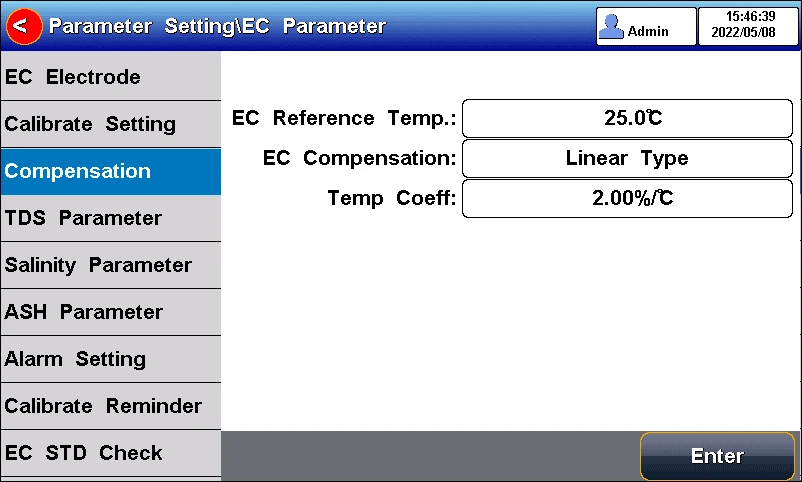
Figure 5-8 Conductivity temperature compensation setting
5.4.4.5 Conductivity Compensation
EC Compensation Mode: Three different compensation modes can be used for various applications. The meter supports Linear type, DI water type and non-comp type.
1) Linear type: Linear compensation is usually used for the measurement of medium and high conductivity solutions. With linear compensation, you can set the temperature compensation coefficient, which defaults to 2.00%/°C (approximately the temperature compensation coefficient of a sodium chloride solution at 25°C). It allows user to set the temperature coefficient.
2) DI water type: DI water compensation is usually used for the measurement of pure water and ultrapure hydropower conductivity below 5μS/cm. It allows user to set the temperature coefficient.
3) Non-comp type: Non compensation is usually used to obtain the true conductivity value at the measured temperature.
5.4.4.6 TDS Parameter
The TDSF calibration type can be calibrated by standard solution or setting the TDS Factor. The TDS factor can be adjustable, and the default is 0.500. It allows user to calibrate the TDS Factor.
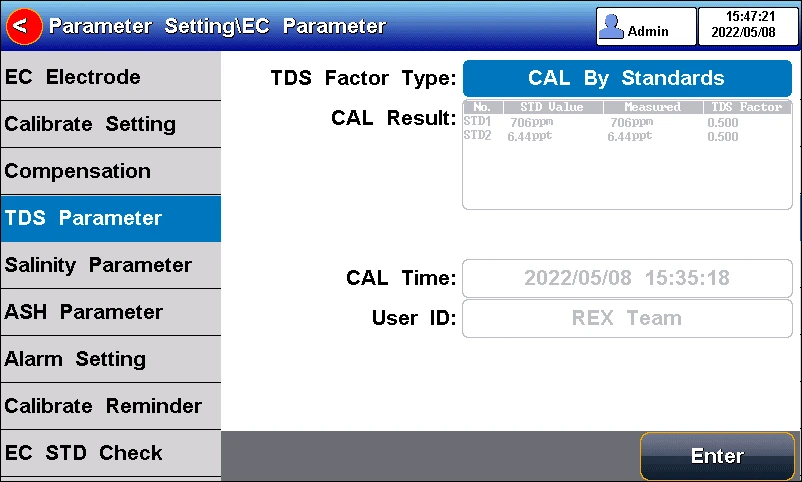
Figure 5-9 TDS measurement settings
5.4.4.7 Salinity parameter
The meter supports both default salinity and seawater salinity measurement types.
Sea salinity mode: it indicates the nominal salinity value used to measure seawater salinity correction. The standard seawater salinity concentration adopted here is 3.500%, also written as 35 psu.
Default Salinity Mode: the salinity of common sample, which can be used to approximate the salinity of the measured solution.
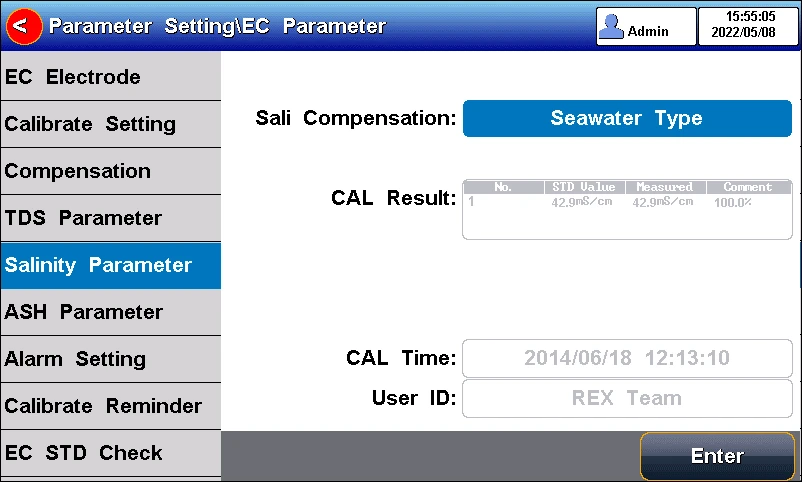
Figure 5-10 Salinity measurement settings
5.4.4.8 Conductivity Ash parameter
The meter supports the measurement of conductivity ash generally calculating the ash content using an ash conversion coefficient.
Ash Conversion Factor: Represents the conversion coefficient K of the conductivity of the solution to ash, which has a small value of 10-4.
Blank Conductivity: It allows to input manually or measure in the blank.
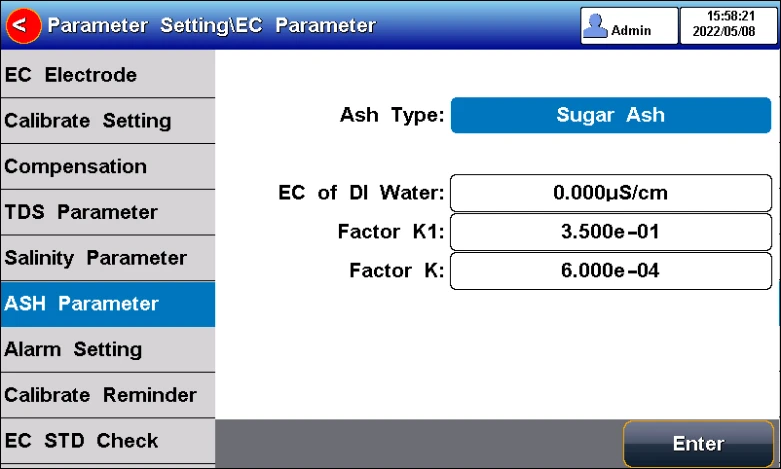
Figure 5-11 Conductivity Ash measurement parameter settings
5.4.4.9 Alarm setting
The meter support measurement and calibration result monitoring alarm. The parameter includes the conductivity, TDS, salinity, resistivity, sugar ash and HFCS Ash.
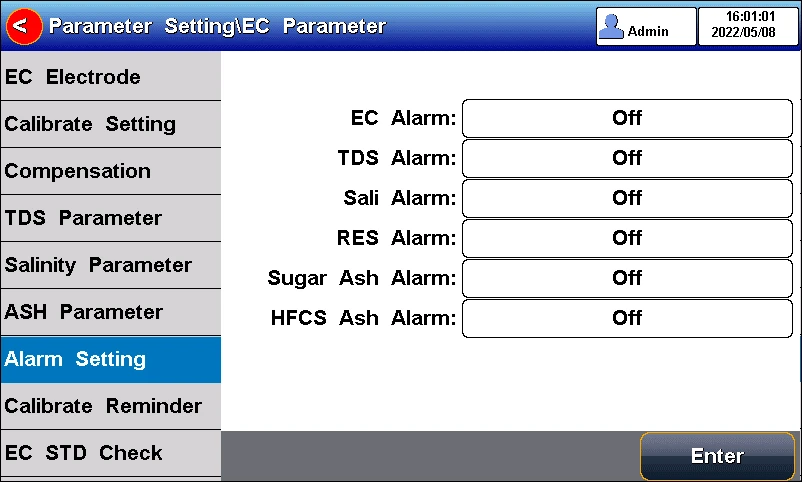
Figure 5-12 Alarm setting information
5.4.4.10 Calibration reminder settings
The meter provides calibration prompts function. From the setting, the user can select calibration reminder (recommended) and calibration reminder (mandatory)for future calibration.
Calibration reminder (recommended): When enable the calibration reminder, the instrument verifies whether the calibration data of conductivity electrode is within the validity period. If calibration information expires, a striking calibration reminder will appear at "Calibrate" on the main interface, but it will not affect the measurement and data saved.
Calibration reminder (mandatory): When enable the mandatory calibration, the instrument verifies whether the calibration data of conductivity electrode is within the validity period. If calibration information expires, a striking calibration reminder will appear at "Calibrate" on the main interface, the measurement data cannot be saved and output.
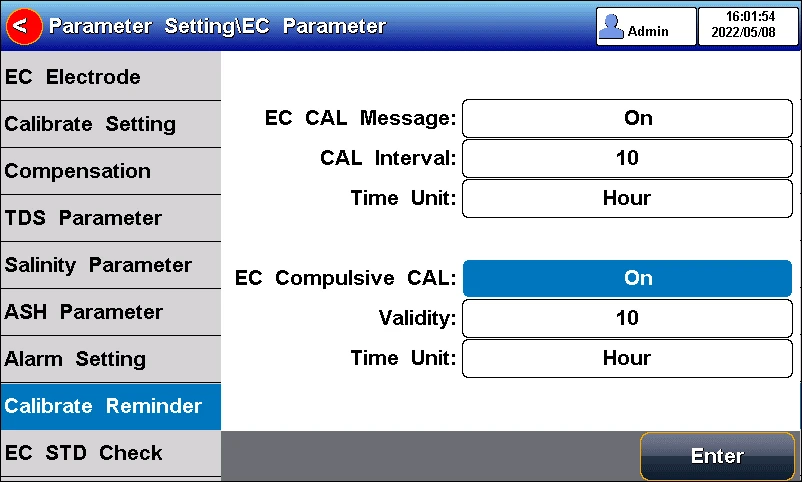
Figure 5-13 Calibration reminder setting information
5.4.4.11 Verification Reminder settings
The meter provides verification prompts function. The cell constant of conductivity electrodes drifts slightly over time, and this change will have a direct impact on the measurement results. So the verification of standards is important for accurate results.
Verification reminder (mandatory): When enable the verification reminder, the instrument verifies whether the verification data of EC electrode is within the validity period. If verification information expires, a striking verification reminder will appear at "Calibrate" on the main interface, the measurement data cannot be saved and output.
It allows user to input the conductivity standard value and the allowable deviation. If the deviation amount is set to 0, it means that no verification is required.
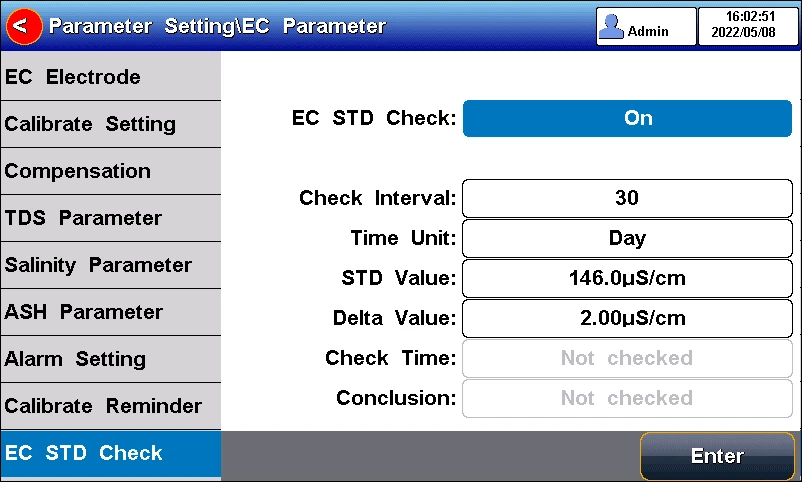
Figure 5-14 Conductivity verification information
5.4.5 Temperature Parameter Settings
The temperature unit of the meter is selectable in °C and °F.
Temperature compensation mode: ATC and MTC.
ATC means automatic compensation. MTC means manual compensation. It allows user to input the temperature.
5.4.6 Data Management Settings
5.4.6.1 Sample ID type
The instrument supports three setting methods of Sample ID: number order, time order, and manual.
5.4.6.1 Sample ID type
The instrument supports three setting methods of Sample ID: number order, time order, and manual.
• Number order: The sample ID No. is increasing with series number.
• Time order: The sample ID No. is increasing with sample measuring time. Format: Year/Y, Month/M, Day/D, Hour/H, Minutes/M, Second/S
• Manual: Manually set the sample ID No. It allows samples to manually enter the sample ID when saving or printing data.
5.4.6.2 Result Autosave
When this function is enabled, the meter saves the results when the reading is stable in the auto-reading and interval timed reading mode.
5.4.6.3 Data Overwrite
The meter provides 500 sets of measurement results storage space. When this function is enabled, the results data that exceeds capacity will overwrite the old results data.
5.4.7 Output option
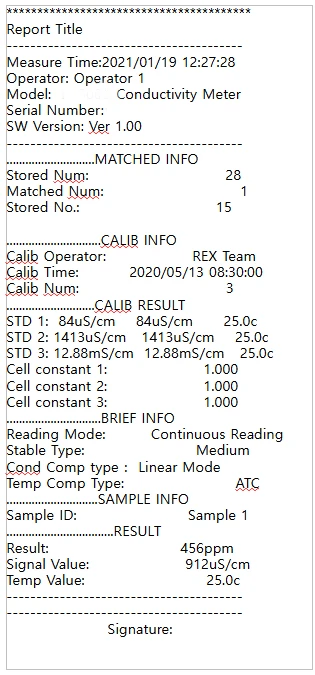
The data format is GLP, STD Format, and Custom. It could select one data format to output the result.
5.4.8 User ID management
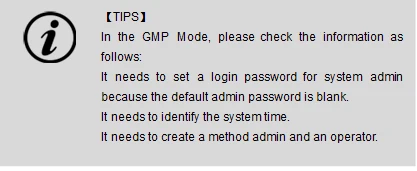
The meter supports hierarchical user authority management and password security management. It allows user to revise the user ID, user type and password, and create a new account. A maximum of eight users can be created, and user type can be system admin, method admin, and operator. The default user is system admin and the initial password is blank. Only system admin has the permission to create all type of users.
5.4.9 System Parameter Settings
5.4.9.1 System Date & Time
Settings of system date and time.
5.4.9.2 Buzzer setting
Users can set the key sound by this setting.
5.4.9.3 Brightness setting
Users can adjust the screen brightness by this setting.
5.4.9.4 Auto Power off
The meter provides auto shutdown function. When the meter is not using, the meter switches off automatically.
5.4.9.5 Restore Default
The meter supports "Restore Default" and "Restore Parameters".
"Restoring Default" will restore all meter parameters to the factory state. "Restoring parameters" will restore the measurement parameters to the factory state.
5.4.9.6 Software version
Users can find the software version information on the general setting page.
5.4.10 GMP Mode
The meter supports the GMP mode, in order to achieve strict control of the measurement process and data traceability. In the mode, the meter enables the login password protection, three-level user rights, data security protection, system log and run log and other security control.
Press the "Setting"- "GMP Mode" to set the mode.
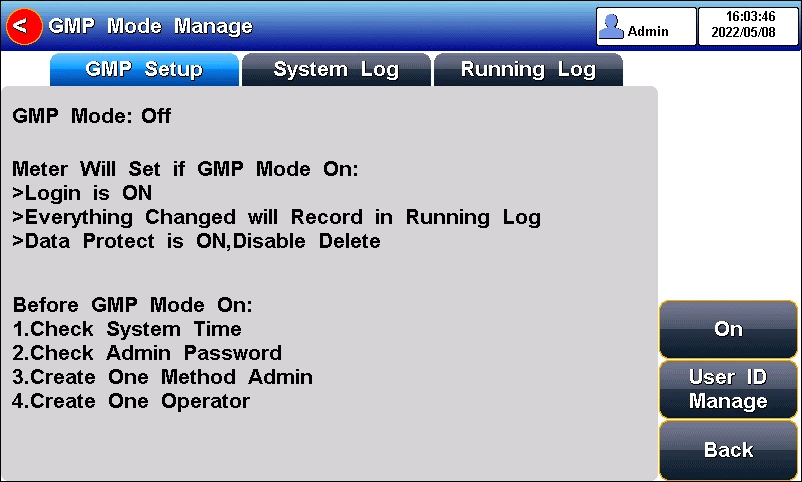
Figure 5-15 GMP mode setting
5.4.10.1 System Log
Access the System Log to view the log, such as GMP mode open log, GMP mode close log, system time modification log and creation log.
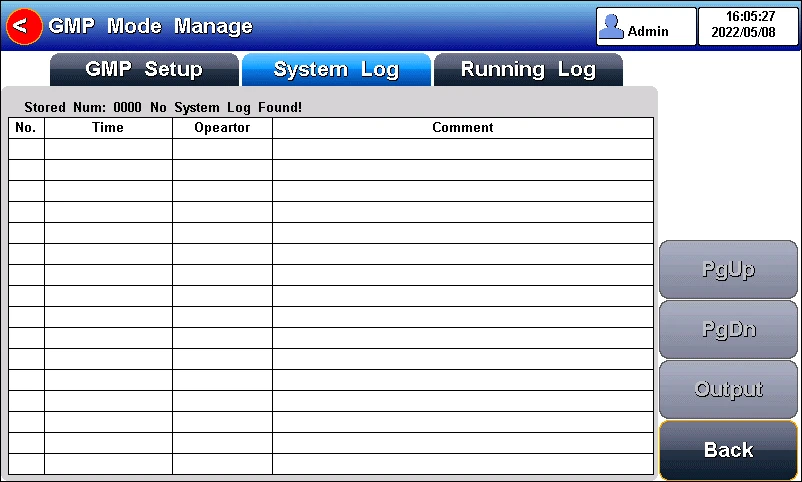
Figure 5-16 System log in GMP mode
5.4.10.2 Running Log
Access the Operation Log to view the log, such as the data log and calibration log, print the data log, and print the calibration log, log in or log out of an existing account.
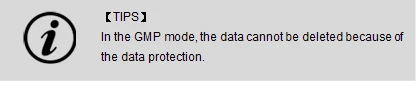
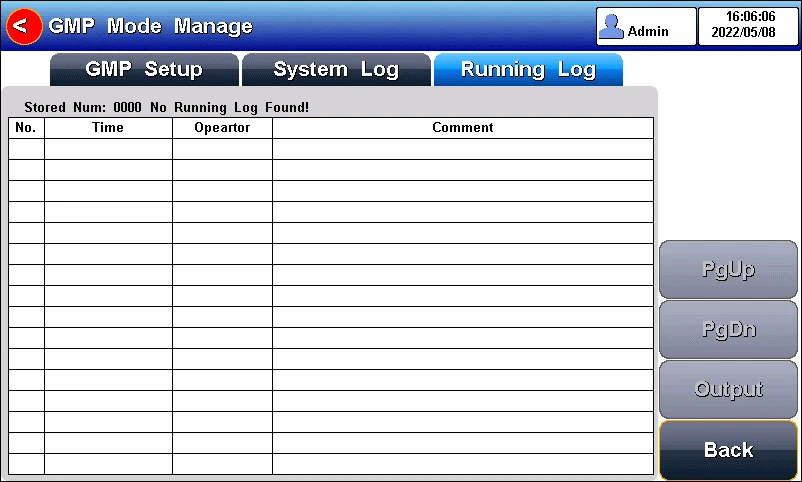
Figure 5-17 Operation log in GMP mode
5.5 Conductivity Measurement
5.5.1 Cell Constant Input
Conductivity electrodes are precisely calibrated at the time of manufacture
and marked with the exact cell constant. Before the measurement, by "Setting"- "EC Parameter" to enter the electrode cell constant.
5.5.2 Calibration Preparation
In general, conductivity electrodes need few calibrations. When the user gets an unexpected result, an electrode calibration is considerable.
Usually, single standard solution is required for calibration. For accurate measurement of sample conductivity above 50mS/cm, a two-point calibration is required. Two standards are required, a low conductivity standard and a conductivity standard close to the sample.
The meter provides various Standards Group including Universal Standard Group and GB group. And allows the user to prepare the customized Standard groups.
5.5.3 Conductivity Calibration
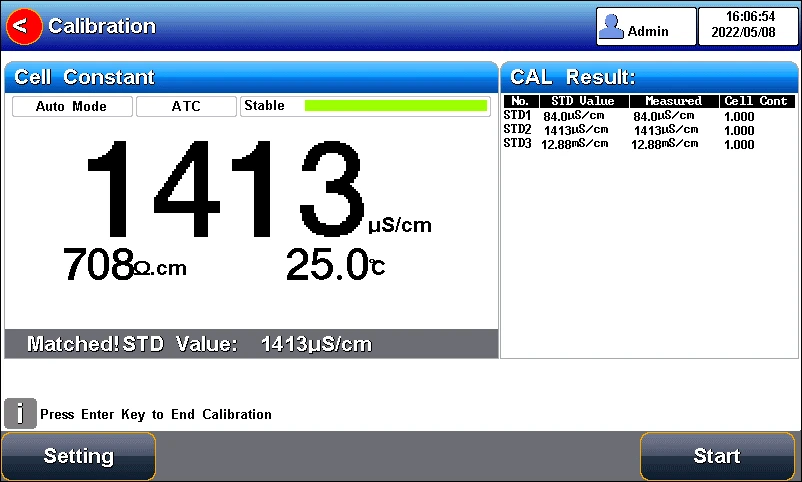
Figure 5-18 Electrode cell constant calibration information
For conductivity electrodes with different cell constants, it is recommended to use the following conductivity standard solutions for calibration.
Table 5-4 KCl standards to electrode cell constants
Cell constant (cm-1). | 0.1 | 1 | 10 |
KCl solution Concentration (mol/L). | 0.001 | 0.01 or 0.1 | 0.1 or 1 |
The calibration process is as follows:
1. In the idle status, press "Setting" -"EC Parameter".
2. Press the "Constant type" to select the "1".
3. Press "Cal. Type" to select the "Cal by Standards".
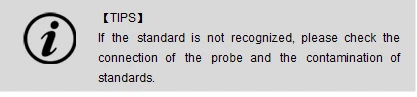
4. Prepare one or more standard conductivity solution (e.g.,1413μS/cm conductivity solution).
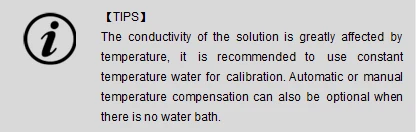
5. Prepare a thermostatic bath, and set the temperature to (25.0±0.1) °C.
6. Place a standard conductivity solution in a thermostatic bath, and set the temperature to (25.0±0.1) °C.
7. Place the conductivity electrode into a standard solution.
8. When the conductivity and temperature reading (e.g.,1413μS/cm, 25.0°C) are stable, press the "Start".
9. If choosing one-point calibration, press  to end the calibration.
10. If choosing multi-points calibration (up to 5), press "Next Point" to repeat the operation.
11. The meter saves calibration data automatically and turn to idle status.
5.5.4 Conductivity Measurement
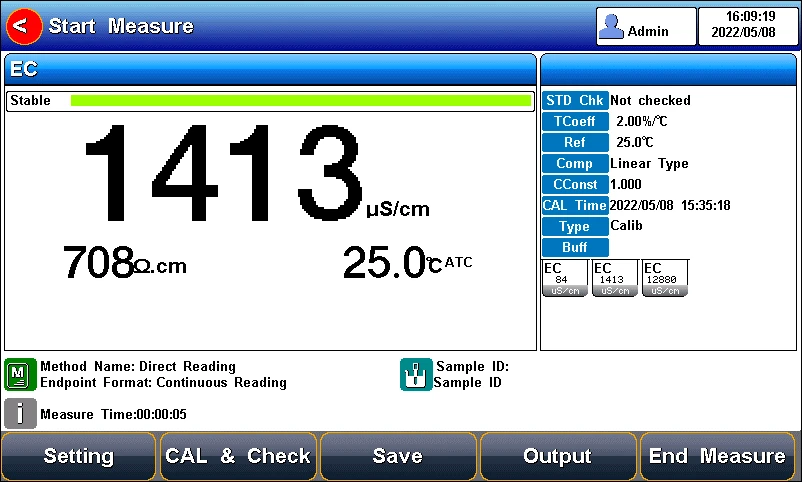
Figure 5-19 Conductivity measurement information
The measurement process is as follows:
1. Setting.
1) Set the parameters (e.g., conductivity).
2) Set the reading mode (e.g., continuous reading, auto-reading, or timed format).
3) Set the temperature compensation (e.g., Linear compensation, temperature compensation coefficient 2.00%/°C).
4) Set the reference temperature (e.g., 25°C).
2. Rinse the conductivity electrode with DI water, dry out.
3. Put the measurement end of the electrode into the sample solution.
4. In the idle status, press "Measure" to enter into measurement status.
5. When the reading is stable, read the results.
6. Press the "Save" to save the measurement results.
7. Press the "Output" to print the measurement result when connect to the printer.
8. Between measurements, stored EC electrode in distilled or deionized water.
9. After measurement, rinse the EC electrode with deionized water thoroughly and put on the electrode protection cap.
5.5.5 Conductivity Verification
In the process of storage and use, the value of the conductivity standard solution may change, which will have a direct impact on the measurement results. Therefore, the verification of the standard substance is one of the important components of laboratory method development, validation and quality control.
This meter supports the verification of conductivity electrodes. The measurement process is as follows:
1. Press "Calibrate"-"Calibration check" - "Conductivity verification"
2. Set the STD value and Delta value as the user requirement.
3. Rinse the electrode with DI water, and dry out.
4. Put the measurement end of the electrode into the sample solution.
5. When the reading is stable, read the results.
6. Press the "Save" to save the verification results.
7. Press the "Output" to print the measurement result when connect to the printer.
8. Between measurements, stored EC electrode in distilled or deionized water.
9. After measurement, rinse the EC electrode with deionized water thoroughly and put on the electrode protection cap.

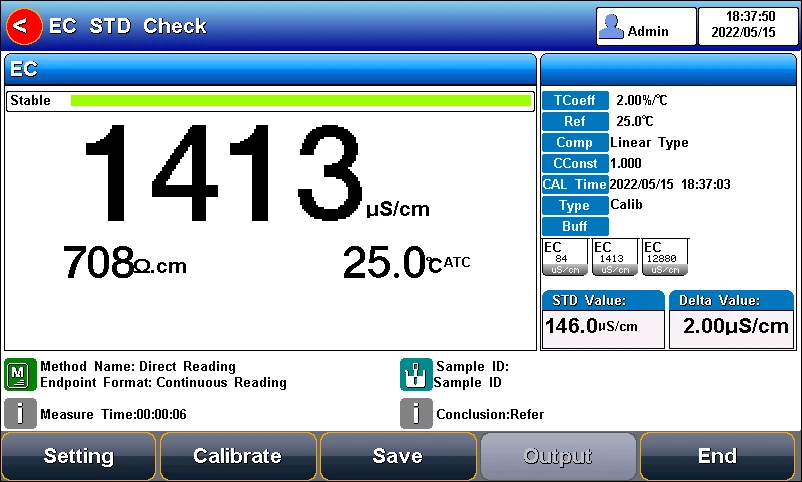
Figure 5-20 The conductivity verification information
5.6 TDS Measurements
5.6.1 TDS conversion factor
5.6.1.1 Low Concentration TDS Sample
For samples with relatively simple composition and low concentration, TDS of solution can be estimated by conductivity. Compared with weighing method, TDS estimation by conductivity is relatively simple and convenient with quite good accuracy. For potassium chloride and sodium chloride solutions below 5000 μS/cm, the TDS coefficient is approximately 0.5. Therefore, 0.5 can be used as the TDS coefficient for approximate estimation in most situations.
The conversion factor adjust process is as follows:
1. Press "Setting" -"TDS Parameter".
2. Select the TDSF CAL Type as the set TDS Factor.
3. Input the TDS factor as the desired TDS coefficient.
Table 5-5 Conductivity to TDS Standard Solution
Conductivity μS/cm | TDS standards | ||
KCl(ppm) | NaCl(ppm) | 442(ppm) | |
23 | 11.6 | 10.7 | 14.74 |
84 | 40.38 | 38.04 | 50.5 |
447 | 225.6 | 215.5 | 300 |
1413 | 744.7 | 702.1 | 1000 |
1500 | 757.1 | 737.1 | 1050 |
2070 | 1045 | 1041 | 1500 |
2764 | 1382 | 1414.8 | 2062.7 |
8974 | 5101 | 4487 | 7608 |
12880 | 7447 | 7230 | 11367 |
15000 | 8759 | 8532 | 13455 |
80000 | 52168 | 48384 | 79688 |
1, 442 indicated the solution contains 40%Na2SO4, 40%NaHCO3, 20%NaCl.
2, The values listed in the table are values at 25°C.
For KCl and NaCl solutions below 5000 μS/cm, the TDS coefficient is about 0.5, so 0.5 can be used as an approximation in most cases.
5.6.1.2 High Concentrations TDS Sample Measurement
For samples with simple components and higher concentrations, such as high concentrations of NaCl solution, TDS factor re-calibration is needed.
For TDS measurements, the user may need to correct the TDS conversion factor by TDS standard.
The conversion factor calibration process is as follows:
1. Setting.
1) Set the parameters (e.g., TDS).
2) Press "Setting" -"TDS Parameter".
3) Select the TDSF CAL Type as the set Cal by STD.
4) Set the reference temperature (e.g., 25°C).
2. Prepare TDS Standard.
3. Place a standard conductivity solution in a thermostatic bath, and set the temperature to (25.0±0.1) °C.
4. Rinse the conductivity electrode with DI water, dry out.
5. Put the measurement end of the electrode into the sample solution.
6. Press the F2 "Calibrate"-"TDS Calibration".
7. Set the STD value as the sample STD value.
8. When the TDS and temperature reading (708ppm, 25.0°C) are stable, press the "Start".
9. If choosing one-point calibration, press  to end the calibration.
10. If choosing multi-points calibration (up to 3), press "Next Point" to repeat the operation.
11. The meter saves calibration data automatically.
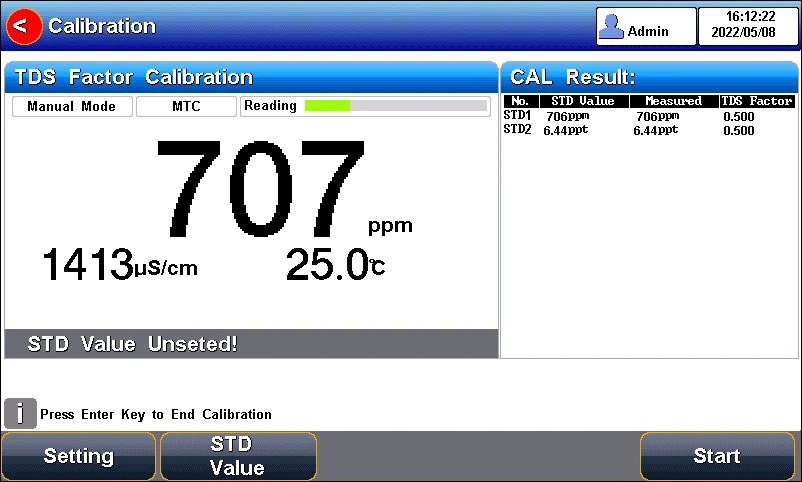
Figure 5-21 TDS coefficients calibration
5.6.1.3 Complex TDS Sample Measurement
For samples with complex compositions, the accuracy of TDS measurements can be improved by re-determination by laboratory methods and manual input of TDS coefficients. When the composition or concentration of the sample to be measured changes significantly, it is recommended to recalibrate the TDS coefficient.
The conversion factor calibration process is as follows:
1. Rinse the electrode with DI water. Put the measurement end of the electrode into the sample solution and set the temperature at (25.0±0.1) °C.
2. Using weighing method to determine the TDS.
3. Calculate the TDS coefficient.
4. Press "Setting" -"TDS Parameter".
5. Select the TDSF CAL Type as the set TDS Factor.
6. Input the TDS factor as the desired TDS coefficient.
5.6.2 TDS Measurements
Users can switch the measurement parameter to TDS measurement by pressing Conductivity/TDS measurement box on the screen.
5.7 Salinity Measurement
The instrument can be used to determine the salinity of sodium chloride. The salinity of sodium chloride can be used to approximate the salinity of the solution being measured. By measuring the conductivity of the sample, the mass percentage of the corresponding sodium chloride solution can be calculated to convert the sodium chloride salinity.
Users can switch the measurement parameter to salinity measurement by pressing Conductivity/TDS measurement box on the screen. The detail refers to the measurement method of conductivity salinity measurement.
5.8 Resistivity Measurement
Resistivity and conductivity are reciprocal to each other, and conductivity can be measured at the same time when measuring resistivity.
Users can switch the measurement parameter to resistivity measurement by pressing Conductivity/TDS measurement box on the screen. The detail refers to the measurement method of conductivity measurement.
5.9 Ash Measurement
5.9.1 White Sugar Ash
The ash content of sugar refers to the percentage of the weight of the sample that remains after the organic matter is completely removed after burning in the sugar. Ash is an important indicator of white sugar. If the ash content exceeds the standard, the grade of white sugar will drop.
The conductivity ash measurement method is to dissolve a certain quality of white sugar in a certain volume of water to measure the conductivity value of the solution. Conductivity ash is calculated at 20°C as follows:
C=6x10⁻⁴(C1-0.35C2)
Wherein,
C: Conductivity ash (%)
C1:31.3 g/100 ml of the conductivity of the sugar solution at20 °C, μS/cm.
C2:The conductivity of the distilled water at20°C for sugar dissolving, μS/cm.
When the temperature is lower than 20 °C, the following formula can be used to compensate, generally applied in 20±5 °C.
C20°C=Ct/[1+0.026(t-20)]
Wherein,
C20°C: Conductivity value at 20°C, μS/cm.
Ct: The actual measured conductivity value, μS/cm.
5.9.2 Fructose Glucose Syrup Ash
Fructose syrup Ash is measured similarly to the white sugar ash measurement method. Fructose syrup Ash calculation formula is as follows:
C=K*(C1-K1*C2)
Wherein:
C: Fructose glucose syrup ash, %(g/100g).
K: The conversion coefficient of the solution conductivity converted to ash; the default is 7.93x10⁻⁴.
K1: The correction coefficient of the solution with deionized water, default 0 39.
C1:25% conductivity of the sugar solution at 25°C, μS/cm.
C2: Conductivity of dilution with deionized water at 25 °C, μS/cm.
5.9.3 Blank Measurement
There are 2 ways to measure blank values. It allows to input the blank value manually and measure the blank value in the calibration menu.
Manually enter the blank value for DI water in Parameter Settings - Conductivity Settings-Setting Ash Measurement Parameters.
The blank measurement process is as follows:
1. Select the Ash parameter.
2. Press "Calibrate"-"Calibrate ash blank conductivity".
3. After the reading is stable, press "Start" to complete the measurement of the blank conductivity.
5.9.4 White Sugar Ash Measurement
The white sugar ash measurement process is as follows:
1. Calibrate the EC electrode.
2. Blank Measurement.
3. Select the "White Sugar Ash Method" in "Method Management".
4. Dissolve a certain amount of white sugar in a certain volume of water (according to the ratio of 31.3g/100ml of sugar liquid).
5. Press "Measure" to start a measurement.
5.9.5 Fructose Glucose Syrup Ash Measurement
The white sugar ash measurement process is as follows:
1. Calibrate the EC electrode.
2. Blank Measurement.
3. Select the "Fructose Slurry Ash Method" in "Method Management".
4. Dissolve a certain amount of white sugar in a certain volume of water (according to the ratio of 31.3g/100ml of sugar liquid).
5. Press "Measure" to start a measurement.
5.10 User ID management
The meter supports hierarchical user authority management and password security management. It allows user to revise the user ID, user type and password, and create a new account. A maximum of eight users can be created, and user type can be system admin, method admin, and operator. The default user is system admin and the initial password is blank. Only system admin has the permission to create all type of users.
5.11 Data Management
Press "Data" to view the detail of results.
The meter stores the measurement results independently according to the measured parameters. The meter provides data Storage 1000 sets for each parameter (EC/Resistivity/TDS/Salinity/Ash/Temp),100 sets of calibration data and 1000 sets of verification data.
5.11.1 Data Base
Press "Data" to view the detail of results.
The meter stores the measurement results independently according to the measured parameters. The meter provides data Storage 1000 sets for each parameter (pH/mV/ORP).
The user can press "Delete" into the delete menu. It allows users to select the parameter data or all data to delete.
The user can view the data filter by storage number, time, operator, method name, sample ID and electrode ID. By the filter setting, press "Start" to look up the data. The filter data shows in a graph. Press "<<" and">>" to choose data. User can choose one and press "Detail" to see the detail result. User can choose one and press "Output" to output the current result, output matched result and output all result. Users can press "Operate" to the setting menu. In the operation menu, it allows to select the output type.
5.11.2 Statistic
The meter supports the statistical analysis function. By pressing "Statistic", the meter calculates basic statistical results, including maximum, minimum, average, standard deviation, relative standard deviation, and related statistical information of the results.
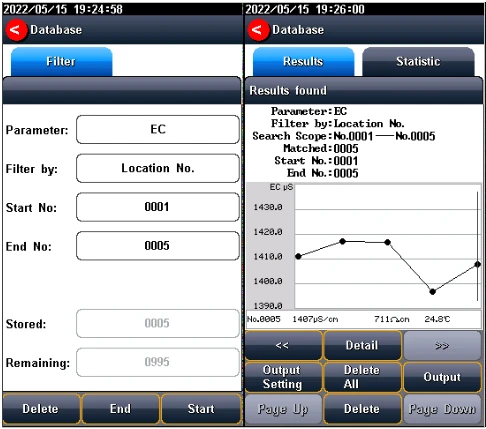
Figure 5-22 Results setting view
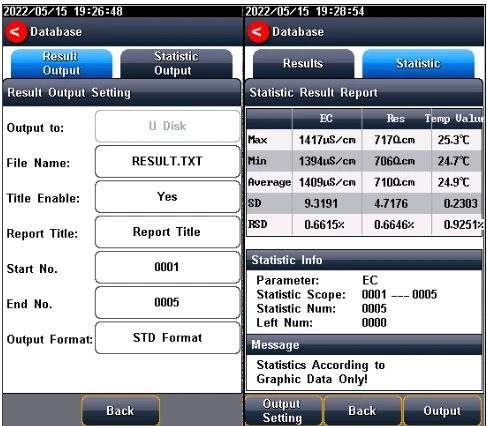
5-223 Output settings
6. Maintenance/Troubleshooting
6.1 Meter Maintenance
The correct use and maintenance of the instrument can ensure the accurate and reliable performance of the instrument. Additionally, exposure to chemicals or harsh use environments can affect performance.
• If the meter is not used for a long time, please disconnect the power supply.
• The electrode socket of the instrument must be kept clean and dry, and should not be in contact with acid, alkali, and salt solutions.
• Keep the meter and accessories clean and away from acids, alkalis, and any corrosive solutions/gases.
• Users can clean the meter surface with clean waters and detergent.
• When the meter is transported, please follow the instructions:
- please remove all connected cables.
- Please remove the electrode holder.
- Please use original packaging in the long-distance transport to avoid damage.
6.2 Electrodes Maintenance
For more detailed information, please refer to the electrode instruction manual.
6.3 Battery Maintenance
The instrument uses a built-in lithium battery. The battery takes 6 hours to fully charge. Follow the below instruction to maintain battery:
• When the meter is turned on and not charged, the power light flashes four times when the power flashes once when the power is 25% and is 100%.
• When the meter switches off, the power light keeps the lighting for a full charge.
Precautions for the use of lithium batteries:
• Keep the meter away from the high-temperature environment.
• Keep away from water.
• Keep away from flammable and explosive substances.
• Please charge for 15 minutes if not in use for a long time.
• Please stop charging in time after fully charged.
• Continuous charging may result in decreased battery life.
• Please charge and discharge it every 3 months to extend the life of the lithium battery.
6.4 Troubleshooting
Table 6-1 Troubleshooting
Phenomenon | Probable reasons | Solutions |
1. No Display | Damage to the meter. | Replace or repair as required. |
2. Incorrect conductivity measurement | 1. The electrode is out of service life 2. The electrodes are not calibrated or are calibrated incorrectly | 1. Replace the electrodes 2. Recalibrate the electrode or replace the standard solution |
If the meter still does not work, please contact your local dealer for further assistance.
7 Technical Supports
Accessories
Please refer to the accessories table for purchasing recommendations.
Table 7-1 Meter accessories
Name | Description |
DJS-1VTC conductivity electrode | Conductivity, TDS Measurement Probe |
Conductivity solution 1413 μS/cm | Standard solution |
8 Appendixes
Appendix 1
Conductivity Standard Solution
Table 1 KCl standards to electrode cell constants
Cell constant (cm-1). | 0.1 | 1 | 10 |
KCl solution Concentration (mol/L). | 0.001 | 0.01 or 0.1 | 0.1 or 1 |
Table 2 Approximate concentrations of KCl solutions and their conductivity values (μS/cm) relationship
T(°C) | 84μS/cm | 1413μS/cm | 12.88mS/cm |
5 | 53.02 | 896 | 8.22 |
10 | 60.34 | 1020 | 9.33 |
15 | 67.61 | 1147 | 10.48 |
20 | 75.80 | 1278 | 11.67 |
25 | 84.00 | 1413 | 12.88 |
30 | 92,19 | 1552 | 14.12 |
35 | 100.92 | 1696 | 15.39 |