


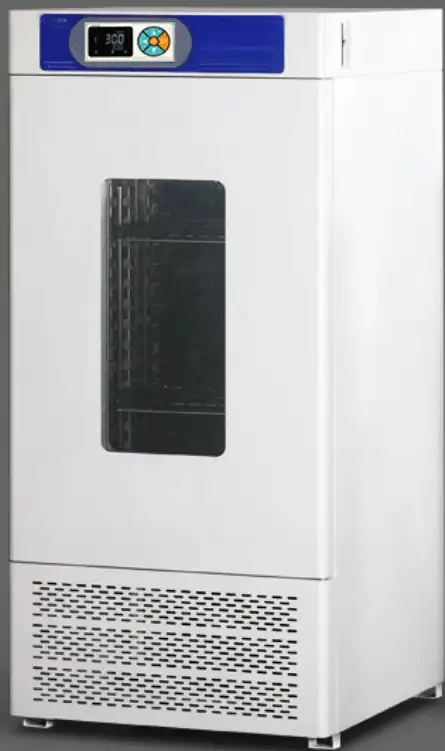
BOD Incubator BEV1Q7 (BIBD-103)
Biochemical (mold) Incubator- Sea, Air, Door to Door Shipping
- 1 Year Warranty
- US & European Standards

Specifications
| Model | BEV1Q7 |
| Inner size (mm) (HxWxD) | 800x500x380 |
| Interior Volume (L) | 150 |
| Overall dimension (mm) (HxWxD) | 1350x640x660 |
| Power (KW) | 0.45 |
| Temp range (°C) | 0~65 |
| Temp. Accuracy (°C) | ±0.1 |
| Temp. Fluctuation (°C) | ±0.5% |
| H: 0~90°C 1. The low-temperature will be delivered 10 days after the order is placed.2. Each layer of board can bear a maximum weight of 20KGCaution: Before purchasing the model 250, it is necessary to measure the dimensions of the door and elevator to avoid the chamber being too large to enter. |
Features
The refrigeration system adopts high-quality well-known brand compressors with time-delay protection function and stable operation. It introduces the concept of green environmental protection and uses environmentally friendly refrigerant to make the system more energy-saving and efficient and make the environment healthier;Reasonable air duct circulation system to ensure uniform temperature of the working room.
mirror stainless steel interior,shelf spacing and shelf number can be adjusted,BOD socket is inbuilt
Intelligent microcomputer PID LED control, touch type parameter setting button, Balanced dual system control heating and cooling, without temperature surge. with timing and over temperature alarm functions.
With a large viewing angle observation window, the inner tank is equipped with a lighting device to facilitate observation.
The temperature range can reach 90 °C, and high-temperature sterilization can be carried out after each experiment to reduce cross infection.
There is a drainage channel at the bottom of the inner tank, which effectively collects condensed water generated by long-term operation.
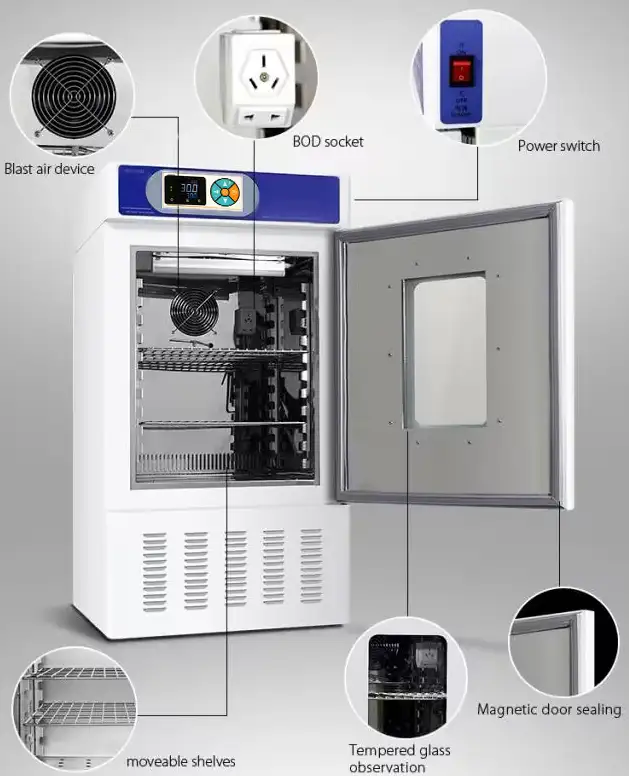
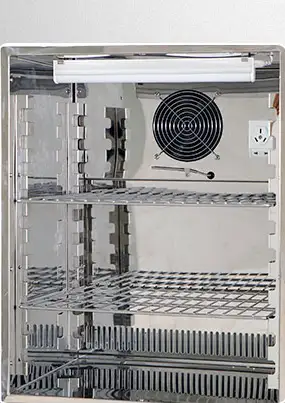
Stainless steel liner
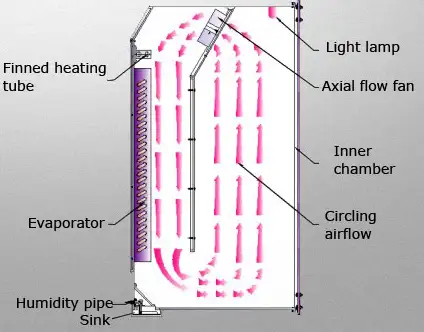
Perfect air current cycling
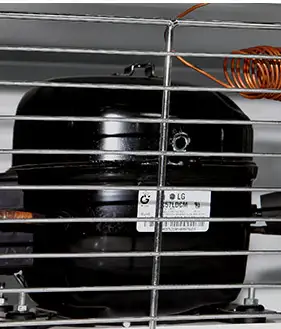
Without fluorine R134a refrigeration compressor
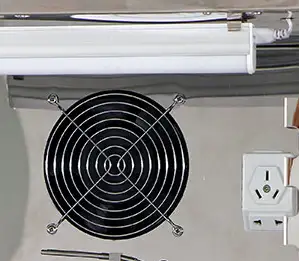
Lighting system and BOD socket
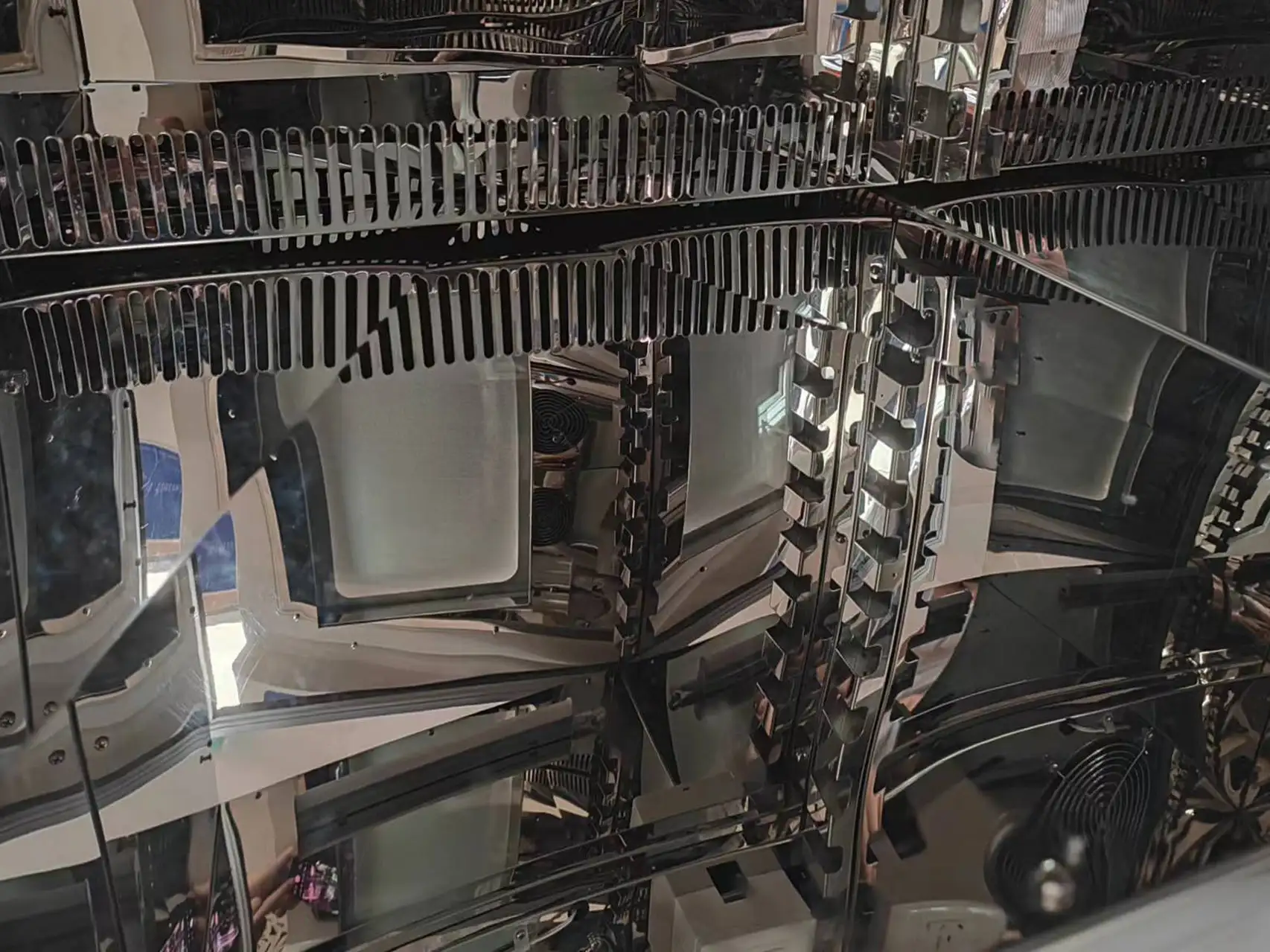
Design with drainage groove in the inner
Applications
For environmental protection, medical, drug testing, health and epidemic prevention, livestock, aquaculture and other scientific research and production departments. A special constant temperature equipment for the analysis of the BOD determination of water, bacteria, biochemical, microbiological culture protection, plant cultivation, breeding.Accessories For Purchase
| Images | Name |
| programmable controller | |
 | test hole |
| shaker | |
| Stainless steel perforated layer plate |
Operating Manual
Download1. Application
2. Product Structure
3. Working principle
4.Technical parameter
5. Installation
6. Control Panel
7. Operation
8. View and set intrinsic parameters
9. Maintenances
10. Troubleshooting
11. Wiring Layout
12. Packing list
1. Application
Biochemical incubator is a thermostatic equipment with cooling function, highly precise and advanced. Widely used in biological genetic engineering, medical treatment, health and epidemic prevention, medical test, agriculture and animal husbandry, aquaculture and other scientific research institutions for plant cultivation, breeding test, bacteria, mould, microbial cultivation & preservation, BOD determination, etc.
2. Product Structure
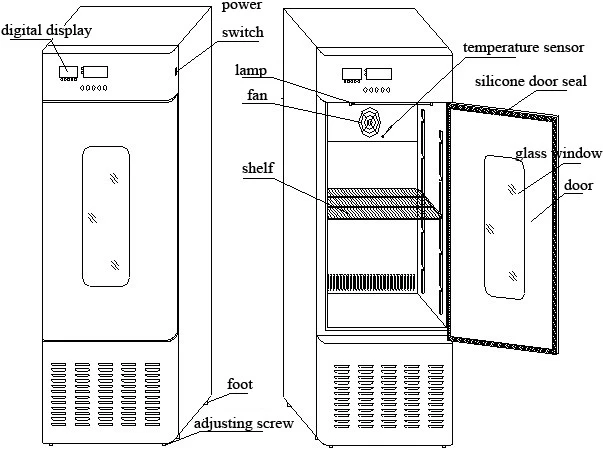
Figure 1
The incubator body is made of high quality steel sheet with attractive appearance. Equip with large observation window and built in lighting lamp, which you can observe inside samples clearly. The inner chamber is made of mirror stainless steel, adjustable shelf. Easy to clean and durable.
3. Working principle
Biological incubators transfer actual temperature detected from temperature sensor into signal, through microcomputer control to heater and compressor towards required temperature.
4.Technical parameter
1.volume:250L;
2.temp. range:0~65°C;
3.temp. fluctuation: ±1.5°C(250L) ;
4.temp. Uniformity: ±2°C(250L) ;
5.power voltage:AC 220V/50Hz;
6.input power: 700W(250L);
7.working ambient temp.10~30°C relative humidity below 70%
8.refrigeration: R290
9.equipment classify: class I type B
5. Installation
1.The equipment should be installed in ventilated place and avoid direct sunlight. The distance between equipment and wall have to be much than 10 CM
2.Keep the incubator balance via adjusting screw.(refer to technical drawing)
3.AC 220V/50HZ power supply, in order to be safe, please connect protective conductor thermal
4. Please install this equipment in the place where is far away from fire source.
6. Control Panel
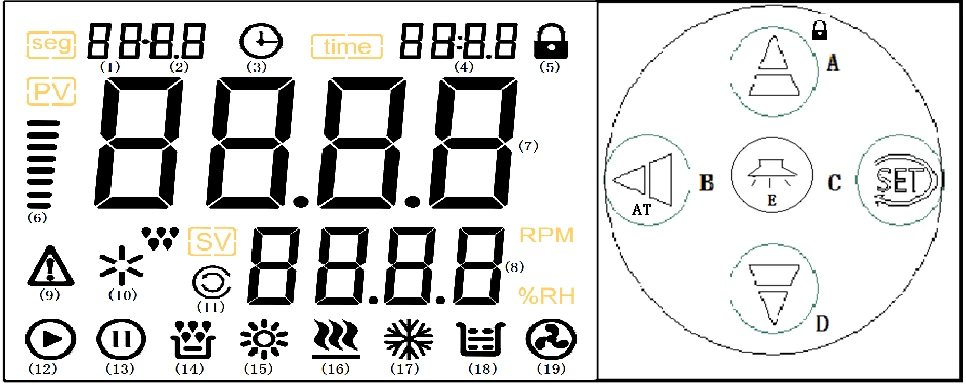
Figure 2
Indicator and key instruction
1."heat"indicator:it is on if there is heating output , or it is off
2."cool" indicator:it is on if there is cooling output , or it is off
3."alarm" indicator:it is on if temperature is abnormal or over-temperature alarm, or it is off
4."defrost" indicator: no defrost function in this equipment
5."lighting" indicator:it is on when lighting lamp is on, or it is off
6."set temp." indicator:it is on if the right screen displays set temperature, or it is off
7."set time" indicator:it is on if right screen displays running time, or it is off
8."set"key:set or view temperature ,time and other parameters
9."◄"shift key:press this key to modify set value in setting mode
10."▼"decrease / rerun:press this key to decrease set value in setting mode, long press this key decrease continuously. After running is over, in non-setting mode, long press this key to reboot.
11."▲"increase:increase set value in setting value, long press this key increase continuously
12."lighting"key:lighting lamp button, press this key to turn on or turn of lighting lamp.
7. Operation
1.After power is connected, left screen displays "index number and version number", right screen displays "the max setting temperature" . It will access normal mode after 3 seconds
2.View and set temperature and time of constant temperature
1)if without timing function
Press "set" key to access temperature setting mode, left screen displays "SP" right screen displays setting temperature(it will flash from single digit), modify required setting value via shift ,increase or decrease key; re-press "set" key to log out this mode, the modified data will be saved automatically.
2)if with timing function
Press "set" key to access temperature setting mode, left screen displays "SP" right screen displays setting temperature (it will flash from single digit), modify required setting value via shift ,increase or decrease key; re-press "set" to access timing setting mode , left screen displays "ST", right screen displays timing time (it will flash from single digit);re-press "set" key to log out this setting mode, the modified data will be saved automatically.
When timing is "0", it means no timing function, controller keeps running, right screen displays setting temperature; when timing time is not "0", right screen displays running time or setting temperature. If display running time, the decimal point of the single digit which is on the right screen is on, when measured temperature reaches setting temperature, the timer start timing, the decimal point of the single digit which is on the right screen is flashing, timing time is over and stop running, the right screen displays "End", beeper beeps, it will stop beeping after 1 minute. After running is over, long press "decrease" key for 3 seconds to reboot
Notice : if change setting temperature during timing, the controller will start timing from 0
3. Sensor alarms abnormally
If the left screen displays "---", it means that there is something wrong with temperature sensor or controller or temperature is in outside of temperature range, controller will disconnect heating output automatically, beeper beeps, alarm indicator is on, please check the temperature sensor and other connections.
4.When oven-temperature alarming, beeper beeps, "ALM" is on. if oven-temperature alarm because of setting temperature changed, "ALM" is off and without beep
5.Press any key to mute if beeper beeps
6.Without press any key within 1 minute in setting mode, it will be back to normal mode automatically.
8. View and set intrinsic parameters
Long press set key for 3 seconds, the left screen displays "Lc", right screen displays password, you can modify required value via "increase" " decrease" or "shift" key . re-press "set" key , if the password is incorrect, controller will be back to normal mode, if password is correct, it will access temperature setting mode. re-press "set" key modify parameters of . long re-press "set" key for 3 seconds to log out this mode, the data will be saved automatically.
Intrinsic parameter-1
Parameter code | Parameter | Parameter instruction | (range)factory default |
Lc- | Password | When "Lc=3"view or set parameters | 0 |
AL- | Over-temperature alarm | When measured temp. >setting temp. +AL", alarm indicator is on, beeper beeps , disconnect heating output When | (0~20.0°C) 5.0 |
Ct- | Compressor delay started function | Compressor starts delay protection time, the mixed interval time from compressor stops to compressor reboots | (0~600 seconds) 60 |
uP- | Compressor starts threshold | When compressor works in intermittent mode If measured temp. ≥ setting temp.+ uP" And delay time is up, start compressor Notice : this parameter is only available when start or stop compressor manually(intrinsic parameter-2 , Crc=1) but it is unavailable in automatic mode | (-1.9~2.0°C) 0.4 |
dn- | Compressor closes threshold | When compressor works in intermittent mode If measured temp. ≤setting temp. +dn" turn off compressor Notice : this parameter is only available when start or stop compressor manually(intrinsic parameter-2 , Crc=1) but it is unavailable in automatic mode | (-2.0~(uP-0.1)) 0.2 |
Lt- | Light lamp delay off function | When turn on light lamp, it will be off automatically after delay Lt .if "Lt=0",delay is unavailable , you have to turn off light lamp manually | (0~30 mins) 2 |
T- | Control cycle | Heating control cycle | (1~30seconds ) 5 |
P- | Proportion | Timing proportion adjustment | (1~50.0) 16.0 |
I- | Integral time | Integral acting in regulation | (1~2000 seconds ) 600 |
d- | Differential time | Differential acting in regulation | (0~1000 seconds ) 150 |
Pb- | Zero adjustment | Modify error margins of sensor (low temp.) during test Pb=actual temp.-test temp.) | (-12.0~12.0°C) 0 |
PK- | Full scale adjustment | Modify error margins of sensor(high temp.) during test PK=1000*(actual temp.-test temp.)/ test temp. | (-999~999) 0 |
Table 1
Intrinsic parameter -2
Parameter code | Parameter | Parameter instruction | (range) factory default |
Lc- | Password | When "Lc=9"view or set parameter | 0 |
ndc- | Working way of compressor | 0:compressor only works in intermittent mode 1:compressor will work in balanced mode or in intermittent mode according to CP (details as below ) 2:compressor will work in balanced mode or in intermittent mode according to Htd (details as below ) | (0~2) 0 |
CP- | The fixed switch point of compressor running mode | When ndc=1 If setting temperature ≥CP, compressor works in intermittent mode, on the contrary, it will work in balanced mode | (0~100.0°C) 30.0 |
Htd | The auto-switch point of compressor running mode | When ndc=2 If setting temperature ≥ ambient temperature + Htd, compressor works in intermittent mode, on the contrary, it will work in balanced mode | (-50.0~50.0°C) 0.0 |
Crc | Start/stop mode of compressor | When compressor works in intermittent mode 0: the compressor will be started or closed automatically (depend on ambient temp. and setting temp.) 1:start or close the compressor manually (depend on up and dn which on the intrinsic parameter-1 | (0~1) 0 |
Cnp | prohibited working temp. of compressor | When setting temperature ≥Cnp, compress stops working Notice : this running mode is in priority, it means the controller will proceed with this first instead of balanced mode or intermittent mode | (0~100.0°C) 42.0 |
ndt | Timing mode | 0:no timing function; 1:with timing function, when reach setting temperature(start timing),right screen displays running time 2:if with timing function, right screen displays running time | (0~2) 0 |
Hn- | Timing unit | 0:minutes ;1:hour | (0~1) 0 |
nP- | The max power | The max power percentage of heating output | (0~100%) 100 |
Co- | Disconnect heating output margins | When measured temperature ≥setting temperature +Co, disconnect heating output | (0~20.0°C) 5.0 |
SPL- | The mix setting temp. | The mix setting temperature | (-15.0~5.0°C) 0.0 |
SPH- | The max setting temp. | The max setting temperature | (5.0~100.0°C) 60.0 |
Table 2
Intrinsic parameter -3
Parameter code | Parameter | Parameter instruction | (range)factory default |
Lc- | Password | When "Lc=18"view ambient temperature | |
Ht- | Ambient temp. | surrounding temperature of the controller |
Table 3
Notice : these intrinsic parameters had been adjusted well , it is not necessary to adjust again
9. Maintenances
1.Keep upright when moving this biochemical incubator
2.In order to prolong the lifetime of equipment, don't change setting value frequently
3.This equipment is equipped with two fuses, if there is something wrong with this equipment when running, please disconnect power supply first, check the fuse whether is undamaged then check other parts
4.In order to maintain the appearance of equipment, don't clean the equipment appearance with corrosive solution and clean inner chamber with dry cloth and alcohol
5.If set this equipment aside , please keep inner chamber dry and disconnect power supply
6.In order to make sure uniform temperature , frequently check fan whether works normally. The samples should not be crowded in the inner chamber.
7.In order to make sure good temperature effect, don't touch or collide the temperature sensor
8. This equipment is equipped with cooling relief function, which is intermittent cooling mode. When cooling stops, it is normal that if there is pull-in of magnet valve or refrigerant backflow sound.
10. Troubleshooting
Troubleshooting | Handing |
Screen displays (----) | ·There is something wrong with temperature sensor , check the temperature sensor , model : PT100 |
Temperature can't reach setting value | ·Setting temperature is lower than display temperature Check whether the heater is damaged Check the controller board and other connections |
Temperature rises slowly | Check whether the fan stops working fan is broken something wrong with relative connections |
Screen displays nothing | check whether power switch is on check whether the plug cord is 220V check failures according to wiring layout |
Table 4
11. Wiring Layout
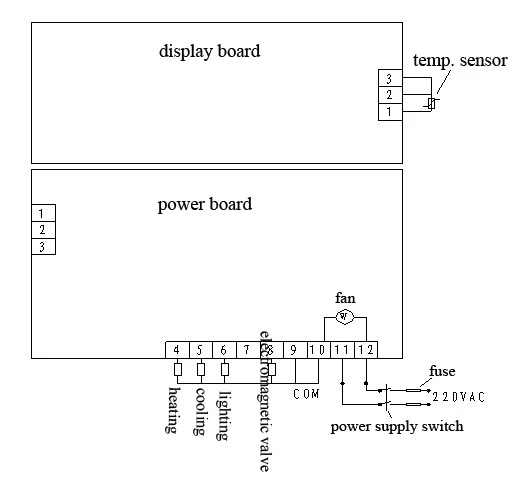
Figure 3
12. Packing list
NO. | Name | Quantity | Remarks |
1 | finish product | 1 | |
2 | instruction manual | 1 | |
3 | shelf | 2( 70L) 2(100L) 2(150L) 2(250L) |