
Get Price
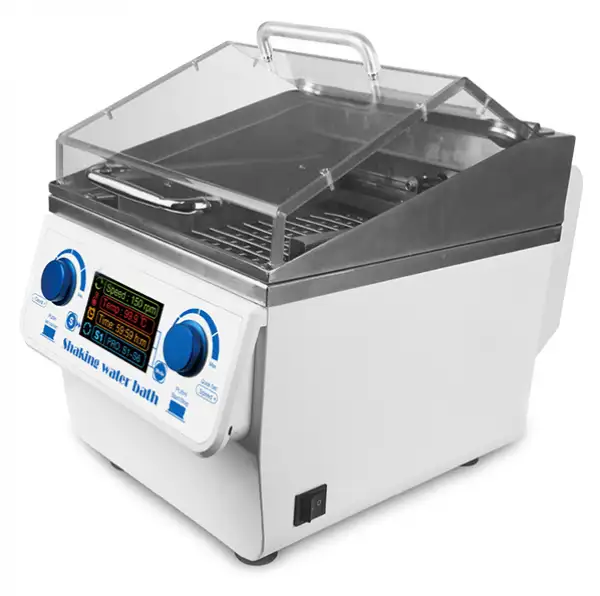
Shaking Water Bath BBSW-301
Water Bath Shaker is a temperature controlled thermostat water bath and oscillator combined laboratory equipment, mainly applicable to colleges and universities, medical, petrochemical, health and epidemic prevention, environmental monitoring and other research departments for biological, Biochemical, cell, bacteria and other liquid, solid-state chemical...
- Unique and novel appearance, small size, powerful functions. All surfaces in contact with water are made of high-quality stainless steel and are corrosion-resistant.
- TFT LCD holographic displays operating speed, temperature, time. Graphic dynamic symbols and precise data at a glance.
- Built-in chip memory storage mode, memory 9 kinds commonly used combination of parameters, and can achieve single-node cycle or multi-node pulse cycle. To meet more experimental requirements.
- Using microcomputer program PID automatic temperature control, with a good temperature uniformity, high temperature control accuracy, safety and comprehensive protection features.
- Up to 3-Year Product Warranty
- US & EU Compliance Standards
- Door-to-Door Shipping
Technical Specifications
Detailed operating and construction parameters for this model.
| Model | BBSW-301 |
| Heating capacity | 10L |
| Temp. Control Range | R.T.+5°C ~100°C |
| Temp. Stability (100°C) | ±0.5°C |
| Time Range | 1m~99h59m OFF is forever |
| Oscillation mode | Reciprocating |
| Amplitude | 26mm |
| Speed range | 20~200rpm |
| Sink size((WxDxH) | 250x304x200mm |
| Voltage | AC220/110V, 50/60Hz |
| Power | 1100W |
| Dimensions(WxDxH) | W.288 x D.506 x H.350 mm |
| Net weight | 10kgs |
Product Features
Key design, performance, usability, and safety advantages.
Operating Manual View instructions, operating procedures, safety information, and maintenance guidance.
1. Safety Warnings and Guidelines
1.1 Important operation information of the security
2. Security
3. The maintenance of Instrument
4. After Sale Service Commitment
5. Introduction
6. Specifications
6.1. The normal operating condition:
6.2. The basic parameters and function
7. Basic Operation
7.1 structure schema
7.2 Diagram of operation panel and display screen
7.3 Operating instructions
7.4 Power connection
8. Operation Guide
9. Failure Analysis and Handling
10. Wiring Diagram of water bath shaker
1. Safety Warnings and Guidelines
1.1 Important operation information of the security
Before operation, please have a perfect conception of how to use the Instrument. Read this manual carefully before using it.
 Operation before reading the Manual is forbidden. Read the guidelines and directions below and carry out the countermeasure according to them.
2. Security
The operation, maintenance and repair of the Instrument should comply with the basic guidelines and the remarked warning below. Otherwise, it will affect the scheduled using life of the Instrument and the protection provided.
This product is a normal and an indoor Instrument which conforms to Standard B style- I type- GB9706.1.
Please read this manual carefully before operating this instrument, otherwise it may cause personal injury.Only qualified inspectors trained in how to install and use electrical equipment can operate the equipment.
Operators do not attempt to open or repair the instrument, which will disqualify you from warranty and may be subject to electric shock.The company is responsible for the repair if necessary.
Before connecting the power supply, make sure the voltage of the power supply is consistent with the required voltage of the instrument.And ensure that the rated load of the power outlet is not less than required by the instrument.If the power cord is damaged, it must be replaced.Replacement must be done with the same type and specification of the power cord.Do not press anything on the power cord when using this instrument.Do not place the power cord where people move.When the power cord is plugged and unplugged, be sure to hold the plug.When the plug is inserted, make sure that the plug is fully inserted into the socket. Do not force the power cord when pulling the plug.
The instrument should be placed in places with low humidity, low dust and away from water sources and away from direct sunlight and strong light sources.The room should be well ventilated, free of corrosive gases or strong magnetic field interference, away from heating, furnace and all other heat sources. Do not place the instrument in a damp or dusty place.
Power off when you finish your work. Pull off the connector plug when there's long time no use of the Instrument and cover it with a cloth or plastic paper to prevent from dust.
Pull the connector plug from the jack immediately in the following cases, and contact the vendor:
• There is some liquid flowing into the Instrument.
• Drenched or fire burned.
• Abnormal operation such as abnormal sound or smell.
• Instrument dropping or outer shell damaged.
• The function has obviously changed.
3. The maintenance of Instrument
The platform and clamp should be cleaned by the cloth stained with a little alcohol. If there are smutches on the Instrument, clean them by soft cloth stained with cleaning cream.
4. After Sale Service Commitment
1. Content of warranty
The company will be responsible for replacement due to fault caused by the materials and manufacturing from the date of delivery within 1 month. The company will provide free warranty due to fault caused by the materials and manufacturing from the date of delivery within 12 months. In the warranty period, the company will provide free repair service or replacement for those machines which are proved as defective apparatus selectively.
2. Scope of Warranty
Improper use or use under unmoral condition, damage caused by repair or modify without authority etc. do not belong to the scope of warranty.
Out of Warranty period, charge the cost of fees appropriately
5. Introduction
BBSW-301 thermostatic water bath shaking table is a biochemical instrument with temperature controlled thermostatic water bath and oscillator, which applies for Oscillatory culture of various liquid and solid compounds such as biology, biochemistry, cell and bacteria in many fields as schools, hospital, petrochemical industry, petrochemical industry, environment monitoring and so on. It's a necessary laboratory instrument for research, education and industry in the field of plant, biology, microbiology, genetic virus, medicine, environmental protection and so forth.
Its feathers are as followings:
• Unique and novelty in appearance, small in volume and powerful in functions. It has strong corrosion resistance because all its surfaces connecting with water are made of high quality stainless steel.
• TFT LCD holographically displays the running speed, temperature and time. It's clear to see graphical symbols and exact data.
• Memory storage mode with built-in chip, which has nine kinds common parameter combinations and single - node cycle or multi-node pulse cycle can be realized as well. Meet more experimental requirements
• Microcomputer program PID automatically controls temperature, which has good temperature uniformity, high temperature control accuracy and comprehensive safety protection.
• Oscillation and heating are designed separately. Users can take off moving frame when oscillation is not required. And then the instrument can be used as thermostatic water bath, which realizes one camera dual use.
• Direct current motor, low noise, no maintenance and long service life.
• Transparent and flip type cover design makes easier operation and better observation of internal running situations. The v-type heat cover can prevent water drop from dropping into the flask.
6. Specifications
6.1. The normal operating condition:
Ambient temperature:4C 45C The relative humidity: ≤70%
Power supply:AC110V/220V 1.5A
6.2. The basic parameters and function
type | BBSW-301 |
Heating capacity | 10L |
Temp. Control range | R.T.+5°C ~100°C |
Temp.Stability | ±0.5°C |
Oscillation mode | reciprocating |
Oscillation range | 0 ~ 26mm |
Speed range | 20 ~ 200rpm |
Sink size | W.250xD.304xH.200mm |
voltage | AC220/110 50/60Hz |
Power | 1100W |
Dimension | W.288xD.506xH.350mm |
Net Weight | 10kgs |
Table 1
7. Basic Operation
It mainly introduces the structure of the instrument, the function of the operation panel, and the preparation before starting the instrument for the first time. Users should be familiar with the content of this chapter before they operate the instrument.
7.1 structure schema
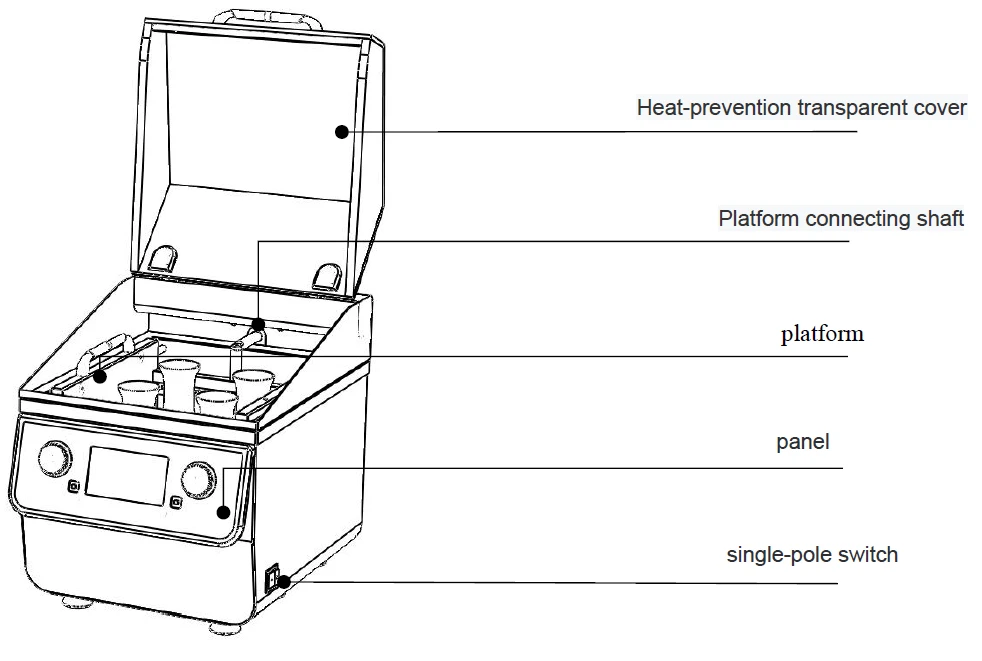
Figure 1
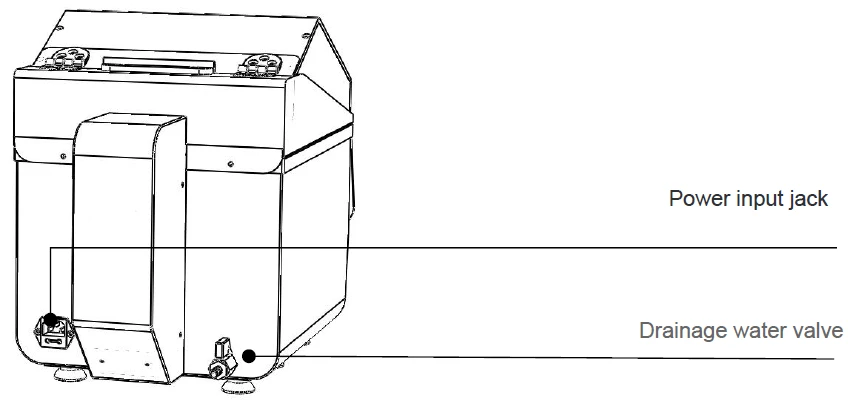
Figure 2
7.2 Diagram of operation panel and display screen
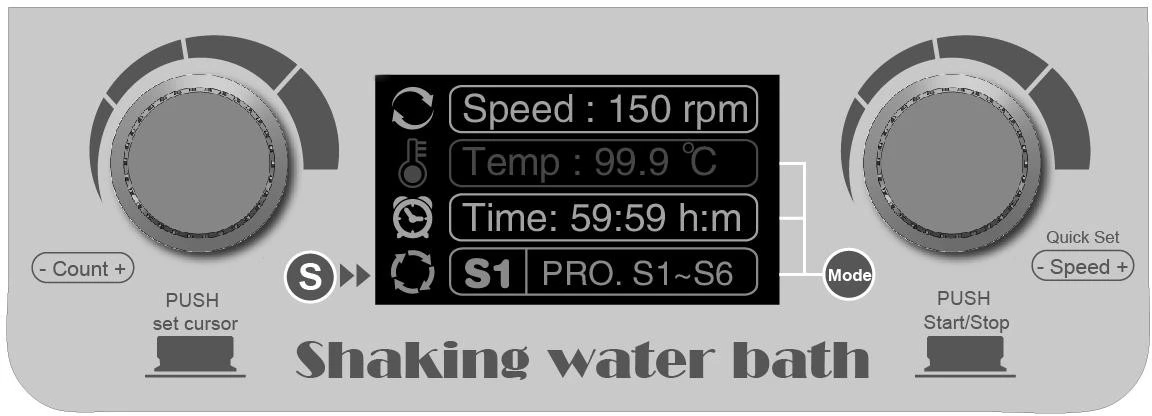
Figure 3
7.3 Operating instructions
 left : In setting mode, press down the knob to switch cursor position, only for
setting temperature and time. Turn the right knob to increase the number at
the setting .Turn to the left is the opposite situation.
right : Turn the right knob to increase speed. Turn to the left is the opposite situation.Press the knob to start operation. Press the knob again to stop operation.
 Press the button to select single node from S1 to S9. Each node stores different running parameters separately,Each node stores different running parameters separately. This
button is a program selection key of single - node.
 Press the button can circularly set temperature, time, and multi-node parameters. At
the same time, turn the left knob to move the cursor and add or subtract the value to finish parameter settings.
7.4 Power connection
Put the instrument on a firm and level table. Insert the cylindrical jack of the power cord into the power input jack at the back of the instrument as the picture shows. And connect the other end of the power cord to the grid whose voltage requires AC110V/AC220V
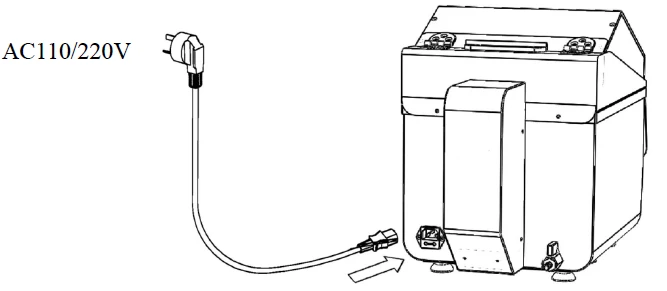
Figure 4
8. Operation Guide
1. Setting of speed, temperature and timing time
Turn on the power switch, the display will light up and holographically displays various parameters of the instrument into initialization, meanwhile with the sound of "di".
Set speed quickly and immediately: Turn the right knob and set the speed value immediately. Stop turning the knob, the instrument will automatically confirms the implementation of the new set value and saves it, just as the right picture shows. If increase of modification range is needed, just turn the knob quickly.
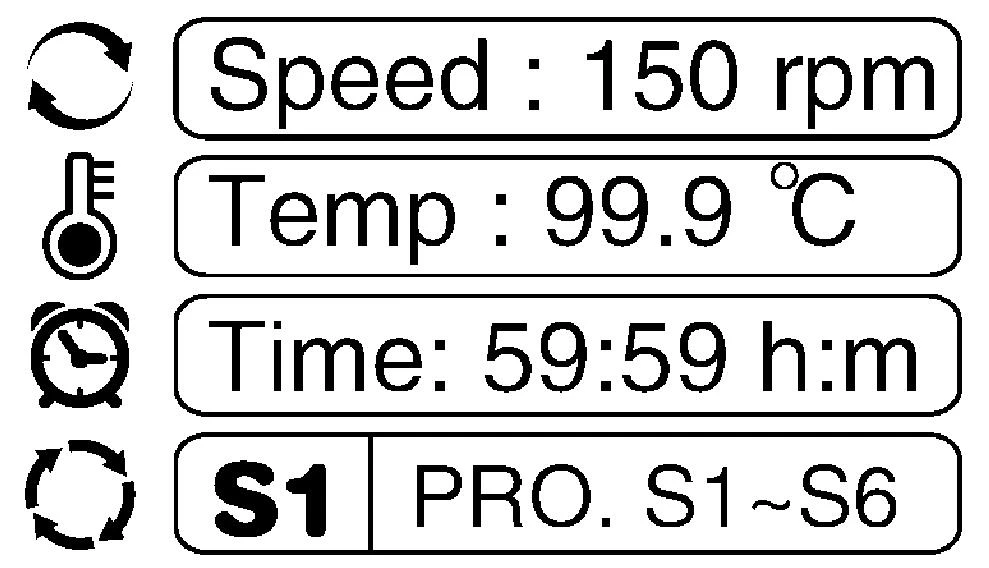
Figure 5
2. setting temperature: press key, The temperature parameter frame changes from colorful
one to white one and enters the setting mode. At this point, the temperature value is the setting value of the last time, and the cursor flickers at the end. Turn the left knob to increase or decrease the current cursor value. Press the knob to move the cursor forward and set the leading digit. Stop turning the knob, the instrument will automatically confirms the
implementation of the new set value and saves it, just as the right picture shows. If increase of modification range is needed, just turn the knob quickly.

Figure 6
3. Setting timing time :press key, The time parameter frame changes from colorful one to white one and enters the setting mode. At this point, the time value is the setting value of the last time, and the cursor flickers at the end. Turn the left knob to increase or decrease the current cursor value. Press the knob to move the cursor forward and set the leading digit. Stop turning the knob, the instrument will automatically confirms the implementation of the new set
value and saves it, just as the right picture shows. If increase of modification range is needed, just turn the knob quickly.

Figure 7
Attention: when time setting shows 00:00, it means time running value as ∞.
4. Operation and stop
• Click START/STOP (right knob) can run the current program. The timing ends, the operation will stop and the buzzer calls an alarm.
• After the operation finished, the instrument waits for the instruction and the time parameter displays "OVER". Press any key can restore the initial state. Press the START/STOP button directly, and the program can start with the speed and time parameter of last time setting.
• During the operation, pressing START/STOP key for a little time can stop the operation. If press START/STOP key again, program will start as well.
• If operation starts at the situation of the temperature is set, it needs to be heating to the set
temperature before blending. Please wait for a moment.
• In the process of temperature heating, the indicator light in the screen temperature parameter icon will flash and long light after reaching the set temperature.
5. Node and programming mode
• Single node: The built-in chip of the instrument can remember nine kinds
parameter sets from S1 to S9 which can display circularly with one key '. Click the START/STOP key (right knob) can run the current program. Users can store common parameters into the instrument for easy operation.

Figure 8
• Multi-node model: This machine can realize multiple node cycle running.
9. Failure Analysis and Handling
Failure analysis and processing procedures
NO. | Phenomenon | Cause | Remedy |
1 | The display screen does not light when the power switch is turned on | Power access failure | Check power connect or not |
Fuse burnt out | Change fuse(250V 3.0A Φ 5x20) | ||
Switch damaged | Exchange switch | ||
others | Contact seller | ||
2 | The temperature is seriously inconsistent with the actual temperature | Fuse damaged | Contact seller or manufacturer |
3 | The temperature panel displays " OPEN " ,with the alarm sound of "du" | Temperature sensor circuits or ambient temperature is below zero | Contact seller or manufacturer |
4 | Heat is normal, but doesn't run | Motor fault or connection line fault | Contact seller or manufacturer |
5 | The buttons don't work | Key damaged | Contact seller or manufacturer |
6 | The box cannot warming,with the alarm sound of "du" | Heat cover is not fully closed | Close the heat cover |
Table 2
10. Wiring Diagram of water bath shaker
(Below diagram is just for reference. It is subject to change without prior notice.)
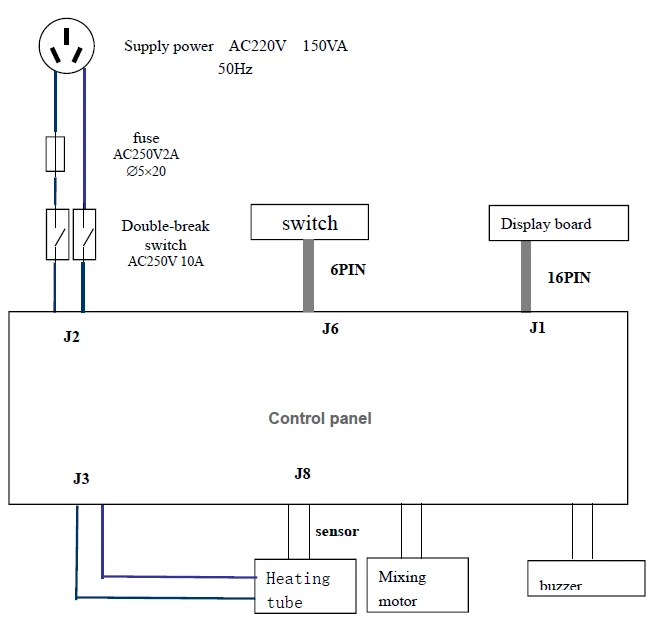
Figure 8