
Get Price
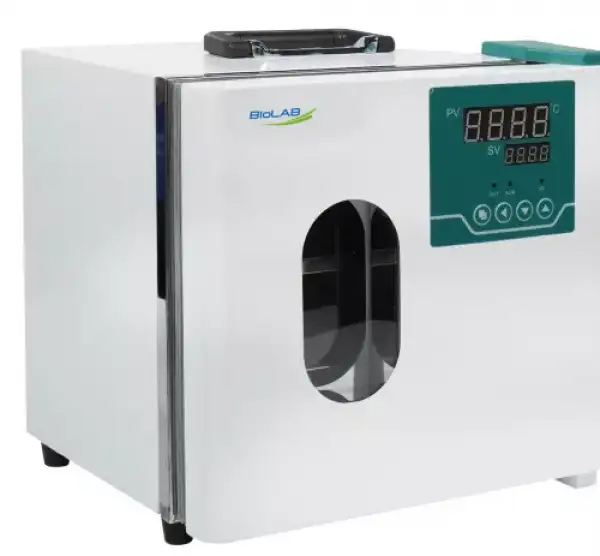
General Purpose Incubator BER-1802
- 1. Internal naturally air convection,four sides heating method, to make inner temperature uniformity.
- 2. Mirror stainless steel inner chamber, four corners arc transition easy to clean.
- 3. PID controller, with over-temperature protection function, with over-temperature alarm, sensor fault alarm, fixed value operation, regular operation, deviation correction, menu locking and other functions.
- 4. With high quality glass window and installed LED light on the door,easy to observe the sample inside, especially under dark conditions.
- 5. Portable design, the top handle is easy to move, optional 12V vehicle power supply, vehicle 12V, 100-240V can be used.
- Up to 3-Year Product Warranty
- US & EU Compliance Standards
- Door-to-Door Shipping
Technical Specifications
Detailed operating and construction parameters for this model.
| Model | BER-1802 |
| Cycle Mode | Natural Convection |
| Function | |
| --Temp. Range | RT+5-65°C |
| --Temp. Resolution Ratio | 0.1°C |
| --Temp. Motion | ±0.5°C |
| --Temp. Uniformity | ±1.5°C |
| Structure | |
| --Inner Chamber | mirror stainless steel |
| --Quter Shell | Cold rolling steel electrostatic spraying exterior |
| --Insulation Layer | Polyurethane |
| --Heater | Heating Element |
| --Power Rating | 0.12kW |
| Controller | |
| --Temp. Control Mode | PID Intelligent |
| --Temp. Setting Mode | Touch button setting |
| --Temp. Display Mode | Measuring temperature: LED upper row ; Setting temperature: the lower row |
| --Timer | 0-9999min (with timing wait function) |
| --Operation Function | Fixed temperature operation, timing function,auto stop. |
| --Additional Function | Sensor deviation correction, temperature overshoot self-tuning, internal parameter locking, power-off parameter memory |
| --Sensor | PT100 |
| Safety Device | Over temperature sound-light alarm |
| Specification | |
| --Inner Chamber size(W*L*H)(mm) | 230*200*280 |
| --Exterior Size (W*L*H)(mm) | 310*276*378 |
| --Packing Size (W*L*H)(mm) | 350*312*457 |
| --Volume | 12.8L |
| --Max. Shelf Number | 2 |
| --Load Per rack | 5kg |
| --Shelf Space | 35mm |
| --Power Rating (50/60HZ) | AC220V/0.36A |
| --NW/GW (kg) | 12\14 |
| Optional accessories | Vehicular/DC12V/AC110V/AC220V Supply |
Product Features
Key design, performance, usability, and safety advantages.
Applications Explore common laboratory, research, industrial, and process applications.
It is used for industrial and mining enterprises, food processing, agriculture, biochemistry, biology, medicine industry of bacteria, microbe and other small culture experiments.
Operating Manual View instructions, operating procedures, safety information, and maintenance guidance.
1. Safety warning before use
2. Main features of product
3. Technical Specification
4. The panel indication
5. Operations and usages
6.Seven The internal parameters of the temperature are seen and Set.
1. Safety warning before use
1.Do not store volatile, flammable or explosive materials in the equipment, otherwise it may cause explosion or fire.
2.Do not place the equipment in a place that is wet, wet or may splash water, otherwise it may lead to accidents such as leakage, short circuit or electric shock.
3.Non-professional technicians shall not disassemble, repair or modify the equipment, otherwise it may cause fire or electric shock accidents due to improper operation.
4.The equipment should be installed on a solid ground. If the ground is not solid enough or the installation site is not suitable, injuries may be caused by the equipment tipping over.
5.The equipment should be installed on a solid ground. If the ground is not solid enough or the installation site is not suitable, injuries may be caused by the equipment tipping over.
6.Before any repair or maintenance of the equipment, be sure to disconnect the power supply to prevent electric shock or personal injury.
7.Be sure to wear gloves when performing equipment repair or maintenance to prevent injury caused by touching edges or sharp corners.
8.If the equipment is found abnormal operation, immediately unplug the power plug, stop the operation of the equipment. Operation under abnormal conditions may cause electric shock or fire.
2. Main features of product
1, the use of intelligent PID temperature controller table with timing, alarm indication, temperature deviation correction, temperature control self-tuning and other functions, temperature control accurate and stable.
2, with over temperature power off, alarm indicating system, when the control temperature exceeds the set upper limit instrument automatically cut off the power output buzzer alarm. Ensure the safety of experiment and personnel.
3, the integrated liner structure is simple and beautiful, the magnetic tape seal and the training door lock device is safe and convenient to use.
4, the four walls around the heating to ensure that the internal temperature is uniform.
5, good thermal insulation design, prevent the ability to lose too fast, the maximum extent to achieve green, energy saving, low carbon environmental protection.
6. The box shell is treated by electrostatic spraying process, beautiful and generous in shape, anti-corrosive and durable, showing the luxurious and elegant instrument shape.
* Portable box design portable convenient for outdoor emergency, vehicle transport and other venues.
3. Technical Specification
Model | BER-1801 | BER-1802 | |
Cycle Mode | Natural convection | ||
Function | Temp. Range | RT+5-65°C | |
Temp. Resolution Ratio | 0.1°C | ||
Temp. Motion | ±0.5°C | ||
Temp. Uniformity | ±1.5°C | ||
Structure | Inner Chamber | Mirror stainless steel | |
Outer Shell | Cold rolling steel electrostatic spraying exterior | ||
Insulation layer | Polyurethane | ||
Heater | Heating Wire | ||
Power Rating | 0.08kW | 0.12kW | |
Controller | Temp. control mode | PID Intelligent | |
Temp. setting mode | Touch button setting | ||
Temp. display mode | Measuring temperature: LED upper row;Setting temperature: the lower row | ||
Timer | 0-9999min (with timing wait function) | ||
Operation function | Fixed temperature operation, timing function,auto stop. | ||
Additional function | Sensor deviation correction, temperature overshoot self-tuning, internal parameter locking, power-off parameter memory | ||
Sensor | PT100 | ||
Safety device | Over temperature sound-light alarm | ||
Specification | Inner Chamber size(W*L*H)(mm) | 230*200*200 | 230*200*280 |
Exterior size (W*L*H)(mm) | 310*276*298 | 310*276*378 | |
Packing size (W*L*H)(mm) | 350*312*377 | 350*312*457 | |
Volume | 9.2L | 12.8L | |
Shelf Number | 2 | ||
Load Per Rack | 5kg | ||
Shelf Space | 35mm | ||
Supply(50/60HZ) Current rating | AC220V/0.36A | AC220V/0.36A | |
NW/GW (kg) | 8/10 | 12/14 | |
Optional Accessories | Vehicular/DC12V/AC110V/AC220VSupply | ||
Table 1
4. The panel indication
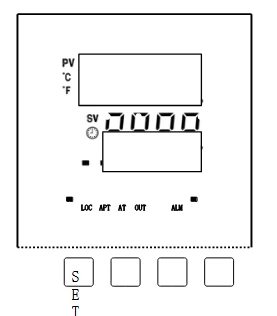
Figure 1
Key defines
【Set】: Set key, in the main screen state, click this key to enter the temperature and time target value Setting state, long press this key for 3 seconds to enter the internal parameter Setting state.
【 】: Shift / Auto-tuning, in the Setting state, click this key to change the Setting value.In the main screen state, long press this key for 6 seconds to temperature auto-tuning selection state.
【 】: Decrease / rerun key. In the Setting state, click or long press this key to decrease the Setting value.In the main screen state, long press this key for 3 seconds to restart the run.
【 】: Increase / lock screen key. In the Setting state, click or long press this key to increase the Setting value.In the main screen state, click this key to lock or unlock the screen.
LED indicator Defines
1. 【AT/F】indicator :The lamp will be on when the temperature unit is degree Fahrenheit .The lamp will flash in auto-tuning, it will flash. In other states, it will be off.
2. 【TIM】indicator: The lamp will be on when there is a timing Setting,it will flash in reservation timing, it will be off when no timing function.
3. 【OUT】indicator :The lamp will be on when there is heating output , otherwise it will be off.
4. 【LOC】indicator : The lamp will be on when the screen is locked, otherwise it will be off.
5.【SIN】indicator : Invalid reservation
6. 【ALM】indicator: The lamp will be on when there is temperature deviation alarm or abnormal temperature measurement.It will flash when there is temperature deviation alarm. Under normal condition, it will be off.
5. Operations and usages
1. Controller power on display
After all the display are on for about 3 seconds, PV area displays SV displays version number for about 1 second and then enters the normal display state.
2. Reference and Setting of temperature and time
1) No-timing function:
In the main screen state, click the【Set】to enter the temperature Setting state, the PV area displays prompt SP, and the SV area displays the temperature Setting value, which can be modified to the required Setting value through the【shift】,【increase】,【decrease】, then click the【Set】to exit the Setting state, and the Setting value will be saved automatically.
Timing function:
In the main screen state, click the【Set】to enter the temperature Setting state, the PV area displays the prompt SP, the SV area displays the temperature Setting value, and the modification method is the same as above; then click the 【Set】 to enter the time Setting state, the PV area displays the prompt ST, TIME area displays the time Setting value; then click【Set】to exit the Setting state, and the Setting value will be saved automatically.
When the Setting time is "0", it means continuous operation. When the Setting time is not "0", before the timing starts, if the timing direction is count-down, the TIME area will display the timing time; if the timing is count-up, the TIME area will display "0". When the timing starts, "indicator" will flash.When the time is up, the operation will end. The TIME area will display End, and the buzzer will beep for EST seconds (see 7. Parameter TABLE-1). At this time, long press the 【decrease】for 3 seconds, the operation can be restarted.
3.Reservation function(see7.Parameter TABLE-6)
When an reservation time is Set, heating operation is prohibited.
PC-D9000 type: In reservation timing,A indicator flashes, and the count-down TIME area displays the reservation running time.
PC-E9000: In reservation timing,TIM indicator flashes, and the count-down TIME area displays the reservation running time.
Abnormal temperature measurement alarm
If the PV area displays "----", it means that the temperature sensor is faulty or the temperature exceeds the measuring range or the controller itself is faulty. The controller will automatically disconnect the heating output, the buzzer will sound continuously and the alarm light will be on. Please check the temperature sensor and its wiring carefully.
5.Deviation over temperature alarm (see 7. Parameter TABLE-1)
When the upper deviation over temperature alarm occurs in process, the buzzer beeps, the alarm light is continuously on, and the heating output is disconnected.When the lower deviation over temperature, the alarm will occur and flash. If the over temperature alarm is generated due to changing the temperature Setting value, the alarm light will be on, but the buzzer will not sound.
6. Lock screen function.
Three screen locking modes are provided. See [7. Parameter TABLE-1] for details.
Password unlocking: In the lock screen state, click the 【increase】, the input password prompt PA is displayed in PV area, and the password is displayed in SV area. After entering the correct password, click the【Set】to unlock.
7. When the buzzer sounds, press any keys to silence.
Auto-tuning system
When the temperature control effect is not ideal, the system can be auto-tuning. There will be a large overshoot in the process of auto-tuning. Please take this factor into consideration before system auto-tuning.
In the running state and the main screen state, long press the 【shift】for 6 seconds to enter the system auto-tuning selection state. The PV area displays the auto-tuning prompt AT, and the SV area displays "0". You can click the 【increase】 or 【decrease】 to select the display "1", and then click the 【Set】to enter the system auto-tuning state. The AT light flashes. After the auto-tuning is completed, the AT light stops flashing The controller will get a better set of PID parameters and save them automatically. In the process of system auto-tuning, long press the【shift】for 6 seconds to stop the auto-tuning program.
In the process of system auto-tuning, if there is an over temperature alarm of upper deviation, the alarm light will not be on and the buzzer will not sound, but the alarm relay will be automatically disconnected. In the process of system auto-tuning, the【Set】 is invalid.
6.Seven The internal parameters of the temperature are seen and Set.
In the main screen state, long press the【Set】for 3 seconds, the password prompt LC will be displayed in PV area, and the password will be displayed in SV area.Modify the required password through【increase】,【decrease】 and 【shift】, and then click the 【Set】. If the password is incorrect, the instrument will automatically return to the main screen state. If the password is correct, enter the internal parameter setting state, and then click the【Set】to modify each parameter in turn. In this process, long press the【Set】for 3 seconds to exit this state, and the parameter value will be saved automatically. See the table below for details:
Parameter Table
The Indicator | Parameter Name | Description of the parameter function | (Range) Initial value |
Lc | Password. | Lc=3,parameter values can be viewed and modified | 0 |
ALH | Upper Deviation Over-temperature Alarm | PV>SP+ALH, over-temperature alarm of upper deviation | (0~100.0°C) 20.0 |
ALL | Lower Deviation Over-temperature Alarm | PV<SP-ALL,over-temperature alarm of upper deviation Description:ALL=0,the lower deviation alarm is invalid | (0~100.0°C) 0 |
Pb | Temperature Measurement Deviation Correction | Used to correct errors in temperature measurement. Pb = Actual temperature-PV | (-50.0~50.0°C) 0 |
PL | Temperature Measurement Slope Correction | It is commonly used to correct errors arising from high temperature measurement. PL = 1000 * (Actual temperature-PV)÷ PV Description: In Parameter【TABLE - 4】,En = 1 This feature is invalid. | (-999~999) 0 |
ndT | Timing Mode | 0:No-timing; 1:Constant temperature timing; 2: Run timing. | (0~2) 1 |
Tdn | Timing Direction. | 0:Count-up; 1:Count-down | (0~1) 0 |
Hn | Time Unit. | 0:Minute; 1:Hour | (0~1) 0 |
SPd | Constant Temperature Deviation | SP-SP d ≤PV≤SP+SP d, Enter a constant temperature state. | (0.1~50.0°C) 0.5 |
EST | End Timing Prompt Time | When the timing is over, the buzzer will prompt the time. Note: EST = 9999, indicates a permanent prompt. | (0~9999s) 60 |
EH | End Timing Constant Temperature Controller | 0: Turn off the heating output after timing; 1: Keep constant temperature controlling after timing | (0~1) 0 |
LF | Lock Screen Function | 0: Lockless screen function; 1: Lock screen function, unlock without password. 2: Lock screen function, need password to unlocked. | (0~2) 0 |
LdT | Lock Screen Delay | In the main screen state, if no key is pressed in the delay LDT time, the controller will automatically lock the screen. Description: LDT = 600, the delay screen locking function is invalid | (10~600s) 30 |
PAd | Unlock Password | The password must be entered to unlock it. | (0~9999) 1 |
Add | Mail Address | Local Address Description: PC-E9000 has no communication function. | (1~32) 1 |
Table 2
The Indicator | Name | Description of the parameter function | (Range) Initial value |
Lc | Password | Lc=567,parameter values can be viewed and modified | 0 |
rST | Factory Reset | 0:Cancel; 1:Conform。 | (0~1) 0 |
Table 3