
Get Price
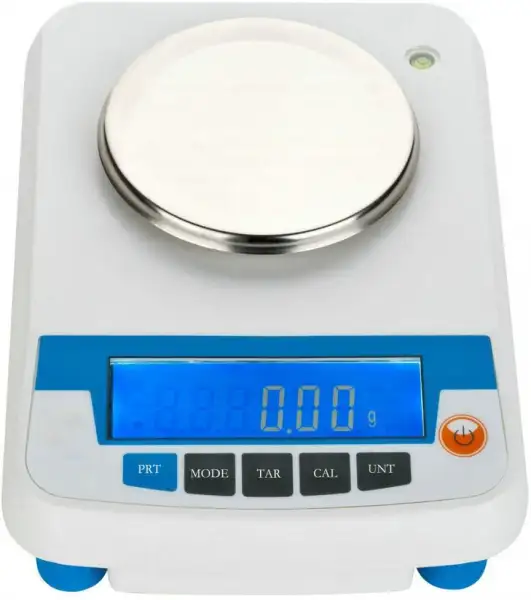
Weighing Scale BFU-6218
- Functions: weighing, parts counting, percent weighing.
- Up to 3-Year Product Warranty
- US & EU Compliance Standards
- Door-to-Door Shipping
Technical Specifications
Detailed operating and construction parameters for this model.
| Model | BFU-6218 |
| Weighing Range | 0~5000g |
| Readability | 100mg |
| Pan Size | Φ165mm |
| Dimension/N.W. | 280*200*60mm/ 1.8kg |
| Shipping Size/G.W. | 320*280*150mm/ 2.5kg |
| Standard Accessaries | Calibration Weight (optional), Adapter, Manual, Dust cover |
Product Features
Key design, performance, usability, and safety advantages.
Operating Manual View instructions, operating procedures, safety information, and maintenance guidance.
Electronic Balance
Operation Manual
1. Environment Conditions
2. Start up
3. Calibration
4. Weighing
5. Tare
6. Unit conversion
7. Counting
8. Percentage function
9. Print function
10. Backlight
11. Low voltage indication
12. Packing List
Electronic Balance
Operation Manual
Please read and adhere to all recommendations in this manual to ensure the best experience and to maintain your analytical balance in good working order. This operation manual is for BFU-6218 series balance.
1. Environment Conditions
1.1. After unpacking, remove all packaging, take out the buffer sponge on the hood inside the hood, and install the pan. Place the balance on a stable work surface, free from vibration, sunlight and drafts.
1.2. Temperature: 20°C±10°C, and its temperature fluctuation is not greater than 5°C/h.
1.3. Relative humidity: < 50% ~ 80%.
1.4. Operating voltage: 110V/220V
2. Start up
2.1. The balance is powered on, and in order to get an accurate measurement, it usually needs to be preheated for one hour. If there is an urgent need, when the preheating time is insufficient, the balance can be calibrated after weighing, to obtain accurate measurement values.
2.2. Press the power key, the display will light up. It displays "8.8.8.8.8.8.", "Maximum capacity", "------" in turns. At last, it
shows "0.000" under weighing mode. For example, the final display is:
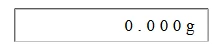
Figure 1
If you want to stop using the balance for a long time, you should turn off the power switch and then unplug the power.
3. Calibration
3.1. Calibration is performed one hour after the balance is turned on and preheated to make the calibration more accurate.
3.2. Calibration operation: make the pan empty, press and hold down the "Calibration" key, appear "CAL--" put the corresponding weight, when the day identifies the weight value, the screen will blink the corresponding value, press the cal key to confirm, return to the measurement mode (calibration weight value minimum value 40g, can be arbitrarily increased every 10g calibration)
3.3. If you do not put the weight in about 10 seconds after entering the calibration state and "Err--1" is displayed, the calibration state is automatically exited.
4. Weighing
4.1. Place the weighed object on the pan, and when the reading is stable and the white dot at the bottom left of the display disappears, the mass of the object can be read.
4.2. The maximum weighing of the balance is the maximum value displayed on the machine +9e (e=10d d is the minimum reading displayed). After the maximum weighing is exceeded, the horizontal line on the display "------" indicates that the
cumulative weighing exceeds the specified range, and the weighing object should be taken immediately to prevent damage to the balance.
5. Tare
When the white dot at the bottom left of the display disappears, press the "TARE" key to remove the tare weight on the pan, and the peeling function is invalid when the white dot is displayed.
For example:
Place the container on the pan to show the quality of the container:

Figure 2
Then tap the < TARE > key to display blanking, then an all-zero state appears, and the container's quality display value has been removed:

Figure 3
When the container is removed, a negative value of the container mass appears:

Figure 4
Tap the < TARE> key again, and the display is all zero:

Figure 5
6. Unit conversion
Unit conversion: Press the "Unit" key in turn to select different units, g, oz, ct, lb, and continue to cycle. Convenient for conversion between units.
7. Counting
Counting:: Press the "Mode" key to display "-Cou--", press the "TARE" key to confirm, the display "OU-10 PCS" blazed, press the "Mode" key, you can change from "10pcs" to "500pcs", the larger the number, the higher the counting accuracy. Put the corresponding shining number on the pan of the count items, press the "TARE" key to confirm, display "Cou--", later, the count setting is completed. When the single weight of the counted item is less than 2d (d is the minimum reading displayed), "Err--3" is displayed, and the count setting cannot be performed.
8. Percentage function
Percent: Press and hold the "Mode" key for about 3 seconds until "-Cou--" shines, press the "Mode" key again, "-PER--" shines, press the "TARE" key to confirm, "PER100%" shines, put the item to be set to 100%, press the "TARE" key, "PER-- %" is displayed, and then "100%" is displayed. Remove the item and put other items, which shows the percentage of the item and the item set earlier. When the set item is less than 2d after dividing by 100, "Err--2" is displayed, the percentage cannot be set, and the quality of the set item needs to be increased.
9. Print function
Print: This balance has printing function, the baud rate is fixed at 9600bps.
This balance has computer connection function, through PC connection, you can save records, export Excel form.
10. Backlight
Backlight: Press "mode" button, the display shows "- bL -", press "TARE" confirmed that show "- bL on -" and then press the "mode" key, the display "- bL off -". Select the required backlight on mode, press the peel button to confirm. "-bl -" indicates that the backlight is manually enabled or disabled, and "RST" indicates that the system is reset. Press the TARE key to confirm, and then RST OFF is displayed. Press the peel key again to enable the backlight.
11. Low voltage indication
When the battery is used, if the battery symbol is displayed on the upper left of the LCD, the battery capacity is insufficient and the battery needs to be replaced.
12. Packing List
BFU-6218 series Electronic Balance, Scale pan, AC adapter, User's manual, Calibration weight (Optional)