
Get Price
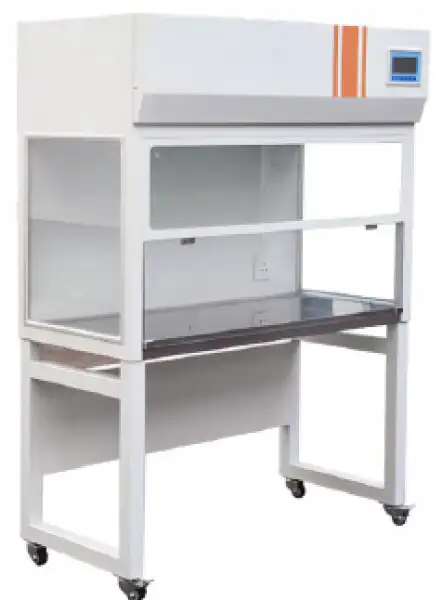
Vertical Laminar Airflow BKF-601
- The PCR laminar flow cabinet extracts air from the laboratory, enters the operating area through a two-stage filtration system, forms a clean area, and finally discharges it into the laboratory.
- The system includes a positive pressure HEPA filtration system that can form an uninterrupted ISO Class 5 air clean area in the sample preparation area.
- The chamber can accommodate pipe racks, racks, suction tubes, micro centrifuges, and thermal circulator.
- The control system adopts intelligent microcomputer control, with a blue display screen and digital indication of various parameter values.
- The workbench is made of integrated stainless steel, which is easy to clean, and the edges are bent with large arcs.
- The front of the clean table maintenance port allows for replacement and maintenance of fans and filters at the front of the clean table.
- The lighting and sterilization system is interlocked with a backup socket design, ensuring safe and convenient use.
- The box body adopts cold rolled steel plate spray molding technology, with a delicate and delicate appearance.
- Up to 3-Year Product Warranty
- US & EU Compliance Standards
- Door-to-Door Shipping
Technical Specifications
Detailed operating and construction parameters for this model.
| Model | BKF-601 |
| Internal Size (W*D*H) | 700*510*580mm |
| External Size (W*D*H) | 860*590*1620mm |
| Clean grade | 100 grade@≥0.5μM (209E U.S Federal) |
| Number of bacteria | ≤0.5per/utensil·hour (Φ90mm utensil) |
| Average speed | 0.25~0.45m/s |
| Noise | ≤62dB(A) |
| Vibration half peak | ≤5μm(x,y,z) |
| Illumination | ≥300Lx |
| Power supply | AC single phase220V/50Hz |
| Maximum power | 100W |
| Weight | 80kg |
| Suited for person | Single person single side |
| Specification and number of Hepa filter | 685x455x50 |
| Specification and number of Fluorescent/UV lamp | 12Wx/20W |
Product Features
Key design, performance, usability, and safety advantages.
Operating Manual View instructions, operating procedures, safety information, and maintenance guidance.
1. Brief introduction
2. Structural Characteristics
3. Working Principle
4. Schematic Diagram for Controller
4.1 Main technical indicators and requirements
4.2 Panel Indication
4.3 Instructions for Use
5. Wiring diagram
6. Maintenance
7. General Failure, Causes, And Troubleshooting
1. Brief introduction
1. The shell is welded by cold-rolled plates, the surface is electrostatically sprayed, and the work surface is SUS304 brushed stainless steel, which is corrosion-resistant and easy to clean.
2. The lighting and sterilization systems are interlocked safely, and there is a timing function of ultraviolet light
3. Digital display LED control interface, more user-friendly design
4. The vertical quasi-closed table top and the formation of a downward flow air curtain in the operation room can effectively prevent the input of external air and the operation area is clean
5. Equipped with HEPA high-efficiency air filter, with primary filter for preliminary filtration, which can effectively extend the service life of the high-efficiency filter
2. Structural Characteristics
Laminar flow cabinet: by several major components of the cabinet, fan and high efficiency filters, operating switches, etc. Box cold plate production, surface spray treatment, work tops, stainless steel. Purification unit uses a variable air volume fan system, by adjusting the fan working status, can the average wind speed to maintain a clean work area within the rated range, and effectively extend the life of the high efficiency filter.
3. Working Principle
By The Centrifugal fan pressure air through the primary filter, into the plenum chamber, and then after a hepa filtered from the blowing of the wind surface, clean air, clean air flow to the uniform cross-section wind speed through the clean area, the region the dust away, thus forming a work environment of high cleanliness.
4. Schematic Diagram for Controller
4.1 Main technical indicators and requirements
1. Power supply voltage: 220VAC±10%;
2. Working environment: Ambient temperature: -10~60°C; Relative humidity: < 85%RH.
4.2 Panel Indication
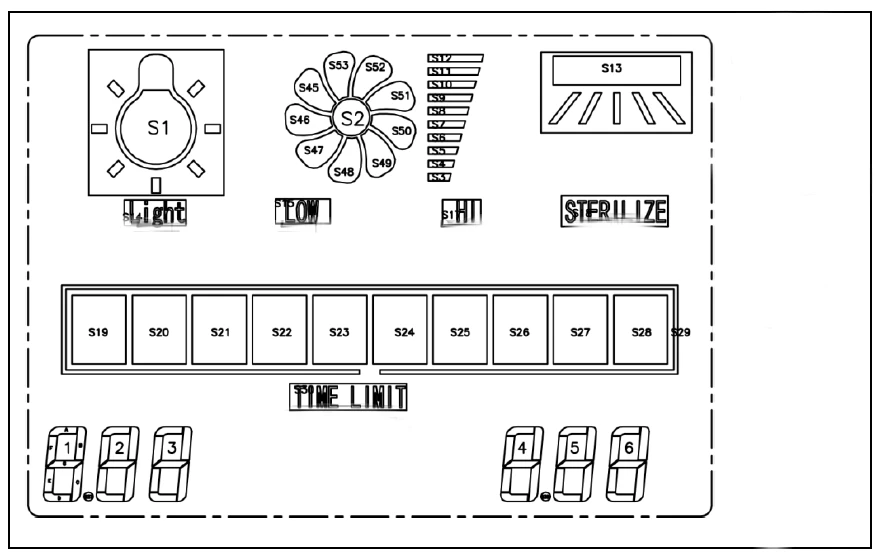
Figure 1
1. [Lighting]: Lighting button, click to turn on or off the lighting output. Long press the lighting button to enter the internal parameter interface.
2. [Fan/Increase]: Fan button, click to turn on or turn off the fan output. When in parameter modification mode, it is reused as the increase button;
3. [Sterilization/Decrease]: Sterilization button, click to turn on or off the sterilization output. When in parameter modification mode, it doubles as the decrease button;
4. [Power]: Power button, click to turn on or turn off the screen display. When the power button is turned off, all outputs are shut down
4.3 Instructions for Use
4.3.1 Display the model and version number when the device is turned on
When powered on, the LCD displays 001 on the left and 001 on the right. After about 3 seconds, the display screen disappears and the [Power] button needs to be pressed to enter the normal display state.
4.3.2 Fan function
When the fan is turned off, clicking the [Fan] button will activate low-speed output, and the low-speed icon will light up. Clicking the [Fan] button again will activate high-speed output, and the high-speed icon will light up. Clicking the [Fan] button a third time will turn off the fan output, and both the high-speed and low-speed icons will turn off.
4.3.3 Sterilization function
In the sterilization off state, clicking the [Sterilization] button initiates sterilization output, illuminates the sterilization icon, and simultaneously turns off the fan and lighting output (this can be modified through parameters to not turn off the fan and lighting output).
4.3.4 Working hours timing
When there is output from the sterilization process, the accumulated working hours are counted, and the progress bar displays the percentage of the maximum working hours.
When the working duration exceeds 90%, the duration bar flashes as a reminder (the percentage and whether to prompt can be set through parameters).
4.3.5 Internal parameters
In the main interface display state, long press the [Lighting] button for 3 seconds. The password prompt "PAS" will appear on the left side, and the password value will be displayed on the right side. Modify the password value to the desired value using the [Increase] and [Decrease] buttons, and then click the [Lighting] button. If the password value is incorrect, the instrument will automatically return to the main interface display state. If the password value is correct, it will enter the internal parameter setting state. Click the [Lighting] button again to modify each parameter in turn. During this process, long pressing the [Lighting] button for 3 seconds can exit this state, and the parameter values will be automatically saved.
Internal parameter table -1
Parameter indication | Parameter name | Parameter function description | (Range) Factory default value |
PAS | Password | "PASS=1"can view and modify the parameter values at any time | 0 |
LAn | Language choice | 1 - Interface prompt symbols display in English. | (0~1) 0 |
ACL | Sterilization shutdown selection | 0-Sterilization does not affect lighting and fan output. 1. Turn off the lighting and fan output during sterilization. | (0~1) 1 |
SPH | Maximum working hours | Setting the upper limit of working hours. | (1~999) 999 hundred hours |
PE | percentage prompt | When the work timing exceeds the percentage parameter of the maximum working hours, the work bar flashes to indicate. | (0~100) 0% |
Table 1
Internal parameter table -2
Parameter indication | Parameter name | Parameter function description | (Range) Factory default value |
PASS | Password | "PASS =9" can view and modify the parameter values at any time | 0 |
CLr | Clear working hours | Select ON, click the lighting button to return to the main unit interface and clear the current working hours. | (OFF~ON) |
Table 2
5. Wiring diagram
Special reminder: To minimize interference with the instrument during wiring, please ensure that strong current lines (such as power lines and load lines) are separated from weak current lines (such as sensor signal lines and button leads).
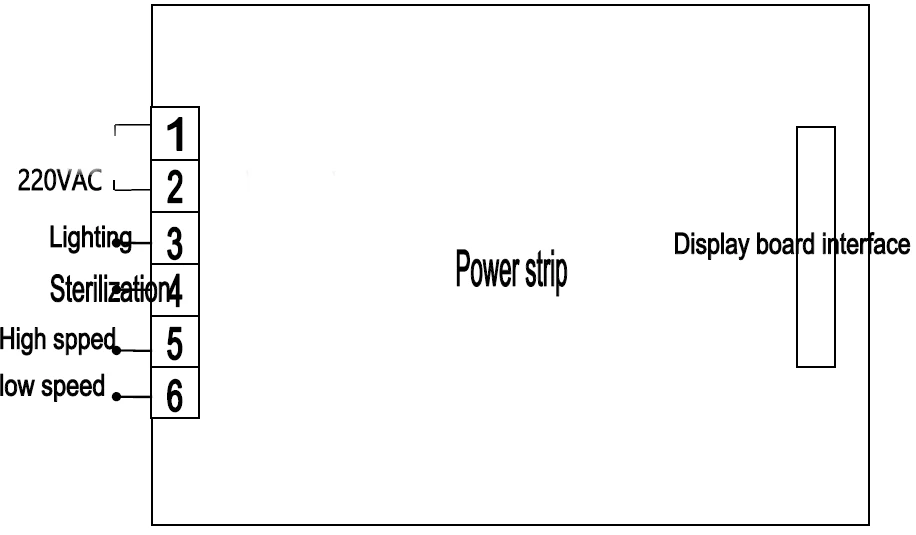
Figure 2
6. Maintenance
1. Based on actual usage, periodically remove the primary filter cleaning, the cleaning cycle is generally 3-6 months. (if not long-term cleaning, the dust will affect the amount of wind insufficient to reduce the cleaning effect.)
2.When the early effect of the normal exchange or clean the filter air filter, still can not achieve the desired cross-section wind speed, then adjust the fan voltage, and thus achieve the desired uniform wind speed.
3.Generally when the fan operating voltage adjustment to the highest point in the use of eighteen, still can not achieve the desired wind speed, description of the filter on the high efficiency filter dust too much (filter kong has basically stuck to timely update) general efficiency air filters use a period of eighteen months.
4.Replacement of high efficiency air filters, should pay attention to the correctness of the model dimensions (original manufacturer configuration), arrow wind devices, and pay attention to the peripheral sealing of the filter is absolutely no leakage occurs.
7. General Failure, Causes, And Troubleshooting
Faults | Reason | Troubleshooting methods |
Total power switch is not close automatically trip | 1. fan stuck lead to motor stall, or short-circuit lines | 1 adjust the fan air shaft position, or replace the impeller and bearings, check the line is intact. 2. the control circuit diagram, point by point inspection line components of the shell insulation resistance, and repair insulation failure. |
Wind speed is low | 1a primary filter too much dust. 2. the high efficiency filter failure. | 1. the beginning of the cleaning efficiency of the filter. 2 the replacement of high efficiency filter. |
Fan does not turn | 1 the contact does not work. 2 the fan power fuse has blown. | 1 check the contact line is normal. 2 replace the fuse. |
Fluorescent lamp is not lit | 1. a lamp or relay damage. 2. the lamp power supply fuse has blown. | 1 replace the lamp or relay. 2 replace the fuse. |
Table 3