
Get Price
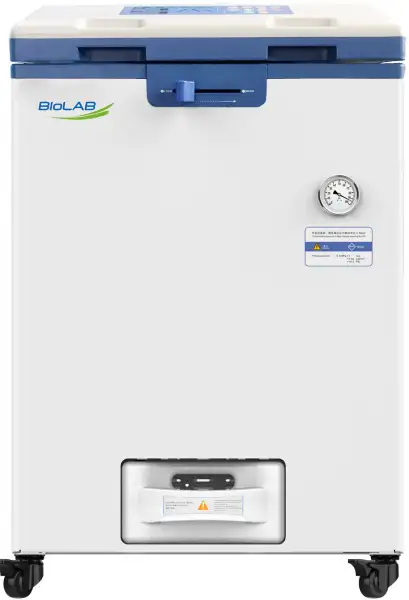
Vertical Autoclave BAVT-403-A
- Safety:
- 1. Humanized design:
- The lid and bench corners are covered with insulation to avoid getting scalded.
- 2. Interlocking device:
- The exclusive patented "eight column evenly distributed" interlock device is safer and more reliable than ordinary interlocking devices.
- 3. Lid closing checking:
- The machine cannot start if the lid is not locking well by checking mechanically and electrically.
- 4. Real time monitor:
- Up to 3-Year Product Warranty
- US & EU Compliance Standards
- Door-to-Door Shipping
Technical Specifications
Detailed operating and construction parameters for this model.
| Model | BAVT-403-A |
| Capacity | 110L |
| Sterilization Temperature | 105°C~138°C |
| Working Pressure | 0.29 Mpa |
| Features | |
| Dimension(L*W*H)(mm) | 644x831x1180 |
| Chamber dimension(Dia*H)(mm) | Φ390x895 |
| Rated power(W) | 4600 |
| SUS 304 Basket(Dia*H)(mm) | (Φ 370x500) x3 |
| Power requirement | 220V±10% 32A 50HZ/60HZ |
| Temperature display accuracy | 0.1°C |
| Working environment | 5°C~40°C relative humidity ≤85% |
| Chamber material | SUS304 stainless steel |
| Sterilization temp. range | 105°C~138°C |
| Sterilization time range | 1~6000 min |
| Melting temp. range | 60°C~115°C |
| Melting time | 1~6000 min |
| Warming temp | 45°C~79°C |
| Warming time | 1~9999 min |
| Drying | Drying time: 80~160°C |
| Cooling lock OPEN temp. range | 40°C~99°C for solid,waste,agar,self-defined, 40°C~80°C(note)for liquid |
| Sterilization mode | Liquid,Liquid with warming,solid,Wrapped instrument,Fabric,Rubber,Fast,Waste,Agar,Self-defined |
| Program number saved | 60 programs |
| Exhaust speed control | Fully automatic internal discharging with 6 levels choice |
| Lid open way | Flip open(up and down) |
| Water tank | 1 water tank to collect steam + 1 water storage tank |
| Appointment timer range | (Auto start up appointment) 0 ~ 15 days |
| Pressure gauge range | -0.1~0.5MPa |
| Pressure valve set pressure | 0.29 Mpa |
| Controller | "Inspiration" smart microcomputer controller |
| Safety Device | Eight column evenly distributed interlock device, electric double interlock,lid closing checking,dry scorch protection,safety valve,water level sensor,over temperature/pressure protection,temperature/pressure monitor, electricity safety(over current/short circuit/leakage),cooling lock,anti-scald lid and bench corner,automatic troubleshooting |
| Biosafety function | Option for 0.2μm biosafety filter |
| Packing Dimension | 98*80*143 |
| CBM | 1.12 |
| Net Weight | 146 |
| Gross weight | 182 |
Product Features
Key design, performance, usability, and safety advantages.
Extra Information View additional product guidance, technical notes, diagrams, and supporting information.
1. Air Filter
Filtration efficiency is higher than 99.99% for particles with a diameter of 0.2 μm.
2.Fully Automatic Drying
Allows setting of drying temperature and drying time. After sterilization, water is drained automatically, and an inbuilt pump supplies clean air into the chamber through an air filter.
3. Auto water fill
Equipped with automatic water feeding function, standard is with 28L water tank at the back to store water, option is direct water supply by pipe connection from water source while manufacturing.
4. LCD/USB/APP/Smart Management System (Optional)
LCD: 5-inch screen displays information in text.
USB: Enables storing and transferring sterilization data.
APP: Remote management app
Smart System: Linked with the LIMIS/SCADA system.
5. Auto Drainage (optional)/Auto Cleaning
Includes a water pump. Drainage can be initiated by pressing a button or set for timed automatic drainage. Automatic cleaning can be scheduled regularly or after each sterilization cycle.
Accessories For Purchase View compatible optional accessories and additional items available separately.
| Images | Name | Description |
 | Micro printer | To print temp. time and FO value Printing set:printer+digital pressure sensor:can print temp.and pressure in data and flowchart way |
 | Digital pressure sensor | Printing set:printer+digital pressure sensor:can print temp.and pressure in data and flowchart way |
 | Load thermometer | Floating PT100 sensor |
 | Tray | |
 | Stainless steel bucket | |
 | IQ/OQ/PQ (3Q)adapter joint | |
 | Adjust foot |
Operating Manual View instructions, operating procedures, safety information, and maintenance guidance.
1. Precaution on Safe Operation
2. About the Instrument
2.1 Application
2.2 Sterilization principle
2.3 Types of microorganisms killed
2.4 Product structure
2.5 Normal working conditions
2.6. Transportation requirement
2.7 Storage requirement
2.8. Service life
2.9 Technical specifications
2.10 Appearance and Parts
2.11 Parts Function
3. Installation of Autoclave
3.1 Placement of Autoclave
3.2 Power Supply Connection
3.3 Checking Package
3.4 Cleaning
3.5 Setting of Local Altitude
4. Operation Instruction
4.1 Basic Sterilization Illustration &Operation Instruction
4.2 Creating,Modifying,Deleting the Program
4.3 Clock Checking and Calibration
1. Precaution on Safe Operation
• To ensure the safe and correct use of the instrument, please read this manual carefully before use and operate according to the instructions in the manual. If it is not used according to the method specified by the manufacturer, the protection provided by the instrument may be damaged.
• In addition to sterilization, drying and agar melting, the instrument shall not be used for other purposes; it shall not be used for sterilization of inflammable, explosive, oxide prone or strong acid, alkali, salt water and other substances, or it may cause corrosion of sterilization chamber and pipeline, or even explosion.
• During installation, it is required to connect correctly according to the power requirements on the instrument nameplate; if the voltage fluctuates too much, it is required to use a regulated power supply to ensure the best performance of the instrument; if other types of voltage are used, it is required to use a transformer, otherwise the instrument will be damaged.
• The instrument must be reliably grounded. Do not connect the ground wire of the instrument to the plastic pipe, gas pipe, telephone ground wire, lightning rod, etc.
• Do not let the object block the exhaust port on the safety valve, so as to avoid that the safety valve can not exhaust and relieve the pressure in case of abnormal situation.
• Before opening the chamber cover, make sure that the reading of the pressure gauge is "0 MPa"; when the pressure in the sterilization chamber is higher than "0 MPa", do not open the chamber cover and drain valve, otherwise it will cause high-pressure steam to spray out and hurt people.
• When adding distilled water into the sterilization chamber, do not leak the water into the control circuit, so as to avoid electric shock accident or other faults.
• When using cleaning or other bags, please put the bag in the stainless steel basket first, and then put it into the sterilization chamber, otherwise the accuracy of temperature may be affected.
• Pay attention to observe the temperature in the sterilization chamber. The temperature is high at the end of operation. When opening the cover, pay attention not to put your face and hands close to the sterilization chamber to prevent scalding caused by steam spraying. When taking out the articles from the sterilization chamber, wear heat insulation gloves. Since the liquid needs to be cooled for a certain time, when the sterilized liquid material is taken out from the sterilization chamber, it is necessary to confirm that the temperature has dropped to a sufficiently low level to avoid scalding.
• Distilled water must be used as sterilization water to avoid affecting the service life of sterilizer. When the instrument works continuously, it shall be ensured that there is an interval of more than 15 minutes for the instrument to cool down. Otherwise, the instrument will note able to produce enough saturated steam.
• In case of any abnormal situation (such as abnormal sound, smell, smoke), turn off the power supply immediately, pay attention to observation, and contact the local dealer or our after-sales service department after the abnormal situation no longer continues.
• It is recommended to place a pressure steam sterilization chemical prompt card (hereinafter referred to as the chemical indicator card) on the sterilized substance for each sterilization. After a sterilization cycle, when the color change of the chemical indicator card coincides with the temperature and temperature duration to be represented, it indicates that the temperature and temperature duration reached have met the requirements of the sterilization Institute If necessary, sterilization can be carried out; otherwise, sterilization requirements are not met.
2. About the Instrument
2.1 Application
This series of products are used for sterilization of scientific research institutions, laboratory utensils, culture media and unsealed liquids or preparations. Machine working only with power on.
2.2 Sterilization principle
Steam is used as sterilization factor to kill loaded microorganisms. The main technical parameters of sterilization, such as pressure, temperature and time, are set and controlled by the program.
2.3 Types of microorganisms killed
Using hot and humid high pressure steam as sterilization factor to kill loaded microorganisms, including spores of bacteria, spores of fungi, etc.
2.4 Product structure
It is mainly composed of shell, sterilization chamber, sterilization door, built-in steam generator, pipeline system, temperature control system, pressure detection, safety interlock protection device and so on. The specification is preset and carried out automatically.
2.5 Normal working conditions
• Ambient temperature: 5 °C~ 40 °C
• relative humidity not greater than 85%.
• Atmospheric pressure: 70kPa~106kPa.
• Suitable for power supply AC220V±22V,(50/60)Hz±1Hz.
2.6. Transportation requirement
Instruments are not allowed to stand upside down, overlap, below is not allowed to put items, avoid rain, carefully handle, there should be anti-movement measures.
2.7 Storage requirement
• Ambient temperature:-20 °C~ 55 °C.
• Relative humidity not greater than 93%.
• An indoor or sheltered place free of corrosive gas and well ventilated
2.8. Service life
It is recommended to use up to 8 years
2.9 Technical specifications
Model | BAVT-403-A |
Dimension(L*W*H,mm) | 644mmX831mmX1180m |
Net weight | 146kg |
Capacity(L) | 110L |
Chamber dimension(Dia*H,mm) | φ390mmX895mm |
Power requirement | 220V±10% 25A 50HZ/60HZ |
Rated power | 4600W |
Chamber material | SUS304 |
Sterilizing temperature | 105°C~138°C |
Sterilizing time range | 1min~6000min |
Melting temperature range | 60°C~115°C |
Metling time range | 1min~6000min |
Warming temperature range | 45°C~79°C |
Warming time range | 1min~9999min |
Drying time range | 1min~300min |
Cooling lock open temp.range | Solid/agar 40°C~99°C,Liquid 40°C~80°C |
Exhaust level | 0-5 Levels adjustable |
Water tank | Yes |
Auto Startup Timer | 0~15days |
Pressure | MAWP/Design pressure: 0.3MPa |
Sterilizing mode | Liquid mode Liquid with warming mode Solid mode Wrapped instrument mode Fabric mode Rubber mode Fast mode Waste mode Agar mode Self-defined mode Drying mode BAVT-403-A |
Controller | "Inspiration II"fast speed microcomputer controller |
Safety device | Self-induction pressure interlocking device, lid closing checking, over temperature protection, temperature monitor, dry scorch protection system, over pressure protection,safety valve,over current and short circuit protection, leakage protection device,anti-scald safety protection, cooling lock, automatic troubleshooting system |
Standard spare parts | Stainless steel baskets,waterplate,waste water bottle |
Optional spare parts | Printer, printing set,load thermometer, , adjustable pin,automatic water feeding parts |
Table 1
2.10 Appearance and Parts
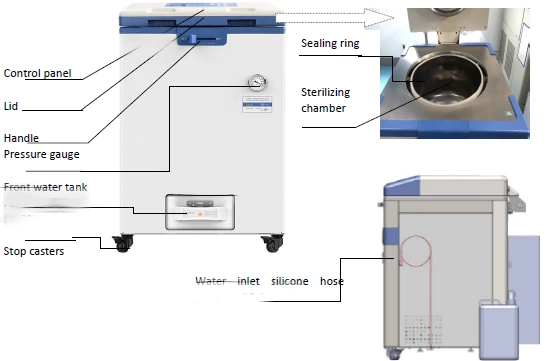
Figure 1
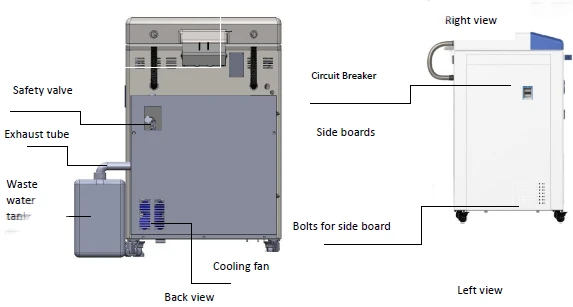
Figure 2
2.11 Parts Function
1.Display Panel Function:
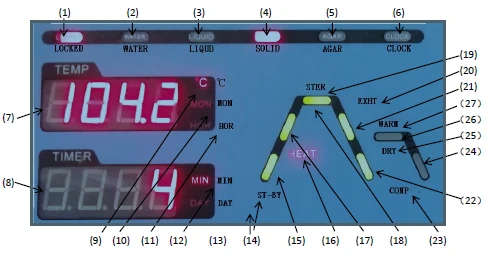
Right Screen
Figure 3
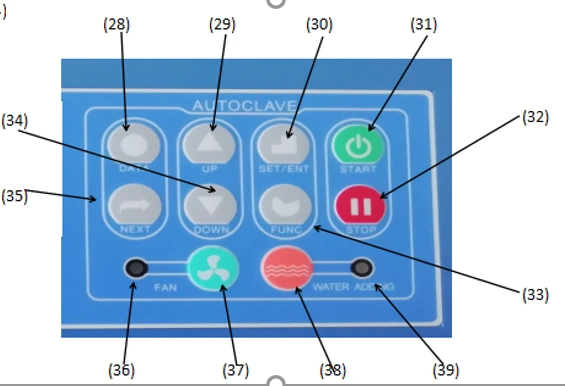
Figure 4
1. LOCKED: Interlocking indicator, which will be on during interlocking.
2. WATER: Water level indicator.Under standby condition,the indicator on means that there is sufficient water in sterilization chamber for sterilization, and indicator off indicates water shortage and then the system will automatically start for water intake.At this time, screen A will show and flash "ADD1", and the system will come back to standby condition after water intake completes.
3. LIQUID: The light indicates the current operation mode is liquid mode
4. SOLID: The light indicates the current operation mode is solid mode
5. AGAR: The light indicates the current operation mode is agar melting mode
6. CLOCK: The light indicates the current operation mode is auto startup mode
7. Screen A: Display the set temperature, actual temperature, month and hour. It will display the year information in time checking and calibration mode, and menu code in administration mode.
8. Screen B:Display the set time, remaining time, minute, date, error number or user program No.,when setting clock, will show "yEAr".
9. °C: The light indicates the current unit is °C.
10. MON: The light indicates the current unit is month
11. HOR: The light indicates the current unit is hour
12. MIN: The light indicates the current unit is minute
13. DAY: The light indicates the current unit is day
14. ST-BY: The light blinking indicates the instrument is in standby status
15. Heating status indicator 1: The light blinks from room temperature until the loca lboiling point
16. HEAT: *HEAT* is light and heating status indicator is blinking to indicate that the
instrument is in heating stage or melting stage; if *HEAT* and heating status indicator blink together, it indicates entering the melt parameters modification status
17. Heating status indicator 2: The light blinks from the local boiling point until the set sterilizing temperature
18. Sterilizing status indicator: The light blinks in course of sterilizing
19. STER. : *STER.* is light and sterilizing status indicator is blinking to indicate that the
instrument is in sterilizing stage, the temperature of this stage shall be the set sterilizing temperature.If *STER. * and sterilizing status indicator blink together, it indicates entering the sterilizing parameters modification status
20. EXHT. : *EXHT* is light, and steam exhaust status indicator is blinking to indicate that the instrument is in steam exhaust stage. If *EXHT.* and steam exhaust status indicator blink together, it indicates entering the steam exhaust temperature modification status.
21. Exhaust indicator: The light blinks from the completion of sterilization until the temp is lower than the cooling lock OPEN temp set by the user and as for the programs with warming or drying,blinks from the completion of sterilization until the beginning of warming or drying.
22. Cooling status indicator 1: The light blinks from the temperature lower than the cooling lockOPEN temperature to 40°C in program without warming or drying.
23. COMP.: The letter blinking indicates that the running of program is finished
24. Cooling status indicator 2: The light blinks from the completion of warming or drying until you press STOP.
25. DRY: *DRY* is light, and drying/warming status indicator is blinking to indicate that the instrument is in drying stage. If "DRY" and drying/warming status indicator blink together, it indicates entering the drying parameters modification status
26. Drying/Warming status indicator: The light blinks in course of drying or warming
27. WARM: *WARM* is light, and drying/warming status indicator is blinking to indicate
that the instrument is in warming stage. If *WARM* and drying/warming status indicator
blink together, it indicates entering the warming parameters modification status.
28. DATA: Under standby status, you can press *DATA* button to inquire the detailed
parameters of current program; When setting the parameters of program, press *DATA*
button to cancel the modification and exit, unless the *SET/ENT* button has been pressed
to save the modification before pressing the *DATA* button.
29. UP: Under standby status, you can press *UP* button to enter the immediate next
program, i.e., the current program is U10, press *UP* button, it will enter U11, and display
the detailed parameters of current program; When modifying the parameters of programs, you can press *UP* button to increase the set value, and press and hold the button to increase the display value by 10 units until the maximum value
30. SET/ENT: Setting and Entering button, press the *SET/ENT* button at the first time to
enter the program parameters modification status, and press the button again to save the
change.
31. START: Start button is used to start sterilization or melt; For the avoidance of misoperation, this button has delay response function so it could only work when pressed and held for over2 seconds.
32. STOP: Stop button is used to stop sterilization or melt; For the avoidance of misoperation,this button has delay response function so it could only work when pressed and held for over2 seconds.
33. FUNC: *FUNC* button must work with other buttons, press the *FUNC+STOP* button together to delete the current program,press the *FUNC+NEXT* button together to enter the auto startup mode, press the *FUNC+DATA* button together to enter the administrator menu.If the machine is equipped with load thermometer, press FUNC+DOWN,screen A will show current load thermometer value,screen B will show program no.At this moment,press FUNC+DOWN, screen A will show current chamber pressure,Screen B will show pressure unit:kPa,PSI or bar,then press FUNC+DOWN will go back to temp. display.During the process, press FUNC+UP can adjust the exhaust level,from level 0 to level 5,level 0 means no exhaust,level 5 means full exhaust.
34. DOWN: Under standby status, you can press *DOWN* button to enter the previous program, i.e., the current program is U10, press *DOWN* button, it will enter
U09, and display the detailed parameters of current program; When modifying the parameters of programs, you can press *DOWN* button to decrease the set value, and press and hold the button to decrease the display value by 10 units until the minimum value
35. Next: Enter the next option
36. Cooling fan status indicator: The light indicates the cooling fan is working.
37.FAN: Start/Stop button for cooling fan is used to control the start and stop of fan from the completion of sterilization stage or drying/warming stage to the temp lower than 40*, while the cooling fan indicator will be on or off with this switching. The cooling fan may shorten the waiting time for sterilized articles cooling.
38.WATER ADD:When screen B shows "n08",press this button to add water into the inside water tank.
39.Object temp indicator: When it is on, it means the load thermometer is on, and the
indicator off indicates the load thermometer function is off.
2. Cooling lock function:
After sterilizing, while cooling down, normally the chamber is cooling down quicker than the articles inside (especially for liquid). So, the user may get burnt if the articles are still hot. To make sure safety, autoclave is equipt with cooling lock "OPEN" temperature function, you can set a safe lid "OPEN" temperature. The lid can be opened only when the chamber temperature is lower the preset "OPEN" temperature. If the machine is installed with load thermometer, the lid can be opened only when the chamber temperature and the article temperature are both lower the preset "OPEN" temperature.
3. Optional parts:
1)Printing set:
2)Load thermometer
3)Printer
3. Installation of Autoclave
3.1 Placement of Autoclave
1) This autoclave is precision instrument,during installation, place the autoclave on a falt ground and fix the wheels by pressing the breaker down.( If the ground is not flat, we can provide special wheels before purchasing) Do not place the autoclave in an environment with high humidity, direct sunlight and temperature less than 5°C over 40°C。
2) Leave a certain space between the autoclave and the wall,it is suggested to keep 10cm between back and wall, and 20cm between sides and wall, to dissipate heat more fully.
3) Do not place the instrument under the fire alarm probe to prevent mis-alarming caused by the hot steam.
4) The exhaust port of the safety valve should not be close to the power supply outlet and should not be blocked.
3.2 Power Supply Connection
1) The instrument must be grounded reliably,if the power socket does not have the ground terminal, it is required to ground the instrument with independent ground wire before powered on.
2) Power supply:single -phase AC220V 土 10% ,50Hz/60Hz
BAVT-403-A ·······························≥25A
3)Connect the BAVT-403-A plug into a 3 pin industrial socket or connect the power cord to air switch with power pack ,of which, the red/brown wire connecting to live wire,green/blue wire to zero wire,yellow/green wire to earth wire.If it is installed with one plug/socket, connect it with 25A cable.
Note:The specification of power supply supply should comply with the requirement on name plate of the machine.No heavy article is allowed to place on power cord and the damage or exposure of power cord or loosening output lead may cause fire or electric shock.
○ When there is no power, please open the left panel and pull the ring under the locking system to open the lid( pull the ring and move the lid handle at same time).
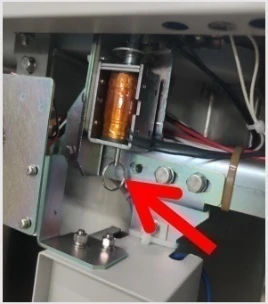
Figure 5
3.3 Checking Package
Check the package before opening, take a picture if there is any damage. Open the box from the bottom (do not open the top), take out like a hat(shaken by two people from two sides). After opening the package, check if there is any damage of the machine, report to distributor or manufacturer.
3.4 Cleaning
1) Switch on the leakage protection switch and turn on the power, and then open the cover of sterilizer chamber,and take out the protective foams from the chamber. Clean the chamber and put the water plate and stainless steel baskets in.
2) Clean the foam scraps inside the sterilizer chamber completely to avoid blocking the pipeline.
3.5 Setting of Local Altitude
Before shipping, the machine has been set for an elevation between 0-300m, if the local elevation is over 300m, please reset the altitude to make sure proper usage of the machine.
4. Operation Instruction
4.1 Basic Sterilization Illustration &Operation Instruction
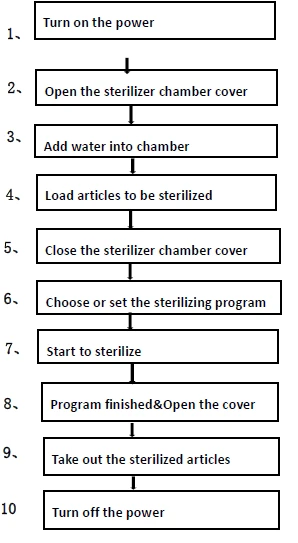
Figure 6
1. Turn on the power
•Turn on the switch on the left side of the machine。
•After turn on the power, the system will do the self-checking:"ST-BY"will blinkwhen the handle is at "locked"position, screen A will show current temperature, screen B will show newly saved program no. and panel will show corresponding flow chart and "locked"light will be on.When the handle is at "unlocked" position,Locked light will be off,screen B will flash LID.
•If the instrument is under standby condition, and no any operation within 30 minutes,the machine will enter into electricity-saving mode, and screen will go drak except for LOCKED light, press any button can restore the display.
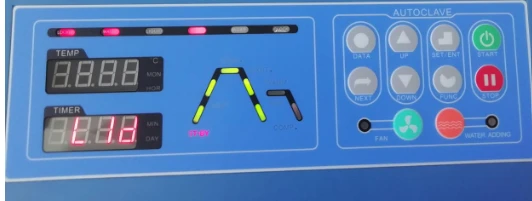
Figure 7
2. Open the sterilizer chamber cover
•While opening the lid, lightly press the middle of front end of chamber cover,and turn the lock lever to the right to UNLOCK position.At this time,the LOCKED light will be off. Grab the handle and open the chamber cover.
Note:
1) Do not open the chamber cover rudely to prevent seal ring from
damage.During the LOCK lever operation, it is necessary to make sure the instrument has been powered on and power switch is also on.
2) After sterilization, the sample should be taken away in time. If the sample is not taken for a long time, it may cause negative pressure, resulting in the lid can not be opened.
(3) Check whether the sealing rings are sticky: If so, separate them so as not to affect the sealing.

Figure 8
3. Add water into chamber
(1) Add water manually( For BAVT-403-A )
•Front water tank: Drain the front water tank. If the condensate water is not promptly drained, it may overflow from the water filling funnel onto the floor.
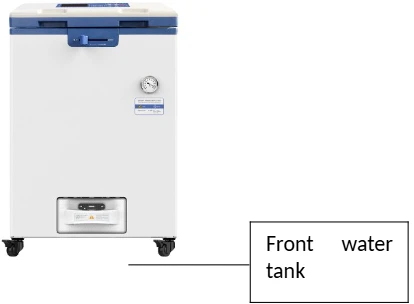
Figure 9
• Manual water adding: Open the lid, add water to the sterilization chamber from the top and ensure the water level is not higher than the surface of the water plate.
Maintain the water level sensor regularly, and replace the water in the sterilization chamber and water inlet tank frequently to prevent dirt from adhering to the water level sensor and affecting its normal operation.
Note:  Do not open the sterilization chamber drain valve or water tank drain valve during sterilization, otherwise it may cause high temperature steam to spray out and hurt the operator.
○ Always check the water level at the bottom of the chamber before each sterilization cycle since frequent water shortages can cause the electric heating tube to boil dry constantly, thereby accelerating its rust and aging, and reducing its service life.
○ Always use purified or demineralized water (conductivity: 10~15us/cm) in the sterilization chamber, and do not use well water, saline water, or hard water, otherwise it may lead to corrosion and scaling of the sterilization chamber and shorten the service life of the heating element.
(2) Add water automatically (For BAVT-403-A )
For BAVT-403-A ,drain the front water tank
For BAVT-403-A , drain the 10L external water tank, if you want to do drying process later, connect the water tank on the right front side of the instrument to the exhaust pipe to collect water discharged after sterilization and before drying.
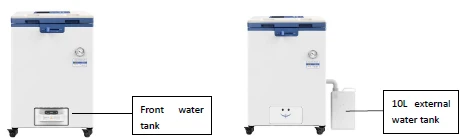
Figure 10
•If the condensate water in the above water tank is not promptly drained, it may overflow to the floor.
Bring over a full pail(over 30L) of sterilizing water, put the silicon automatic water adding pipe into this pail, and follow the below screen instruction, water will be added into the back storage water tank(28L) and flow into the chamber automatic when you start the work.
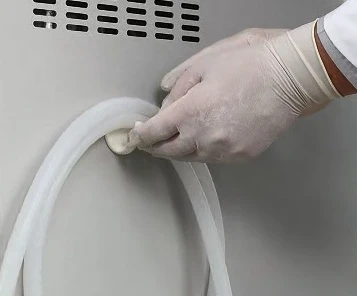
Figure 11
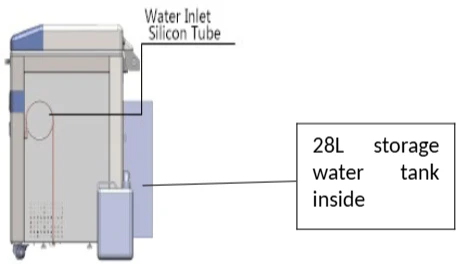
Figure 12
•If there is no water in the water tank, when you turn on the machine, screen will show N08, press the ADD WATER button, the water will be pumped into the inner water tank from the 30L outer water tank you just put in front of the machine. And at the same time, the screen B will show ADD2. If you press STOP button shortly, the water pumping will suspend, press the STOP again to continue. If you press STOP button for 3 seconds, the water pumping will be stopped.
•When you press START, if the screen B shows ADD1, it means the water is pumped into the chamber from the inner water tank.
•The water level sensor should be regularly maintained,and it is recommended to frequently replace the water in sterilization chamber and water tank to prevent scale in water attaching to water level sensor and therefore affecting normal work of water level sensor.
Note:○Do not open the drainage valve of chamber or darainage valve of inside steam collecting tank to avoid injury from the high temperature steam.
○The water level inside the chamber may decrease after each cycle, please add new water on time.Lack of water for a long time may cause damage to the heater.
○It is recommended to use distilled water with a electricity conductivity between 10~15us/cm,do not use well water, salt water or hard water,so as to prevent the chamber from corrosion,fouling and shortening the life of heater.
4. Load articles to be sterilized
•Take the baskets out, and put the articles to be sterilized into the baskets
•Put the water plate first, then put the baskets on the waterplate, do not put the basket directly on the heater.
Notes:
VERY IMPORTANT
Clean the articles to be put in thoroughly by cleaning agent and water
While putting the articles into the baskets,make sure the articles is placed well (overlap may cause inadequate sterilization).Put carbon steel devices and stainless steel device in different baskets and put several layer of Kapok paper under the carbon steel devices so as to protect the stainless baskets.
Sterile equipment should be packed with breathable packaging materials such as sterilization bags, sterile paper, gauze bags, etc.
1. When the sterilizer is loaded with plastic bags, the sterilization bags should be placed in the basket first and then in the sterilization chamber, otherwise the temperature control will be affected.
2. When the sterilizer is loaded with a cleaning bag, the opening of the cleaning bag shall be opened, and it shall be confirmed that the bag does not contact the inner wall of the sterilization chamber. During sterilization, if the bag mouth is sealed, the sterilization will be insufficient. If the bag is jammed into the sterilization chamber and the steam cannot fill every corner, the sterilization will be incomplete.
3. When sterilizing glassware such as beakers, conical bottles and test tubes, the glassware shall be placed upside down or horizontally. If the vessel can only be placed directly, a small amount of distilled water or purified water can be put into the sterilized vessel.
4. When sterilizing the liquid, such as chemical reagent or solvent, pay attention to the rationality of the liquid in the container (the volume of the flask shall not exceed 3 / 4, and the volume of the test tube shall not exceed 1 / 2), so as to avoid the liquid overflowing from the container during the process of heating or cooling. Before sterilizing, the cover of the container shall be loosened so as to ventilate, otherwise the container will be broken.
5. When agar is dissolved, the volume of the container should be less than 2 L, otherwise the dissolution will be insufficient. (Note: the Durham test tube with a diameter of more than 6mm shall be used as the sample tube. When the diameter of the sample tube is less than 6 mm, bubbles will remain in the tube, which will affect the sterilization effect).
6. If equipped with load thermometer, please put is in a place not easy to get damaged.
5.Close the sterilizer chamber cover
•Press the middle part of the front end of the chamber cover gently, push the cover opening / closing handle to the left to the locked position, the system will give a sound, and the indicator light "locked" on the display panel will be on.
Note:
○Before closing the cover, check if there are objects in or on the sealing ring, clean it to avoid damaging the sealing ring that may cause the steam leakage.
○Only when the lid close icon on the screen changes to white and not blinking, the machine will start to work.
6. Select or set the program
•For BAVT-403-A there are ten basic modes. For BAVT-403-A ,there are eleven basic working modes available.And these working modes have been saved as nine basic programs (U01, U02, U03, U04, U05, U06, U07, U08, U09), one self-defined program (U10), and one drying program(U11)before delivery.U11 is only for BAVT-403-A.
• The parameters of these ten or eleven basic modes cannot be deleted, but users can select any one as needed to modify parameters and it will become a new program after modified, and a maximum of 20 programs (for BAVT-403-A ) and 60 programs (for BAVT-403-A ) (including the basic programs) can be created and saved;
•We set the default drying temperature and time to be lower and shorter to protect the articles. But when you run the cycles with drying, it is recommended to increase the drying temperature and time depends on different articles compared to the default temperature/time of the fixed program, higher temperature and longer time will help for through drying.
•The DRY and ADD WATER icons are only for the automatic water feeding and drying models(For BAVT-403-A)
• Basic working modes and parameters of corresponding basic programs(Any settings related with drying data are only for drying models:BAVT-403-A -,it doesn't mean that the whole mode is only for drying models, it just means the particular drying data in that mode is only for drying models):
•Selecting the sterilizing program: Press the "UP" and "DOWN" button to choose the sterilizing program. The screen will show the U01 to U05, this is the set programs. If you want to sterilize under those programs. You just need to press the start for 3 seconds to start. If you want to create the new programs, you can press "SET/ENT" button to enter into the setting menu, press the "UP" and "DOWN" to set the temperature, then press the "NEXT" to enter into time setting. Then pressure "SET/ENT" again to save the new program, the new programs will be U04 to U20. Do not press STOP randomly during the process. Do not open chamber or water tank drainage valve during process.
•The basic program parameters corresponding to basic working mode and user-defined mode are as follows:
Note: the exhaust level is 0-5, 0 is no exhaust, and 5 is full exhaust. Every increase of 1 level will increase the exhaust volume.
U01-Liquid mode
○Sterilization process: Standby→Watersupply→Heating→Sterilization→Steamexhausting→Complete
○ Application: Sterilization of liquids
○ Click the "DATA" key to show parameters on the LCD display:
○ Default parameters of U01 and new program parameter ranges generated therefrom
Name | Default Parameter | New Program Parameter Range |
Sterilization temperature | 121 °C | 105 °C~138 °C |
Sterilization time | 20 min | 1 min~6,000 min |
Steam exhaust level | 0 | 0-5 |
Cooling fan | Open | Open/Close |
Extended time for purging cold air | 0 min | 0 min~10 min |
Cover opening temperature | 80 °C | 40 °C ~ 80 °C |
Table 2
U02-Liquid with warming mode
○Sterilization process: Standby→Watersupply→Heating→Sterilization→Steamexhausting→Warming→Complete
○ Application: Sterilization of liquids. In order to prevent solidification, automatic warming is enabled after sterilization (e.g. for agar medium sterilization)
○ Default parameters of U02 and new program parameter ranges generated therefrom
Name | Default Parameter | New Program Parameter Range |
Sterilization temperature | 121 °C | 105 °C ~ 138 °C |
Sterilization time | 20 min | 1 min ~ 6,000 min |
Warming temperature | 50°C | 45 °C ~ 79 °C |
Warming time | 600 min | 1 min ~ 9999 min |
Steam exhaust level | 0 | 0-5 |
Cooling fan | Open | Open/Close |
Extended time for purging cold air | 0 min | 0 min ~ 10 min |
Cover opening temperature | 80 °C | 40 °C ~ 80 °C |
Table 3
U03-Solid mode
○ Sterilization process: Standby→Watersupply→Heating→Sterilization→Steam exhausting (water drainage)→Drying→Complete
○ Application: Sterilization of solids
○ Default parameters of U03 and new program parameter ranges generated therefrom
Name | Default Parameter | New Program Parameter Range |
Sterilization temperature | 121 °C | 105 °C ~ 138 °C |
Sterilization time | 20 min | 1 min ~ 6,000 min |
Drying system | 124°C | 80 °C ~ 160 °C |
Drying time | 40 min | 0 min ~ 300 min |
Steam exhaust level | 3 | 0-5 |
Cooling fan | Open | Open/Close |
Extended time for purging cold air | 0 min | 0 min ~ 10 min |
Cover opening temperature | 97°C | 40 °C ~ 99 °C |
Table 4
U04-Wrapped instruments mode
○ Sterilization process: Standby→Watersupply→Heating→Sterilization→Steam exhausting (water drainage)→Drying→Complete
○ Application: Sterilization of surgical instrument packs, paper bags, and paper-plastic packaged instruments
○ Default parameters of U04 and new program parameter ranges generated therefrom
Name | Default Parameter | New Program Parameter Range |
Sterilization temperature | 121 °C | 105 °C ~ 138 °C |
Sterilization time | 30 min | 1 min ~ 6,000 min |
Drying system | 124°C | 80 °C ~ 160 °C |
Drying time | 40 min | 0 min ~ 300 min |
Steam exhaust level | 3 | 0-5 |
Cooling fan | Open | Open/Close |
Extended time for purging cold air | 0 min | 0 min ~ 10 min |
Cover opening temperature | 97°C | 40 °C ~ 99 °C |
Table 5
U05-Fabric mode
○ Sterilization process: Standby→Watersupply→Heating→Sterilization→Steam exhausting (water drainage)→Drying→Complete
○ Application: Sterilization of textiles and dressing packs
○ Default parameters of U05 and new program parameter ranges generated therefrom
Name | Default Parameter | New Program Parameter Range |
Sterilization temperature | 121 °C | 105 °C ~ 138 °C |
Sterilization time | 30 min | 1 min ~ 6,000 min |
Drying system | 124°C | 80 °C ~ 160 °C |
Drying time | 80 min | 0 min ~ 300 min |
Steam exhaust level | 3 | 0-5 |
Cooling fan | Open | Open/Close |
Extended time for purging cold air | 0 min | 0 min ~ 10 min |
Cover opening temperature | 97°C | 40 °C ~ 99 °C |
Table 6
U06-Rubber mode
○ Sterilization process:
1. Standby→Watersupply→Heating→Sterilization→Steam exhausting (water drainage)→Drying→Complete
○ Application: Sterilization of heat and moisture-resistant tubular rubber, porous rubber, and similar items
○ Default parameters of U06 and new program parameter ranges generated therefrom
Name | Default Parameter | New Program Parameter Range |
Sterilization temperature | 121 °C | 105 °C ~ 138 °C |
Sterilization time | 30 min | 1 min ~ 6,000 min |
Drying system | 124°C | 80 °C ~ 160 °C |
Drying time | 40 min | 0 min ~ 300 min |
Steam exhaust level | 3 | 0-5 |
Cooling fan | Open | Open/Close |
Extended time for purging cold air | 0 min | 0 min ~ 10 min |
Cover opening temperature | 97°C | 40 °C ~ 99 °C |
Table 7
U07-Fast mode
○ Sterilization process:
1. Standby→Watersupply→Heating→Sterilization→Steam exhausting (water drainage)→Drying→Complete
○ Application: Only suitable for sterilization of exposed items. Use cartridge cases or specialized sterilization containers for loading. After sterilization, the items should be used promptly without further storage. There is no defined expiration date.
○ Default parameters of U07 and new program parameter ranges generated therefrom
Name | Default Parameter | New Program Parameter Range |
Sterilization temperature | 134°C | 105 °C ~ 135 °C |
Sterilization time | 12 min | 1 min ~ 6,000 min |
Drying system | 140°C | 80 °C ~ 160 °C |
Drying time | 20 min | 0 min ~ 300 min |
Steam exhaust level | 3 | 0-5 |
Cooling fan | Open | Open/Close |
Extended time for purging cold air | 0 min | 0 min ~ 10 min |
Cover opening temperature | 97°C | 40 °C ~ 99 °C |
Table 8
U08-Waste mode
○ Sterilization process: Standby→Watersupply→Heating→Sterilization→Steam exhausting (water drainage)→Complete
○ Application: Sterilization of waste, which can be solids, liquids, or a mixture of solids and liquids
○ Default parameters of U08 and new program parameter ranges generated therefrom
Name | Default Parameter | New Program Parameter Range |
Sterilization temperature | 126°C | 105 °C ~ 138 °C |
Sterilization time | 40 min | 1 min ~ 6,000 min |
Steam exhaust level | 0 | 0-5 |
Cooling fan | Open | Open/Close |
Extended time for purging cold air | 0 min | 0 min ~ 10 min |
Start time for purging cold air | 0 min | 0 min ~ 250 min |
Cover opening temperature | 97°C | 40 °C ~ 99 °C |
Table 9
U09-Agar mode
○ Sterilization process: Standby→Watersupply→Heating→Melting→Steamexhausting→Warming→Complete
○ Application: Agar melting
○ Default parameters of U09 and new program parameter ranges generated therefrom
Name | Default Parameter | New Program Parameter Range |
Melting temperature | 100°C | 60 °C ~ 115 °C |
Melting time | 10 min | 1 min ~ 6,000 min |
Warming temperature | 50°C | 45 °C ~ 79 °C |
Warming time | 600 min | 1 min ~ 9999 min |
Cover opening temperature | 80 °C | 40 °C ~ 80 °C |
Table 10
Note: During the warming stage, the cover can be opened at any time to take out the sterilized load. To continue warming, please close the chamber cover.
U10-Self-defined mode
○ Sterilization process:
1. Standby→Watersupply→Heating→Sterilization→Steamexhausting→Warming (Drying)→Complete
○ Application: Setting sterilization process parameters according to customer-specific requirements
○ Default parameters of U010 and new program parameter ranges generated therefrom
Name | Default Parameter | New Program Parameter Range | Remark |
Sterilization temperature | 121 °C | 105 °C~ 138 °C | |
Sterilization completion condition | By time | By time/By F0 value | |
F0 value | 10 | 1-300 | |
Sterilization time | 20 min | 1 min ~ 6,000 min | |
Warming temperature | 50°C | 45 °C~ 79 °C | |
Warming time | 600 min | 0,1 min ~ 9999 min | 0 indicates the warming function is not activated |
Steam exhaust level | Level 3 | Level 0 to Level 5 | |
Cooling fan | Open | Open/Close | |
Drying system | 140°C | 80 °C~ 160 °C | |
Drying time | 20 min | 0, 0 min ~ 300 min | 0 indicates the drying function is not activated |
Extended time for purging cold air | 0 min | 0 min ~ 15 min | |
Cover opening temperature | 97°C | 40 °C~ 99 °C | |
Start time for purging cold air | 0 min | 0, 1 min ~ 250 min | 0 indicates the function is not activated |
Table 11
Note: 1. If the warming function is available, during the warming stage, the cover can be opened at any time to take out the sterilized load. To continue warming, please close the chamber cover.
2. When "by time" is selected as the sterilization completion condition, only the sterilization time can be set. When "by F0 value" is selected, only the F0 value can be set.
U11- Drying mode
○ Drying process: Drying→Steamexhausting→Complete
Name | Default Parameter | New Program Parameter Range |
Drying system | 140°C | 80 °C ~ 160 °C |
Drying time | 20 min | 1 min ~ 300 min |
Cover opening temperature | 80 °C | 40 °C ~ 80 °C |
Table 12
Note:
• The drying temperature refers to the temperature of the drying heat source rather than the displayed chamber temperature.
• The drying temperature should be adjusted to the recommended suitable temperature to ensure effective sterilization and protect the load being sterilized. If necessary, the temperature can be increased appropriately within the drying data range. The correct drying temperature helps expedite the drying process.
• Only for BAVT-403-A models.
7. Start to sterilize
1)After power turned on, screen displays the latest saved program. If you continue to use the program, long press "START" to start the work directly.
2)Call the saved program: in standby mode, press the "up" or "down" key once, and thedisplayed program number will be increased or subtracted by 1 based on the current program number. If the current program number is U10, Press the "up" key once, the display program number is U11; if the "down" key is pressed once, the program number is displayed as u09; when the "up" or "down" button is continuously pressed, the displayed program number increases or decreases in 10 units. When the button is stopped, the specific parameters of the current program will be displayed on the two screens in turn. Select the appropriate program and press "start" to start the operation.
3)Modify or set up a new program and start: 。
For the specific modification method, please refer to Chapter 3 operation instructions
(2), creating, modifying and deleting procedures.
4) Clock check and calibration:
For details, please refer to the third part of the third chapter of the operating instructions,and for setting the timing start, see the fourth part of the third chapter
5) Program printing function: if the printer is installed and set in the administrator menu, enable it. Set up the print function before running the program. For details, please refer to P001 set by user administrator in Chapter 4, maintenance and management of instruments (3).
6) Exhaust setting:
During the process of sterilization, if the default exhaust level is not suitable, you can press the "func" and "up" keys at the same time for manual adjustment. Each time you press the "function" button, the exhaust level will increase by one level. If you press it again at the fifth level, it will be adjusted to level 0 and cycle up and down.
8. Program finished&Open the cover
•When reach the set sterilizing temp.,melting temp. or drying temp, the system will give a indicating sound.
•When all the program finished and temperature is lower than the cooling lock open temp., the COMP. will blink,system will send out 5 long sound,indicating the finish of the sterilization. You can open, pay attention not to get burnt.
•When the temperature is lower than 40 °C, the "COMP." will no longer flash, and the "ST-BY" will flash. The system will return to the standby state, and the cover can be opened safely.
Note:Do not press STOP randomly during the process. Do not open chamber or water tank drainage valve during process.
。
9. Take out the sterilized articles
1)Always wear the heat insulation gloves when taking articles out after sterilization,and wait until the steam disappers before reaching into the sterilizer chamber.
2)When sterilize the liquids,make sure taking articles out with enough low temperature,due to slow cooling speed of liquid.
3)Press the "FUNC" + "DOWN" key at the same time to check the actual temperature of the load thermometer when the load thermometer is installed. When taking out the basket, pay attention that the thermometer is not stuck before taking it out.
10. Turn off the power
1)The power switch should be turned off at the end of the day's sterilization work or when it is not in use for a long time.
2)At the end of the day's work, it is recommended to drain out all water in the sterilization chamber.
4.2 Creating,Modifying,Deleting the Program
1. Creating and modifying the program
Find the required sterilization mode by pressing the "up" or "down" key, and then press the "set / ENT" key to enter the parameter modification interface. If there is a function of setting and enabling password in the background, the administrator password should be input. In the setting process, if you press the "data" key, the parameter settings will not be saved and return to the standby state; if you press the "set / ENT" key during the setting process, the parameter settings will be saved and a new sterilization mode will be generated. Press "start" again to start the running program.
Example: modify u01 program
1) When the "set / ENT" key is pressed, the sterilization temperature, the "ster." character and the sterilization status light on the digital display screen a flash, indicating that the sterilization temperature can be modified. Press the "up" or "down" key to modify the parameters. Then press the "next" key, the sterilization time, "ster." character and sterilization status light on the digital display screen B will flash, indicating that the sterilization time can be modified. Press the "up" or "down" key to modify the parameters.
2) Then press the next key, the exhaust level parameter displayed on the digital display screen a flash, indicating that it can be modified.
3) Then press the next key, the digital display screen B shows "open", and the digital display screen a shows that the opening temperature parameter flashes, indicating that it can be modified.
4) Then press the next key to modify the sterilization temperature.
At this time, to save the parameters, press the "set / ENT" key to exit and generate a new program u09;
At this time, if you do not want to save the parameters, press the "data" key to directly exit and return to the program u01.
Note: the program parameters can only be modified in standby mode. If the parameters cannot be set during the sterilization process of the instrument, you can only press the "data" key to view the sterilization parameters.
2. Deleting Program
•If you need to delete the program, press FUNC+STOP to delete.
•Default U01-U05 programs can not be deleted
3. Setting the sterilizing time
•Some items (such as liquid) have high thermal inertia, in order to obtain the ideal sterilization effect, it is recommended to use the load thermometer;ifno,set a longer sterilization time.
For example, for 3L water in a flask,when the chamber temperature reaches set temperature after 20 minutes, but the liquid in the bottle hasn't reach yet, it needs 33 minutes more to reach. So, the sterilization time should set to be 53minute. Actul required sterilizing time(53min)=Normal sterilizing time(20min)+Delay time(33min)
•When installed with load thermometer, the system will begin sterilization process only when the liquids reaches the set temperature.
•When sterilize waste processing bags, 300-500ml water will help to shorten the delay time while heating up.
•A delay time is also needed for plastic products.
4. Setting of Administrator Menu
Under standy by condition, press FUNC+DATA together, enter into secret code:667788, press SET/ENT button to enter into the administrator menu. You will seeP001 to P019.
•Administrator Menu:
P001 PRINTER switch:0 means off, 1 means on, 1 means printing out the cycle data. when P003 is on, P002 can be set to 2, 2 means printing data and curve. When machine is installed with load thermometer and P002 is on, enter the engineer menu to change DYUD to 2,the printer can print the load thermometer temp.and chamber temp. at the same time.When P003 is off,P001 will change to 1 automatically.
P002 Load thermometer: yes means on, no means off
P003 Setting of pressure unit: 1: Kpa; 2: bar; 3: psi; 4: no means no this optional
accessory or pressure sensor is off
P004 Display of printing date: 0: DDMMYY; 1: YYMMDD
P005 Printing language: 0: English; 1: Chinese
P006 Safety valve test: yes for enabled; no for disabled
P007 Chamber temp sensor's temp compensation: the temp compensation
scope is -5--+5; screen B will show temp compensation value and press
of UP or DOWN button may adjust the value.
P008 Load thermometer's temp compensation: the temp compensation
scope is -5--+5; screen B will show temp compensation value and press
of UP or DOWN button may adjust the value.
P009 Setting of max working temp: The temp range is 135-145°C and press of
UP or DOWN button may adjust the max temp for safety valve test.
P010 Setting of local altitude: the UP or DOWN button may be used for adjusting
the altitude and every press of this button will increase or decrease one
unit and pressing and holding it will be 10 units increase or decrease until
the upper limit of 3000m or lower limit of 0.
P011 Boiling point temp corresponding to P010: after setting of altitude, press
NEXT button and local boiling point will be shown, and the value of 99.8
on the screen represents the boiling point 99.8°C
P012Cooling fan: yes means on, no means off.Will be on when temp. is over 40°C,if you don't want to use, can press FAN button to switch off. Completely off is in P012.
P013 Button sound, yes means on, no means off
P014 Software version
P016 Do you need a password to create, modify and delete the program, yes means on,no means off,pass word is same to the administrator menu password
P017 Administrator menu password, press UP/DOWN and NEXT to modify if you want
P018 Total cycle number,each press of START will increase one to this number
P019 Pressure sensor pressure value compensation,pressure compensation range is -5-5kPa, screen B will show compensation value,if the vaue is -0.3kPa,means the value to compensate is -0.3kPa.
P020 Safety valve testing cycle,range is 30-360 days or off, press UP or DOWN to adjust.
P021 Time not to test the safety valve
P023 The printing temperature can be adjusted 0-5; 0: chamber temperature 1: article temperature 2: chamber temperature / article temperature 3: chamber temperature / filter element 4: article / filter element 5: chamber temperature / article / filter element
4.3 Clock Checking and Calibration
•Under standby status,press FUNC+NEXT together to enter the clock checking and calibration mode( F05),with screen A and B showing the current parameters like below:
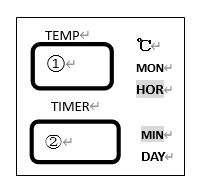
Figure 13
•F05 default parameter¶meter adjustable range
Name | NO. | Default Parameter | Adjustable Range |
YEAR | ① | 2011 | 2000--2099 |
MONTH | ② | 1 | 1-12 |
DATE | ③ | 1 | 1-31 |
HOUR | ④ | 1 | 0-23 |
MINUTE | ⑤ | 1 | 0-59 |
Table 13
1) If the time setting is correct, press the "data" key to exit.
2) If the time setting is not correct, press the "set / ENT" key to enter the parameter modification interface: the time displayed on the digital display screen a flashes, and the digital display screen B displays "year", indicating that the year can be modified. Press the "up" or "down" key to set.
3) Press the "next" key, and the time and month indicator lights on the digital display screen a will flash, indicating that it can be modified; press the "up" or "down" key to increase or decrease the display value accordingly. Each time you press the "up" or "down" key, the display value will increase or decrease by 1 month. If the value is over 12 months (or the minimum value of 1 month), it will stop in December (or January) if it exceeds the maximum value of 12 months (or the minimum value of 1 month) Press this key to display January.
4) Press the "next" key, the time and date indicator lights on the digital display screen B will flash, indicating that it can be modified; press the "up" or "down" key to increase or decrease the display value accordingly. Each time you press the key, the display value will increase or decrease by 1 day. If you press this key continuously, the display value will increase or decrease by 10 units, exceeding the maximum value After 31 days (or the minimum value of 1 day), it will stop on 31 days (or 1 day). If it stops on 31 days, press this key again to display 1 day.
5) Press the "next" key, and the time and hour indicator lights on the digital display screen a will flash, indicating that it can be modified; press the "up" or "down" key to increase or decrease the display value accordingly. Each time you press the key, the display value will increase or decrease for 1 hour. If you press the key continuously, the display value will increase or decrease in 10 units. If the maximum value exceeds 23 hours (or the minimum value of 0 hours), it will stop at 23 hours (or 0 hours), if it stops In 23 hours, press the key again, the display is 0 hours.
6) Press the "next" key, and the time and minute indicator lights on the digital display screen B will flash, indicating that it can be modified; press the "up" or "down" key to increase or decrease the display value accordingly. Each time you press the key, the display value will increase or decrease for 1 minute. If you press this key continuously, the display value will increase or decrease in 10 units. If the maximum value exceeds 59 minutes (or the minimum value is 0 minutes), it will stop at 59 minutes (or 0 minutes). If it stops for 59 minutes, press the key again, and the display is 0 minutes.
7) When all parameters are modified, and then press "set / ENT" key, the modified parameters will be permanently saved, even if power failure will not be eliminated. If