
Get Price
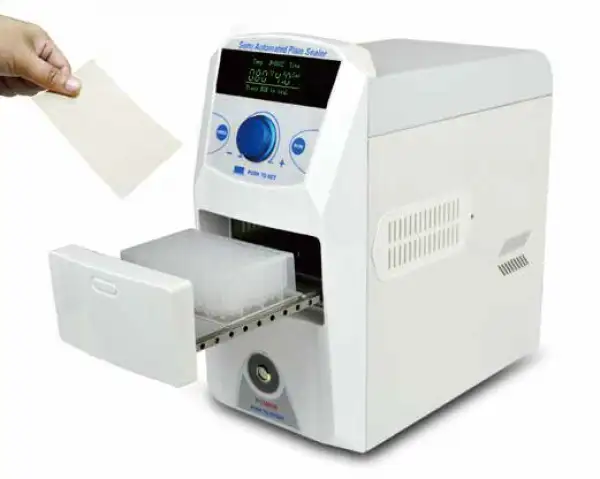
Plate Sealer BPPS-201
Semi-automatic Thermal Sealer is a kind of film sealer to prevent evaporation and leakage of various microplates (PCR plates, deep-well storage plates, microplates and cell culture plates) during the detection process by heat sealing various special heat sealers. Sealing instrument for sample loss and space cross-contamination. It is an indispensable...
- Compact appearance, small occupied space, simple operation.
- OLED display screen, high light and no visual angle limit, more energy saving and eco-friendly.
- Adjustable sealing plate temp.:80~200°C, real temp. displays, rapid heating, reaching 170°C in 300 seconds, rapid cooling down with fan cooling.
- Sealing plate pressure can be adjusted according to the real result, various kinds of micro plates and heat sealing films to replace.
- Up to 3-Year Product Warranty
- US & EU Compliance Standards
- Door-to-Door Shipping
Technical Specifications
Detailed operating and construction parameters for this model.
| Model | BPPS-201 |
| Temp. Range | 80°C ~200°C, (increment: 1°C) |
| Temp. Display Accuracy | ±1°C |
| Temp. Uniformity | ±1°C |
| Sealing Time Range | 0.5 ~10sec. (increment: 0.1sec) |
| Sealing Pressure Range | 1 ~5grade |
| Compatible Plate Material | PP (Polypropylene) / PS (Polystyrene) / PE (Polyethylene) |
| Compatible Plate Types | standard microplates: PCR plate(skirted, semi-skirted, non-skirted), deep-well plate, ELISA plate. |
| Sealing Plate Height | 9mm ~48mm |
| Compatible Sealing Plate Film | 1. foil polypropylene material2. transparent polyester fiber - polypropylene material3. transparent polymer material4. thin layer transparent polymer material5. foil material |
| Front Panel Material | fireproof ABS |
| Sealing Plate Material | Ceramics |
| Voltage | AC 220V / AC 110V switchable, 50/60Hz |
| Power | 300W |
| Fuse | 250V, 8A, Φ5 x 20 |
| Dimension | W.180 x D.350 x H.380mm |
| Net Weight | 12kgs |
Product Features
Key design, performance, usability, and safety advantages.
Items Included Review the standard components and accessories supplied with this product.
| Images | Name |
 | Copper sheet for fixing film optional when sealing film |
 | Block for microplate(1) |
 | Block for 96-well PCR plate |
 | Block for microplate(2) |
Operating Manual View instructions, operating procedures, safety information, and maintenance guidance.
1. Safety Warnings and Guidelines
Important Operation Information of The Security
1.1 Security
1.2 Instruments Maintenance
1.3 After-sales service
2. Introduction
3. Specifications
3.1 The normal operating condition
3.2 The basic parameters and performance
4. Preparations
4.1 Structure Description
4.2 Keyboard and Display Panel
4.3 Key Function
5. Operation Guide
5.1 Sealing Condition Setting
5.2 Sealing Operation
5.3 Heating plate clearance
5.4. Other Function
6. Failure Analysis and Trouble Shooting
6.1 Failure Analysis and Processing Procedures
6.2 Wiring Diagram of BPPS-201
1. Safety Warnings and Guidelines
Important Operation Information of The Security
 It is forbidden to operate before reading the operation manual. Read the guidelines and directions below and carry out the countermeasure according to them.
1.1 Security
To operation, maintenance and repair the instrument, please comply with the basic guidelines and the remarked warnings below. Otherwise, the instrument will suffer effect on the scheduled working life and also on the protection provided.
This product is a normal and an indoor using instrument.
Before operation, read the manual carefully. These units are designed for using in the laboratory environments by who're knowledgeable in safe laboratory practices.
The operator should not open or repair the instrument by himself. Otherwise, the instrument will lose the qualification of repair guarantee or cause accidents. The company will repair the instrument based on warranty description.
A.C. power's grounding should be reliable to safeguard against an electric shock. The 3-pin plug supplied with thermo-shaker's power cable is a safety device that should be matched with a suitable grounded socket.
Make sure the voltage is complying with the voltage required. Make sure the rated electrical outlet load no lower than the demand. Power line should be replaced with the same type if it any damage. Make sure there is nothing on the power line. Hold the jack when pull out the power line. Do not pull the power line. Do not put the power line in ambulatory place.
 The temperature of metal block will be very high during the normal operation. There will be scald or boiling of the liquid. It is strictly prohibited any part of the body touching the instrument from scald.
The instrument should be put in the place where of low temperature, little dust, no water, no sunshine or hard light, and of good aeration, no corrosively gas or strong disturbing magnetic field, and far away from central heating, camp stove and other hot resource. Do not put the instrument in wet and dusty place. The vent on the instrument is designed for aeration. Do not wall up or cover the vent. The distance between each device should be more than 100cm when there is more than one instrument.
Power off when operation finished. If long period do not use the instrument, pull off the connector plug, cover a cloth on the instrument to prevent from dust.
Pull the connector plug from the jack at once in the following case, and contact the vendor.
◦ There is some liquid flowing into the instrument;
◦ Drenched or fire burned;
◦ Abnormal operation: such as abnormal sound or smell;
◦ Instrument dropping or outer shell damaged;
◦ The function has obviously changed.
1.2 Instruments Maintenance
The well in the block should be cleaned by the cloth stained with alcohol to assure good heat translation between the block and the test tube and no pollution. If there are smutches on the instrument, clean them with cloth.
Power off when cleaning the instrument.
Do not drop the clean fluid in the well when cleaning. Corrosive clean fluid is strongly prohibited.
1.3 After-sales service
1. Warranty content
Within a month from the delivery date, the cause of failure due to material and
manufacturing defects, the Company will be responsible for the guarantee replacement.
Within 12 months from the delivery date, the cause of failure due to material and manufacturing defects. The company will prove to be defective instruments selected for repair or replacement.
The product must be sent to the maintenance department of the company by the user. The freight will be borne by the user. The Company will bear the return shipping costs.
Over the warranty period, the Company will charge appropriate maintenance costs.
2. Warranty coverage
The above warranty is not suitable for improper maintenance, damage caused by unauthorized repair or modification.
2. Introduction
BPPS-201 is a semi-automatic thermal sealer, which prevents sample loss and space cross infection caused in process of testing of various kinds of micro plate (PCR plate, deep well storage plate, Elisa plate and cell culture plate) by sealing various kinds of heat sealing films. With simple and elegant appearance and adjustable sealing pressure settings of sealing platen, it is easy to operate and accepts a wider range of plates, including standard plates and deep well plates. With variable temperature and time settings and rapid heating, its real temperature displays simultaneous.BPPS-201 is applied to ordinary adhesive films, heat sealing films, optical heat sealing films (quantitative PCR), permanent heat sealing films. Instead of artificial sealing, automated sealing operation ensures seal platen firm. The uniform pressure ensures consistent results.
Product features:
1. Simple and elegant appearance designed, small occupied space, simple operation.
2. OLED display screen, high light and no visual angle limit, more energy saving and eco-friendly.
3. Adjustable Sealing platen temperature:80~200°C, real temperature displays, rapid heating, reaching 170°C in 300 seconds, rapid cooling down with fan cooling.
4. Sealing platen pressure can be adjusted in accordance to reality, various kinds of micro plates and heat sealing films for replacement.
5. The microprocessor controls temperature with good accuracy. The ingenious uniform structure of heat sealing platen ensures consistent sealing results.
6. With variable temperature and time settings for accurate optimization. Temperature can be precisely set in increments of 1.0°C, and time in increments of 0.1 seconds.
7. Advanced ceramics platen heating technology avoids adhesion of sealing films due to excessive high temperature.
8. Two sides of the body is equipped with windows, which is convenient to clean and maintain the heating platen.
9. When the unit is left idle more than 60min, it automatically switches into stand-by mode during which the temperature of the heating element is reduced to 60°C to save energy.
10. When the unit is left idle more than 120min, it switches off automatically for added safety. It switched off the display and heating. With slight current provided for central element, the sealer will restart once pressing any button.
11. The drawer is controlled by humanized design if a hand or objects blocked the drawer when it's moving, the drawer motor will automatically reverse. This feature prevents injury to the user and unit.
3. Specifications
3.1 The normal operating condition
Ambient temperature: 10°C~35°C
The relative humidity: ≤70%
Power supply: AC220V/110V, 50Hz/60Hz
3.2 The basic parameters and performance
Model | BPPS-201 |
Sealing Temperature Range | 80 °C to 200 °C, (increments of 1.0°C) |
Temperature Accuracy | ±1 °C |
Temperature Uniformity | ±1 °C |
Sealing Time Range | 0.5 ~ 10 sec. (increments of 0.1 sec) |
Sealing pressure range | 1-5 grades |
Compatible Plate Materials | PP(Polypropylene)/PS(Polystyrene)/PE (Polyethylene) |
Compatible Plate Types | Standard Micro plate Plates: PCR plate(skirted, semi-skirted, non-skirted), Deep-Well storage, Plates, Elisa Plates. |
Sealing Plate Height | 9mm ~ 48mm, non-adjustment |
Compatible Sealing Plate Film: | Foil Polypropylene material Transparent polyester fiber- Polypropylene material transparent polymer material Thin layer transparent polymer material lamellar material |
Front Panel Material: | Fireproof ABS |
Sealing Platen Material: | Ceramics |
Voltage | AC 220/110V, switchable, 50/60Hz |
Maximum Power: | 300W |
Dimension (WxDxH) | W.180xD.350xH.380mm |
Net Weight | 12kgs |
Table 1
4. Preparations
This chapter introduces the instrument's mechanical structure, keyboard and each key's function and some preparations before power on. You should be familiar with this chapter before the instrument is first operated.
4.1 Structure Description
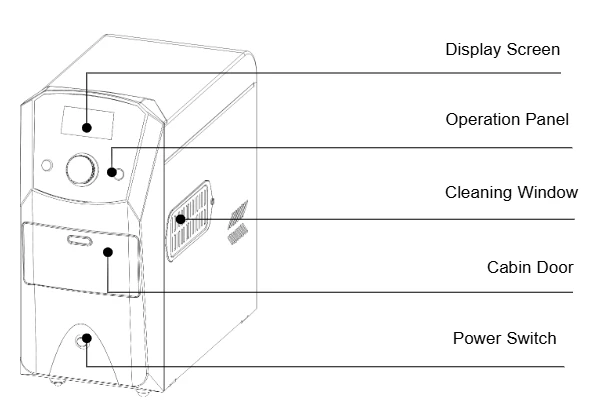
Figure 1
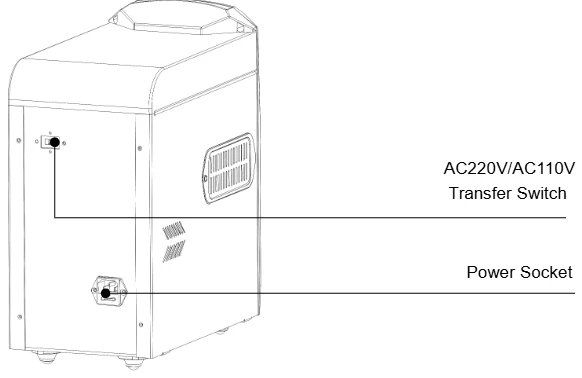
Figure 2
4.2 Keyboard and Display Panel
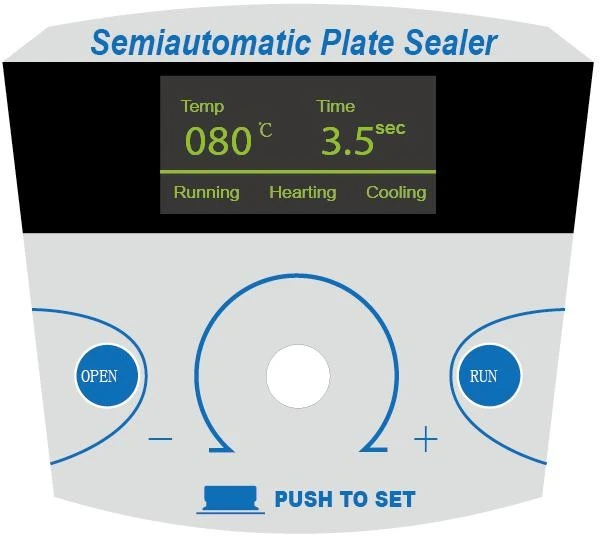
Figure 3
4.3 Key Function
OPEN Key for opening and closing the cabin door. Press it when the door is closed, the door will be open. Press it when the door is open, the door will be closed.
RUN Sealing key. Press the key when the temperature arrives at the setting temperature, the drawer automatically closes and sealing process automatically starts.
 Key for setting parameters. Rotate to change the parameter value and press to switch the setting target.
5. Operation Guide
5.1 Sealing Condition Setting
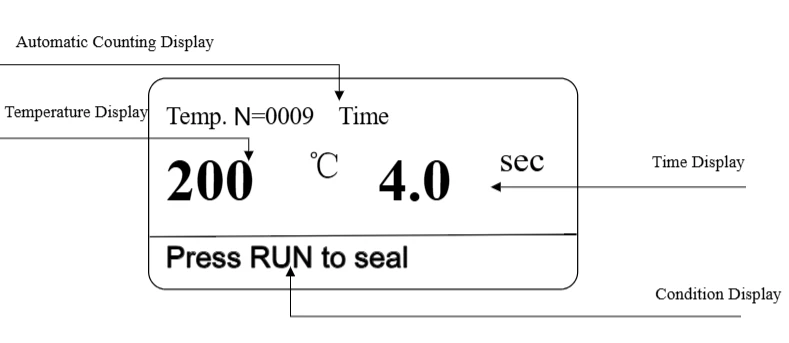
Figure 4
5.1.1 Sealing Temperature Setting
After power on, turn on the power switch right under the machine. Press "PUSH TO SET" for 3 seconds, the temperature part twinkling on the screen. Rotate the "PUSH TO SET" key to set sealing temperature, rotate counterclockwise to reduce the temperature value, rotate clockwise to increase temperature value. Temperature setting range is from 80°C to 200°C.
5.1.2 Sealing Time setting
After sealing temperature is set, then press "PUSH TO SET", as time part twinkling on the screen, rotate "PUSH TO SET", to set sealing time. Rotate counterclockwise to reduce the time, rotate clockwise to increase time. Timing range is 0.5 seconds to 10 seconds.
5.1.3 Pressure Function Setting
Adjust the sealing pressure according to sealing imprint on the plate sealed. If the imprint is light, increase the sealing pressure. If the imprint is deep, reduce the sealing pressure.
After sealing time is set, press key "PUSH TO SET", as temperature part twinkling in the middle of the screen, rotate button "PUSH TO SET", to adjust sealing pressure. Rotate counterclockwise to reduce the pressure, rotate clockwise to increase pressure. Pressure setting range has 1-5 grades. The minimum pressure is 1, the maximum pressure is 5.Factory reset is 3.
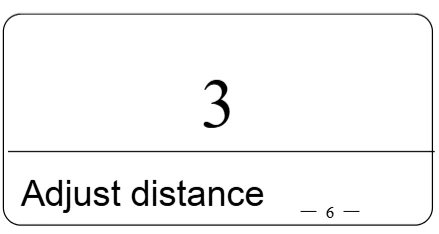
Figure 5
5.1.4 Sleep Time Setting
On pressure setting screen, press "PUSH TO SET", starts the sleep time setting and hour value twinkling, rotate "PUSH TO SET", to set hour value. Rotate counterclockwise to reduce value, rotate clockwise to increase value. Then press key "PUSH TO SET", minute value twinkling. Rotate "PUSH TO SET" to adjust minute value. Sleep time of factory reset is 1 hour.
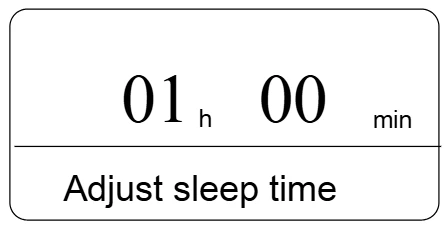
Figure 6
Then press key "PUSH TO SET" again, the deep sleep time setting starts. Operation is the same as sleep time setting. Factory reset of deep sleep time is 2 hours.
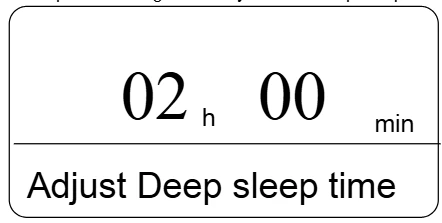
Figure 7
Attention: While deep sleep time setting value is less than sleep time setting value, the deep sleep time will be automatically set as sleep time value and 1 hour.
It will automatically confirmed as the current setting value if no operation within 5 seconds.
Chart:general sealing film temperature and time setting.
Sequence | Name | Sealing Condition Setting | Sequence | Name | Sealing Condition Setting |
1 | clear-seal | 170°C,2.5S | 3 | pierce-seal | 180°C,4S |
2 | peel-sea | 175°C,3S | 4 | Alfoil-seal | 180°C,4S |
Table 2
The above parameter is just for reference. Adjust by user according to reality.
5.2 Sealing Operation
When sealing condition is set, start sealing operation. As the picture shows below:
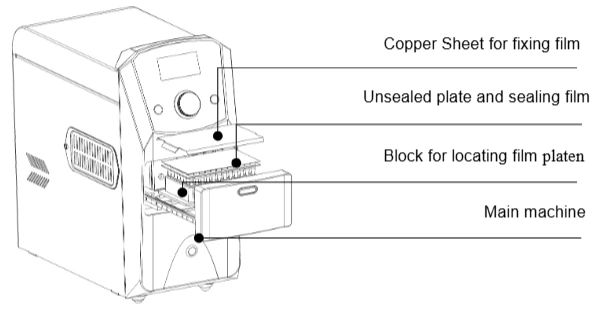
Figure 8
5.2.1 Press "OPEN", slip off the drawer, load the adapter, unsealed plate, sealing film and copper sheet for fixing film.
5.2.2 After the temperature displayed on the screen increased to target setting temperature, hearing a sound "di", then press "RUN", the drawer slipped into the machine to seal. After the sealing is finished, the drawer will automatically slip off for next sealing.
Attention: When the temperature displayed is not up to target temperature, pressing "RUN" doesn't work for sealing.
5.2.3 After sealing operation, press "OPEN", slipping the drawer into machine, and turn off the power switch right under the machine.
5.3 Heating plate clearance
5.3.1 When the appearance of the heating plate adheres leftover of sealing film or sealing plate due to improper operation, which affects the normal operation. Please clean the heating plate according to the steps as below.
5.3.2 Press "OPEN", open the drawer, turn off the power, and pull out the plug.
5.3.3 Take out the two plates as the chart shown below.
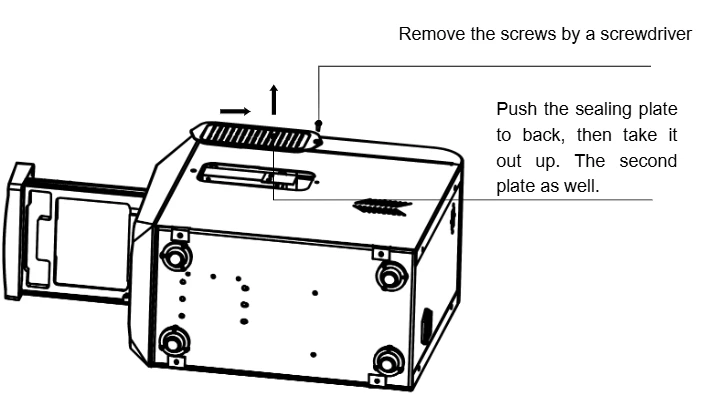
Figure 9
5.3.4 When the plate appearance temperature is close to room temperature, use napkin or towel to clean the leftover.
Attention: Don't use solid tools to wipe the heating plate appearance, which will damage the heating plate and affect the sealing effect.
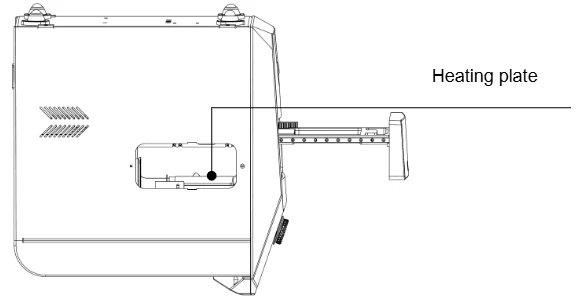
Figure 10
5.3.5 After clearance, install the sealing plate back as 3.3 on two sides.
5.4. Other Function
5.4.1 "No Plate " Alert Function
When operating sealing, if there is no unsealed plate in the machine, then drawer will automatically slip off, showing "No plate".
5.4.2 Standby Function
When the unit is left idle within 30 minutes, it automatically switches into standby mode,
during which the temperature of the heating element is reduced to 60°C to save energy. Press any key, the unit will recover the temperature set before.
When the unit is left idle within 120 minutes, it automatically switches into "Deep sleep" mode, turn off the screen and power off the heating element. With slight current provided for central element, the sealer will restart once pressing any button.
User can set sleep time and deep sleep time as your need.
5.4.3 Power off protection function
When the unit is out of power during operation, electric motor stops. Don't adjust the moving element by hand. When power on next time, moving element will automatically reset.
5.4.4 Automatic counting function
The counter on the screen will automatically adds one after every sealing operation. Press "OPEN+RUN" at the same time more than 30 seconds, the counter can be clear.
6. Failure Analysis and Trouble Shooting
6.1 Failure Analysis and Processing Procedures
NO . | Phenomenon | Possible Causes | Processing Procedure |
1 | No signals on the display when power on. | No power | Check the power |
Broken fuse | Exchange fuse(250V 3A Φ 5x20) | ||
Broken switch | Exchange the switch | ||
Others | Contact with the seller | ||
2 | The actual and displayed temperatures are much different. | Temperature sensor | Contact with the seller |
3 | "ERR001" in the display with the alarm of beep. | Over temperature | Contact with the seller |
4 | "ERR005, ERR006" in the display with the alarm of beep. | Temperature sensor is broken | Contact with the seller |
5 | "ERR601" in the display with the alarm of beep. | Motor blocked | Contact with the seller |
6 | Press invalid | Broken Switch | Contact with the seller |
7 | "ERR412" in the display with the alarm of beep. | Underneath photoelectric switch broken | Contact with the seller |
8 | "ERR411" in the display with the alarm of beep. | Photoelectric switch above broken | Contact with the seller |
9 | "ERR402" in the display with the alarm of beep. | Photoelectric switch outside broken | Contact with the seller |
10 | "ERR401" in the display with the alarm of beep. | Photoelectric switch inside broken | Contact with the seller |
11 | "NO plate" in the display with the alarm of beep. | No plate or incorrect placement | Reposition sealing plate |
Table 3
6.2 Wiring Diagram of BPPS-201
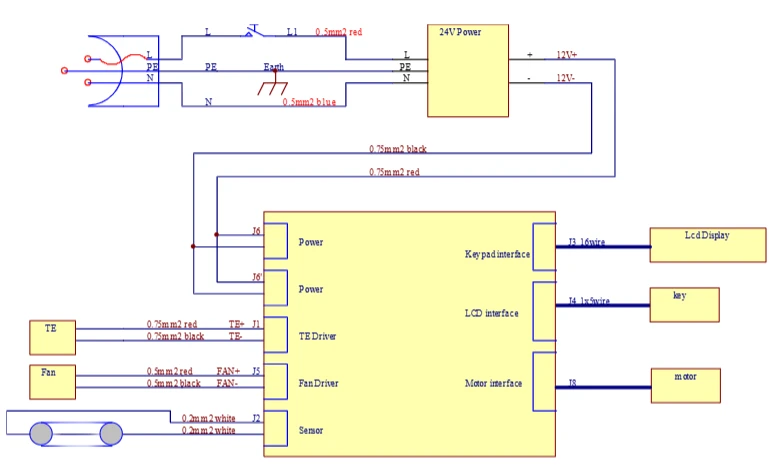
Figure 11