
Get Price
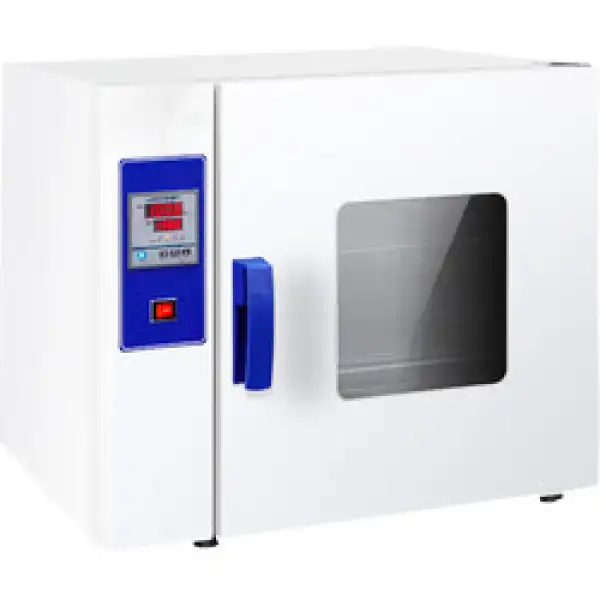
General Purpose Oven BOGP-104
Designed for continuous drying operations , general purpose ovens provide temperature homogeneity regulated by microcomputer control systems. Stainless steel interiors with easy to clean surface while silicon rubber sealing prevents heat loss and gives stability during operation.
- Micro-computer intelligent control system with LED display
- Forced air convection maintains temperature uniformity
- High quality stainless steel inner chamber with electrostatic spray treated exterior
- Large observation window
- Up to 3-Year Product Warranty
- US & EU Compliance Standards
- Door-to-Door Shipping
Technical Specifications
Detailed operating and construction parameters for this model.
| Model | BOGP-104 |
| Capacity | 225L |
| Internal dimension/capacity (HxWxD) mm / liter | 750x600x550 |
| External dimension (HxWxD) mm | 980x965x770 |
| Package dimension (HxWxD) mm | 1100x1045x850 |
| Voltage (V) | 220 |
| Power (W) | 3000 |
| Temp. Range (°C) | RT+5°C~250°C |
| Temp. Precision (°C) | ±0.5 |
| Floating Range (°C) | ±1% |
| Weight (KG) (Wooden shelves included) | 102 |
Product Features
Key design, performance, usability, and safety advantages.
Applications Explore common laboratory, research, industrial, and process applications.
Drying, Roasting, Laboratory, Research, Engineering, Industry, Agricultural, Biology
Operating Manual View instructions, operating procedures, safety information, and maintenance guidance.
1. Description
2. Technology parameter
3. Operation
4. Maintain
5. Trouble shooting and Failure analysis and solutions
6. After-sales service
1. Description
This drying oven is used in biology, chemical pharmaceutical, medical treatment unit, industry and mining enterprise, universities and colleges and scientific research for drying, melting wax, sterilizing and disinfecting
Principle and structure
Heating tube is the back of inner chamber, fan in the back of chamber, temp. controller control the constant and change of temperature, the air flow inflows inner chamber via heating tube, and the function of fan is to make inside temperature more uniform arc-design, shelf space can be adjusted ,built in temp probe.
Wool rock as thermal insulation material between working chamber and shell, shell is made of steel plate, the shell is deal with spray paint, inner chamber is made of zinc-plating or stainless steel .the observation window is made of double tempered glass .silicone door seal to make sure better sealability, enhance the stillstand performance of inner chamber .this drying oven is equipped with intelligent temp. control system .(with timing function and precise temp. control)
2. Technology parameter
Name Model | Inner chamber(mm) | Exterior size (mm) | Voltage (V) | Power (KW) | temp.°C | Fluctuation °C | ||||
H | W | D | H | W | D | |||||
BOGP-101 | 350 | 350 | 350 | 520 | 640 | 665 | 220 | 1.2 | +5~300 | ±1% |
BOGP-102 | 450 | 450 | 350 | 620 | 740 | 665 | 1.4 | |||
BOGP-103 | 550 | 550 | 450 | 720 | 840 | 765 | 2 | |||
BOGP-104 | 750 | 600 | 520 | 980 | 900 | 770 | 3 | |||
Table 1
Use method
Make sure the switch is in the "off" position before power on, check whether it is broke circuit or leakage, connect power, turn on power switch
Panel display
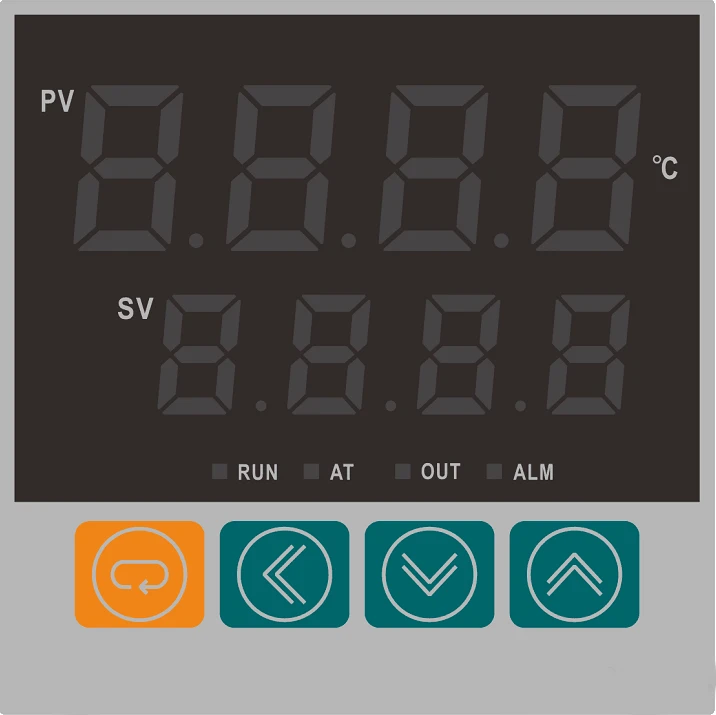
Figure 1
1. PV display
Displays the measured temperature or various prompts based on controller status.
2. SV display
Display set temperature or display timing time according to controller status; Various parameters.
3.SET Key
value modification; Parameter call, parameter modification confirmation.
4. Shift key
Used to set values, control parameter shifts, and view running times.
5. Reduce key
Used to set values, modify control parameters, or enter a self-tuning state.
6. Add key
Used to set values, modify control parameters, or enter a self-tuning state.
3. Operation
1. The sequence of each function
The controller is powered on:
When the controller is powered on, SY is displayed on the upper monitor and the index is displayed on the lower monitor, indicating the input type. After another 2 seconds, the upper monitor shows the upper limit of the range, and the lower monitor shows the lower limit of the range, indicating the measurement range. After another 2 seconds, the upper monitor displays the measured value, and the lower monitor displays the set value, entering the standard display mode
Temperature setting:
Press the SET key to display SP in the upper monitor. Press"  "or "
"or "  " key to displays the lower monitor as the required value. Click the function key, the upper monitor displays ST(MIN). Press"
  "or "
"or "  " key to displays the lower monitor as the required value. The controller returns to standard mode.
2. Detailed description of each function
Part of PV display:If "  " is displayed, the sensor is short circuit or the input signal exceeds the measurement limit. If "
  " is displayed, the sensor short circuit or input signal is lower than the lower limit of the range. When the input signal of the controller is not within the range, the buzzer will beep, press any key can cancel it.
Query time:
When the controller works in standard mode, as long as the shift key is pressed, the upper monitor will show the timer, and the lower monitor will show the set time of the controller, then press "  " key, the controller will return to standard mode.
Timing:
When ST is set to 0, the controller cancels the timing and keeps working. When ST is not set to 0, the controller has timing function. When "END" is displayed in the lower monitor, the controller stops working and the buzzer chirps, and press any key can cancel it. Press "  " and "
  " key together for 4 seconds can restart the controller.The RUN indicator flashes when the timing function is started, and lights up when the timing function is not started.
3. Self-adjusting function(Set the setting time to 0, to cancel the timing and end the self-adjusting, then set a time again
If the temperature control effect is not good, please start the self-adjusting function. After pressing "  " key for 4 seconds, the AT indicator flashes, and the controller starts self-adjusting, then the RUN indicator lights. The control effect will be greatly improved.
During the process of self-adjusting, press "  " key for 4 seconds and the indicator light will turn on, the self-setting will stop, and the controller will control according to the original PID parameters.
Press the SET key for more than 4 seconds to appear LK, adjust LCK to 18, and then press the SET key to display the prompt of control parameters in the upper monitor (please see the parameter list for detailed prompts). Press " " or " " key to displays the lower row as the required value.
Press SET continuously to return to standard mode (if no key is pressed, the controller will automatically return to standard mode after one minute).
The table below for each functional parameters
Sign of Prompt | Name | Setting Arrange | Illustrate | Initial Value |
Pb | Zero adjust- -ment (intercept) | -100~999 -100.0~999.9 | When the zero error of the controller is large and the error of full scale is small, adjust this value,This value is rarely adjusted(PT100)。 | 0 |
PK | Full scale adjustment (slope) | -1000~2000 | When the zero error of the controller is small and the error of full scale is large, adjust this value,PK=4000x(the reading value of the mercury thermometer subtract the current temperature value)/current temperature value.In general, adjust this value first(Pt100)。 | 0 |
rH | Upper range setting | 0~400°C 0.0~400.0 | Adjust rH to take the range of0~rH(°C)。 | User required |
AL | Alarm setting | 0~full scale 0.0~full scale | When the temperature exceeds SP+AL value, the alarm light and the alarm will turn on | 6 |
P | Proportional band | 0~full scale 0.0~full scale | The larger the P is, the smaller the proportional effect is,P=0 is the positional control, and the insensitive area is 0.4. | 15 |
I | integral time (reset time) | 10~3600 Sec. | The larger bigger integral action time constant(i), the weaker the integral action | 300 |
d | derivative time (rate time) | 0~3600 Sec. | The larger the time constant (d), the stronger the differential action | 100 |
Ar | Overshoot inhibition | 0~200% | The smaller the value of XF is, the stronger controller's ability to suppress temperature. | 100 |
T | heating cycle | 1~100 Sec. | The relay shall not operate for more than 20 seconds and the SSR and SCR switches shall not operate for more than 2s( only applicable to heating side). | 3 |
dp | Decimal point setting | 0;1 | DP=0 displays at a resolution of 1°C; DP=1 displays at a resolution of 0.1°C, | 1 |
CE | Chronon | 0-1 | 0 is measured in minutes;1 is measured in minutes。 | 0 |
drt | Open-door detection | 0-50.0 | If the temperature drop is detected within 10 seconds, it will be regarded as door opening detection(drt). Setting it to 0 means that this function is not available. Notes:There is no such parameter in the refrigeration control. | 0 |
Table 2
Notice
1. The samples should not be placed too crowded, so as not to affect convection inside the chamber. Please connect the oven with protective conductor terminal according to relevant regulations. in order to be safe, don't touch electrical circuit which is in the left oven with hand and wet cloth
2. Don't splash water to observation door, or it may crack
3. Don't use this kind of oven to dry inflammable, volatile and explosive substance, or it may cause explosion
4. Maintain
1. Drying oven should be kept clean, please use cotton cloth to clean glass door,
in order to avoid chemical reaction , do not use corrosive chemical solution to sweep
2. If drying oven is not used for long period, in order to avoid corrosion, should be applied with neutral grease or vaseline in the electroplating pieces. and placed in a dry indoors
3. Please operate this oven according to our manual, if there is something wrong with this oven , please refer to below solution
5. Trouble shooting and Failure analysis and solutions
Trouble | Failure analysis and solutions |
1.The equipment fails to work after power is connected | * there is something wrong with power , ask an electrician for help * heating wire burned out, test the two end resistance value of heat ware ,if resistance value is 0 , It means that the heating wire is short-circuit , it occurs switch trip ; if the resistance value is hundred Kohm or infinity ,it means that heat ware is open circuit power switch blade is off The power switch is on ,check the control circuit board and cable |
2.temperature stops rising | * Check timing whether it is timing settings; * Most users do not understand the function, when reaches timing value, the heating wire stops working, the fan fails to work, temperature stops increasing. * Check whether the fan is working , if fails (use multi-meter to test the voltage of fan pin whether it is 220V ), then call us to send accessories to solve * Checking control panel with a multi-meter to see whether there is output, according to the drawing; (Drawings attached). |
3.motor fails to run | Result : it is running, but the airflow is unable to circulate ,lead to temperature rises slowly ,then contact us |
4.handle is broken | Replace and contact supplier |
5.there are differences between the temperature which panel displays and mercury temp. | premise: Thermometer need to be tested whether it is qualified then to measure The installation position of mercury :hang the thermometer in the center of chamber ,avoid putting on the shelf to measure Refer to the parameter adjustment table |
6.temperature appears bounce or keep stationary ,or abnormal "----" | * there is something wrong with temperature sensor , should to be replaced . Note : sensor adopts Pt100 platinum resistance |
Table 3
6. After-sales service
1. One year warranty,lifetime service . and this product is warranted for a period of twelve months from the date of original purchase, please retain your receipt to establish proof of purchase!
2. Don't dismantle, repair or refit equipment without authorization and guidance from our company. This warranty does not extend to the repair or refit of any products.
3. This warranty does not cover any damages which is caused by improper operation,improper power output,or improper cable connection.
4. If the product is located outside in china, during the warranty period, we will offer the parts for free. but not bear freight charge. If outside of warranty period, you need to pay for the parts and the freight charge as well.
5. The warranty does not cover consumable parts, such as light lamp or glass door and so on.