
Get Price
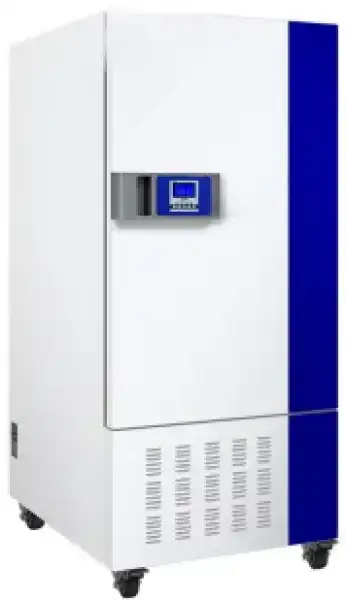
General Purpose Incubator BOHA-317
Widely used in scientific research, pharmaceutical, foodstuff, materials science, cosmetics, tobacco, microbe, chemical industry, electronics and other fields. A constant temperature and humidity chamber/mold incubator can provide a stable temperature and humidity environment, simulate various climatic conditions, especially used in samples tests, shelf...
- Refrigeration Technology
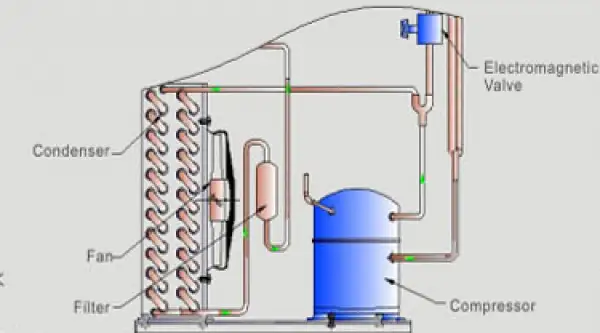
- World famous compressor: balanced refrigeration technology, auto defrost, multiple security system, long time running, environmental protection, high efficiency and energy saving.
- Auto-defrost function: original rapid heat pump defrost technology, for continuous operation, effectively prevent frost because of continuous operation of evaporator.
- Refrigeration effect manual control system: meet customer's terrible work environment.
- Up to 3-Year Product Warranty
- US & EU Compliance Standards
- Door-to-Door Shipping
Technical Specifications
Detailed operating and construction parameters for this model.
| Model | BOHA-317 |
| Convection mode | Forced-convection |
| Control mode | 30 Programmable PID Control System |
| Temperature range (°C) | 0~65°C |
| Humidity range | 40~95%RH |
| Temp. resolution (°C) | 0.1 |
| Temp. fluctuation (°C) (10-40°C) | ±0.5 |
| Humidity fluctuation (RH) | ±2 |
| Timing range | 0~99Hour, Or 0~9999min |
| Running environment | environment temp.10-30; relative humidity below 70% |
| Heat insulator material | imported environmental protection material |
| Material of internal surface | SUS304 Interior steel materials |
| Power voltage | Single phase AC220V/50Hz |
| Sterilization function | with |
| Temp. uniformity (°C) 10-40°C | ±1 |
| External dimension (mm) (HxWxD) | 1410x650x680 |
| Liner dimension (mm) (HxWxD) | 757x508x389 |
| Liner volume (L) | 150 |
| Shelves | 3 |
| Rated power (W) | 1080 |
| Net weight (KG) | 107.5 |
| Gross weight (KG) | 133 |
| Package size (mm) (HxWxD) | 1605x760x830 |
Product Features
Key design, performance, usability, and safety advantages.
Refrigeration Technology
World famous compressor: balanced refrigeration technology, auto defrost, multiple security system, long time running, environmental protection, high efficiency and energy saving.
Auto-defrost function: original rapid heat pump defrost technology, for continuous operation, effectively prevent frost because of continuous operation of evaporator.
Refrigeration effect manual control system: meet customer's terrible work environment.
Imported DuPont SUVA R134a environmental refrigerant. For cleaner world, for better work condition.
To save energy, to reduce the cost.
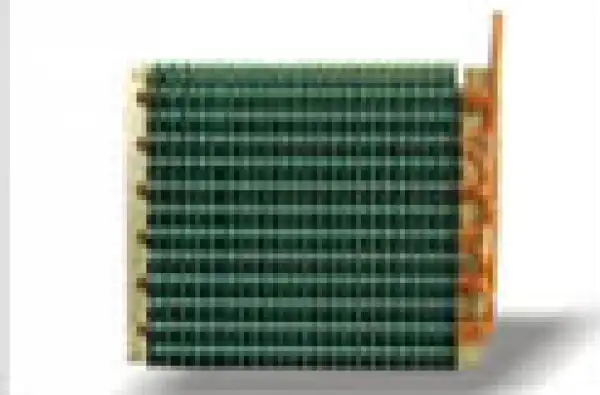
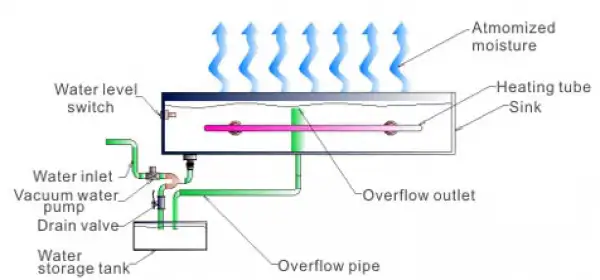
Humidification System
Original design of humidification system, prevent disadvantages (non uniformity, instability) of traditional atomizer design.
Automatic water intake, automatic water level control, ensure the precision of humidity control.
Stainless steel SUS304 internal surface and water tank, ensure the quality of atomization and uses persistent.
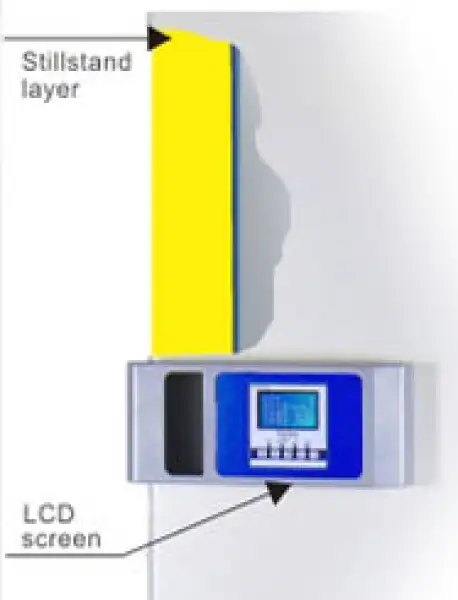
Efficient Isolation Design
Double-layer isolation design, reduce power consumption, environmental protection concept, energy conservation.
Internal isolated door design, easy observation of working room samples, keep temperature stable in the working room.
Excellent imported temperature and humidity sensor
Imported industrial sensor PT100, short response time, low self-heating temperature.
Imported humidity sensor, aerospace material, no maintenance, precise humidity control level.
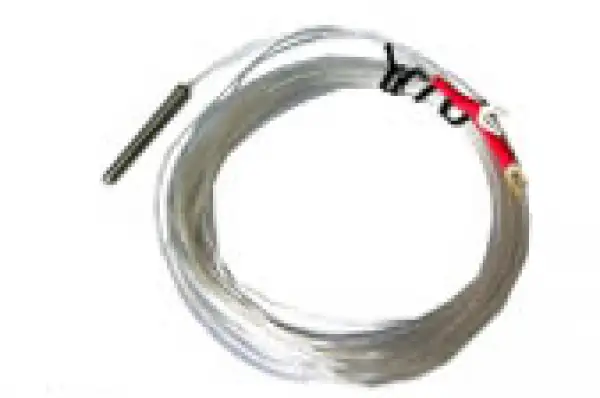
Pt100temperature sensor
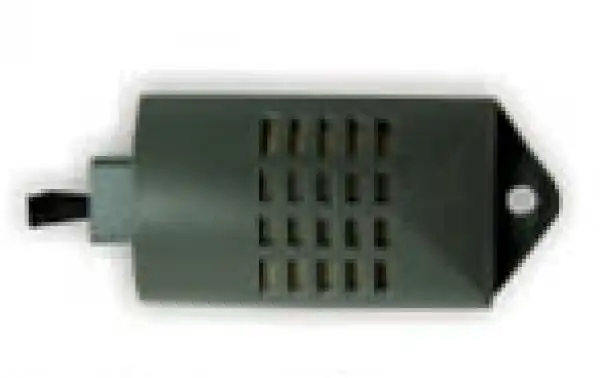
Precise humidity sensor
Programmable PID Control
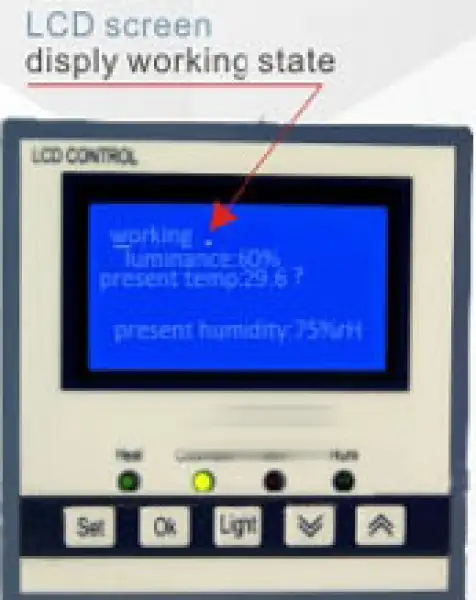
Integrated dot-matrix LCD display, Chinese and English subtitles, all the parameters display clearly at a glance. friendly design, display parameters: temperature, humidity, cycle, run time, run/stop.
Adaptive PID controllers precisely control the temperature and humidity, prevent temperature soaring, keep the working room temperature stable and uniform.
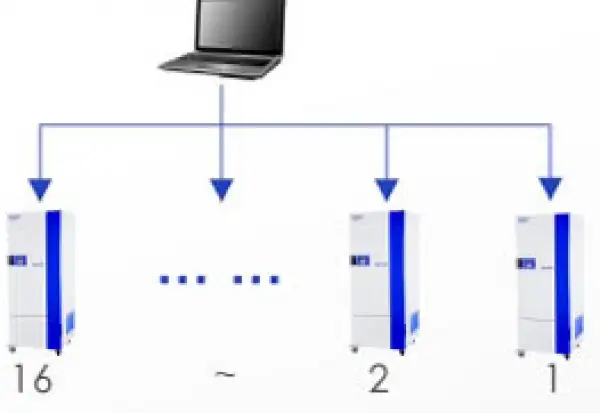
User password protection, built-in multifunctional memory menu, connect to multiple devices (up to 16 units) by RS485 interface, real-time monitoring.
Programmable multi-sections control, to meet customer needs, temperature and humidity control up to 30 sets. Time setting: 0~99h, 0~9999m, programs can be executed automatically.
Set operations with beep tips
Remote-controlled operation, with programmable software (option). Bacteria-free culture with UV disinfection (meet Mold incubator)
Software Monitor
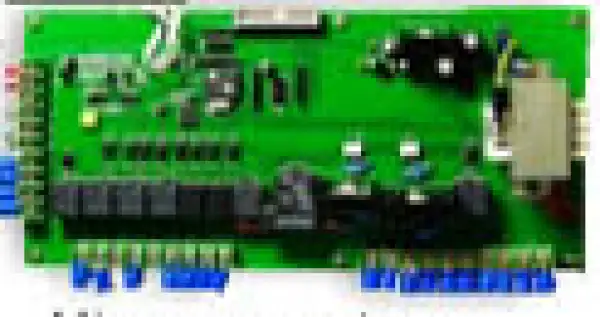
Micro-computer intelligent controller
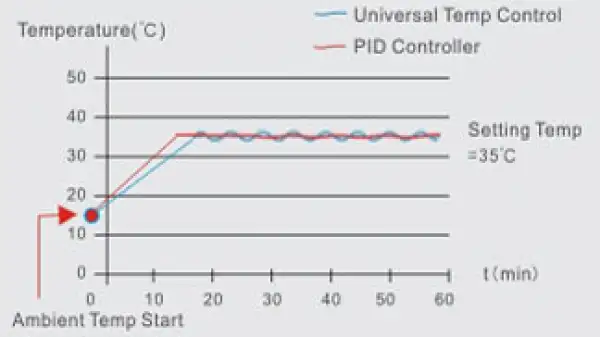
Perfect Air Current Cycling
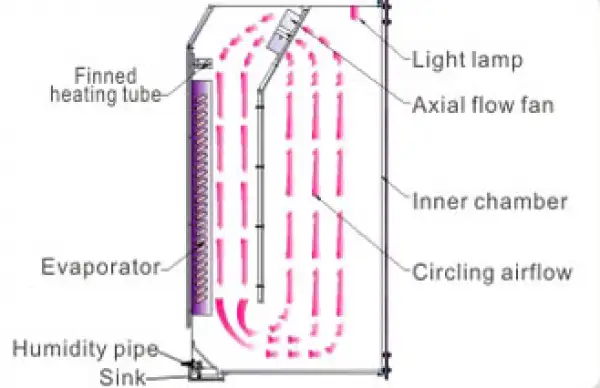
Air current cycling: perfect forced convection, maximum samples number of working room, minimum temperature recovery time after opening, world famous axial fan, perfect air current design, ensure an ideal result of samples culture.
Air current cycling: keep temperature continuous and stable, keep humidity continuous and stable, ensure perfect sample culture environment.
Accessories For Purchase View compatible optional accessories and additional items available separately.
| Name |
| Portable printer |
| Touch LCD controller |
| Gas Interface |
| Built-in power supply interface |
| Programmable software |
Operating Manual View instructions, operating procedures, safety information, and maintenance guidance.
1. Application
2. Performance
3. Technical Parameters
4. Structure
5. Equipment installation
6. Installation
7. Preparation before Operation
8. Panel instruction
1. Application
A constant temperature and humidity chamber is thermostatic equipment with heating, cooling and humidification function, highly precise and advanced. Widely used in plant cultivation, breeding test, bacteria, mold, microbial cultivation & preservation, BOD determination and so on. Which is also used in biological genetic engineering, medical treatment, health and epidemic prevention, medical test, agriculture and animal husbandry, aquatic and other scientific research institutions.
2. Performance
Constant temperature and humidity transfers actual temperature and humidity detected from temp. sensor and humidity sensor into signal. Through microcomputer control to heater towards required temperature and humidity.
3. Technical Parameters
1. Volume:150L.250L.400L;
2. Temp range :0~65°C;(with humidity5~50°C);
3. Temp fluctuation range :±0.5°C(10°C~40°C);
4. Temp uniform range :±1°C(10°C~40°C);
5. Humidity range :40-95%RH(10°C~40°C );
6. Humidity fluctuation :±2%;
7. Power voltage : 220V/50Hz;
8. Input power:1080W(150L) 1100W(250L) 1350W(400L);
9. Working ambient :ambient temp 10~30°C relative humidity70% below ;
10. Refrigeration:R290;
11. Equipment class:Class I
Notice :This equipment has low temperature auto-defrost function, it is normal that there is fluctuation when low temperature auto-defrost.
4. Structure
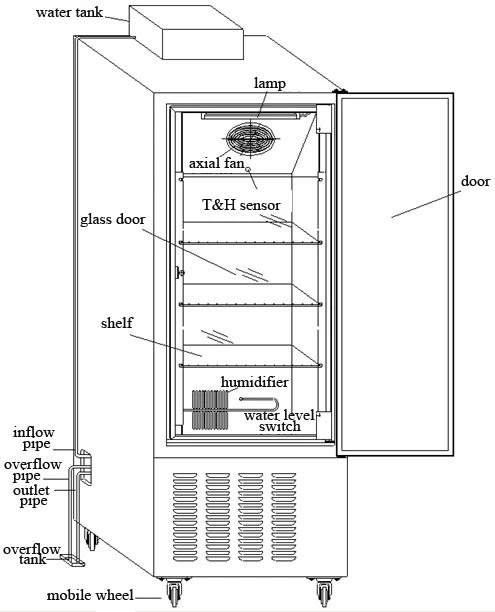
Figure 1
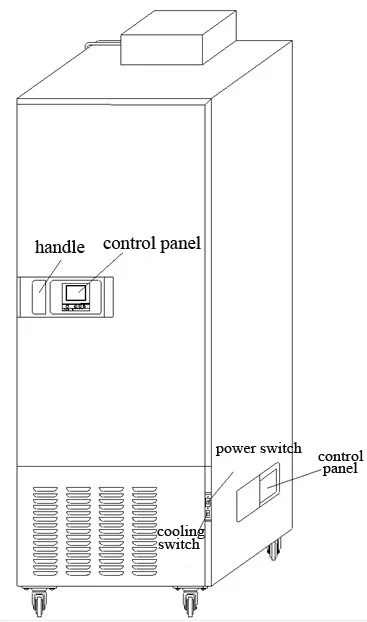
Figure 2
5. Equipment installation
In order to make sure the equipment can run normally, please place equipment as following:
 Attention: ambient temperature 10~30°C ;relative humidity less than 70%
1. Avoid exposure to the sunlight.
Do not place it in direct sunlight, or it won't reach predicted performance
2. An efficient vent place
If you operate this equipment in a narrow and concealed room, it may lead to
over-heating and malfunctioning. Minimum safe distance between equipment and wall is 10CM
3. Keep away from heat source
Don't install the equipment near heating source. External excess heat will affect performance of the equipment and may cause malfunctioning
4. Flat and firm ground
Make sure to install it in flat and firm ground. Uneven surface or leaning installation may damage equipment or injure people. Proper installation can avoid shaking and noise
5. Avoid humid place
Install the equipment in a place where humidity is less than 70%. Otherwise it may cause short-circuit or electric shock.
Warning
Do not place this equipment outdoors. If it exposed in the rain, it may cause short-circuit and electric shock.
Do not place equipment in humid environment or a place with dripping water. Otherwise it may cause short-circuit or electric shock.
Avoid place with flammable or corrosive gas.
Do not place equipment near flammable materials and volatile substance. Otherwise it may cause explosion or fire. Do not place equipment in the place where has acidic and corrosive gas, or corrosion will cause short-circuit, electric shock or equipment damage.
6. Installation
1. Unpacking
Remove packing materials ,open the door for ventilation. Please use neutral detergent to clean if the shell and panel is dirty. then wipe with wet cloth and at last with dry and clean cloth
2. level equipment
Fix equipment with the front brake-wheel after installation in case equipment moves
3 Earthing
Warning
Please use power socket that has protective conductor terminal in case of electric shock. If it is not connected, has to install protective conductor terminal by licensed technician.
Do not connect protective conductor terminal through gas, water pipe, telephone line or lighting arrester which will cause electric shock.
4. Idle equipment
Before setting equipment aside , empty water in the humidifier and remove internal, moisture thoroughly. Be sure the inner chamber is dry and cool before closing the door .
5. Move equipment
Before moving equipment ,empty water in the humidifier .or it will cause creepage or electric shock because of overflow water or splashed water.
7. Preparation before Operation
When equipment running in the first time, please operate as below:
1.Take out the shelves or other accessories
2.Clean the inner wall with gauze which is soaked by alcohol and then use dry cloth to wipe-dry
3.Put the shelves into inner chamber according to your experiment of requirement
4.Put water tank on the top of equipment before using ,please connect water pipe with water inlet and overflow outlet which in the left of equipment (refer to component picture ) ,and put storage water tank under the overflow pipe and water outlet for spare use
5.Pour enough pure water into water tank
Notice :don't use NaCl or other Halide solution to clean equipment ,or it will cause rust.
8. Panel instruction
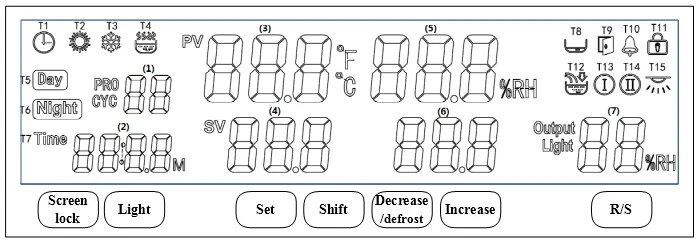
Figure 3
Symbol definition
T1: appointment: its twinkling means the controller enter into appointment mode, meanwhile, the (2) area displays appointment time (count down).
T2: heat: its lightening means heater working.
T3: refrigeration: its lightening means air compressor working.
T4: humidity: its lightening means humidifier working.
T5: daytime: its lightening means the machine is in daytime mode.
T6: night: its lightening means the machine is in night mode.
T7: timer: its twinkling means the timer working, meanwhile, the (2) area displays setting time(count down).
T8: lack of water: its lightening means lack of water, its twinkling means low-level water alarm.
T9: door open: its lightening means the door is open
T10: alarm: its lightening means temperature or humidity alarm; its twinkling means low-temperature or high-temperature protection.
T11: screen lock: its lightening means screen is locked, one can not change any setting value before unlock it.
T12: watering: its lightening means water pump working.
T13: defrosting: its lightening means the defrosting system working.
T14: valve: its lightening means valve working.
T15: illumination/sterilization: its lightening means lamp working, its twinkling means UV lamp working.
Display window
(1) Area: cycle/segment
(2) Area: timer or setting time
(3) Area: current temperature value
(4) Area: temperature setting value
(5) Area: current humidity value
(6) Area: humidity setting value
(7) Area: illumination or heating output power
Button definition
Screen lock: in normal mode, one can press on this button for 2 seconds to lock or unlock the screen.
Light: in normal mode, one can click on this button to switch on/off the lamp.
Set: in normal mode, one can click on this button to set value of temperature, humidity, illumination and others; or press on this button for 3 seconds to enter into inner parameters.
Shift: in setting mode, one can click on this button to shift digit position; in normal mode, one can click on this button to shift daytime or night mode; in programmable mode, one can click on this button to inquire cycles and segments.
Decrease/defrost: in setting mode, one can click on this button to decrease setting value; in normal mode, one can press on this button for several seconds to activate defrosting function.
Increase: in setting mode, one can click on this button to increase setting value
R/S: in normal mode, one can click or press on this button to start or stop the controller running.
Operation and usage
1. After power on, (3) area displays "PS", (5) area displays "V01", the buzzer beeps, and then ,after 2 seconds, the controller will enter into normal mode.
2. Setting values: after clicking on set button in normal mode, symbols "TIME"and"SV" twinkle, one can modify the setting value (digit position twinkling), by shift, decrease, increase buttons, and one can shift to next group value by another clicking on set button. After modification, one can press on set button for 1 seconds to quit setting mode, the setting value will be saved automatically.
In programmable mode, segment value position twinkles after clicking on the set button. In this time, one can modify the segment number by decrease or increase button, and inquire setting value of time, humidity, temperature, and illumination in every segment.
In day/night mode, after clicking on set button, "DAY"symbol will twinkle, then, one can choose daytime or night mode by decrease or increase button, after another click on set button, one can inquire and modify every value of current mode, by increase and decrease buttons.
3. Setting of cycles and segments: in programmable mode or day/night mode, when the controller is in stop situation, after pressing on "set" button for 3 seconds, the (1) area displays "Lc", the (2) area displays "0", users can adjust the password to 3 by increase/decrease buttons, so that the controller enters cycle and segment setting mode. PRO----total program number, CYC----total cycle number.
4. Fault reminder:
Temperature alarm:symbol"°C"flashes quickly when upper deviation occurs,symbol"°C"flashes slowly when lower deviation occurs;
Humidity alarm: symbol"%RH"flashes quickly when upper deviation occurs,symbol"%RH"flashes slowly when lower deviation occurs;
If the (3) area displays "---",user should check the sensor and controller.
Inner technical parameters
In normal mode, press on set button for 3 seconds, the (1) area will display "Lc",users can input right code and click on the set button one more time to enter different inner parameters. After adjusting the value of parameters, please do remember to press on the set button for another 3 seconds to quit setting mode.the value adjusted will be saved automatically.
symbol | name | function | (range) factory value |
Lc | password | when"Lc=9",this parameter group can be inquired and adjusted. | 0 |
U1 | Running mode | 0:constant value mode; 1:day/night mode, 99 cycles; 2:program mode, 1~30 segments,0~99 cycles | (0~2) 0 |
U2 | Power down protection | 0:no operation; 1:begin with the first segment; 2: restart from the power down time | (0~2) 0 |
U3 | Timer adjust | Modification value=【display value(s)-real value(S)】*10 ÷ real value(m)。 | (-999~999) 0 |
U4 | Timing unit | 1:minute 0~9999; 2:hour 0~9999 | (1~2) 1 |
U5 | Timing temperature point | When U5= display temperature-setting temperature, timer starts to work | (0~10.0°C) 0 |
U6 | Timing humidity point | When U6= display temperature-setting temperature, timer starts to work | (0~50.0%) 0 |
U7 | 【R/S】time | Press on the【R/S】for U7 time to run/stop | (0~10s) 0 |
U8 | Lock screen time | Lock screen time, 0 means unlock | (0~300s) 0 |
U9 | Reminder time (stop) | The buzzer beeps for U9 seconds when running stop. 0 means buzzer beeps continuously | (0~300s) 0 |
UA | Illumination time | Illumination time, 0 means manual operation | (0~9999min) 0 |
Ub | address | Communication address | (1~16) 1 |
Table 1 Parameter 1
symbol | name | function | (range) factory value |
Lc | password | when"Lc=103",this parameter group can be inquired and adjusted. | 0 |
TH | Temperature upper deviation alarm | when"display value>set value+TH",upper alarm occurs, heating and humidity cut down User can click on any button to stop buzzer | (0~20.0°C) 5.0 |
TL | Temperature lower deviation alarm | when"display value<set value+TH",lower alarm occurs, heating and humidity cut down User can click on any button to stop buzzer | (-50.0~0°C) 0 |
Tb | Zero adjust(low temperature) | Tb = real temperature - display temperature | (-99.9~99.9°C) 0 |
TA | Full adjust(high temperature) | TA = 1000 *( real temperature - display temperature)÷display temperature | (-999~999) 0 |
TP | Proportional band | Adjustment of proportional function. | (0.1~50.0) 8.0 |
TI | Integration time | Adjustment of integration function | (1~2000s) 500 |
TD | Differential time | Adjustment of differential function. | (0~2000s) 200 |
TT | Heat period | Heating control period | (1~60s) 5 |
Tc | Low temperature cutoff | Heating cutoff point. | (-2.0~0°C) -0.5 |
To | Heat power | Heating max power percentage | (0~100%) 100 |
Table 2 Temperature parameter-2
symbol | name | function | (range) factory value |
Lc | password | when"Lc=203",this parameter group can be inquired and adjusted. | 0 |
HH | Humidity upper deviation alarm | when"display value>set value+TH",upper alarm occurs, heating and humidity cut down User can click on any button to stop buzzer | (0~50.0%) 20.0 |
HL | Humidity lower deviation alarm | when"display value<set value+TH",lower alarm occurs, heating and humidity cut down User can click on any button to stop buzzer | (-50.0~0%) 0 |
Hb | Zero adjust(low humidity) | Tb = real humidity - display humidity | (-99.9~99.9%) 0 |
HA | Full adjust(high humidity) | TA = 1000 *( real humidity - display humidity)÷display humidity | (-999~999) 0 |
HP | Proportional band | Adjustment of proportional function. | (0.0~90.0) 10.0 |
HI | Integration time | Adjustment of integration function | (1~999s) 200 |
Hd | Differential time | Adjustment of differential function. | (0~999s) 30 |
HT | Heat period | Heating control period | (0~60s) 5 |
Hc | Low temperature cutoff | humidity cutoff point. | (-50.0~50.0%) 0.0 |
Ho | humidity power | Humidity max power percentage | (0~100%) 100 |
Table 3 Humidity parameter -3
symbol | name | function | (range) factory value |
Lc | password | when"Lc=109",this parameter group can be inquired and adjusted. | 0 |
C1 | Forbidden compressor | when"temp.measured value≥C1", the compressor must not work. | (0~100.0%) 80.0 |
C2 | Not start compressor | when"temp.setting value≥C2", Start the compressor only once when the temperature measuredt value is higher than the temperature setting value. | (0~100.0%) 42.0 |
C3 | Constant temp.open point | when"temp.setting value≤C3",compressor works in balance mode | (-15~100°C) 0.0 |
C4 | Costant humi open point | when"humi.setting value≤C4",compressor works in balance mode. | (0~100%) 10 |
C5 | Working mode | (0~3) 3 | |
C6 | Compressor start delay | (0~600s) 180 | |
C7 | Defrost mode | (0~2) 0 | |
C8 | Defrost interval 1 | (0~9999min) 0 | |
C9 | Defrost interval 2 | (0~9999min) 0 | |
CA | Defrost interval 3 | (0~9999min) 0 | |
Cb | Defrost time 1 | (0~200s) 0 | |
Cc | Defrost time 2 | (0~200s) 0 | |
Cd | Defrost time 3 | (0~200s) 0 | |
CE | Solenoid valve function | (-2~1) -2 | |
CF | Solenoid valve start | (0~50.0°C) 0 |
Table 4 Compressor parameter - 4
symbol | name | function | (range) factory value |
Lc | password | "Lc=209" this parameter group can be inquired and adjusted. | 0 |
P1 | Illumination control | 0:no illumination; 1:3 levels; 2:4 levels; 3:5 levels; 4:6 levels; 5:10 levels | (0~5) 4 |
P2 | Humidity set | 0:no humidity;1:humidity display only;2:humidity can be controlled。 | (0~2) 2 |
Table 4 Parameter -5
symbol | name | function | (range) factory value |
Lc | password | When"Lc=36" this parameter group can be inquired and adjusted. | 0 |
AP | Appointing set | 0:shut off appointing fuction; 1:start appointing fuction | (0~1) 0 |
T_ | Appointing time | When AP=1, the timer can be set. | (0~9999min) 0 |
Table 5 Appointing set -5
Wiring layout
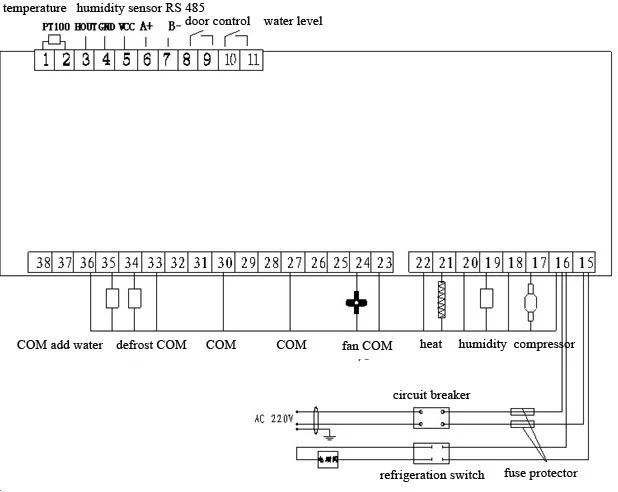
Figure 4