
Get Price
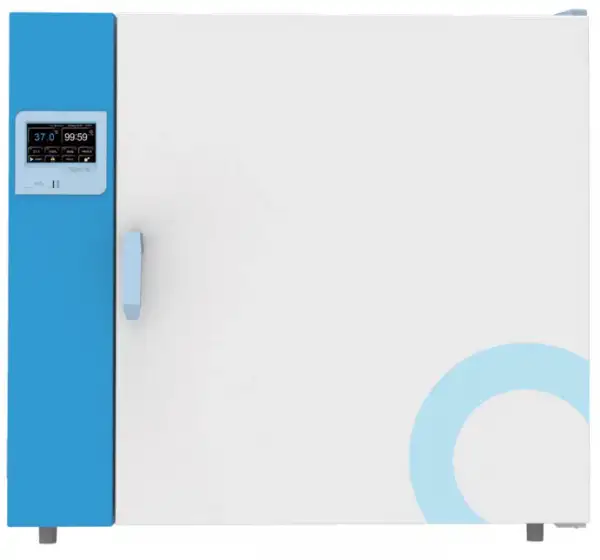
General Purpose Incubator BIGP-6405
Heating Incubator - natural convection: The heating incubator provides stable and controllable temperature environment through precise temperature control. It adopts natural convection mode, stable airflow and small temperature fluctuation. It is widely used in bacterial culture, fermentation, breeding, constant temperature culture and other tests. Heating...
- Intelligent:
- It provides two options: colorful touch screen controller and LCD controller. It is easy to operate. (Professional type LCD controller)
- With preset power on, standby and shutdown functions.
- Parameters such as multi-stage temperature, circulating wind speed, time and heating rate can be set and programmed at the same time, simplifying the complicated test process and realizing automatic control and operation.
- Up to 3-Year Product Warranty
- US & EU Compliance Standards
- Door-to-Door Shipping
Technical Specifications
Detailed operating and construction parameters for this model.
| Model | BIGP-6405 |
| Type | Touch screen |
| Capacity (L) | 420L |
| Temp Range | RT+5 - 80°C |
| Stability | ±0.2°C |
| Uniformity (at 37°C) | ±0.8°C |
| Display Resolution | 0.1°C |
| Max number of shelves | 2(23) |
| Max load per shelf | 20Kg |
| NW | 160Kg |
| Timing Range | 1 - 5999mins |
| Interior Dimension WxDxH (mm) | 1000x530x800 |
| Exterior Dimension WxDxH (mm) | 1285x750x980 |
| Electrical Requirement | AC220V/50Hz |
| Power Consumption | 1000W |
Product Features
Key design, performance, usability, and safety advantages.
Intelligent:
It provides two options: colorful touch screen controller and LCD controller. It is easy to operate. (Professional type LCD controller)
With preset power on, standby and shutdown functions.
Parameters such as multi-stage temperature, circulating wind speed, time and heating rate can be set and programmed at the same time, simplifying the complicated test process and realizing automatic control and operation.
Specialization:
Tested and manufactured using the international DlN-12880-2007 standard.
Provide professional temperature control, high temperature control accuracy and small temperature uniformity error.
The sample can be viewed through the internal glass door without affecting the temperature inside the box (option)
Stackable to save lab space.
Flexible shelf design for efficient use of interior space.
Safety:
Protection of equipment: The second set of temperature limit alarm system conforms to international standards. When the heating is out of control or exceeds the maximum limit temperature, the heating is automatically cut off, and the sound and light alarm reminds the operator. Ensure that the equipment operates safely without accidents.
Protection of key components: The key electrical components are equipped with over-current, over-temperature, overload and other safety protection to prevent accidental equipment.
Protection of the sample: When the temperature inside the box is higher or lower than the set temperature, the alarm will start to cut off the heater, and the sound and light will remind the operator to protect the sample from normal test without accident.
Protection for users: The cabinet and door are specially insulated to make the surface temperature of the cabinet low, ensuring the operator's safety and no accidents.
Provide fault information: When the device fails, the display will display fault information to ensure that the fault information is clear at a glance.
Humanized design:
Adopting direct heating system, the heating speed is fast and the control precision is high.
PID control technology, high control precision and small temperature fluctuation.
Available in Chinese and English menus to meet different language needs, with ° °C/°F conversion.
The height of the shelf is adjustable to meet different cultivation needs.
Professional stacking: Tool design, the machine can be stacked, saving lab space and improving the use efficiency (same specification).
Convenient data processing:
The touch screen type standard with a USB Interface, which can record the change status of the temperature parameters. The LCD screen is option for USB Interface.
It can be equipped with RS232 data Interface, which can realize remote control of the machine through software (option).
RS-232 and USB can be selected one of them.
Safety:
Protection on Instruments: Comply International standard secondary temp limiting alarm system. When the heating is out of control or exceeds the maximum limit temperature, the heating is automatically cut off with sound and light alarm, ensure operating is safe without any accident.
Protection on key components: Key components are equipped with over-current, over-temperature, overload and other safety protection to prevent accident.
Protection on samples: When the temperature inside the box is higher or lower than the set temperature, the alarm will start to cut off the heater, with sound and light alarm to remind the operator to protect the sample from normal test without accident.
Protection on operator: The cabinet and door are specially insulated to make the surface temperature of the cabinet low, ensuring the operator's safety and no accidents.
Breakdown message provided: When the instrument breakdown, the message will show on the screen to help operator clearly check.
Colorful intelligent touch screen:
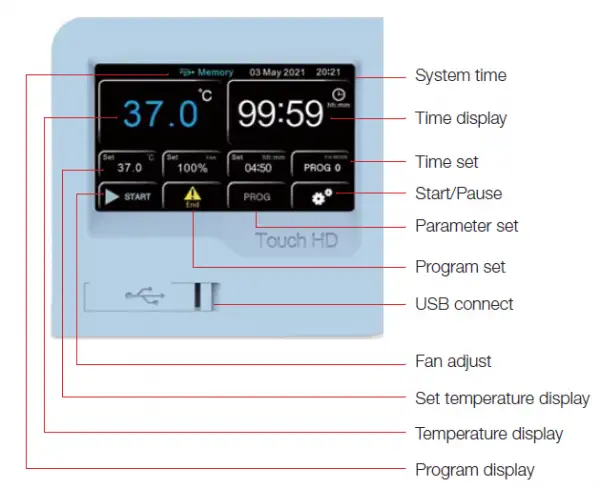
Advanced Color Intelligent Touch Screen Control
1. 4.3 inch touch screen, intelligent touch control, real-time display of parameters, simple and convenient operation.
2. Quick setting of temperature, time and other parameters can be carried out.
3. It has the function of program setting. It can be programmed in 7 segments, 63 steps, 9 steps and 1-99 hours and 59 minutes per segment.
4. With touch screen automatic locking function to prevent non-related personnel from disoperation.
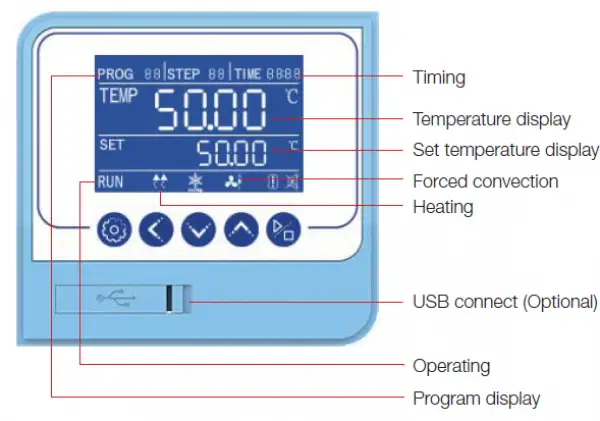
Professional LCD Controller
1. Intelligent program control with high brightness LCD screen, button operation and real-time display of parameters.
2. Quick setting of temperature, time and other parameters can be carried out.
3. It has the function of program setting. It can be programmed in 7segments, 63 steps, 9 steps and 1-99 hours and 59 minutes per segment.
Precise temperature control:
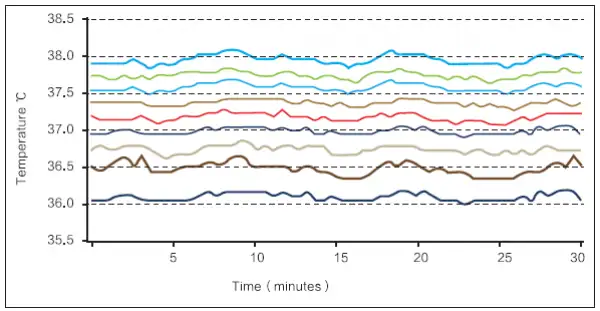
The uniformity of the temperature inside the incubator chamber is ≤±10 degree , so that all samples are heated evenly.
Note: The stability and uniformity are the result under steady state.
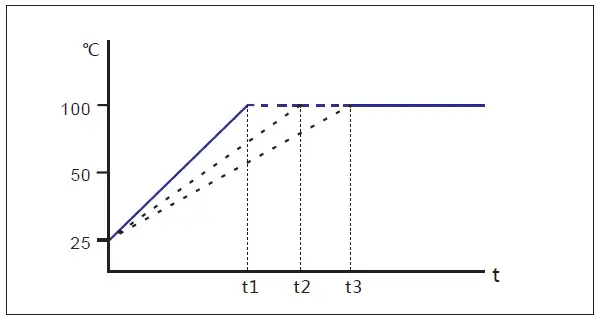
Program control mode, linear temperature rise control.
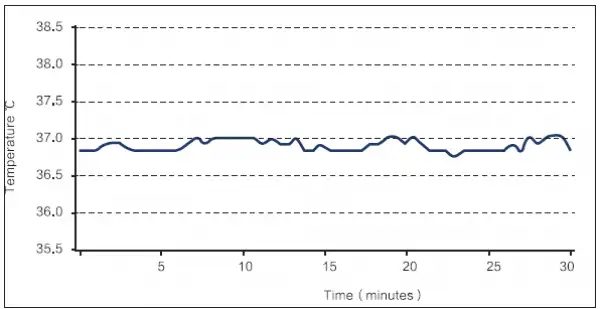
Temperature fluctuation inside the incubator chamber is ±0.2 degree, which ensures the stability of the experiment.
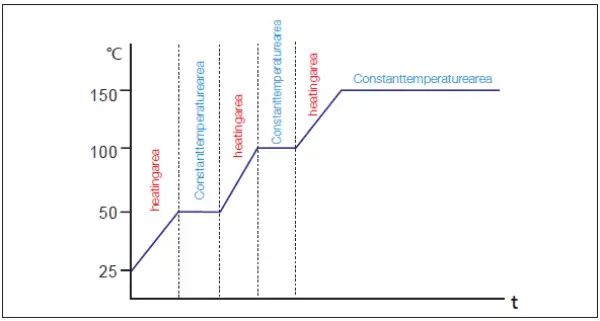
Program control mode, Step heating control.

Professional duct design:
With a unique duct design, the use of large impeller fans, fast temperature rise and fall, stable temperature control, good temperature uniformity.
The circulating fan has adjustable speed, middle and low grades, so as to avoid the volatilization of samples due to excessive air flow during the test.
Famous brand fan, high efficiency, low noise, energy saving and environmental protection.
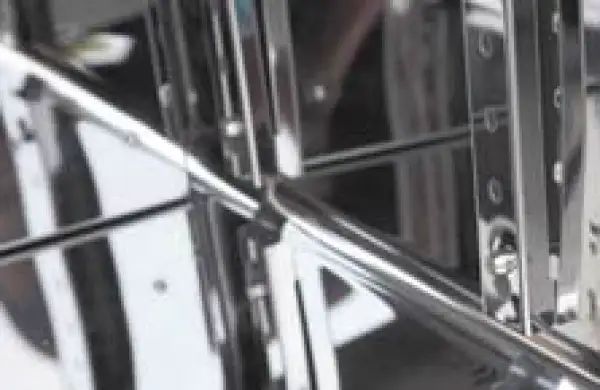
Stainless steel inner liner:
304 stainless steel, mirror polishing, strong anti-corruption ability.
Large arc angle design, no dead angle, easy cleaning and maintenance.
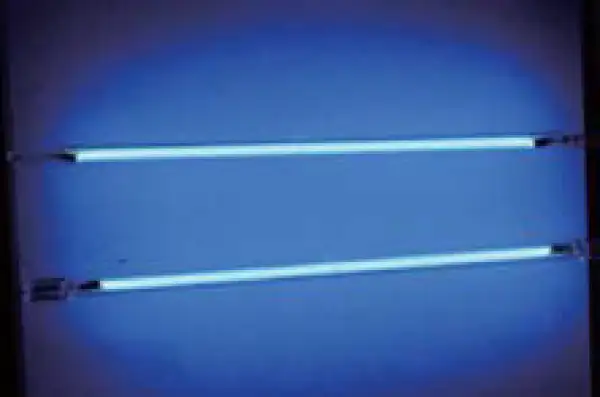
Ultraviolet sterilization system (option)
Ultraviolet lamp is located on the upper wall of the box body. It can disinfect the box body regularly and kill the plankton bacteria in the circulating air of the box body effectively so as to prevent the pollution during cell culture.
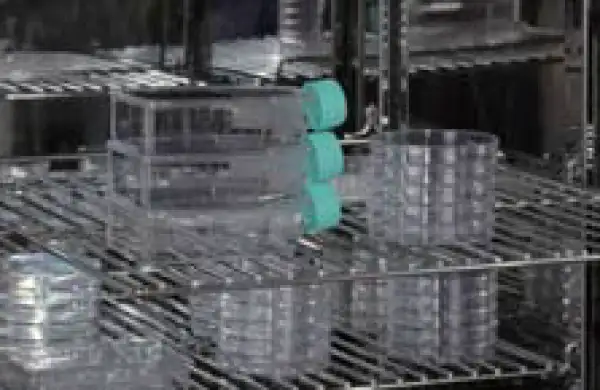
No overturning system:
Wire shelves with no overturning system to always operate safely.
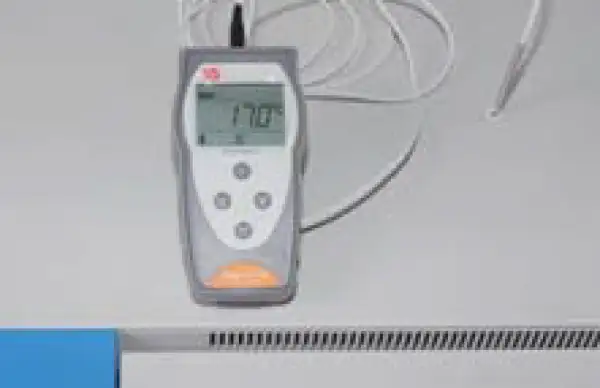
Temperature test hole:
External detection sensor can real-time detect the temperature inside the box through the test hole to ensure that the temperature inside the box is accurate and reliable.
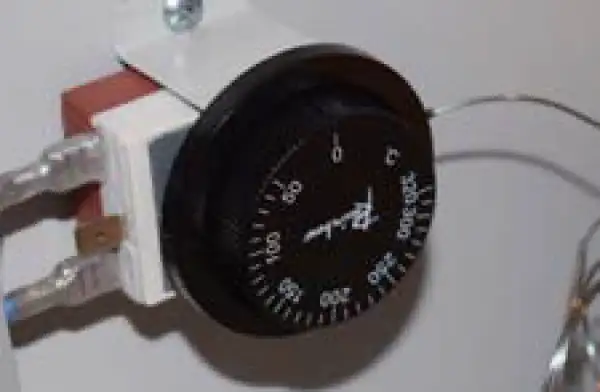
Temperature limit alarm system:
When the temperature control system is out of control and the temperature exceeds the limit
temperature, the heating is automatically interrupted to ensure the safety of testing.

Sample temperature sensor (optional):
Optional sample temperature sensor, real-time detection of sample temperature, so that the temperature is more real and reliable.
Double Convection Model:
Fan power can be adjusted from 0% (equivalent to natural convection) - 100% four gears, which can meet the training requirements of different airflow.
Operating Manual View instructions, operating procedures, safety information, and maintenance guidance.
1. Warranty
2. Contents of package
3. Installation requirements and safety tips
3.1 Installation requirements
3.2 Instruction for Safety
4. Product introduction
4.1 Function introduction
4.2 Specifications
5. Operation Instructions
5.1 Operation steps
6. Clean and maintenance
7. Troubleshooting
1. Warranty
In normal use conditions, the instrument is guaranteed for a period of 24 months from the date of purchase.The warranty is valid only if the product is original. It does not apply to any product or parts of it that have been damaged due to incorrect installation, improper connections, improper use, accident or abnormal conditions of operation.The manufacturer declines all responsibility for damage caused by failure to follow instructions, lack of maintenance and any unauthorized modification
2. Contents of package
The instrument is delivered complete with the following parts:
• Incubator (main unit)
• 2 stainless steel wire shelves
• 4 brackets for shelves
• Power supply cable
• 2 core of fuse
• User manual
3. Installation requirements and safety tips
3.1 Installation requirements
The incubator should be installed in follow conditions:
1. Dry, clean and stable work table with a flat horizontal surface.
2. Respect minimum spaces around instrument 80 cm.
3. Room temperature between 41°F(5°C)and 104 °F(40°C), and relative humidity maximum of 85%.
4. Power supply socket with earth connection.
5. Power feed between 220-240V - 50-60Hz.
3.2 Instruction for Safety 
3.2.1 Danger !
The improper use of this unit may cause property damage and/or personnel injury.
1. The product must be properly electrically grounded (The Hot line or the Neutral line should not be the grounded connection adhere to the product's requirement before using).
2. Please ensure the voltage and frequency of the power supply are compatible with the incubator power requirements prior to use. The fluctuations of the supply voltage shall not exceed 10% of the nominal supply voltage.
3. This unit must use the included electrical cord with a dedicated electrical circuit with a confirmed electrical ground connection.
4. The power switch MUST be in the "OFF" position when power is connected or disconnected from unit.
5. Do not arbitrarily lengthen or shorten the power supply connection wire. Do not modify the power cord in any way.
6. It is prohibited to put in flammable, explosive, volatile, and corrosive substances for drying and baking.
7. Do not touch the chamber door, the chamber body or the surrounding surface when the set temperature is over 176°F(80°C)!
8. Do not put hands or objects into the air inlet or air outlet.
9. The unit should have routine inspections and should be serviced by a qualified service technician when needed.
3.2.2 Warning !
1. Please use the socket connecting with the ground connection to prevent electric shock. If the socket does not have the ground connection, the earth wire must be installed by the qualified electrician. Be sure not to conduct the ground connection through the gas pipe, water pipe, telephone line or lightning rod! This kind of ground connection may cause electric shock due to the incomplete loops.
2. 304 stainless steel material is not acid resistance, so please pay attention to the corrosion prevention measures. Never place corrosive materials inside the unit to prevent damage
3. Do not tension the power supply cord when plug in.
4. The power cord must be removed from receptacle when any of the following occur: When replacing the fuse;
When the product is waiting for overhaul due to faults; When the product goes out of service for a long time; When the product is being moved;
3.2.3 Caution !
1. The incubator should be located on a strong solid surface.
2. Take care when opening and closing the door to prevent damage to delicate internal components.
4. Product introduction
4.1 Function introduction
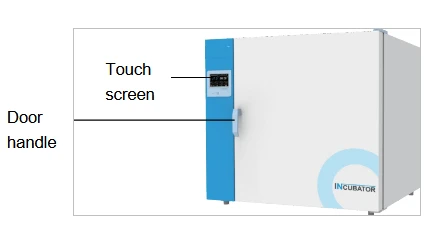
Figure 1
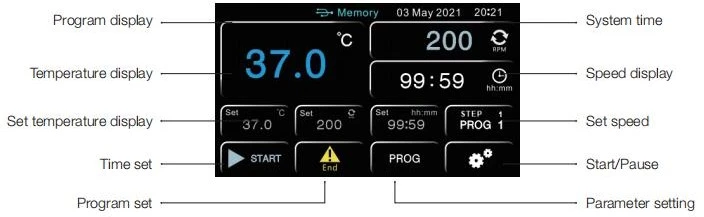
Figure 2
4.2 Specifications
Natural Convection Incubator
Model Parameter | BIGP-6201 | BIGP-6202 | BIGP-6203 | BIGP-6204 |
Chamber Volume | 34L | 54L | 124L | 222L |
Temperature Range | Ambient +5~80°C | |||
Temperature Stability | ±0.2°C | ±0.2°C | ±0.2°C | ±0.2°C |
Display Resolution | 0.1°C | 0.1°C | 0.1°C | 0.1°C |
Standard Quantity of Shelves | 2 | 2 | 2 | 2 |
Maximum Quantity of Shelves | 5 | 9 | 12 | 16 |
Shelves loading | 20Kg | 20Kg | 20Kg | 20Kg |
Net Weight | 44 | 53 | 79 | 108 |
Timer | 1~5999mins | 1~5999mins | 1~5999mins | 1~5999mins |
Internal Dimension ( W*H*D, mm) | 320*320*340 | 400*415*360 | 520*490*480 | 650*650*540 |
External Dimension ( W*H*D, mm) | 610*580*520 | 690*640*468 | 810*755*588 | 940*910*658 |
Electrical Requirement | AC220-240V,50-60Hz | |||
Power Consumption | 250W | 300W | 550W | 700W |
Table 1
Note: All test data are tested in a 25°C environment.
Forced Air Heating Incubator
Model Parameter | BIGP-6401 | BIGP-6402 | BIGP-6403 | BIGP-6404 | BIGP-6405 |
Chamber Volume | 35L | 67L | 146L | 253L | 420L |
Temperature Range | Ambient +5~80°C | ||||
Temperature Stability | ±0.2°C | ±0.2°C | ±0.2°C | ±0.2°C | ±0.2°C |
Display Resolution | 0.1°C | 0.1°C | 0.1°C | 0.1°C | 0.1°C |
Standard Quantity of Shelves | 2 | 2 | 2 | 2 | 3 |
Maximum Quantity of Shelves | 5 | 6 | 10 | 16 | 23 |
Shelves loading | 20Kg | 20Kg | 20Kg | 20Kg | 20Kg |
Net Weight | 48 | 56 | 82 | 119 | 160 |
Timer | 1~5999mins | 1~5999mins | 1~5999mins | 1~5999mins | 1~5999mins |
Internal Dimension ( W*H*D, mm) | 320*320*390 | 400*415*395 | 520*530*510 | 650*650*600 | 1000*800*530 |
External Dimension ( W*H*D, mm) | 610*545*550 | 690*640*560 | 810*755*685 | 940*875*750 | 1285*980*750 |
Electrical Requirement | AC220-240V,50-60Hz | ||||
Power Consumption | 300W | 350W | 600W | 700W | 1000W |
Table 2
Note: All test data are tested in a 25°C environment.
5. Operation Instructions
5.1 Operation steps
5.1.1 Introduction to the main interface
1. Fixed value mode operation screen
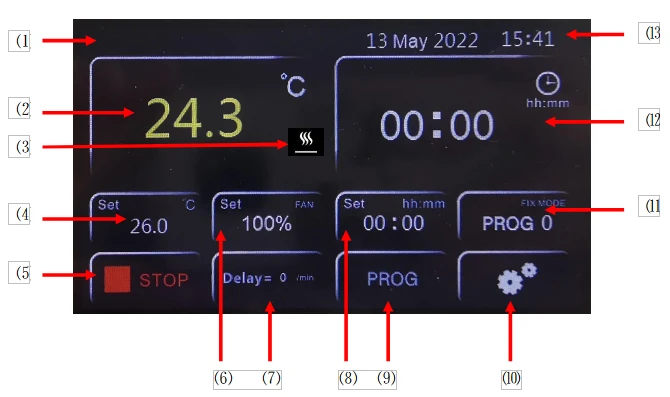
Figure 3
⑴: USB symbol (inserting a USB flash drive will display Memory, indicating that the USB flash drive has been connected).
⑵: Temperature measurement display area.
⑶: Heating symbol.
⑷: Temperature setting area.
⑸: Run/Stop button.
⑹ Note: The speed setting or status display window of the circulating fan inside the box.
⑺: Display of reserved startup time and program cycle times.
⑻: Running time setting.
⑼: Program Content Editing Entrance.
⑽: Parameter setting entrance.
⑾: Entry for selecting the running program number and displaying the current running program group number and program step number.
⑿.Running time display (countdown).
⒀: System date and time display.
Note: Different devices with different functions have different window functions, which will not be described in detail here. If the fan speed setting window pops up when touched in this window area, it means that the device has the function of manually setting the circulating fan inside the box. The fan speed can be set here, which are high speed (100%), medium speed (75%), and low speed (50%).
5.1.2 Program mode operation screen
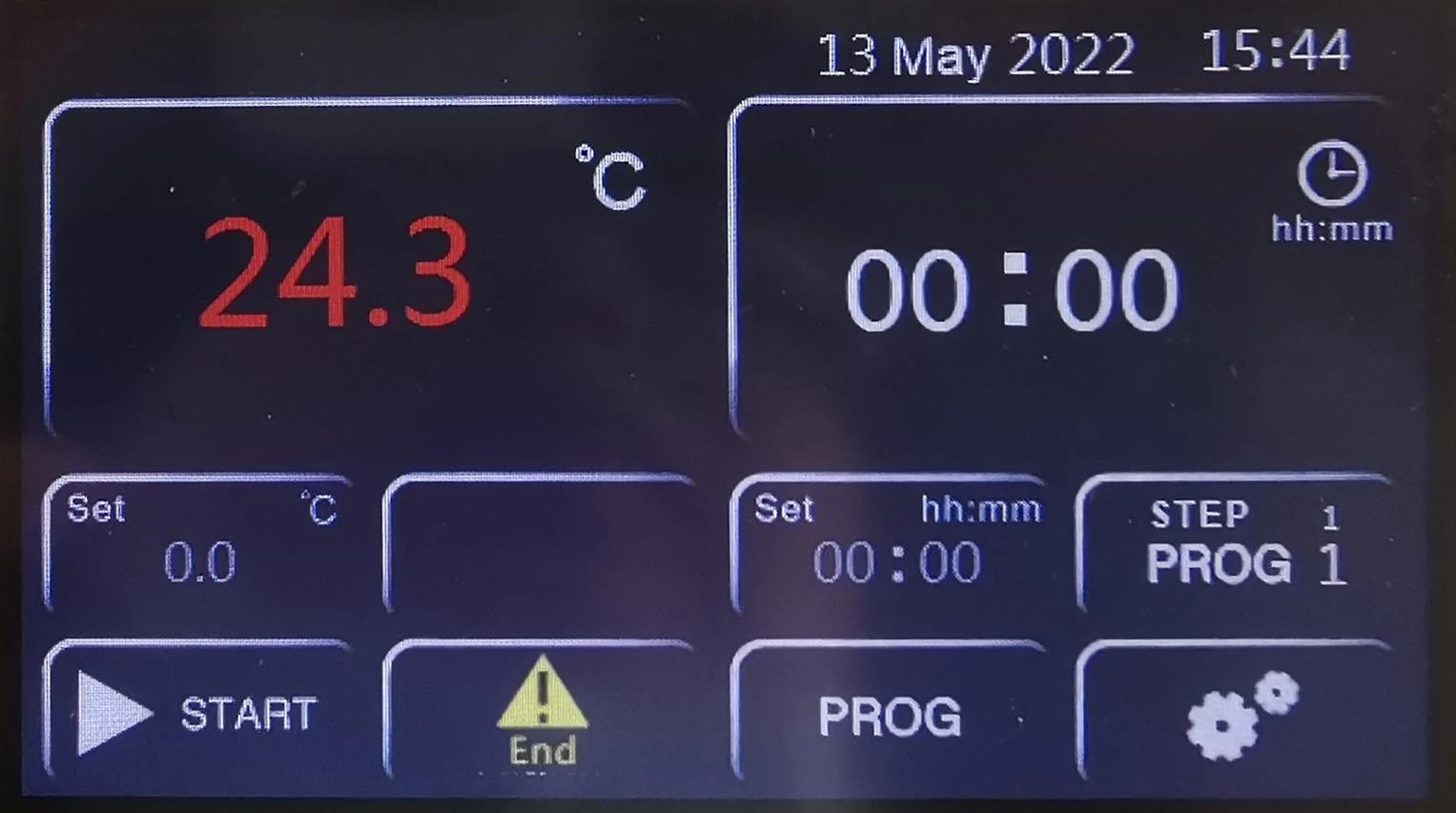
Figure 4
5.1.3 Selection of operating mode
1. Ensure that the controller is in a stopped running state.
2. The operation steps are shown in the following figure:
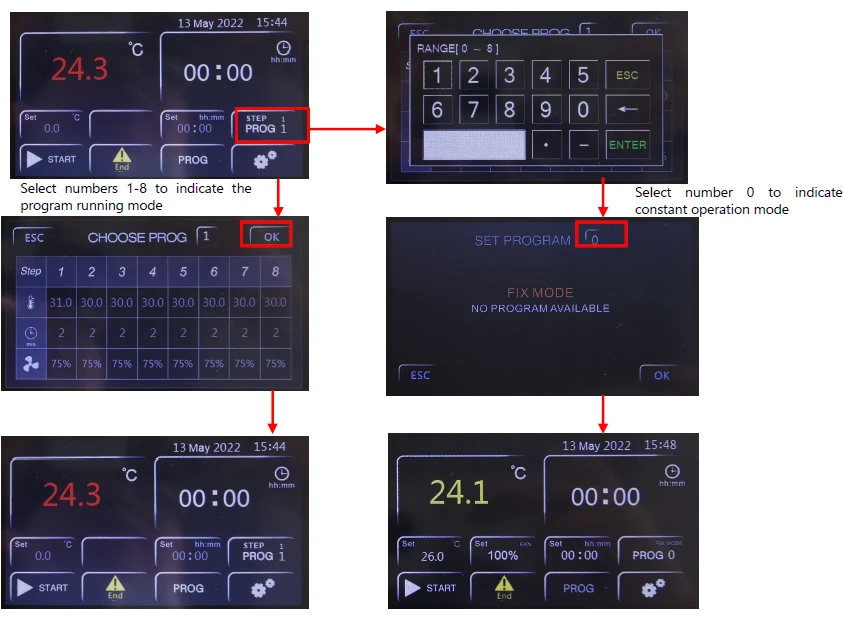
Figure 5
5.1.4 Program Content Editing
1. Ensure that the controller is in a stopped running state.
2. The operation steps are shown in the following figure:
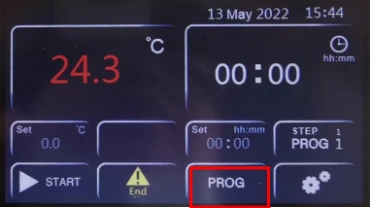
Figure 6
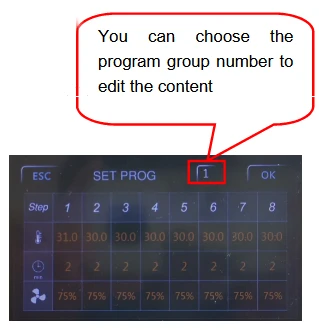
Figure 7
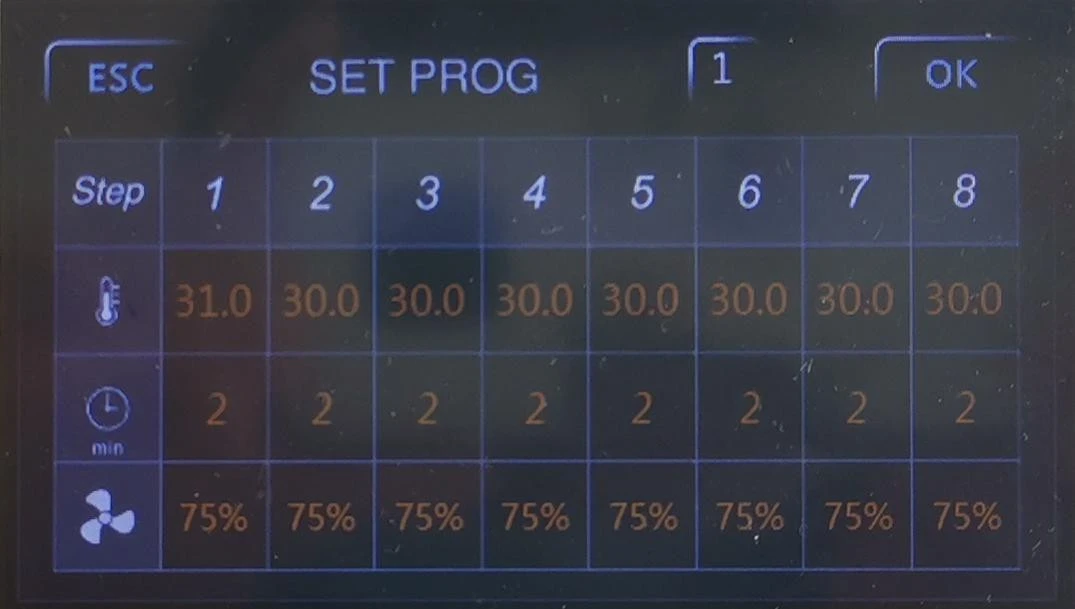
Figure 8
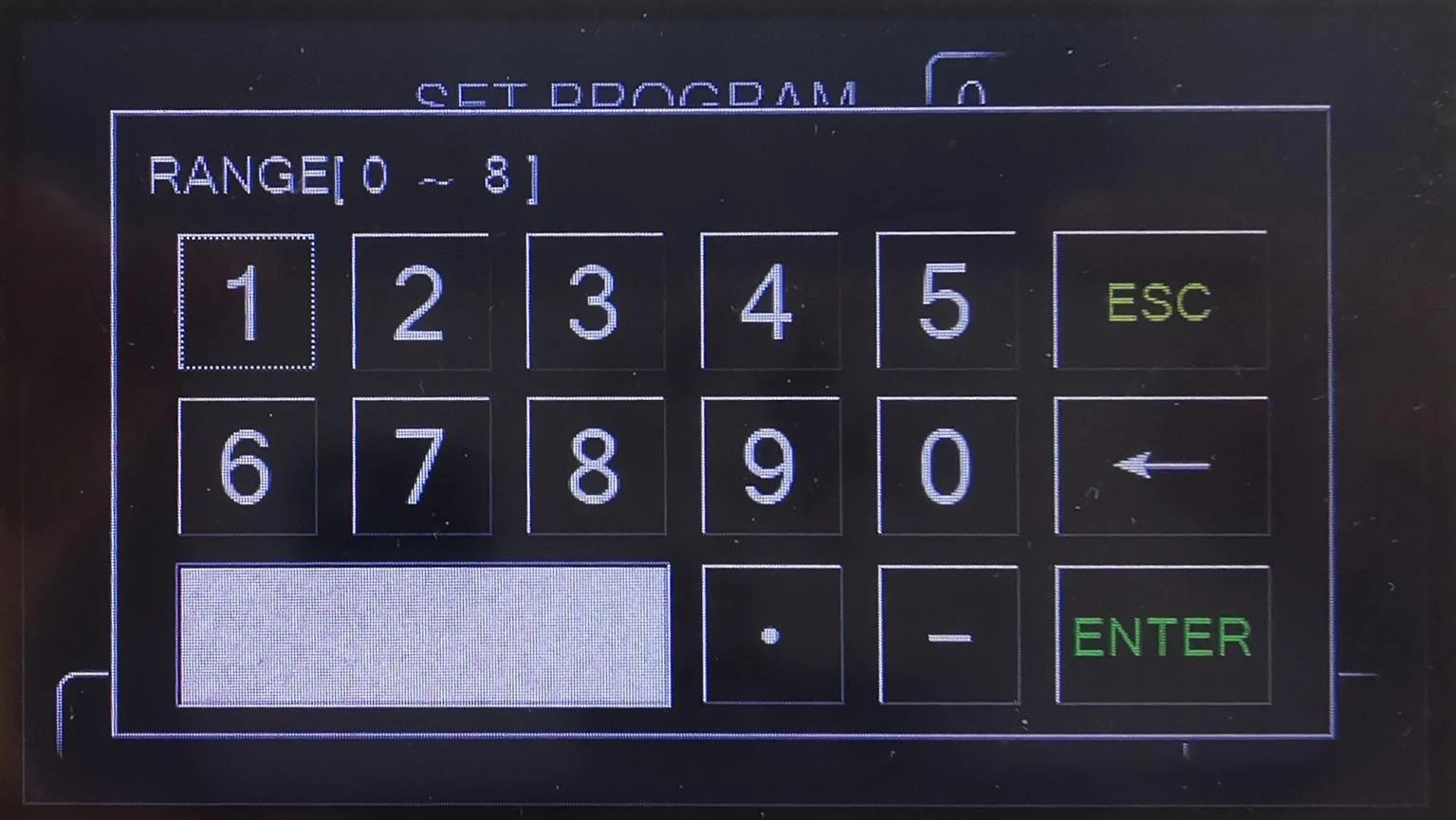
Figure 9
 Temperature setting
 Time setting
 Circulating fan setting
3. Setting the number of program loops
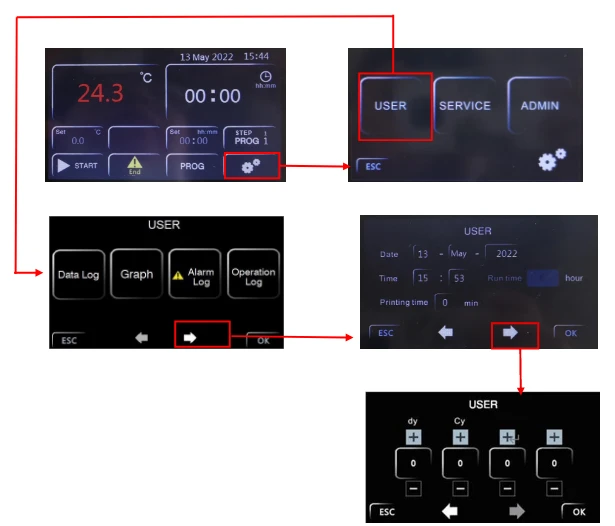
Figure 10
Cy: The number of program loops, 0 represents infinite loops, other numbers represent the
corresponding number of loops, such as 1. If the program only runs once, the device will
stop.
Dy: Schedule the startup time setting. After setting the time here, return to the main interface
and click the run button to start timing. When the time is up, the device will automatically
run.
4.View historical data and curves
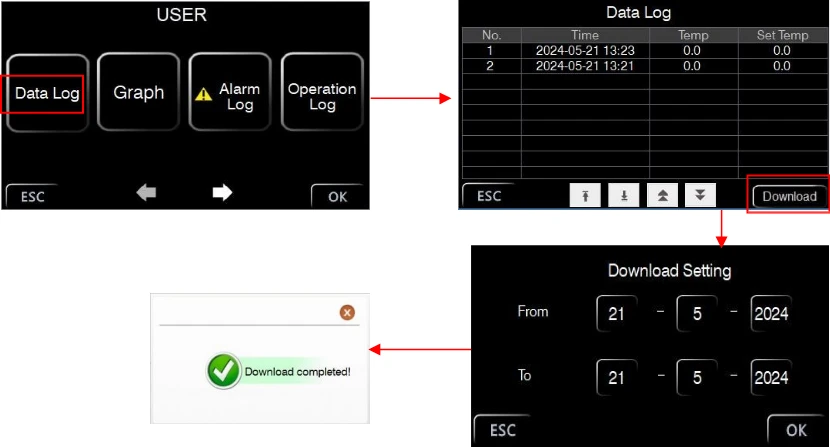
Figure 11
5. Historical Curve Interface
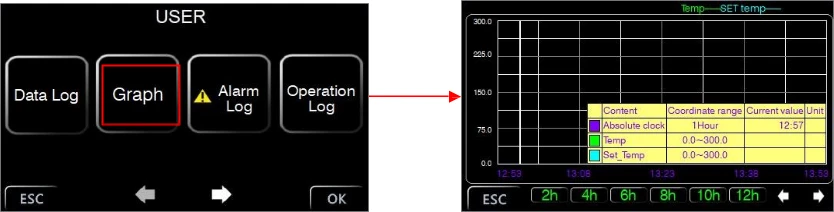
Figure 12
1. Click on Data Log to enter the historical data interface, click Download to select the desired data time period, and click OK to download.
2. Click on Graph to enter the historical curve interface, ESC returns.
6. Alarm information interface

Figure 13
Click on Alarm log to enter the alarm information interface, click Download to select the required data time period, Click OK to download.
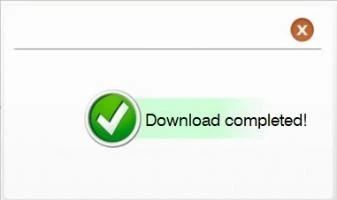
Figure 14
(9)Operation log information interface
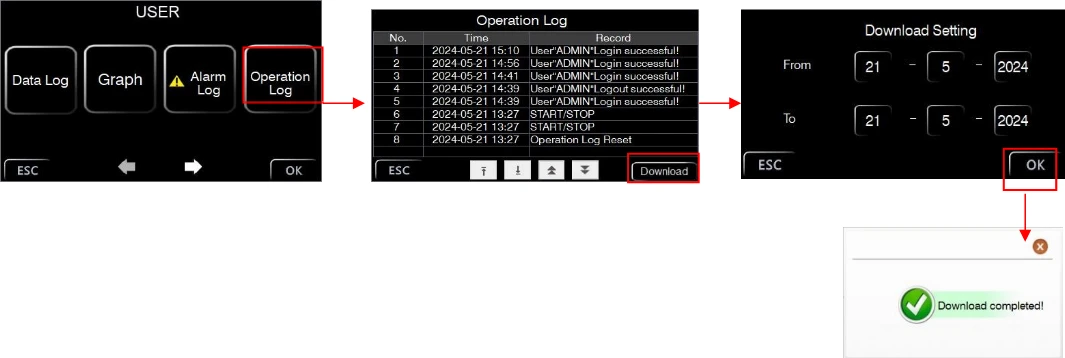
Figure 15
Click on Operation log to enter the operation log interface, click Download to select the required
data time period,
Click OK to download.
Explain: 1. This controller has 8 sets of programs, each with 8 steps, and only requires setting a stable target temperature value and the required stabilization time. For example, using the second program, set the temperature to 100 °C for 2 hours with a fan speed of 75%, and set the temperature to 150 °C for 4 hours with a fan speed of 100%. The settings are shown in the following figure:
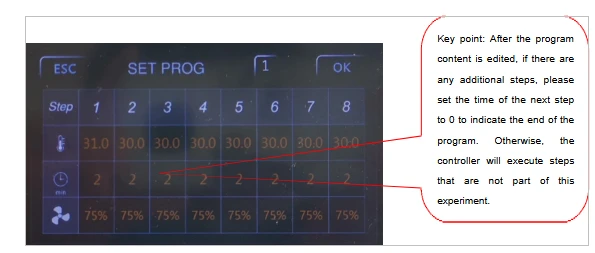
Figure 16
2. This controller is a universal controller. If you find that there is no fan speed setting column in the program editing, it means that you have purchased a device that does not have the function of adjusting the circulating fan speed.
3. To run in program mode, it is necessary to have the correct program content and the required number of program loops in order to effectively meet your experimental requirements.
5.1.5 Fixed value mode operation
1. Select program number as 0.
2. The operation is shown in the following figure:
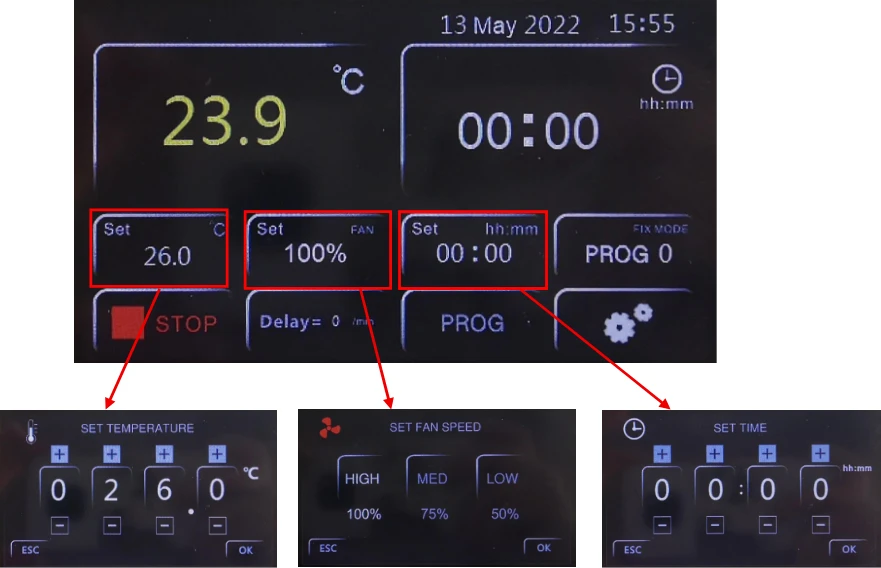
Figure 17
5.1.6 Appointment startup settings
1. Ensure that the controller is in a stopped running state.
2. Ensure that the system time is set correctly.
3. Step 3 of the program content editing: Setting the number of program loops.
4. After setting the delay time, return to the main interface, click the run button, and the main interface will display as follows.
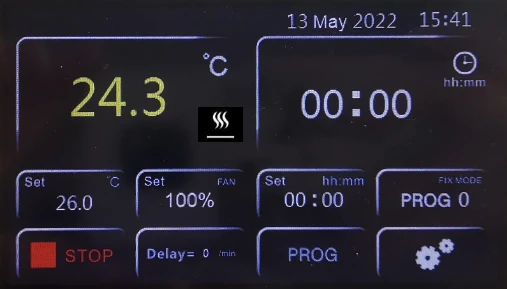
Figure 18
Explanation: 1. Delay=1 means that the device starts running after a delay of 1 minute.
2. After the scheduled operation is completed, the scheduled startup delay time is reset to 0. If you want to schedule the startup operation again, you need to execute the settings again.6.Clean and maintenance
◦ Proper maintenance and cleaning of the instrument guarantee its good conditions.
◦ The inner chamber of the instrument is made of stainless steel, so it can be cleaned with any detergent provided it is not aggressive and / or corrosive.
◦ You should clean the inside and outside surfaces with a standard all-purpose cleaner sprayed on a soft cloth.
◦ Before proceeding with any cleaning or decontamination, the user must ensure that the method used does not damage the instrument.
IMPORTANT
If the instrument must be returned for service, it is necessary to provide for proper cleaning and possible decontamination by pathogens of the same.
It is also recommended to put the instrument in its original packaging to send it in for repairs and if it is missed it is necessary to provide to pack it properly in order to the transport.
Any damage caused from the incorrect shipping will not be covered by warranty.
6. Clean and maintenance
• Proper maintenance and cleaning of the instrument guarantee its good conditions.
• The inner chamber of the instrument is made of stainless steel, so it can be cleaned with any detergent provided it is not aggressive and / or corrosive.
• You should clean the inside and outside surfaces with a standard all-purpose cleaner sprayed on a soft cloth.
• Before proceeding with any cleaning or decontamination, the user must ensure that the method used does not damage the instrument.
IMPORTANT
If the instrument must be returned for service, it is necessary to provide for proper cleaning and possible decontamination by pathogens of the same.
It is also recommended to put the instrument in its original packaging to send it in for repairs and if it is missed it is necessary to provide to pack it properly in order to the transport.
Any damage caused from the incorrect shipping will not be covered by warranty.
7. Troubleshooting
Symptoms | Possible causes | Remedies |
No power after startup (pilot lamp is not on) | Power socket is not energized or plug is in poor contact. | Make it repaired. |
Chamber power line broken or plug is not inserted properly. | Make it repaired or inserted again. | |
Power switch is broken (or is not turned on) | Make it fixed by the professional personnel. | |
Fuse blown | If the fuse still burned out after the replacement and energization, you need to check if the switch, heater or temperature controller are short-circuited or leaked (insulation resistance of 0) and restart after repairing. | |
The temperature displayed abnormal on the screen | Sensor is out of order or wiring i broken (knocked off) | Pt100 is repaired or replaced. |
No temperature rise | Check if timing is set up and time i up. | Refer to the operation of timing function. |
The controller does not work (without output) | When OUT light doesn't shine or 3061 is broken, replace it. | |
Setting temperature is lower than the internal temperature | Open the door until the internal temperature is lower than the setting temperature. | |
Temperature control is inaccurate (static difference is large) | The difference between room temperature and set temperature is less than 5 degrees Celsius. | Minimum temperature under control :Ambient+5°C |
Noise abnormal (BOF series) | The fan is broken or lack of lubricating oil | Replace fan or add lubricating oil |
Friction on rear air duct plate | Repair or add washer |
Table 3